---
title: "Deploy Hermes Agent (All-in-One Bundle)"
description: "Hermes Agent + Hermes Web UI + Web TUI + Browser + Searxng Search"
category: "Other"
url: https://railway.com/deploy/hermes-agent-all-in-one
---
# Deploy Hermes Agent (All-in-One Bundle)
Hermes Agent + Hermes Web UI + Web TUI + Browser + Searxng Search
**[Deploy Hermes Agent (All-in-One Bundle) on Railway](https://railway.com/template/hermes-agent-all-in-one)**
- **Creator:** Protemplate
- **Category:** Other
- **Total deploys:** 126
## Template content
### hermes-agent https://somi-public-assets.s3.ap-southeast-1.amazonaws.com/railway/hermes-agent-logo.png
- **Source:** https://github.com/protemplate/hermes-agent-railway
- **Health check:** /health
- **Public domain:** Yes
### searxng-railway https://somi-public-assets.s3.ap-southeast-1.amazonaws.com/railway/searxng-wordmark.svg
- **Source:** https://github.com/protemplate/searxng
- **Public domain:** Yes
## Documentation
# Deploy and Host Hermes Agent with Hermes WebUI, Web TUI, Chromium Browser & SearXNG on Railway
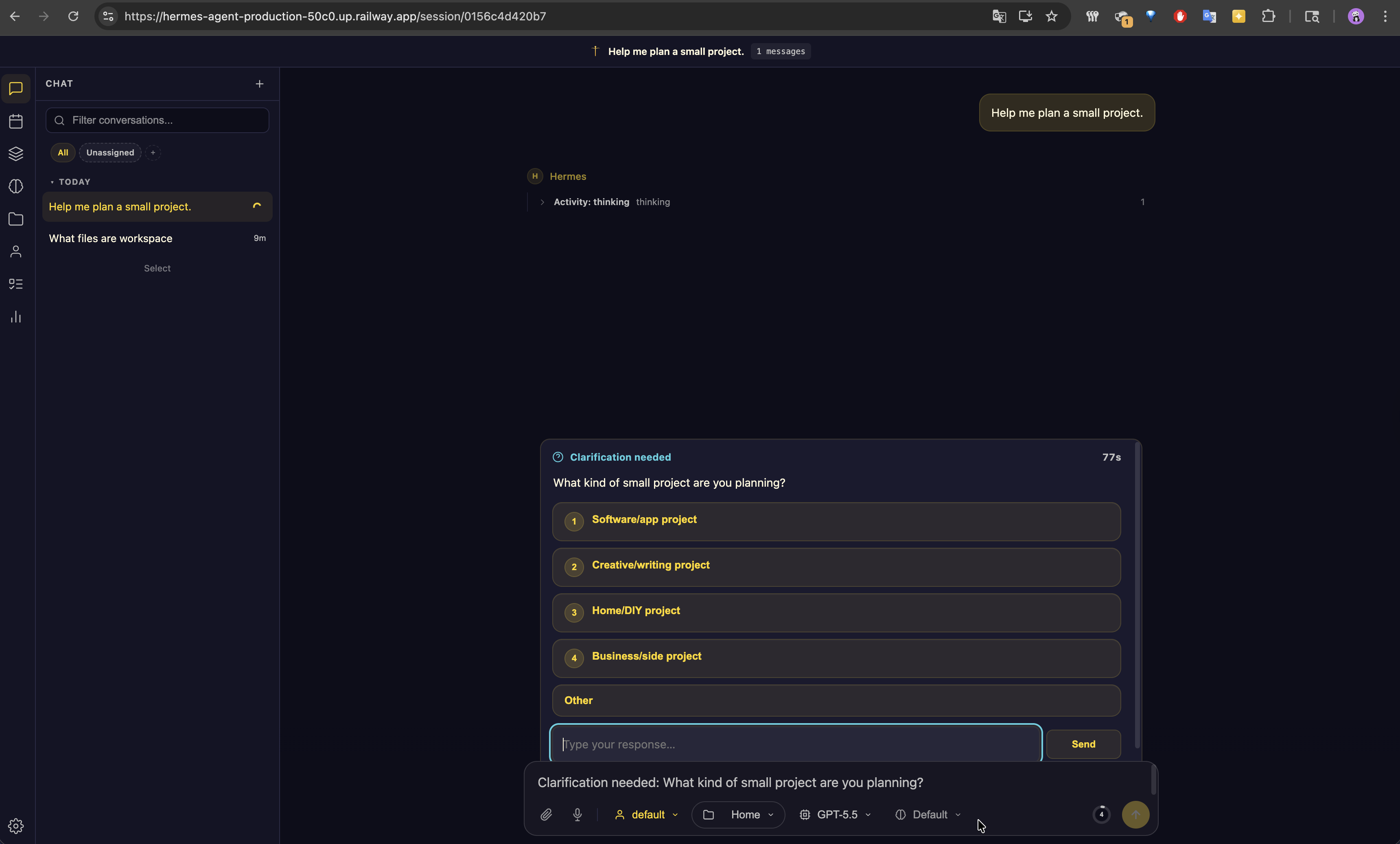
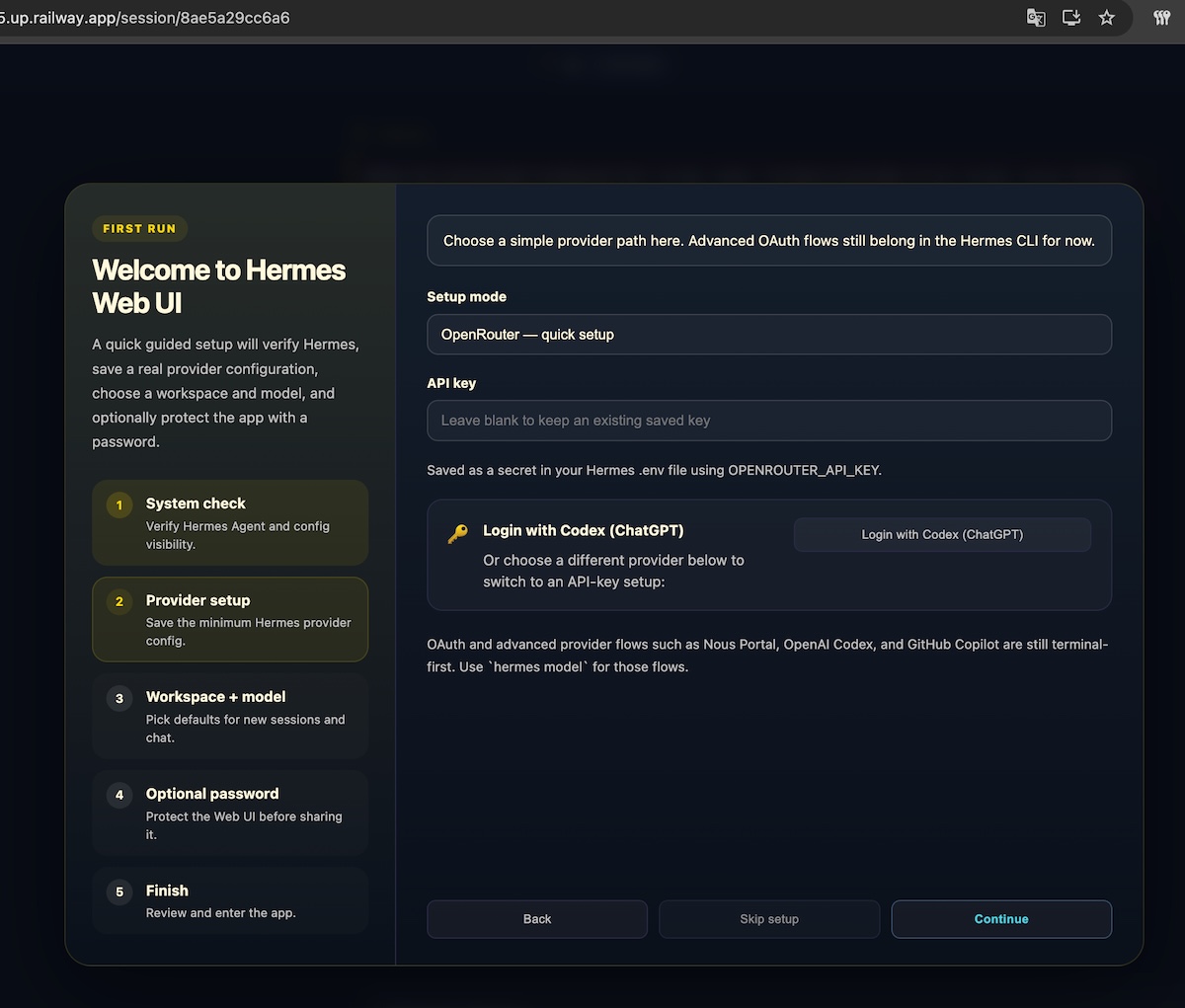
 Hermes Agent is a self-improving, open-source AI agent from Nous Research. It connects to messaging channels such as Telegram, Discord, Slack, WhatsApp, Signal, and Email, remembers previous work, creates and improves skills, and can run scheduled automations. This Railway template packages Hermes with [Hermes WebUI](https://github.com/nesquena/hermes-webui) — the popular community web interface — so you get a polished browser experience for chat, sessions, settings, and onboarding right after deploy.
The template also includes a companion SearXNG service so Hermes has private, self-hosted web search available without third-party search API keys.
Hermes Agent is a self-improving, open-source AI agent from Nous Research. It connects to messaging channels such as Telegram, Discord, Slack, WhatsApp, Signal, and Email, remembers previous work, creates and improves skills, and can run scheduled automations. This Railway template packages Hermes with [Hermes WebUI](https://github.com/nesquena/hermes-webui) — the popular community web interface — so you get a polished browser experience for chat, sessions, settings, and onboarding right after deploy.
The template also includes a companion SearXNG service so Hermes has private, self-hosted web search available without third-party search API keys.
 ### Web-Based TUI: One-Click OAuth, No SSH Required
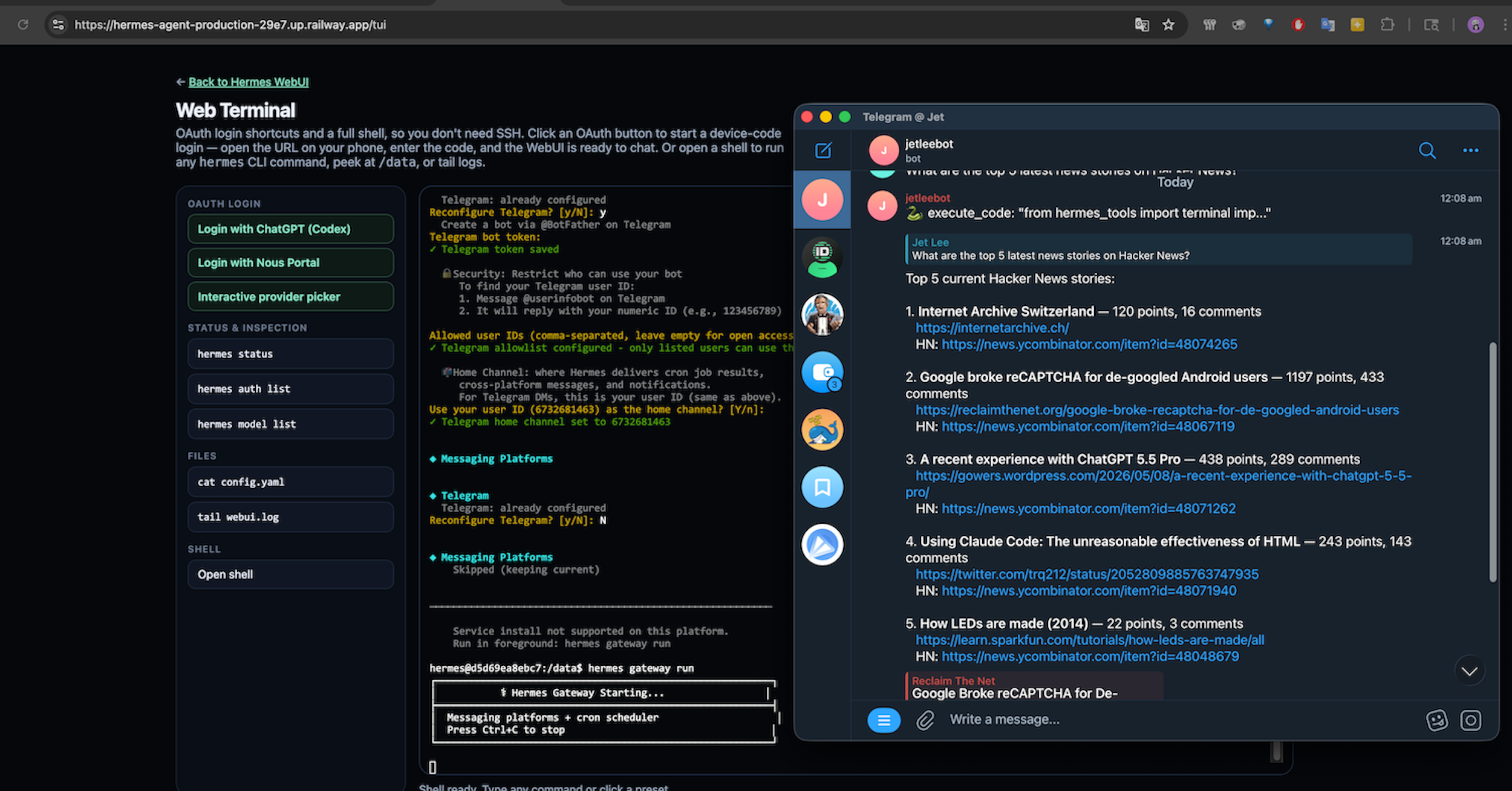
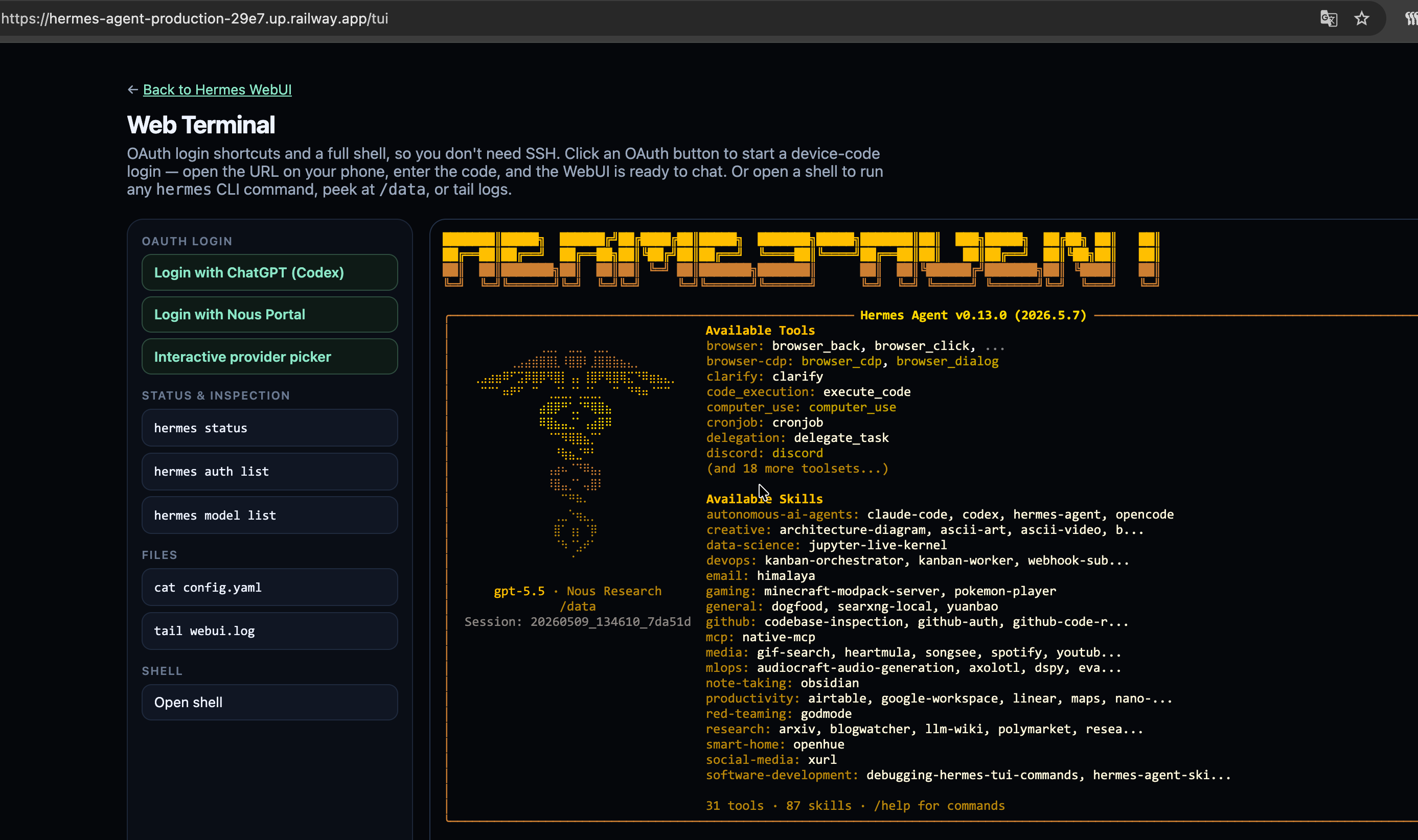
Headless OAuth is a nightmare — no browser, no localhost callback, no easy way to paste a device code. Railway has `railway ssh` if you've installed the CLI and linked the project, but most people deploying from a template haven't, and a browser is always closer to hand than a terminal. This template ships with **`/tui`**, a web-based terminal embedded directly in the Hermes UI. Open it from any browser and you get the full Hermes CLI experience without installing anything locally.
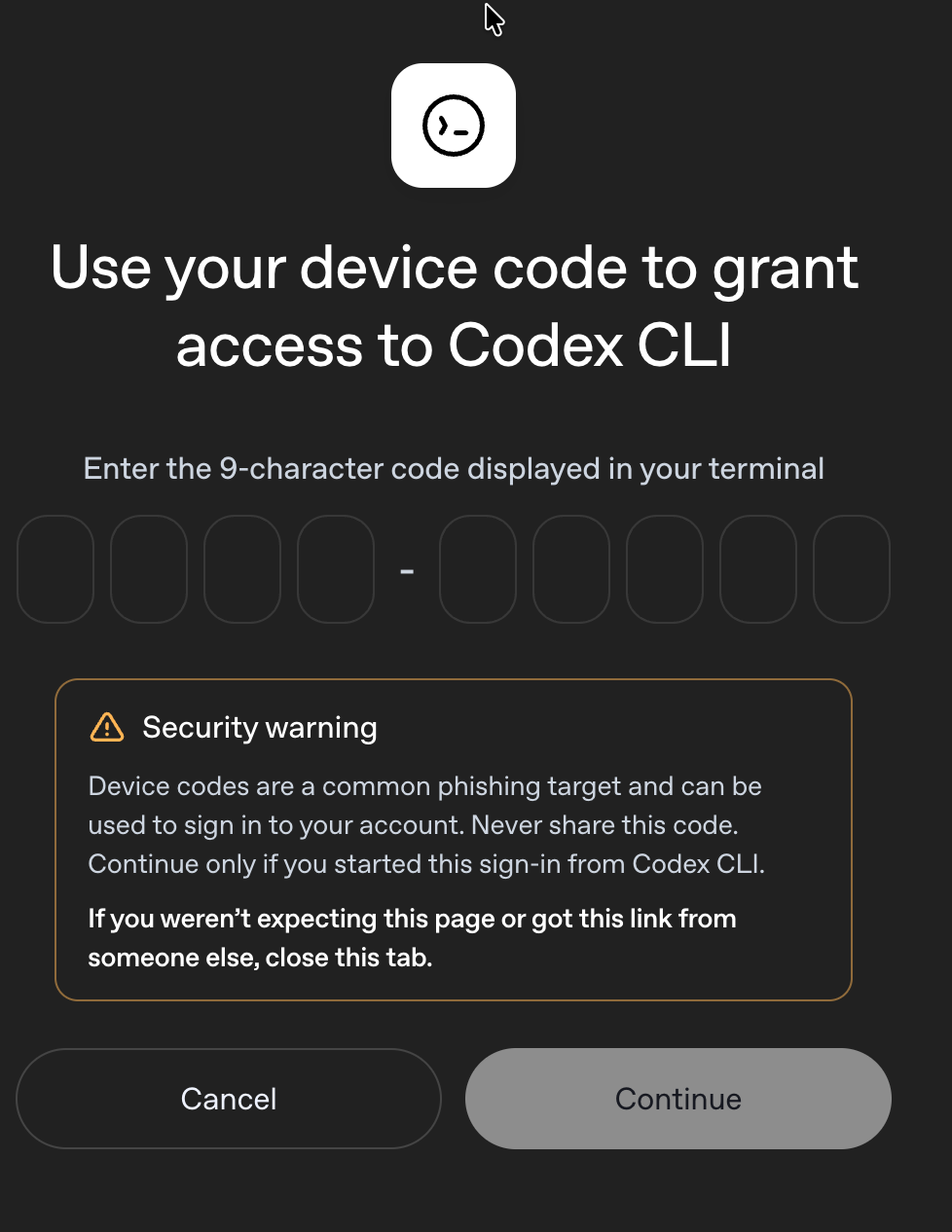
**One-Click OAuth.** `/tui` runs Hermes' device-code flow for you. Click "Login with ChatGPT (Codex)", scan the code on your phone, and you're chatting with GPT-5.5 through your existing **$20/mo ChatGPT subscription** — no API key, no per-token billing, no SSH tunnels, no `xdg-open` errors. Same flow works for **Nous Portal**, **Anthropic (Claude Max)**, and **GitHub Copilot**. For other providers (OpenRouter, DeepSeek, Gemini API, etc.), paste your API key into the WebUI Settings panel.
### Web-Based TUI: One-Click OAuth, No SSH Required
Headless OAuth is a nightmare — no browser, no localhost callback, no easy way to paste a device code. Railway has `railway ssh` if you've installed the CLI and linked the project, but most people deploying from a template haven't, and a browser is always closer to hand than a terminal. This template ships with **`/tui`**, a web-based terminal embedded directly in the Hermes UI. Open it from any browser and you get the full Hermes CLI experience without installing anything locally.
**One-Click OAuth.** `/tui` runs Hermes' device-code flow for you. Click "Login with ChatGPT (Codex)", scan the code on your phone, and you're chatting with GPT-5.5 through your existing **$20/mo ChatGPT subscription** — no API key, no per-token billing, no SSH tunnels, no `xdg-open` errors. Same flow works for **Nous Portal**, **Anthropic (Claude Max)**, and **GitHub Copilot**. For other providers (OpenRouter, DeepSeek, Gemini API, etc.), paste your API key into the WebUI Settings panel.
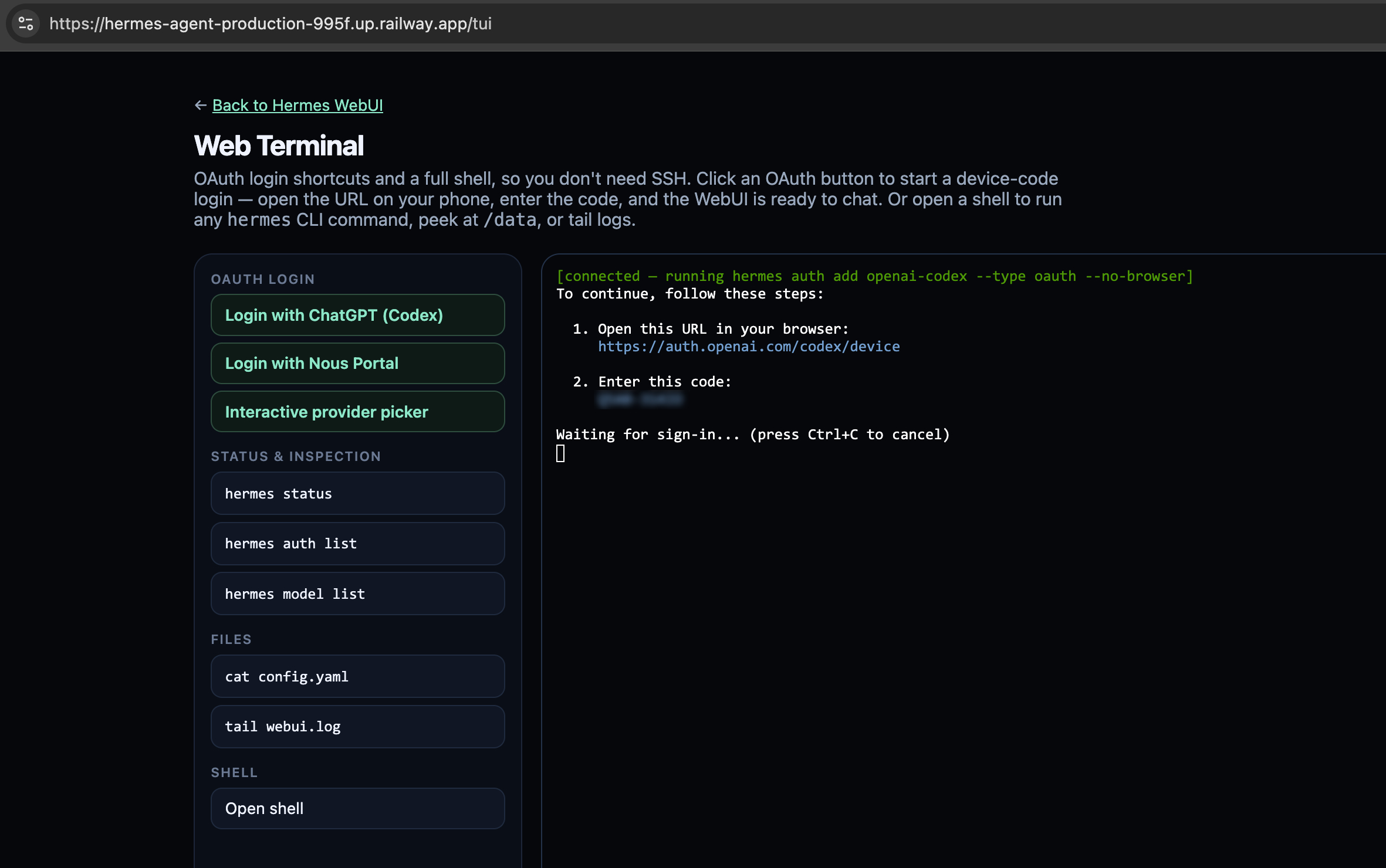
 **Full web shell.** `/tui` also exposes a long-lived `/bin/bash` pane for the moments you need to peek at logs, inspect `/data`, or run a `hermes` CLI command directly — no `railway ssh` setup, no local CLI install required. Authentication reuses the WebUI's `hermes_session` cookie, so the shell is gated behind the same admin password as the rest of the UI.
 ### Built-In Chromium: Real Browser Automation Out of the Box
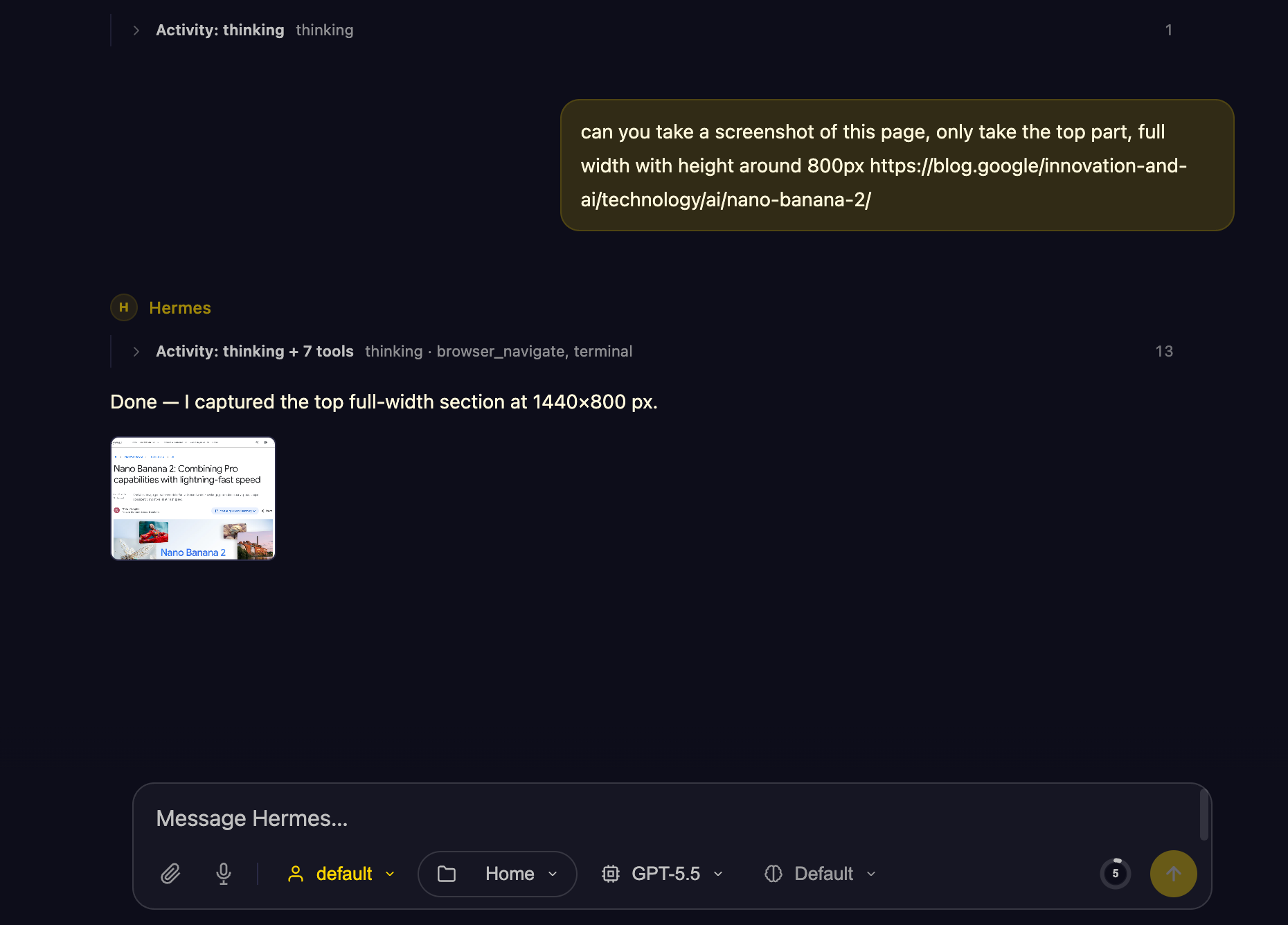 Most Railway templates that "support a browser tool" leave you to figure out the runtime yourself — Hermes happily calls Playwright, but only if Chromium and its system libraries are actually installed. This template ships with **Playwright Chromium pre-installed** in the container, so Hermes' browser tool works the moment the deploy finishes. No `apt-get install`, no missing `libnss3` errors, no headless-shell dance.
That means you can ask Hermes to:
- **Navigate sites and fill forms** — log into dashboards, submit signup pages, click through multi-step flows.
- **Take screenshots** — capture a page, a region, or full scrollable content for reports, monitoring, or audits.
- **Scrape rendered HTML** — pages that need JavaScript to render are no problem.
- **Drive auth flows** — pair the browser with the agent's memory to keep sessions across runs.
Combined with the bundled SearXNG service, Hermes can search the web privately, then open and interact with the results — all inside one Railway project, with no third-party browser API.
## About Hosting Hermes Agent
Hosting Hermes Agent on Railway runs a containerized Hermes Agent installation with Hermes WebUI on the public HTTP port. The WebUI persists configuration into the `/data` volume (`.env`, `config.yaml`, sessions, skills, memory, workspace files, WebUI state). Users configure an LLM provider, default model, channel credentials, and skills directly through the WebUI's Hermes Control Center.
An optional `START_GATEWAY=true` environment variable enables the messaging gateway daemon (`hermes gateway run --replace`) so Telegram/Discord/Slack/email bridges run alongside the WebUI in the same container.
## Common Use Cases
- **Personal AI assistant**: Chat with Hermes from any browser; persistent memory across sessions.
- **Team assistant**: Connect Hermes to Slack/Discord for team workflows with shared memory.
- **Research agent**: Use the bundled SearXNG service for web search and source discovery.
- **Scheduled automations**: Hermes cron capabilities for recurring reports, checks, reminders.
## Dependencies for Hermes Agent Hosting
- **Hermes Agent**: Installed from `https://github.com/NousResearch/hermes-agent` (`HERMES_REF=main` by default).
- **Hermes WebUI**: Installed from `https://github.com/nesquena/hermes-webui` (pinned via `HERMES_WEBUI_REF=v0.50.278`).
- **SearXNG**: Companion search service.
- **Railway volume**: Mount at `/data` for persistent state.
- **LLM provider**: OpenRouter, Anthropic, OpenAI, Gemini, z.ai, Kimi, MiniMax, Hugging Face, or a custom OpenAI-compatible endpoint.
### Deployment Dependencies
- Runtime: Python 3.13, Node.js, uv
- Web UI: Hermes WebUI (Python stdlib + vanilla JS, no build step)
- Browser tooling: Playwright Chromium (agent-side, used when Hermes invokes the browser tool)
- Health check: `/health`
- Volume: `/data`
### Implementation Details
The Hermes service runs a thin Starlette wrapper on `$PORT`. The wrapper serves `/tui` (an in-browser xterm with OAuth shortcuts and a free-form `/bin/bash` pane) and reverse-proxies everything else to Hermes WebUI on the loopback:
```text
User -> Wrapper ($PORT) ──┬── /tui Two-pane web terminal
│ ├── /tui/ws/auth/ one-shot `hermes auth add `
│ └── /tui/ws/shell long-lived /bin/bash -i
└── /* reverse-proxy → 127.0.0.1:9119
(Hermes WebUI)
Hermes WebUI (127.0.0.1:9119)
|-> / Three-panel UI (sessions / chat / workspace)
|-> /health Health probe (Railway uses this through the proxy)
`-> /api/* Chat, sessions, settings, cron, skills, profiles, memory APIs
Background (optional, when START_GATEWAY=true):
hermes gateway run --replace (Telegram/Discord/Slack/email bridges)
```
Both Hermes Agent and Hermes WebUI run inside the same container and share the `/data` volume, so the WebUI reads/writes the same `~/.hermes/` state the Agent uses. Auth on `/tui` reuses the WebUI's `hermes_session` cookie, so users don't have to log in twice.
The SearXNG service is referenced from Hermes with Railway private networking:
```text
SEARXNG_URL=http://${{searxng-railway.RAILWAY_PRIVATE_DOMAIN}}:${{searxng-railway.PORT}}
```
Set `PORT=8080` on SearXNG so the reference can resolve. Railway's runtime-provided `PORT` is not available to template variable references unless it is also set as a service variable.
## Template Variables
Hermes Agent:
| Variable | Default | Required |
| --- | --- | --- |
| `PORT` | `8080` | Yes |
| `ADMIN_PASSWORD` | `${{ secret(32) }}` | Yes |
| `SEARXNG_URL` | `http://${{searxng-railway.RAILWAY_PRIVATE_DOMAIN}}:${{searxng-railway.PORT}}` | Recommended |
| `START_GATEWAY` | `false` | No |
SearXNG:
| Variable | Default | Required |
| --- | --- | --- |
| `PORT` | `8080` | Yes |
| `SEARXNG_SECRET_KEY` | `${{secret()}}` | Yes |
| `SEARXNG_UWSGI_WORKERS` | `4` | No |
| `SEARXNG_UWSGI_THREADS` | `4` | No |
## Why Deploy Hermes Agent with SearXNG on Railway?
Railway handles HTTPS, builds, deployment, logs, volumes, and private networking. This template keeps Hermes and search in one Railway project while avoiding public network traffic between services. The Hermes WebUI integration means users get a production-quality interface from the moment the deploy finishes — no terminal access required, no hand-built admin panel — and configuration persists on the `/data` volume across redeploys.
## Similar templates
- [Rocky Linux](https://railway.com/deploy/rocky-linux) — [Jul'26] Hosted Rocky Linux 9 workspace with SSH and persistent storage. 🚀
- [Foundry Virtual Tabletop](https://railway.com/deploy/X5tR6G) — A Self-Hosted & Modern Roleplaying Platform
- [Letta Code Remote](https://railway.com/deploy/letta-code-remote) — Run a Letta Code agent 24/7. No inbound ports, just deploy.
Open this page in a browser: https://railway.com/deploy/hermes-agent-all-in-one
Most Railway templates that "support a browser tool" leave you to figure out the runtime yourself — Hermes happily calls Playwright, but only if Chromium and its system libraries are actually installed. This template ships with **Playwright Chromium pre-installed** in the container, so Hermes' browser tool works the moment the deploy finishes. No `apt-get install`, no missing `libnss3` errors, no headless-shell dance.
That means you can ask Hermes to:
- **Navigate sites and fill forms** — log into dashboards, submit signup pages, click through multi-step flows.
- **Take screenshots** — capture a page, a region, or full scrollable content for reports, monitoring, or audits.
- **Scrape rendered HTML** — pages that need JavaScript to render are no problem.
- **Drive auth flows** — pair the browser with the agent's memory to keep sessions across runs.
Combined with the bundled SearXNG service, Hermes can search the web privately, then open and interact with the results — all inside one Railway project, with no third-party browser API.
## About Hosting Hermes Agent
Hosting Hermes Agent on Railway runs a containerized Hermes Agent installation with Hermes WebUI on the public HTTP port. The WebUI persists configuration into the `/data` volume (`.env`, `config.yaml`, sessions, skills, memory, workspace files, WebUI state). Users configure an LLM provider, default model, channel credentials, and skills directly through the WebUI's Hermes Control Center.
An optional `START_GATEWAY=true` environment variable enables the messaging gateway daemon (`hermes gateway run --replace`) so Telegram/Discord/Slack/email bridges run alongside the WebUI in the same container.
## Common Use Cases
- **Personal AI assistant**: Chat with Hermes from any browser; persistent memory across sessions.
- **Team assistant**: Connect Hermes to Slack/Discord for team workflows with shared memory.
- **Research agent**: Use the bundled SearXNG service for web search and source discovery.
- **Scheduled automations**: Hermes cron capabilities for recurring reports, checks, reminders.
## Dependencies for Hermes Agent Hosting
- **Hermes Agent**: Installed from `https://github.com/NousResearch/hermes-agent` (`HERMES_REF=main` by default).
- **Hermes WebUI**: Installed from `https://github.com/nesquena/hermes-webui` (pinned via `HERMES_WEBUI_REF=v0.50.278`).
- **SearXNG**: Companion search service.
- **Railway volume**: Mount at `/data` for persistent state.
- **LLM provider**: OpenRouter, Anthropic, OpenAI, Gemini, z.ai, Kimi, MiniMax, Hugging Face, or a custom OpenAI-compatible endpoint.
### Deployment Dependencies
- Runtime: Python 3.13, Node.js, uv
- Web UI: Hermes WebUI (Python stdlib + vanilla JS, no build step)
- Browser tooling: Playwright Chromium (agent-side, used when Hermes invokes the browser tool)
- Health check: `/health`
- Volume: `/data`
### Implementation Details
The Hermes service runs a thin Starlette wrapper on `$PORT`. The wrapper serves `/tui` (an in-browser xterm with OAuth shortcuts and a free-form `/bin/bash` pane) and reverse-proxies everything else to Hermes WebUI on the loopback:
```text
User -> Wrapper ($PORT) ──┬── /tui Two-pane web terminal
│ ├── /tui/ws/auth/ one-shot `hermes auth add `
│ └── /tui/ws/shell long-lived /bin/bash -i
└── /* reverse-proxy → 127.0.0.1:9119
(Hermes WebUI)
Hermes WebUI (127.0.0.1:9119)
|-> / Three-panel UI (sessions / chat / workspace)
|-> /health Health probe (Railway uses this through the proxy)
`-> /api/* Chat, sessions, settings, cron, skills, profiles, memory APIs
Background (optional, when START_GATEWAY=true):
hermes gateway run --replace (Telegram/Discord/Slack/email bridges)
```
Both Hermes Agent and Hermes WebUI run inside the same container and share the `/data` volume, so the WebUI reads/writes the same `~/.hermes/` state the Agent uses. Auth on `/tui` reuses the WebUI's `hermes_session` cookie, so users don't have to log in twice.
The SearXNG service is referenced from Hermes with Railway private networking:
```text
SEARXNG_URL=http://${{searxng-railway.RAILWAY_PRIVATE_DOMAIN}}:${{searxng-railway.PORT}}
```
Set `PORT=8080` on SearXNG so the reference can resolve. Railway's runtime-provided `PORT` is not available to template variable references unless it is also set as a service variable.
## Template Variables
Hermes Agent:
| Variable | Default | Required |
| --- | --- | --- |
| `PORT` | `8080` | Yes |
| `ADMIN_PASSWORD` | `${{ secret(32) }}` | Yes |
| `SEARXNG_URL` | `http://${{searxng-railway.RAILWAY_PRIVATE_DOMAIN}}:${{searxng-railway.PORT}}` | Recommended |
| `START_GATEWAY` | `false` | No |
SearXNG:
| Variable | Default | Required |
| --- | --- | --- |
| `PORT` | `8080` | Yes |
| `SEARXNG_SECRET_KEY` | `${{secret()}}` | Yes |
| `SEARXNG_UWSGI_WORKERS` | `4` | No |
| `SEARXNG_UWSGI_THREADS` | `4` | No |
## Why Deploy Hermes Agent with SearXNG on Railway?
Railway handles HTTPS, builds, deployment, logs, volumes, and private networking. This template keeps Hermes and search in one Railway project while avoiding public network traffic between services. The Hermes WebUI integration means users get a production-quality interface from the moment the deploy finishes — no terminal access required, no hand-built admin panel — and configuration persists on the `/data` volume across redeploys.
## Similar templates
- [Rocky Linux](https://railway.com/deploy/rocky-linux) — [Jul'26] Hosted Rocky Linux 9 workspace with SSH and persistent storage. 🚀
- [Foundry Virtual Tabletop](https://railway.com/deploy/X5tR6G) — A Self-Hosted & Modern Roleplaying Platform
- [Letta Code Remote](https://railway.com/deploy/letta-code-remote) — Run a Letta Code agent 24/7. No inbound ports, just deploy.
Open this page in a browser: https://railway.com/deploy/hermes-agent-all-in-one