We have a lot to cover today:
- We’re taking the first step to introducing currency exchange on the Railway platform
- We’re previewing real-time “multiplayer” infrastructure collaboration
- We’re introducing a number of other improvements
Since that’s a lot of stuff, would you mind if we trim the intro down a bit?
You don’t mind? Excellent!
Let’s trim the intro!
Credit Transfers
It’s now possible to send Railway credits to another Railway userToday we’re introducing a new way to send credits to other users on Railway.
First we’ll show you how it works, then we’ll explain what it means.
If you visit your Public Profile (introduced in Changelog #0161), you’ll now see a magic little button that reads Send Credits.
When clicked, this button will bring up a modal to execute a transaction.
In this case, let’s say thanks to Community Engineer Matt (who wrote this feature) and pass him $10 in credits — Thanks Matt!
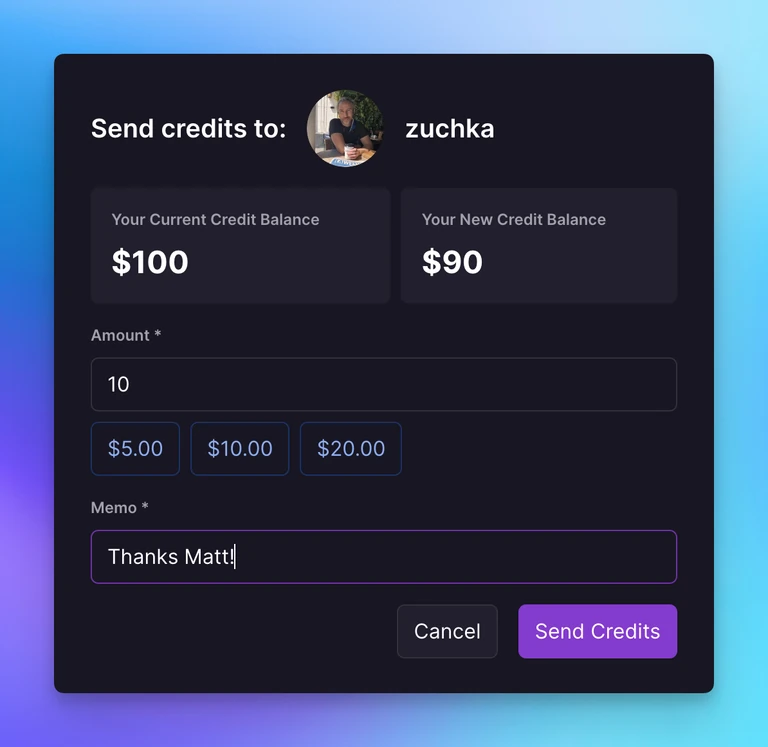
As the sender, the credits are levied against your existing credits and you’ll be billed on the spot if you exceed your current credit balance.
As the receiver, you’ll notice new credits in your account that you can use to pay Railway invoices.
Simple, right?
Let’s talk about WHY we’re shipping this.
There are two reasons:
For starters, the Open Source Kickback program is growing like gangbusters (40% month over month last we checked!) and we’re racing to build the primitives to allow template creators to cash out. This is another step forward in laying the groundwork for a real economy to be built on Railway where template developers will be able to generate real income. To get there we need a mechanism for transferring funds and this is a super early version of that.
The second reason is that we wanted to provide an easier way for administrators to distribute Railway credits to a group — think hackathon organizers, educators, and so forth. So this accomplishes that as well.
So with that said, we invite you to visit the public profile page for any template creator that’s made a template you enjoy and send them a few credits to say thanks.
And to you we also say: Thanks!
Let us know if you run into any issues.
Multiplayer Preview
Behind the scenes look at realtime collaboration or “multiplayer” functionality coming to the Railway canvasLet’s talk about multiplayer software.
This is a really early preview — but sometimes we just can’t wait to show you something. This is exactly one of those times.
Note: If you’d like to skip ahead, the news is that you now get an early version of multiplayer as part of the Canvas Service Groups (Beta) Feature Flag available in your account settings.
“Multiplayer” or “realtime collaboration” has had quite the moment in the sun in our industry for a number of years now. As something that straddles the line between “software feature” and “category-defining software feature,” multiplayer is a key contributor to the popularity of applications like Notion or Figma or Hex as it’s brought new collaborative life to old paradigms.
But while multiplayer has arrived for front office applications, it hasn’t really made its way to infrastructure — at least not yet.
Well we think it should.
Imagine your application’s just gone down and you’re debugging in the Railway dashboard. Shouldn’t the dashboard provide the same level of collaborative context as your document editor? Wouldn’t it be a better development environment to feel the presence of your team when you’re working together on something? We think so.
So with that in mind, today we’re showing an early preview of multiplayer or realtime collaboration in the canvas as well as introducing a few other improvements related to service groups.
This includes:
- Realtime groups and positions are now synced for everyone on the project
- There’s a new "Reset Canvas" command (cmd+k) to remove all groups and nodes in case things get funky
- Click on services names when the group is collapsed to open them
If you have feedback, let us know in the forums.
Attachments in Forum Posts
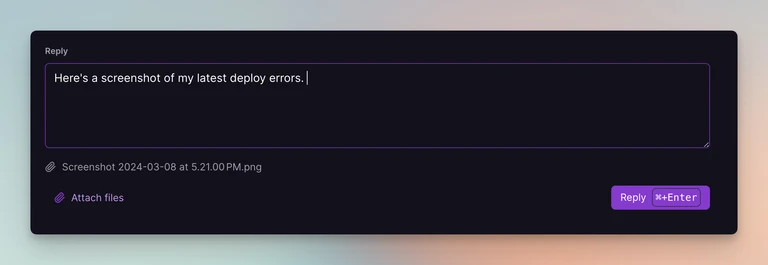
Attachments are now supported in Help Center posts!
This is great news for sharing screenshots, logs, and whatever else you might need to communicate better with the community and Railway Support Engineers.
We’re blitzing through a bunch of improvements to the Help Center and as always would love your feedback — so please let us know how we can make the Help Center work better for you!
As always, thanks for your support.
Fixes and Improvements
- Reminder: Billing Thresholds have arrived for a small number of users
- We published a brand new “Deploy an OpenTelemetry Stack on Railway” tutorial
- We updated dev.new to sort your GitHub repos by last push
- We added a
Railway Help Centerbutton to the modal of crashed deployments - We added a number of small stylistic improvements to the Help Center
- We fixed some issues with template icons and OGs rendering correctly