Come one, come all, to the 192nd edition of the weekly changelog.
This week, we’ll be …
… pulling a rabbit out of a hat with magic ports
… racing ahead in performance with a dashboard speedup
… and turning up the music on Runtime V2 with volume support
That’s right, folks, it’s a packed week filled with awe and wonder.
Let’s get into it!
Introducing Magic Ports
Railway can now automatically detect ports for your servicesThis week we’re introducing Magic Ports and Target Ports.
In the past, setting a $PORT variable was the only way to expose your workloads.
Now, for any deployment using Runtime V2, Railway will automagically detect the ports that the deployment listens on while letting you choose which port the domain points to.
Nice!
This also means that you can have multiple domains point to different ports.
To get started, you’ll first need to have V2 selected in Service Settings > Deploy > Runtime, then head over to the Networking section of the Service Settings.
Let us know your feedback and thoughts on Magic Ports by dropping us a line here. 🎩
Performance Improvements
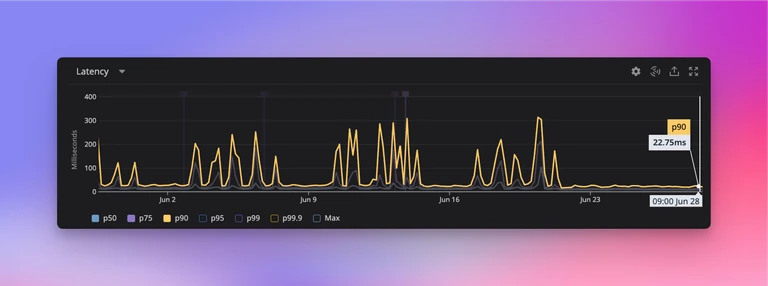
Two weeks ago, we wrote about how we’re making everything in the Railway dashboard faster.
That continues this week, as we’ve performed a number of subsequent speedups.
We’ve now reduced tail latency at peak times to a p90 of 20ms. This is a lot faster than the previous p90 of 300ms.
As a result, the dashboard should feel about 50% faster on average, and not suffer any lag under peak load.
We hope you enjoy zipping around the dashboard.
If anything still feels slow to you, please open a ticket. 🏎️
Volume Support in Runtime V2
As we mentioned with Magic Ports above, earlier this month in Changelog #0189 we introduced Runtime V2 to provide an overall better experience when deploying applications with Railway.
Railway's legacy container runtime had limitations where Private Networking would take up to 3 seconds to initialize. This was inconvenient for those who expected to connect and communicate with services on the same private network.
Runtime V2 fixes that and brings general improvements to your workloads — one major improvement is magic ports.
Now today, in more Runtime V2 news, we wanted to let you know that Volumes is also available on the new runtime.
To get started with Volumes on V2, head over to Service Settings > Deploy > Runtime.
Let us know if anything goes wrong by dropping a ticket in Help Station.
Now get out of here and enjoy the weekend! 🏄
Fixes and Improvements
- We added the ability to bulk edit variable descriptions in the variable raw editor. This should make it easier to edit a large number of variable descriptions