Before we dive into this week’s changelog (object storage edition), we’ve got something new we think you’ll love: Faster builds.
We’re rolling out a brand new metal-based build environment (in beta) to make your builds faster than ever. It’s a big step forward in performance, and we’d love your help putting it through its paces.
Head to Service Settings → Build → Enable Metal Builders to turn it on. Try it with your existing projects, compare build times, and share your feedback. Every insight helps us polish things up and get this ready for prime time. If you hit any issues, let us know in Central Station or on X.
And that’s just the start. This week we also shipped improvements to the dashboard, CLI, MCP server, and Central Station.
But that’s not all, we’re releasing Stripe Connect to cash out bounty winnings, clearer error messages in the Data tab, and adding replica-level metrics to help you keep a closer eye on your services.
Now let's get to what you've all been waiting for, the main event, Object Storage!
Object Storage to Priority Boarding
Object Storage on RailwayNew in Priority Boarding: Object Storage
We’re introducing a new infrastructure primitive that you can use when building your apps: object storage. No need to reach for 3rd-party services when wanting to store files.
- S3-compatible – Works with existing S3 tools and clients
- Private by default – Buckets are private by default. If you want public access, you’ll need to deploy a public proxy to serve those files.
- Compatible with Environments – Object storage integrates with environments. Every new environment you spin up will have its own bucket
- Free during preview – Creating buckets is now available in Priority Boarding for users on the Hobby or Pro plans (currently not part of the free plan to prevent abuse). In terms of limits, workspaces can store up to 1 TB across all workspace buckets
To get started, you can right-click in your project canvas and choose the “Bucket option”
This is just the start, we plan on rolling out more features soon! If you run into any issues, drop us a note in this Central Station thread.
Cash Withdrawals for Bounty Winnings
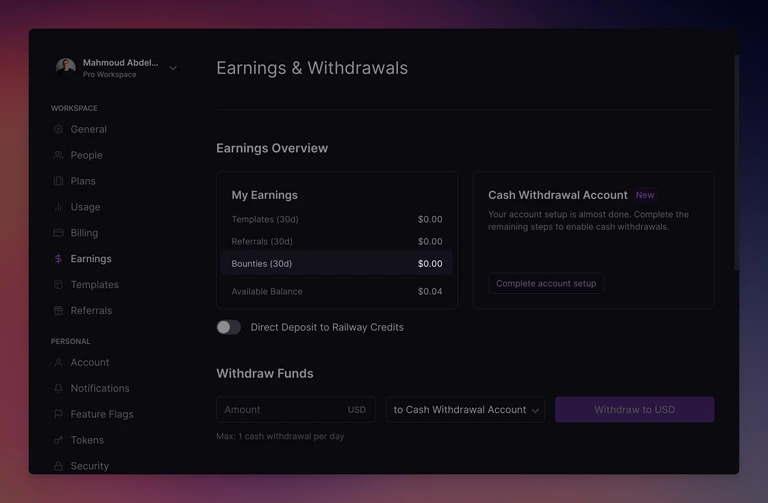
In case you’re unfamiliar, bounties are open requests from the community that anyone can jump in and solve. These can be requests for:
- Railway Templates - share reusable project templates to help others get started quickly
- Questions - lend a hand by solving tricky problems and help others debug issues
- Content - tell us what you’ve shipped on Railway and how you built it
Until recently, bounty winnings were awarded as Railway Credits. But here’s the big news: the bounty board just leveled up. You can now turn your bounty winnings into real cash. Yup, your side quests now come with a direct deposit (via Stripe Connect) button.
Your earnings now show up right alongside templates and referrals on your Railway workspace’s earnings page.
Here’s the full flow, end to end:
- Win a bounty at station.railway.com/bounties
- Set up your cash withdrawal account in your earnings page
- Bank your hard-earned bounty winnings
Happy hunting!
Better Database Tab Errors
Better errors in the database tabWe’re working hard on giving you a world-class experience for databases on Railway. And this week we’ve got a big batch of updates designed to make it easier to see what’s going wrong, and even better, what you should do to fix it. (Shout-out to Brody for shipping this)
Here’s what’s new:
- Smarter deployment states – No more guessing what’s happening
- Pending → You’ll see a loading state
- Completed → We’ll open your deploy logs
- Crashed → We’ll open your deploy logs
- Failed → We’ll open your build logs
- No deployment → You’ll be prompted to create one
- Clearer help with missing variables – Instead of dumping the whole list of required variables, we now show you exactly which ones are missing and prompt you to configure them
- TCP Proxy validation – We’ll check if your TCP Proxy is set correctly on the right application port
- Not set? → We’ll recommend the correct port and prompt you to add it
- Set incorrectly? → We’ll suggest the right port and prompt you to fix it
- And don’t worry, no connection attempts will be made if things aren’t set up properly.
- TCP Proxy autofill – When you’re adding a TCP Proxy for a database service, we’ll automatically suggest the recommended port for you
- More useful error messages – Any errors returned from the API (failed authentication, connection reset, etc.) are now surfaced directly in the UI, so you know exactly what went wrong
- Polished design details – Unified look and feel for loading states and checks in the data tab: consistent banners, buttons, and more
- Logs panel fix – The logs panel now opens to the right state when navigated to with a hash
If you have any feedback about this update, reach out in Central Station.
Replica Metrics
Metrics are now available for all your replicas!When you’ve got a bunch of replicas running for a service, it wasn’t clear which ones were pulling the weight and which ones were just coasting along. Now, you can dig into metrics for each replica and:
- Check performance details for every single one
- Spot when one replica is carrying more load than the rest
- Figure out if it’s time to scale up or rebalance
Give it a spin, and if something feels off, let us know over at Central Station.
Fixes and Improvements
- We improved the dashboard’s command palette redeploy action. Previously, the redeploy action always showed the fixed text "Deploy latest commit", which caused confusion for users when services were deployed from an image. Now, the label dynamically adapts to the service type: "Deploy latest commit" for repo-based services, "Redeploy service image" for image-based services, "Redeploy latest deployment" when no source is set but a deployment exists, and hidden entirely when no deployments are present. This makes the action clearer and provides more accurate guidance for users
- We shipped several improvements to the Railway CLI
- The
railway logscommand now supports by adding fetching a specific number of lines with filters. Here’s a sample commandrailway logs --lines 10 --filter "@level:error AND rate limit". This should improve the debugging experience when using the CLI - The
railway logscommand now supports pulling build logs for a specific build. This is useful for debugging failed builds - You can now list deployments and their statuses by running
railway deployments list - The
--helpcommand is also updated to document these changes
- The
- We shipped a couple of improvements to the Railway MCP server:
- If you ask your coding agent to "find the latest failing build, look at the errors, commit a fix" it can use the new CLI capabilities to complete the task
- Coding agents can now take advantage of the CLI logging update
- The MCP server doesn’t return JSON by default to avoid quickly hitting the MCP token limit. Returning JSON is instead exposed as an option in tools that can return JSON
- We shipped several improvements to Central Station:
- Bounties are now easier to find, and you can filter by category and sort by max payout, newest bounties or based on the most recent activity
- There are now typing indicators so you can see who’s actively replying to a thread. This should make it easier when multiple people are contributing to the same discussion