This week we're shipping features on both ends of the spectrum: one that helps you see everything that's happening across your workspace, and another that brings Railway into your local development workflow.
We’re releasing Audit logs which give you full visibility into who did what, when, and where across your workspace — essential for teams with security and compliance requirements. The Railway CLI also gets a new railway dev command, so you can now spin up your entire Railway environment locally with a single command. No more configuring things twice, no more private network headaches.
We've also cleaned up how Railway interacts with your GitHub PRs (fewer deployment entries cluttering your timeline) and shipped a handful of canvas improvements.
Let's get into it! 🚄
Audit Logs
View and filter audit events in your workspaceFor teams with security and compliance requirements, visibility into who did what and when is essential. We're shipping audit logs to give you exactly that. Previously, if something changed in your workspace and you needed to trace it back, you were out of luck. Now you have a full paper trail.
Audit logs let you see every significant event that happens in your workspace:
- Which events happened — deployments, configuration changes, member additions
- Which project and environment — see exactly where the action took place
- Which user — know who made the change
- When — full timestamps for every event
You can filter logs by event type, environment, project, and define custom time ranges to find exactly what you're looking for.
Check out the documentation for more details on Audit logs and how you can export them via the Railway API.
Audit logs are part of our continued investment in making Railway enterprise-ready. Combined with SSO, RBAC, and our SOC 2 Type II compliance, Railway now has the security and compliance features that larger organizations need.
Let us know on this Central Station thread what you think of the feature and if there are any other events you’d like us to include.
Better Local Dev
Spin up your entire environment locallyWhen Railway started, it was always our goal to make the entire development process easier — and that extends to local development. Right now, you can configure a database or template with one click on railway.com, but spinning that up locally is a bit of a pain.
We're introducing a new CLI command to change that: railway dev.
The goal is simple: develop your project locally with the exact same setup that's in your Railway environment. Here's what it does:
- Manages Docker Compose for your image services — Railway creates, starts, and manages a Docker Compose file in the background for all your image services. This includes Postgres and Redis databases, or anything deployed from DockerHub and GHCR.
- Generates certs with pretty local domains — We start a reverse proxy with
{service}.{project}.railway.localhostdomains for all services configured with a public domain. No morelocalhost:5432confusion. - Automatically rewrites your variables — Variables that reference the public domain, private network, or TCP proxy get updated to point to your locally running services. If your service connects to Postgres over the private network in production, it'll just work locally too.
- Starts your code services — You can specify that your "web" service has a development command like
bun run devand runs on port 8000. When you runrailway dev, it automatically starts with variables pointing to the other local services.
How to try it:
- Install the latest version of the Railway CLI
- In a directory linked to a Railway project, run
railway dev - You'll be prompted to optionally configure any code services (command, directory, port) — you can skip this and set it up anytime with
railway dev configure - Everything starts and you'll see URLs to connect to your services
You can also run railway run {cmd} --service {service} anywhere and it will replace the variables to point to local databases too.
Caveats:
- You need Docker installed and running locally
- Buckets and Railway Functions don't work yet
- Windows support is limited
This is early. There will be bugs and likely big changes ahead. We wanted to get this in your hands now because we'd love your feedback. What's working? What's missing? What would make this indispensable?
Try it out and let us know in this Central Station thread.
Canvas Updates
We shipped several improvements that make working with the canvas smoother:
Add Buckets from dev.new
dev.new → bucketYou can now add a bucket when initializing your project from dev.new. One less step to get your object storage set up.
Duplicating Services in Groups
Duplicating a service that’s in a group remains in thereWhen you duplicate a service that's inside a group, the new service now stays in that group. Previously, duplicating a service within a group would create the new service outside of it, which was annoying if you were trying to keep things organized.
Groups in Template Composer
Templates made up of multiple services will be deployed as a groupYou can now add groups for services, buckets, and even other groups when creating templates in the Template Composer. If you've been using groups to organize your Railway projects, you can now preserve that organization when you turn your project into a template. Templates created from existing projects that contain groups will automatically include them — your users get a well-organized canvas from the start.
If you have feedback or run into any issues, let us know on Central Station.
Cleaner GitHub PRs
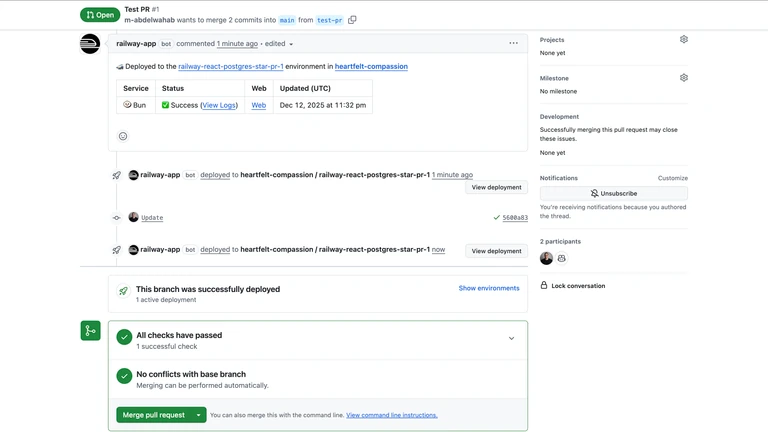
We've cleaned up how Railway interacts with your GitHub pull requests.
Previously, Railway created separate GitHub deployments for each service in your project. If you had five services, you'd see five deployment entries cluttering up your PR timeline. This also meant a lot of GitHub API calls.
Now, Railway creates a single deployment per commit per PR environment. Your PR timelines are cleaner, and we're making far fewer API calls to GitHub.
⚠️ Breaking change: GitHub deployments are now per-commit and environment-scoped. The serviceId field is gone, and environment names have changed accordingly. If you have workflows that rely on serviceId, you'll need to update them to treat each deployment as representing the whole environment instead.
If you run into any issues or want to share feedback, drop by Central Station.
Fixes and Improvements
- We fixed an issue where the branch selector showed an error on the service settings page for public repo deployments