ssh railway.new is all you need. Run it and Railway signs you up, spins up a sandbox, and connects you to the Railway Agent, with nothing to install. Every Sandbox now ships with six coding agents preinstalled, and railway private-network brings private networking to the CLI.
Let's get into it! 🚄
Railway over SSH to Priority Boarding
New in Priority Boarding: Railway over SSH
You can now use Railway over SSH. Connect to railway.new and Railway handles signup, sandboxes, and the agent from your terminal, with no CLI to install and no config to write. Three commands cover most of it:
ssh railway.newopens an interactive terminal app where you can chat with the Railway Agent or create a sandbox.ssh agent@railway.newdrops you straight into a conversation with the Railway Agent.ssh sandbox@railway.newcreates a sandbox and hands back ready-to-run commands to connect, copy files, forward a port, and run the Railway CLI inside it.
The first time you connect from a new machine, Railway returns a link to sign up or sign in and approve your SSH key. You approve the key once, the command you ran goes through, and every connection after that is instant. Your SSH key is the credential, so there's no token to paste and no browser flow to repeat. Run ssh help@railway.new to see the full set of commands.
This is great for humans and even better for agents. SSH is a plain shell command, so an agent like Claude can run ssh sandbox@railway.new with nothing to install and no integration to set up first. A CLI has to be installed, an MCP server has to be configured, and an OAuth login needs a browser the agent can't drive. None of that applies here. Tell your agent to create a sandbox with ssh sandbox@railway.new, and it signs you up, provisions the sandbox, and gets to work over the same SSH. If the environment doesn't have a key yet, Railway points it at ssh-keygen first, then registers that key as the credential. Humans get the interactive app, agents get structured output from the same commands, and both sign in with an SSH key instead of a token.
Before this, getting onto Railway from a terminal meant installing the CLI, running a browser login, and creating a project before any real work could start. An agent had to route around all of that or stop and ask you to finish the login. Railway over SSH turns the client everyone already has into the front door, and the key into the login.
Connect with ssh railway.new, read the Sandboxes docs, and tell us what to build next on Central Station.
Agents in Sandboxes to Priority Boarding
New in Priority Boarding: Agents in Sandboxes
Every Railway Sandbox now ships with six coding agents preinstalled: Claude Code, OpenAI Codex, Cursor, Droid, OpenCode, and Pi. Create a sandbox, connect, and start a session with the harness you already use. You shouldn't have to spend the first few minutes of every session getting the same agent installed, so we put them in the default image.
The base image also includes git, Node, npm, and mise for toolchain management, so an agent has what it needs the moment the sandbox boots. From there, a sandbox reaches the rest of your project over private networking, so an agent can work against your real databases, Redis, internal services, and variables instead of a stubbed-out environment.
Preinstalled agents pay off most alongside checkpoints and forks. Checkpoint a sandbox once you've cloned a repo and installed dependencies, then fork that prepared state into several sandboxes and run a different agent task in each, in parallel. The blog walks through a repo review agent that does exactly this.
Before this, every sandbox started from a clean Debian base, so the first minutes of a session went to reinstalling your agent before any real work began. A fresh sandbox is a working environment from the start.
Read Agents in the Sandbox, check out the Sandboxes docs, and let us know what you think on Central Station.
Private networking in the Railway CLI
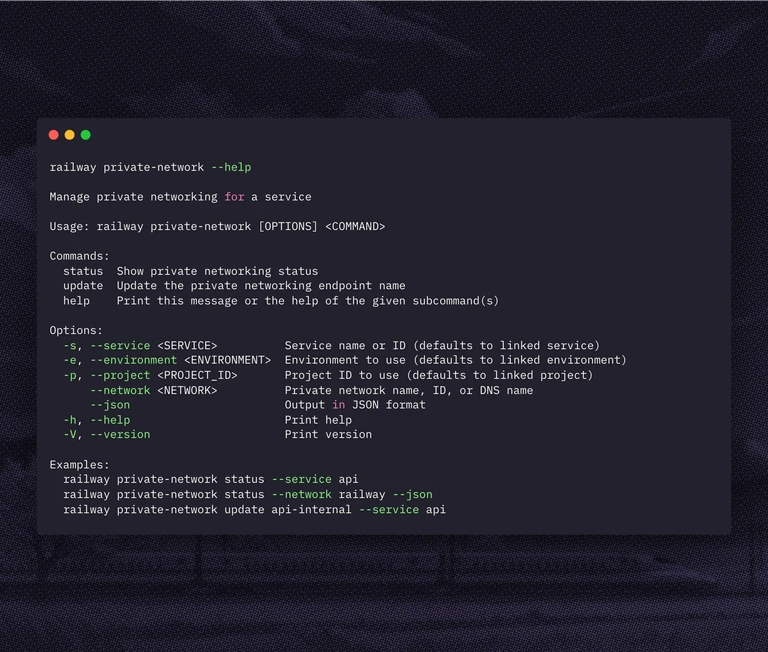
The Railway CLI now inspects and manages a service's private networking endpoint through a new railway private-network command:
railway private-network statusshows the private networking configuration for a service, including its hostname, short name, DNS suffix, address family, and sync state. Pass--jsonfor scripts and agents.railway private-network update <name>renames the endpoint's short name. The CLI validates the name and checks availability before it makes the change.
Before this, checking a service's internal DNS name or renaming its endpoint was a dashboard action. The CLI now exposes the same controls in a scriptable form, so an engineer or agent can read the current configuration and rename an endpoint from the terminal.
Update with railway upgrade, read the private networking docs, run railway private-network --help, and let us know what you think on Central Station.