If your first question about a feature is “what’s the CLI command?”, we’ve got a few for you.
Manage Postgres HA, restore to a point in time, and set up connection pooling from your terminal. Bulk-edit your variables from the CLI, then review the diff before applying changes. Your agents get an upgrade too: railway mcp connects them to the same remote MCP server as our plugins, using your existing CLI login.
Let's get into it! 🚄
Manage Postgres in the Railway CLI
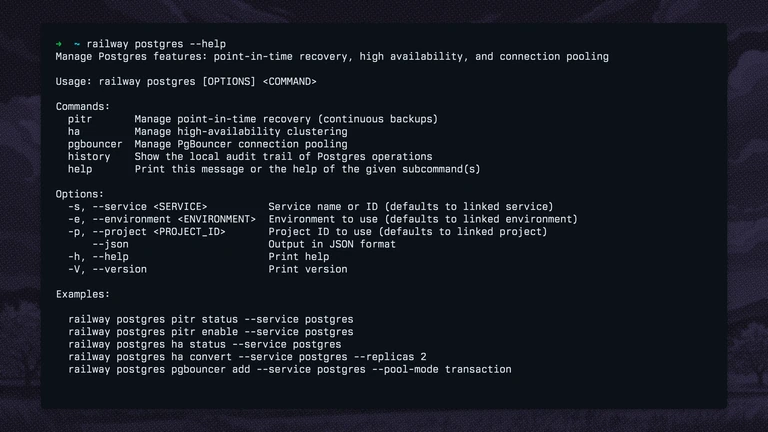
Your database has a command line. Its infrastructure should too.
railway postgres brings Railway's Postgres management controls to your terminal, with commands for three parts of running a database:
-
railway postgres haconverts a standalone service into an HA cluster, shows cluster health, scales its nodes, switches the primary, and reverts a cluster to standalone. -
railway postgres pitrmanages point-in-time recovery, checks archive coverage, and restores to a timestamp. It also manages volume backups and their schedules. -
railway postgres pgbounceradds connection pooling, adjusts pool settings, scales PgBouncer replicas, and shows live pool utilization.
Check a cluster, restore to 30 minutes ago, or add transaction pooling:
railway postgres ha status --service postgres
railway postgres pitr restore --service postgres --at 30m
railway postgres pgbouncer add --service postgres --pool-mode transaction
PITR restores create a separate service, preserving the source database. HA switchovers briefly interrupt connections.
Previously, these management workflows meant returning to the dashboard or writing your own API scripts. The CLI gives humans and agents dedicated commands, with project, environment, and service targeting, plus --json output for automation.
Read the Postgres CLI documentation, try it on your database, and share your feedback on Central Station.
Bulk-edit variables in the CLI
Edit your variables together and review the changes before applying them.A configuration change often touches more than one variable. railway variable edit opens your service's variables as a dotenv file in $EDITOR, so you can add, change, or remove them together.
railway variable edit --service apiSave and close the editor, and the CLI shows a diff for you to review. Changes apply after you confirm. Values are redacted in the diff by default, with --reveal available when you need to inspect them.
Railway-provided variables appear as comments, and sealed variables retain their stored values when you leave their placeholders unchanged. Pass --skip-deploys to update the variables without triggering deployments.
Previously, working through a set of variable changes meant composing set and delete commands or opening the dashboard's raw editor. You can now use the editor you already know and review the complete change before it reaches your service.
Update with railway upgrade, run railway variable edit --help for the available options, and tell us how it fits your workflow on Central Station.
railway mcp now defaults to Railway’s remote MCP server
Previously, railway mcp started the MCP server bundled inside the CLI. It now starts a local proxy that forwards your agent's requests to mcp.railway.com, authenticating with your existing railway login credentials.
This makes Railway's hosted MCP server the default for CLI-connected agents, aligning them with Railway's plugins. Both receive the same hosted tools and updates as they ship. The bundled local server remains available through railway mcp local.
If your agent config already runs railway mcp, update to the latest version and restart the MCP connection. Your existing config continues to work, with no separate editor login.
To configure MCP for another editor, run:
railway mcp installUse railway setup agent to configure both MCP and the use-railway skill. Railway plugins bundle that skill with hosted MCP and connect through OAuth.
Check out the MCP setup documentation or choose your assistant from the plugin installation guides, then tell us what your agent should handle next on Central Station.
Fixes and improvements
-
We fixed TanStack Start deployments that use Nitro without a start script. Railpack starts the generated Nitro server instead of looking in the wrong output directory and crashing. Build logs also explain when
@tanstack/react-startbelongs independenciesinstead ofdevDependenciesto preserve server-side rendering. These changes are included in Railpack 0.39.0 -
We improved
railway listto show your favorite projects first, marked with a star. Previously, the CLI didn't reflect the projects you'd starred on the dashboard. JSON output also includes anis_favoritefield. -
We fixed sealed variables disappearing from CLI and MCP variable listings. Their names are visible while their values remain hidden, so agents can recognize variables that are already set. Deleting a sealed variable through the CLI also works instead of reporting that it couldn't be found.