This week, we're giving you more control over workspace credentials and bringing request tracing to your terminal. Review your team's tokens, rotate passwords across HA database clusters, and investigate failing requests without leaving your CLI.
Workspace token management
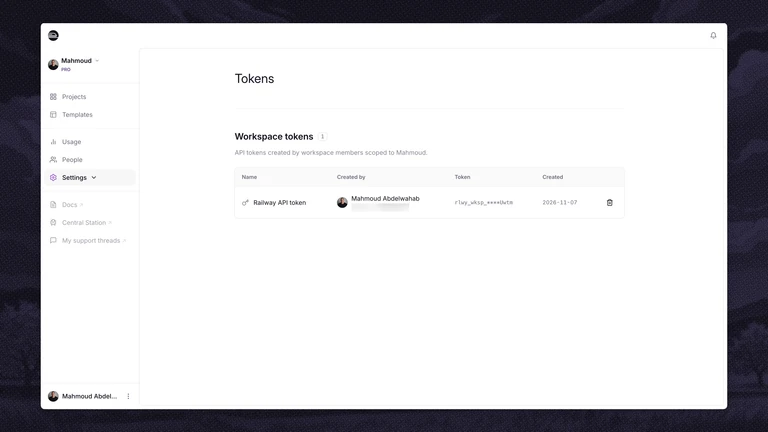
Workspace tokens power shared automation, but managing them used to depend on whoever created them. Only that person could see or revoke their tokens.
Workspace admins can now open Workspace Settings → Tokens to review every workspace token, see who created it and when, and revoke tokens the team no longer needs. Token creation and revocation also appear in your workspace's audit logs.
To create a workspace token, open Account Settings → Tokens and select your workspace in the Workspace dropdown.
Take a look at your workspace's tokens, and share your feedback on Central Station.
Password rotation for HA databases
Regenerate credentials of your highly available databasesPassword regeneration is available for HA clusters running Postgres, MySQL, Redis, and MongoDB. Previously, HA password regeneration required Priority Boarding. MongoDB HA remains in Priority Boarding.
Open your database's Config tab, find the Connection section, and click Regenerate next to Regenerate Password. Railway coordinates the password change across cluster members, updates the proxies, and redeploys running services that reference the password through Railway variables.
The dashboard shows progress throughout the rotation. Cluster members adopt the password without restarting, though older image builds require a redeploy first. If the primary needs that update, a failover causes a brief write interruption.
If rotation fails before the password is committed, Railway restores the previous password. After that point, the dashboard identifies anything that still needs a redeploy. You'll need to update hardcoded credentials and applications outside Railway yourself.
Read the HA rotation documentation, and tell us how it goes on Central Station.
Tracing in the CLI
Enable tracing, find a failing request, and inspect its spans with railway traceFollow a request from Railway's edge through your services and database calls, right from your terminal.
railway trace brings tracing setup and investigation out of the dashboard and into your CLI. Enable tracing with railway trace enable, add --auto-instrument to turn on automatic instrumentation, and check settings with railway trace status.
When something goes wrong, railway trace list --errors --since 2h finds recent failing requests. Use railway trace get <TRACE_ID> to inspect a request's spans as a tree, with durations and statuses to help locate the problem.
Your coding agent can use the same commands to investigate requests. Every command supports --json for structured output, plus --service and --environment to select your target.
Tracing is in preview. The dashboard's Traces page requires Priority Boarding, while the CLI commands are available to everyone.
Update with railway upgrade, read the trace command reference, and share your feedback on Central Station.
Fixes and improvements
- We improved stopped deployment tracking. The activity feed shows a Deployment stopped entry, and project history records who stopped it and when. Previously, manually stopped deployments looked the same as containers that exited on their own.
- We shipped
--environmentforrailway config plan,apply, andpull. You can target another environment without relinking your project first. - We shipped
railway config partials list,release, andtransferto inspect and reassign ownership of resources managed through infrastructure as code. Ownership could previously remain after its authoring file was removed and block reassignment. You can manage that ownership without the original file or a redeploy.