Your agents don't have to wait for you to notice something's wrong.
This week, automations can start when a monitor alerts or when you open a pull request, so an agent gets to work before you've even looked. We're also shipping SCIM directory provisioning, so your identity provider decides who's in your Railway workspace.
Let's get into it! 🚄
Alert and pull request triggers for automations
Let an agent investigate production alerts before you see themLast week, we shipped scheduled automations. This week, they can also start when a monitor alerts or when you open a pull request.
Point an automation at a monitor on your Observability dashboard, and when that monitor alerts, Railway starts a fresh cloud agent in your project. The agent knows which monitor fired and its threshold, so it's already digging when you open the notification. In the video, it traces a memory spike to a leak in the latest deploy and opens a pull request with the fix. Alert triggers are available on the Pro plan, where you can add a monitor to any service or volume.
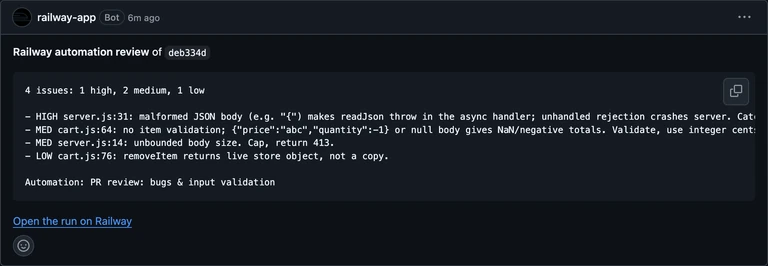
Pull requests work the same way. Add a pull request trigger for a repository your project deploys from, and every pull request you open starts a run with that pull request's code. Pull requests from other people, bots, and forks don't start runs. When a run finishes, Railway comments on the pull request with the agent's findings, or with a link to the run on public repositories.
Here are a few ideas to try:
- “When my memory monitor alerts, check whether the latest deployment introduced a leak. If it did, open a draft pull request with the fix.”
- “When my CPU monitor alerts, check the logs and recent deployments for what changed, and tell me the likely cause and whether a rollback would help.”
- “When I open a pull request, review it for bugs and missing input validation, and report each issue with the file and a suggested fix.”
You can try automations right now from the coding agent you already use. They're in Priority Boarding, so if you haven't joined, turn on Railway Automations on the Feature Flags page first. Then connect a Railway plugin or the Railway MCP server and ask your agent to set one up, or start with “Find opportunities for Railway automations in my project.”
Prefer the dashboard? Enable the Railway Agent Dashboard flag on the same page, then open Automations in your project to create, run, and pause automations there.
Check out the Automations guide to learn more, and tell us what you automate on Central Station.
SCIM directory provisioning
Sync workspace membership from your identity providerRailway workspaces can sync membership from your identity provider over SCIM 2.0. Assign someone to the Railway app in your IdP and they join the workspace as a Member. Unassign, suspend, or delete them, and Railway removes their access automatically.
Until now, workspace membership lived apart from your directory. Admins invited people by hand or relied on domain-based automatic joining, and offboarding meant remembering to remove someone from Railway after they'd already left the IdP. With directory provisioning, the IdP decides who's in the workspace.
Removing a SCIM-managed member does more than take their name off the People page. Railway also:
- Removes their workspace membership and direct project permissions
- Removes them from workspace access groups
- Revokes workspace API tokens they created
- Disables workspace automations they own and deletes their cloud agents
- Blocks them from rejoining through domain-based joining or older invite links
Directory provisioning works with Okta, Microsoft Entra ID, Google Workspace, JumpCloud, OneLogin, PingFederate, Rippling, and custom SCIM 2.0 integrations.
Your workspace needs SAML Single Sign-On and at least one verified email domain. Only people whose IdP email is on a verified domain are provisioned. Workspace roles and access groups stay managed in Railway and don't sync from IdP groups.
To set it up, navigate to your workspace's Security settings, click Connect directory under Directory provisioning (SCIM), and follow the guided setup for your IdP. Once the directory is connected, click Enable provisioning to start syncing assigned users.
SCIM directory provisioning is available on Railway Enterprise and committed spend plans that include Single Sign-On. Read the SCIM provisioning docs to get started, and share your feedback on Central Station.
Fixes and improvements
- We shipped Railway access levels for automations. New automations default to Approve, so any change a run wants to make waits for a person to approve it in the run's chat. Previously, every run had full access to the project.
- We shipped automation events for project webhooks. Subscribe a webhook to Automation Reported or Automation Failed to send run reports and failures to Discord, Slack, or your own endpoint. Previously, only the automation's owner was notified.We shipped automation events for project webhooks. Subscribe a webhook to Automation Reported or Automation Failed to send run reports and failures to Discord, Slack, or your own endpoint. Previously, only the automation's owner was notified.
- We improved what happens when an automation's owner leaves a workspace. Their automations are disabled, so they're still there if the person rejoins. Previously, they were deleted.
- We improved email domain verification. Verifying a domain leaves automatic joining off until an admin enables it and picks a role in Security settings. Previously, verifying a domain turned it on. Domains verified before this change keep their setting.