
Deploy 9Router
9Router AI gateway: one OpenAI-compatible API for 40+ LLM providers
9Router
Just deployed
/app/data
Deploy and Host 9Router with Railway
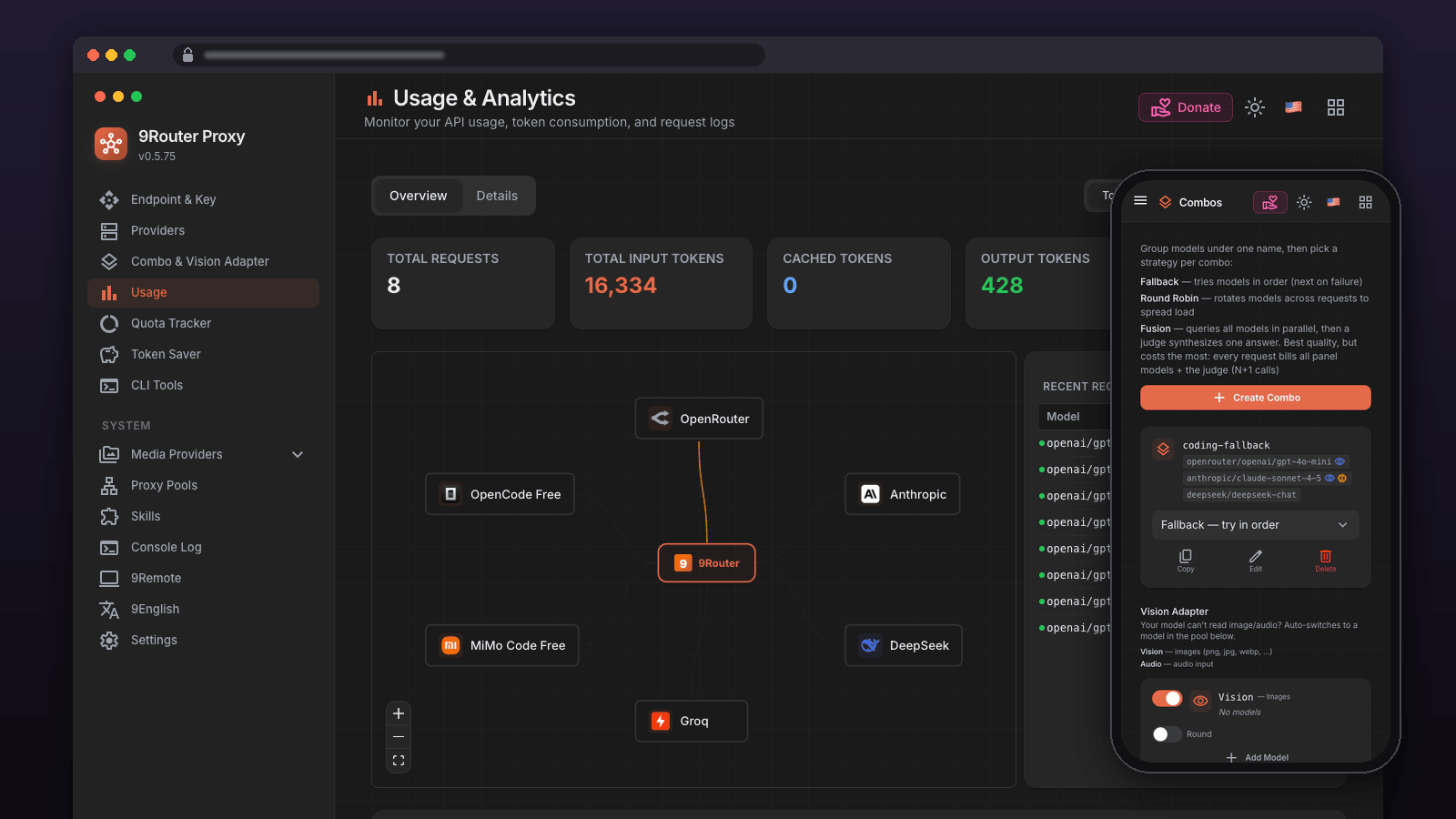
One OpenAI-compatible endpoint for Claude Code, Cursor, Codex and any OpenAI client, routed across 40+ AI providers with fallback combos and usage tracking.
Get started
- Deploy. Nothing to fill in. It idles at about 85 MB and runs on every plan, including Free.
- Sign in with the generated password. Open the service URL and enter
INITIAL_PASSWORDfrom the 9Router service's Variables tab. The login page's "Default password is 123456" hint is wrong for this template, and failed attempts count toward the lockout. - Connect a provider, then a client. Providers → add an API key; Endpoint → create a 9Router API key. Point your client at
https://your-service.up.railway.app/v1with that key.
About Hosting 9Router
9Router is an open-source, self-hosted AI gateway: one OpenAI-compatible endpoint (/v1) in front of 40+ AI providers - Claude, OpenAI, Gemini, DeepSeek, OpenRouter, Ollama, GitHub Copilot, Codex, Antigravity and more - with combos (fallback and round-robin across providers), quota tracking, token savers and a web dashboard. This template deploys the official 9Router image, digest-pinned, with a persistent volume and a deployment healthcheck. It runs as a single Node.js service with a SQLite database under /app/data, which this template mounts on a Railway volume so providers, API keys, combos and usage history survive redeploys and restarts. Every secret (INITIAL_PASSWORD, JWT_SECRET, API_KEY_SECRET, MACHINE_ID_SALT) is generated at deploy time; nothing has to be typed into the deploy form. The image is pinned to a specific version and digest (decolua/9router:0.5.75), so a redeploy never picks up an untested upstream build. Railway probes /api/health before switching traffic, and the service restarts whenever the process exits.
Common Use Cases
- One endpoint for every coding agent. Point Claude Code, Cursor, Cline, OpenCode, Codex or any OpenAI-compatible client at
https://your-service.up.railway.app/v1with one 9Router API key. - Fallback and round-robin across providers. Build a combo that tries your preferred provider first and fails over when it errors or hits a quota.
- Use subscriptions you already pay for. Connect Claude Code, ChatGPT/Codex, GitHub Copilot or Gemini CLI accounts through OAuth and route requests through them.
- A private gateway for your own apps. Reach it over Railway's private network as
http://9router.railway.internal:20128without exposing it.
Dependencies for 9Router Hosting
None. One service, one volume. Provider credentials are added in the dashboard after deploying.
Deployment Dependencies
- 9Router GitHub repository
- 9Router Docker documentation
- 9Router environment variables
- Docker Hub image
Implementation Details
Plan requirements. 9Router is light: measured on this image, the container idles at about 85 MB and peaked at about 95 MB after five idle minutes and a burst of 60 concurrent /v1/models requests. It runs on every Railway plan, including Free (0.5 GB) and Trial (1 GB).
Deploying. Click deploy; there are no inputs. The deployment goes green once /api/health answers (about 10-40 seconds), then open the service URL.
Logging in. Open the service URL, which redirects to /login. Use INITIAL_PASSWORD from the 9Router service's Variables tab, not 123456. The pinned upstream page's default-password hint and "no password set" warning do not account for an environment-provided password; the generated password is enforced by the server. Avoid repeated attempts with the advertised default, which count toward the login lockout. Then set your own password under Profile in the dashboard: leave the current password field empty the first time (the pinned upstream form accepts only an empty value or 123456 there before a password has been saved). Once saved, the dashboard password lives in the database and INITIAL_PASSWORD is no longer used.
API keys. /v1/* always requires a 9Router API key on a remote deployment - requests without one get 401 API key required for remote API access. Create keys in the dashboard under Endpoint (or POST /api/keys) and pass them as Authorization: Bearer sk-....
Connecting providers. Dashboard → Providers. API-key providers (OpenRouter, OpenAI, Anthropic, DeepSeek, ...) take a key and are ready immediately. OAuth providers (Claude Code, Codex, Antigravity, GitHub Copilot, Gemini CLI, ...) open the vendor's consent page. Known upstream issue on any reverse-proxied deployment (decolua/9router#4054): some OAuth flows send the browser back to http://localhost:443/callback?... instead of your Railway domain. The code is still valid - replace http://localhost:443 in the address bar with https://your-service.up.railway.app and press Enter to finish the connection.
Coding agents. Claude Code:
export ANTHROPIC_BASE_URL="https://your-service.up.railway.app"
export ANTHROPIC_AUTH_TOKEN="sk-your-9router-api-key"
Any OpenAI-compatible client uses https://your-service.up.railway.app/v1 with the same key. GET /v1/models lists the models available from your connected providers.
Persistence and redeploys. /app/data is a Railway volume: db/data.sqlite, automatic backups under db/backups/, certificates and the model catalog all live there. Verified on this template: API keys and provider connections created before a redeploy are present after it, and a dashboard session stays valid across redeploys because JWT_SECRET is stable. Because a volume can only be attached to one container at a time, a redeploy has a few seconds of downtime (measured 1 failed probe out of 150 at one-second intervals); in-flight streaming responses are cut at that moment.
Optional variables. CLOUD_URL is only used if you enable Cloud Sync. ENABLE_REQUEST_LOGS=true writes per-request logs to /app/logs, which is not on the volume and grows without bound - leave it off unless you are debugging. HEADROOM_URL and SEARXNG_URL point at optional sidecar services (a Headroom token-saver or a SearXNG instance) if you add them to the project; use their private *.railway.internal addresses.
Upgrades. The image is pinned by digest. To move to a newer 9Router, change the service's source image to the new tag (check the changelog and open issues first - upstream has shipped versions where the dashboard broke, and latest has moved eight times in six weeks), then redeploy. Data on the volume is preserved; take a copy of db/data.sqlite first if you want a rollback point.
The dashboard's Update and Shutdown buttons. The dashboard shows an "update available" badge whenever npm has a newer 9Router. Its update flow copies an npm install command for your terminal and then shuts the server down; neither step can update a Railway container. This template restarts the service automatically after either button, still on the pinned version, so the dashboard is back within a few seconds. To actually upgrade, follow Upgrades above.
Security notes. The dashboard requires a login and the LLM API requires a key on every request from outside the container. The session cookie is marked Secure (AUTH_COOKIE_SECURE=true). API_KEY_SECRET and MACHINE_ID_SALT are generated so keys and machine identity cannot be derived from upstream's public defaults. Railway's platform terms apply to how you use the gateway; run it for your own accounts and keys.
Why Deploy 9Router on Railway?
Railway is a singular platform to deploy your infrastructure stack. Railway will host your infrastructure so you don't have to deal with configuration, while allowing you to vertically and horizontally scale it.
By deploying 9Router on Railway, you are one step closer to supporting a complete full-stack application with minimal burden. Host your servers, databases, AI agents, and more on Railway.
Template Content
9Router
decolua/9router:0.5.75

