
Deploy Aimeos
Laravel e-commerce platform for online shops and marketplaces

Just deployed
/var/lib/postgresql/data

mailpit
Just deployed
/data

Redis
Just deployed
/data
aimeos
Just deployed
/var/www/data
Deploy and Host Aimeos on Railway
Aimeos is an open-source e-commerce platform built on Laravel, running everything from single-brand shops to multi-vendor marketplaces with millions of products. It gives you a complete storefront — catalogue, faceted search, basket, checkout, coupons, subscriptions and orders — plus a Vue.js admin backend, a JSON:API for headless frontends and a GraphQL admin API. Teams choose it when a hosted store is too restrictive and they want the shop inside their own Laravel codebase, where any controller, template or pricing rule can be overridden.
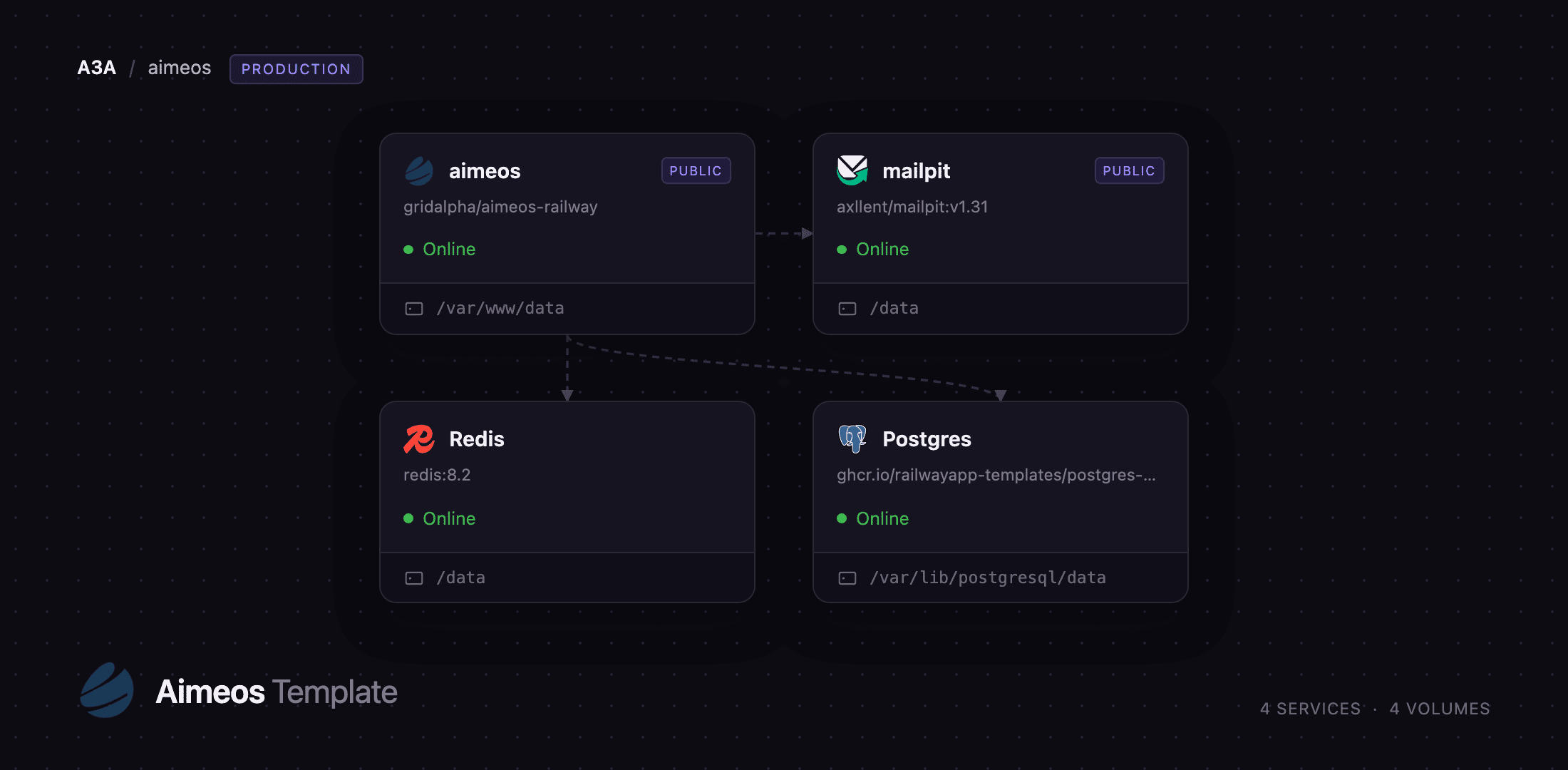
Deploy Aimeos on Railway and the whole stack arrives wired together: an aimeos service running the shop on FrankenPHP, a Postgres database holding products, orders and customers, a Redis instance backing Laravel's cache and sessions, and a mailpit service catching every order, account and password-reset e-mail until you connect a real SMTP relay. The shop container also runs the Aimeos maintenance jobs on a schedule, which is what sends order e-mails, rebuilds the product index and generates sitemaps. Self-host Aimeos this way and the only thing left to choose is a payment provider.
Getting Started with Aimeos on Railway
Set AIMEOS_ADMIN_EMAIL and AIMEOS_ADMIN_PASSWORD before deploying — those become the shop administrator, and there is no default account. The first boot takes a few minutes while it migrates and installs the demo catalogue.
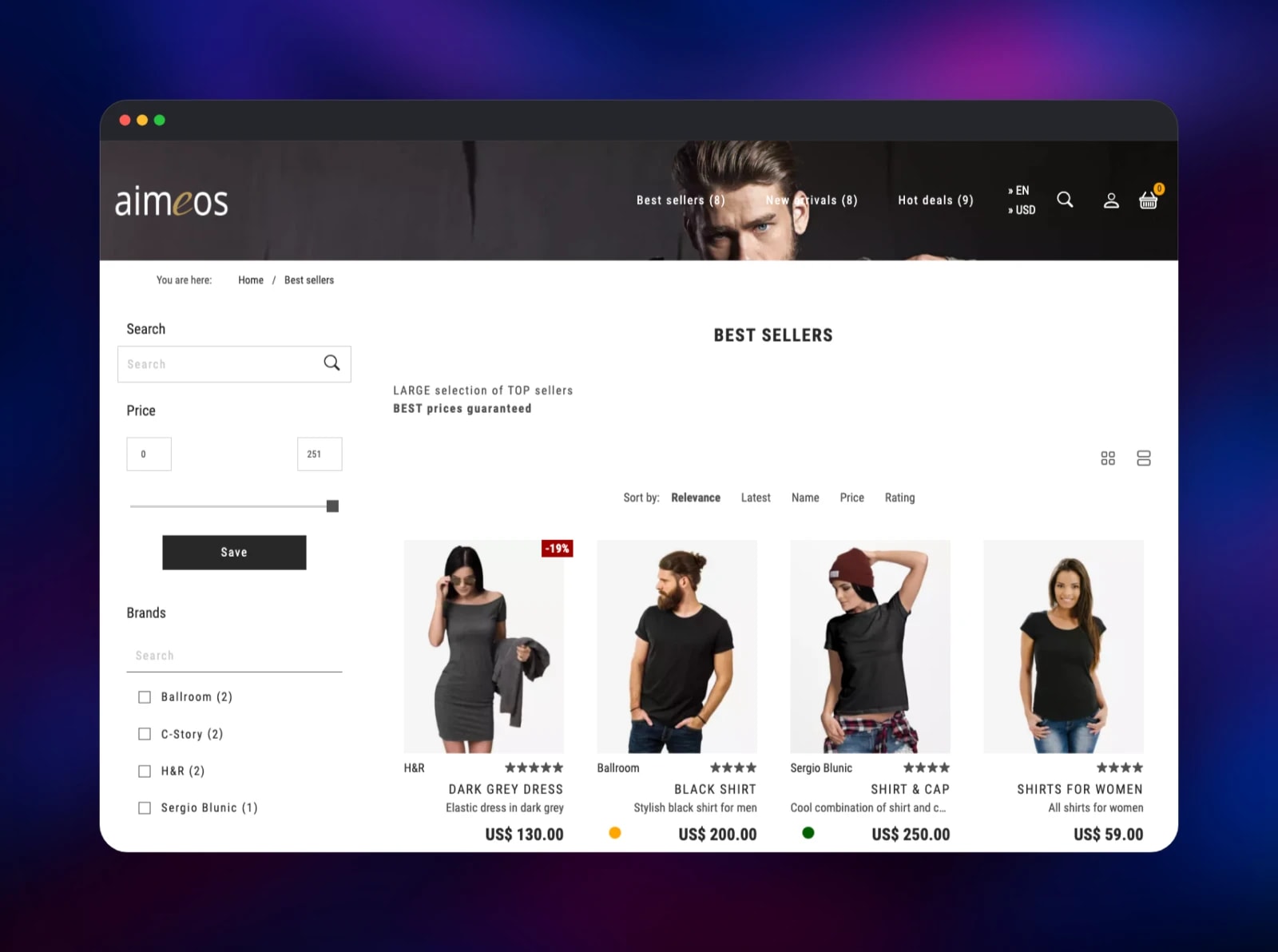
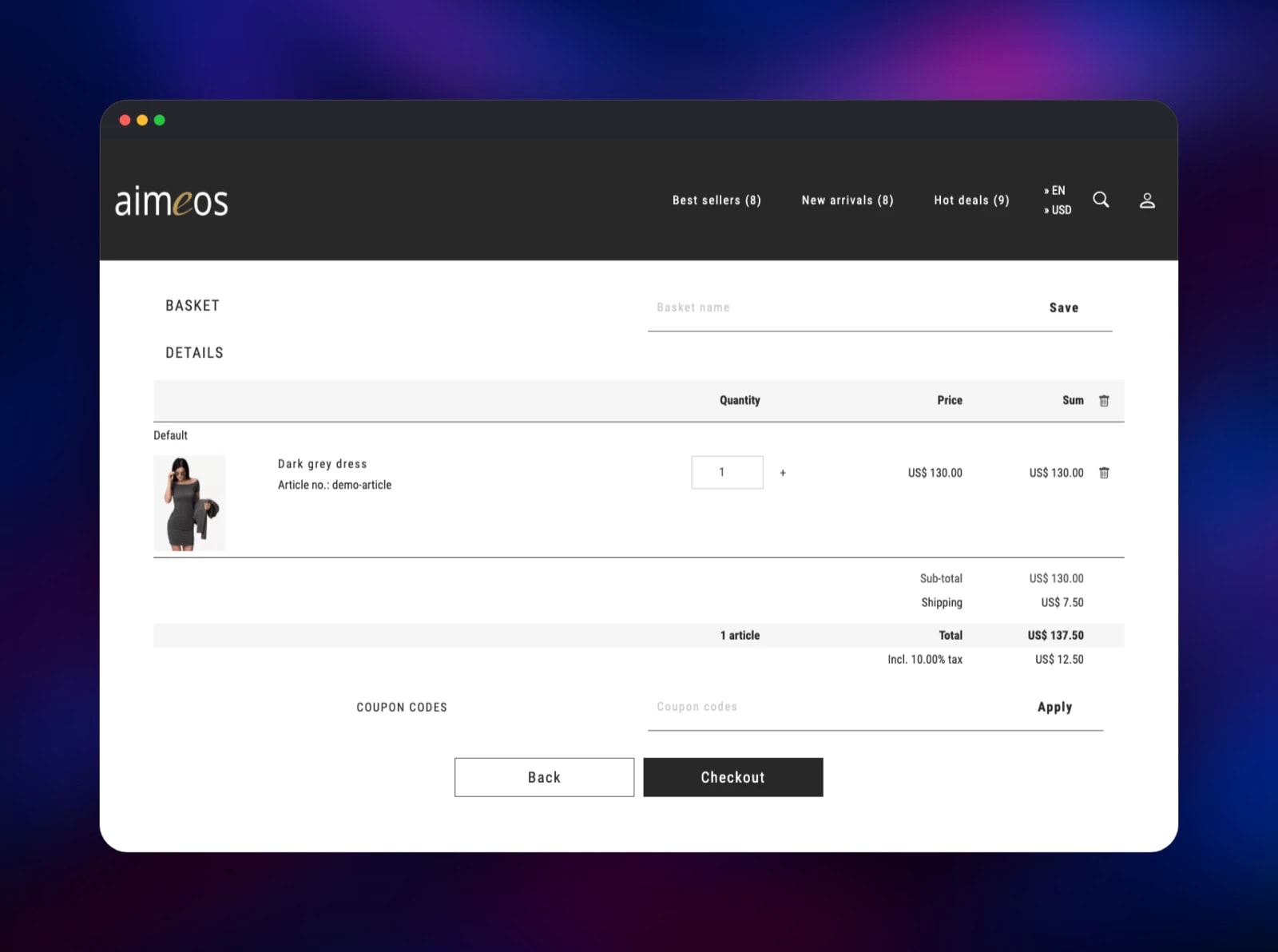
Open the public URL and you land on the storefront, whose navigation carries the demo categories — Best sellers, New arrivals, Hot deals — each holding real products with images, prices and brand filters. Click a product and add it to the basket: the line item with shipping and tax proves the database, the session store and the search index all work.
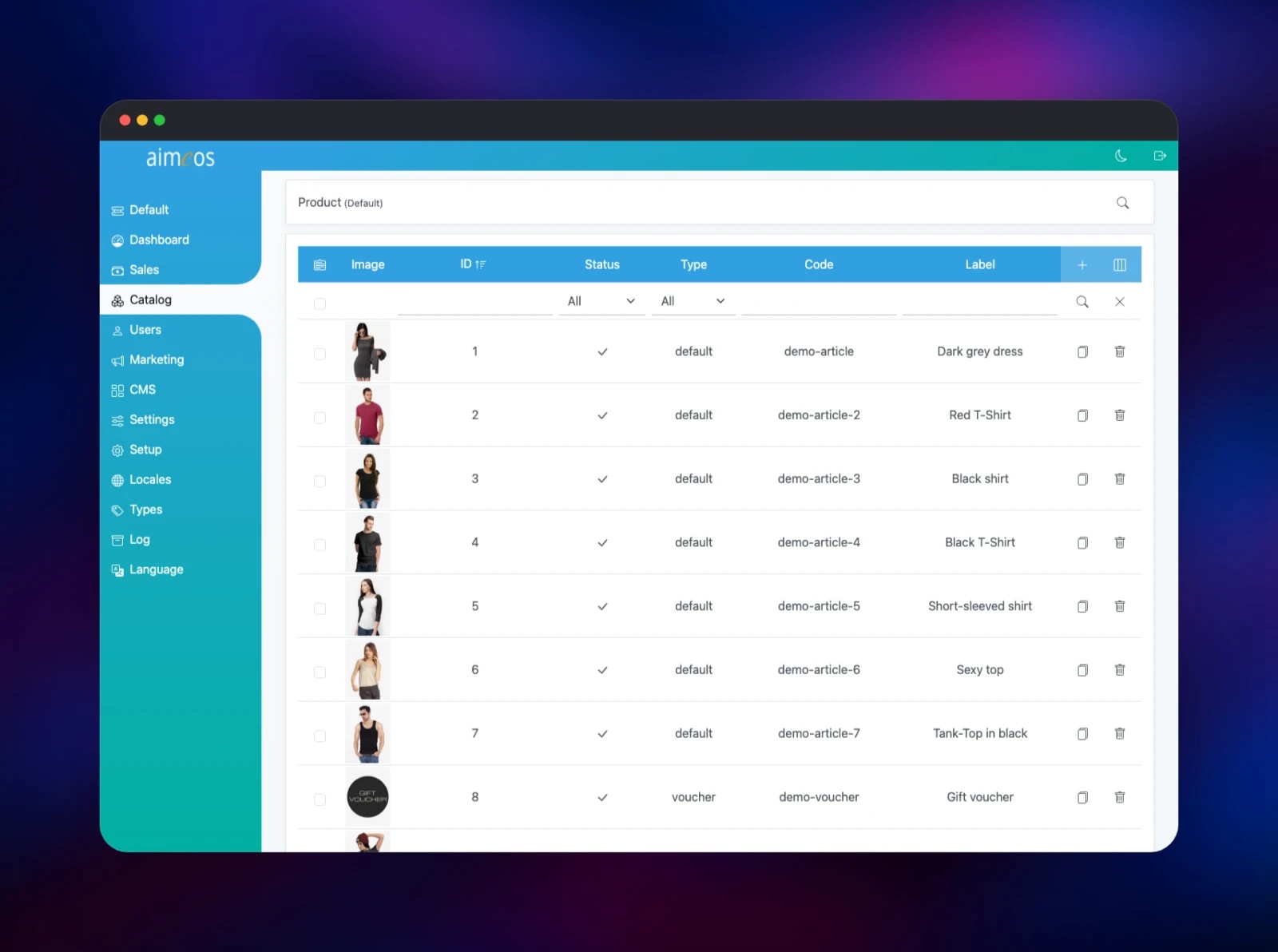
Then go to /admin and sign in. The backend opens on the dashboard; Catalog holds Products, Categories, Suppliers and Attributes. Change a product's price, save, and reload the storefront to see it. Marketing holds coupons, Sales the demo orders.
To see what the shop sends, open the Mailpit service's URL and sign in with the credentials in MP_UI_AUTH; minutes after the first boot its inbox holds the order confirmations the job scheduler sent. For real mail, point the MAIL_* variables at your own provider. AIMEOS_DEMO_DATA=0 starts an empty shop instead — but the demo dataset is also what installs the payment and delivery services a checkout needs.
About Hosting Aimeos
Aimeos is an e-commerce framework that ships as a ready-made Laravel application. The catalogue, basket, checkout and order pipeline are composer packages you can extend or replace, and the same core runs inside TYPO3 and Symfony too. That suits a team that already writes PHP and wants the shop inside the application rather than beside it.
Key features:
- Categories, variants, bundles, vouchers, tier pricing, supplier data
- Faceted search on a dedicated product index, built for very large catalogues
- Basket rules, coupons, subscriptions, recurring payments
- 100+ payment gateways through Omnipay, plus delivery providers
- Multi-vendor, multi-channel and multi-warehouse modes behind single variables
- JSON:API storefront API and a GraphQL admin API for headless builds
- Admin backend in 30+ languages, with full RTL support
The Railway architecture is four services. aimeos serves HTTP through FrankenPHP and keeps uploaded media and CSV import/export files on its volume. Postgres stores the shop data. Redis holds the cache and sessions, which keeps a basket alive between requests. mailpit takes SMTP on the private network and gives you a web inbox.
Why Deploy Aimeos on Railway
Railway removes the setup work between a composer project and a running shop:
- Database, cache and mail service provisioned and wired on deploy
- A persistent volume for product images and import/export files
- HTTPS and a public domain with no certificate work
- Private networking, so only the shop is reachable from outside
- Vertical scaling as the catalogue grows
Common Use Cases
- A branded D2C store whose checkout and pricing rules need real customisation
- A B2B shop with customer-group pricing and large catalogues
- A multi-vendor marketplace, using
SHOP_MULTISHOPand vendor self-registration - A headless storefront in Next.js or Nuxt driven by the JSON:API
Dependencies for Aimeos
- aimeos — built from gridalpha/aimeos-railway on the vendor's
aimeos/frankenphp:8.5base, installing aimeos/aimeos - Postgres —
ghcr.io/railwayapp-templates/postgres-ssl:18 - Redis —
redis:8.2 - mailpit —
axllent/mailpit:v1.31
Environment Variables Reference
| Variable | Purpose |
|---|---|
APP_SECRET | Random string; Laravel's APP_KEY derives from it at boot |
APP_URL | Public shop URL, used in e-mails and generated links |
AIMEOS_ADMIN_EMAIL | E-mail of the administrator created at first boot |
AIMEOS_ADMIN_PASSWORD | Password for that administrator |
AIMEOS_DEMO_DATA | 1 installs the demo catalogue; 0 starts empty |
AIMEOS_JOBS_ENABLED | 1 runs the maintenance jobs in the shop container |
SHOP_MULTISHOP | Enables multi-vendor marketplace mode |
SHOP_MULTILOCALE | Adds the language to every shop URL |
MAIL_HOST / MAIL_PORT | SMTP endpoint; defaults to Mailpit |
MP_UI_AUTH | user:password guarding the Mailpit inbox |
Deployment Dependencies
- Source repository:
- Upstream project:
- Documentation:
Hardware Requirements for Self-Hosting Aimeos
| Resource | Minimum | Recommended |
|---|---|---|
| CPU | 1 vCPU | 2+ vCPU |
| RAM | 1 GB | 2–4 GB |
| Storage | 5 GB volume | 10 GB+ for large media |
| Runtime | PHP 8.2+, PostgreSQL 9.6+ / MySQL 5.7.8+ | PHP 8.5, PostgreSQL 18 |
The first boot is the heaviest moment: migrations plus the demo dataset. A small catalogue then runs comfortably in 1 GB; a large index wants more.
Self-Hosting Aimeos
Aimeos is installed with composer rather than pulled as a prebuilt image. A local install is one command, which then asks for your database and mail settings:
php composer.phar create-project aimeos/aimeos myshop
cd myshop
php artisan serve
The shop is then on http://127.0.0.1:8000 and the backend on /admin. In a container that installer is unusable, so the steps are split: install without scripts at build time, then run setup from the entrypoint using environment variables.
composer create-project aimeos/aimeos . --no-interaction --no-scripts
php artisan migrate --force
php artisan aimeos:setup --option=setup/default/demo:1
php artisan aimeos:account you@example.com --password=secret --super --admin
Aimeos also needs its maintenance jobs on a schedule — order e-mails, index rebuilds, sitemaps, CSV imports. Upstream documents three cron entries; this template runs the same job lists as a loop inside the shop container, because several of them write the media and export directories the web tier serves.
Is Aimeos Free to Self-Host?
Aimeos is MIT licensed and free to use, with no seat limits, transaction fees or feature gates. The company behind it sells commercial extensions, extended support and hosted plans, none of which is needed to run a full shop. On Railway you pay only for the compute, storage and bandwidth the four services use.
FAQ
What is Aimeos? Aimeos is an open-source e-commerce framework and shop application for Laravel. It provides the catalogue, basket, checkout, order pipeline and admin backend as composer packages you can extend, and scales from a small store to a marketplace with millions of products.
What does this Railway template deploy? Four services: the Aimeos shop on FrankenPHP with a volume for media and imports, a PostgreSQL database, a Redis cache and session store, and a Mailpit inbox that captures outgoing mail until you configure a real relay.
How do I log into the Aimeos admin backend?
Go to /admin and sign in with the AIMEOS_ADMIN_EMAIL and AIMEOS_ADMIN_PASSWORD you set before deploying. That account is created on first boot with super-user and site-administrator rights; there is no default password.
Why does the template include Redis and Mailpit? Redis stores the cache and session data, which keeps baskets alive across requests and lets the shop restart without logging anyone out. Mailpit gives the shop a working SMTP endpoint from the first minute, so order confirmations are captured and readable instead of failing silently.
Can I use MySQL instead of PostgreSQL?
Yes. Aimeos supports MySQL 5.7.8+, MariaDB 10.2.2+, PostgreSQL 9.6+ and SQL Server 2019+. Swap the database service and repoint the DB_* variables at it.
Where do uploaded product images go?
They are written to the shop service's volume and served from /aimeos on your public domain. Keep the volume attached, or every deploy starts with an empty media directory.
Template Content


