
Deploy AnythingLLM
Chat with your own documents using the AI model you choose

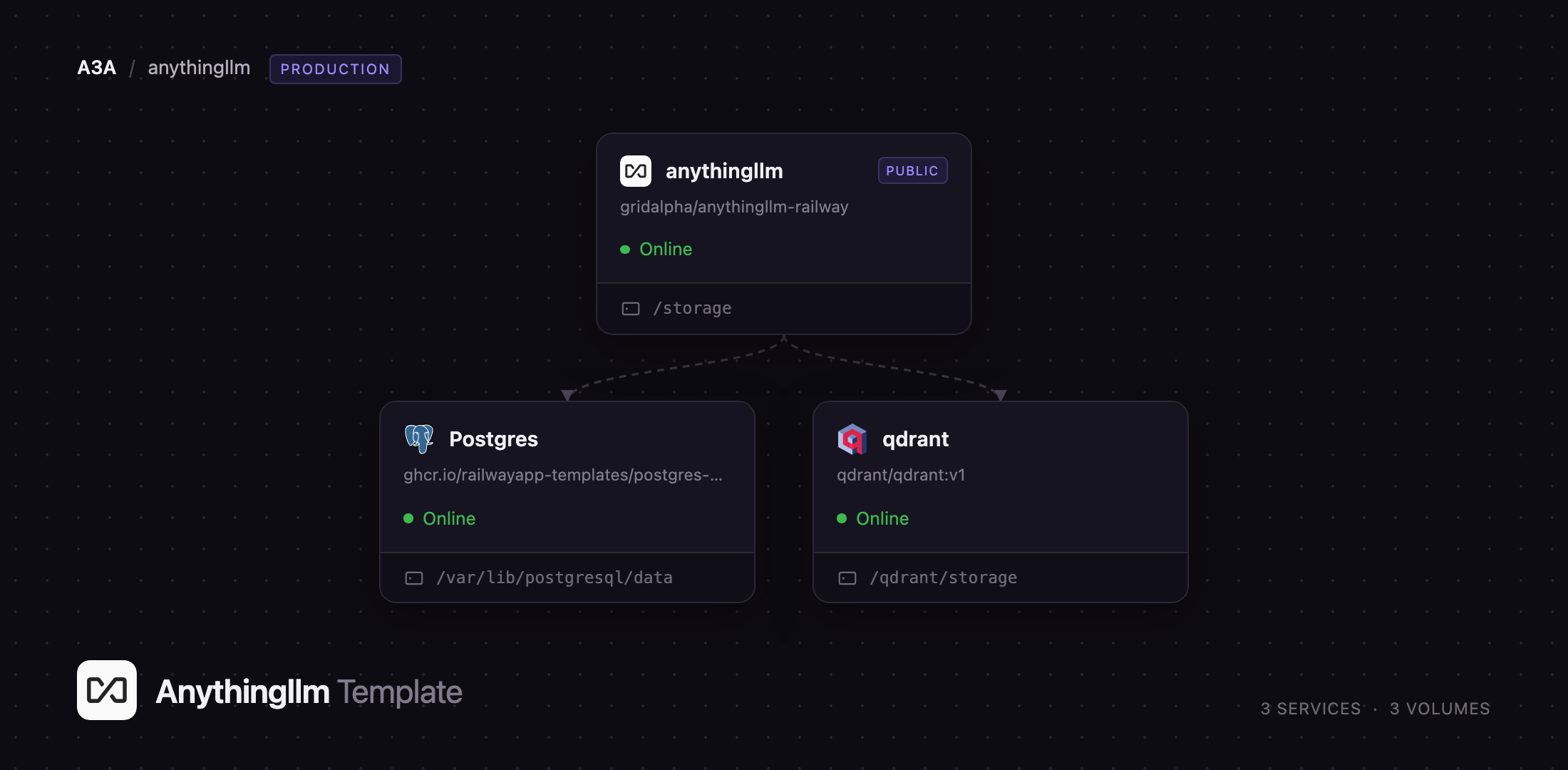
qdrant
Just deployed
/qdrant/storage
anythingllm
Just deployed
/storage

Just deployed
/var/lib/postgresql/data
Deploy and Host AnythingLLM on Railway
AnythingLLM is an open-source AI application that turns a collection of documents into a private chatbot you can question in plain language. Built by Mintplex Labs and MIT licensed, it wraps the whole retrieval-augmented generation stack — parsing, chunking, embedding, vector search and chat — into one interface, so a team can drop in PDFs, spreadsheets or a website and start asking questions minutes later. Its defining idea is the workspace: an isolated set of documents with its own vector namespace, prompt and retrieval settings, so two teams can share an instance without their material mixing. You choose the model — OpenAI, Anthropic, Groq, OpenRouter, a local Ollama server, or any OpenAI-compatible endpoint — and the documents stay on infrastructure you control.
This template runs AnythingLLM in its production shape rather than its laptop one. Three services are wired together: the application, which serves the web interface and runs the built-in document collector; a PostgreSQL database holding workspaces, users, chat history and document metadata; and a Qdrant vector database for the embeddings. Upstream's PostgreSQL build replaces the default SQLite one, so application data lives in a managed database rather than a file on a disk. A persistent volume holds uploaded documents and the embedding model cache. Self-host AnythingLLM on Railway and all of it is provisioned for you.
Getting Started with AnythingLLM on Railway
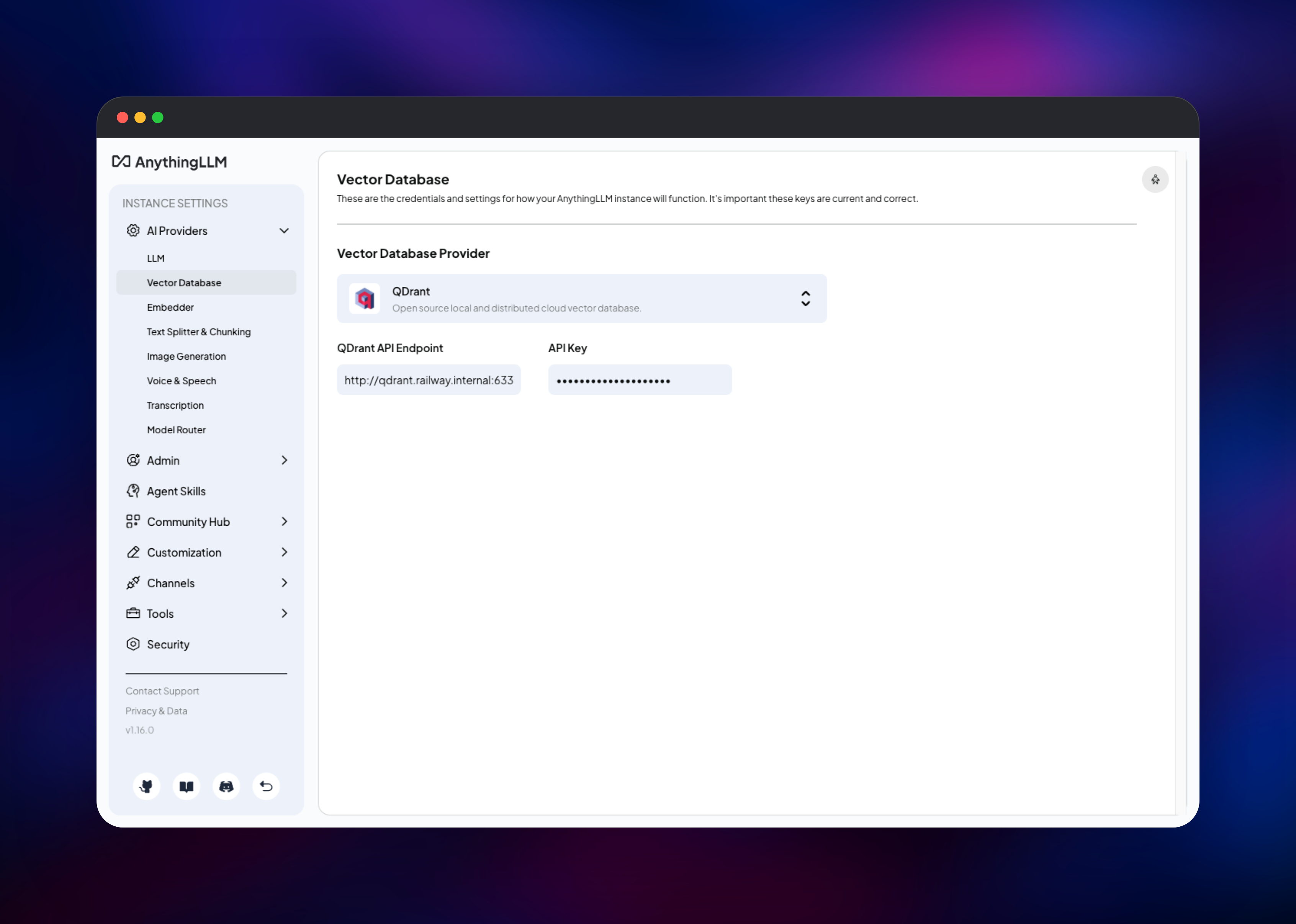
Open the generated public URL and you will be asked for a password. That is the AUTH_TOKEN variable on the AnythingLLM service — read the generated value from the Variables tab, or set your own before deploying. There is no username; one password protects the instance. Onboarding then asks you to pick an LLM provider and paste an API key. Nothing else needs configuring: the embedder runs inside the container and the vector database is already connected.
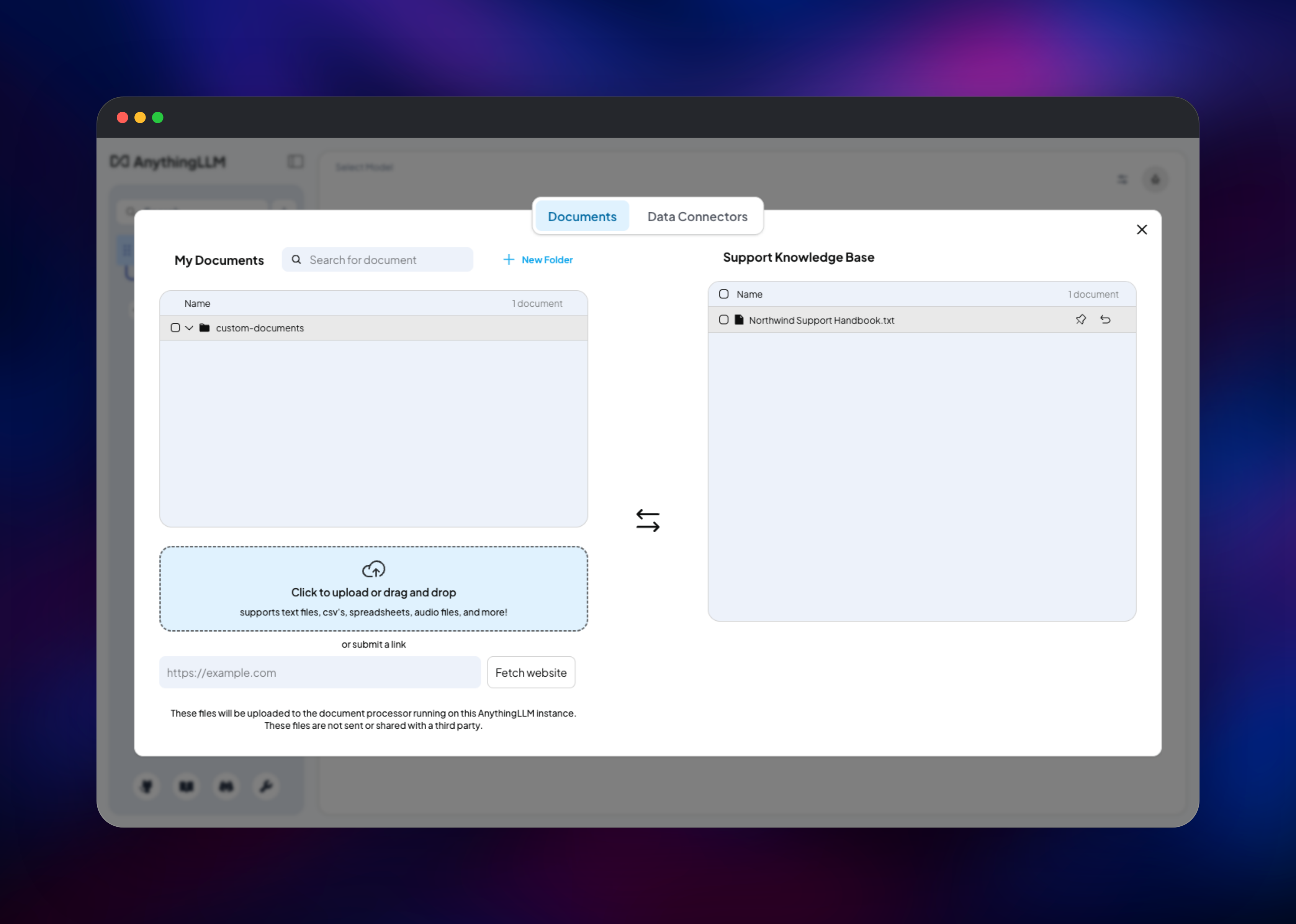
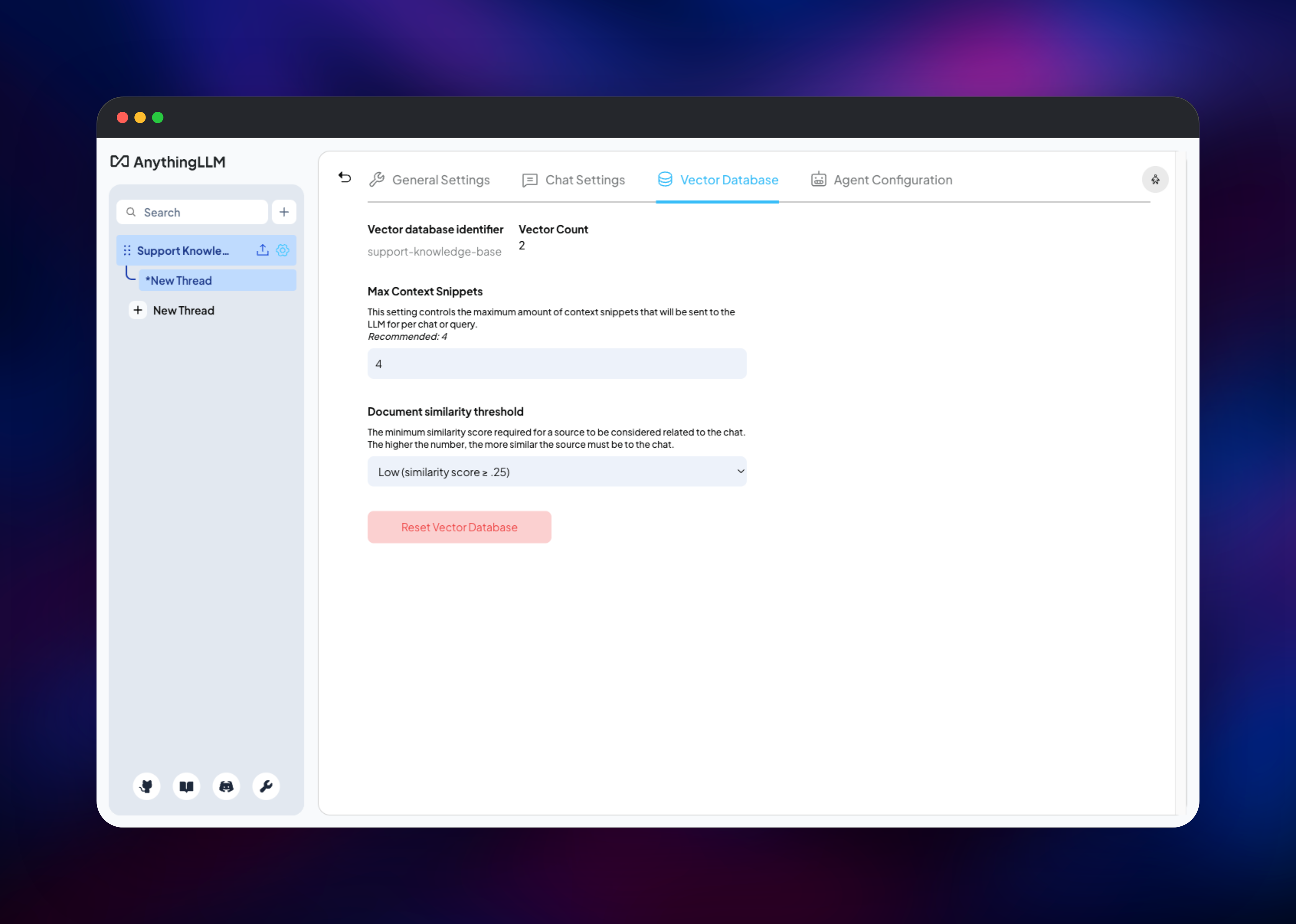
Create a workspace from the + button in the sidebar, then click the upload icon beside its name. Drag in a document, select it, choose Move to Workspace and press Save and Embed. The first embedding downloads a small model, so allow a few seconds. Open the workspace's Vector Database tab and check the vector count is no longer zero — that number proves the collector, the embedder and the vector store are all working. Ask a question and the answer should cite your document. For a team, go to Settings → Admin and enable Multi-User Mode to replace the shared password with named accounts.
About Hosting AnythingLLM
Teams reach for AnythingLLM when they want ChatGPT-style answers over internal material that must not leave their control. Commercial tools solve this by uploading your corpus to someone else's cloud; self-hosting keeps documents and vectors on your own infrastructure while still letting you point at whichever model answers best.
Key features:
- Workspaces with isolated document sets, vector namespaces and prompts
- A built-in document collector for PDFs, Word files, spreadsheets, audio transcription, OCR, websites and GitHub or Confluence connectors
- Model-agnostic chat across major commercial APIs and any OpenAI-compatible or local endpoint
- Embeddable chat widgets and a developer API for putting a workspace in your own product
The architecture is deliberately split. The application container runs two processes: the web server, and the document collector that does the heavy parsing, which is why uploads do not block the interface. PostgreSQL is the system of record for everything structured; Qdrant stores one collection per workspace and runs the similarity search behind every answer.
Why Deploy AnythingLLM on Railway
Railway removes the setup work self-hosting a RAG stack normally involves.
- PostgreSQL and Qdrant are provisioned and connected automatically
- Persistent volumes keep documents and embeddings across redeploys
- A public HTTPS domain with a managed certificate is issued on deploy
- The database and vector store stay private, never exposed publicly
- Vertical scaling and log streaming are built in
Common Use Cases
- Internal knowledge base — point a workspace at policies and runbooks so staff ask instead of searching a wiki
- Customer support — embed product manuals and past tickets, then drop the chat widget into a help centre
- Private AI for regulated teams — pair the stack with a local Ollama endpoint so nothing leaves your infrastructure
Dependencies for AnythingLLM
- AnythingLLM — built from gridalpha/anythingllm-railway on the official
mintplexlabs/anythingllm:pgimage, upstream's PostgreSQL build - PostgreSQL — managed database for workspaces, users, chat history and document records
- Qdrant —
qdrant/qdrant:v1, holding one vector collection per workspace
Environment Variables Reference
| Variable | Purpose |
|---|---|
AUTH_TOKEN | The instance password. Without it the app is unauthenticated |
JWT_SECRET | Signs sessions. Enforced only when this and AUTH_TOKEN are both set |
SIG_KEY / SIG_SALT | Encrypt stored provider credentials. Never change these |
VECTOR_DB | Set to qdrant to use the bundled vector database |
EMBEDDING_ENGINE | native runs the embedder in-process, no API key needed |
LLM_PROVIDER | Optional. Unset so you can pick a provider in the interface |
ANYTHINGLLM_CHROMIUM_ARGS | Browser flags the collector needs for scraping |
Deployment Dependencies
- Source: github.com/Mintplex-Labs/anything-llm
- Image: mintplexlabs/anythingllm
- Docs: docs.anythingllm.com
Hardware Requirements for Self-Hosting AnythingLLM
| Resource | Minimum | Recommended |
|---|---|---|
| CPU | 2 vCPU | 4 vCPU |
| RAM | 2 GB | 4 GB |
| Storage | 5 GB volume | 20 GB or more |
| Runtime | Node.js 18 | Node.js 18 |
The in-process embedder is the main consumer of memory; pointing EMBEDDING_ENGINE at an external provider lowers the requirement.
Self-Hosting AnythingLLM
The quickest local run is one container with a mounted data directory, on the default SQLite build:
docker run -d -p 3001:3001 \
  -v $HOME/anythingllm:/app/server/storage \
  -e STORAGE_DIR="/app/server/storage" \
  --cap-add SYS_ADMIN \
  mintplexlabs/anythingllm
To match this template, use the pg image and point it at both. The following is a Docker Compose service definition:
services:
  anythingllm:
    image: mintplexlabs/anythingllm:pg
    ports: ["3001:3001"]
    volumes: ["./storage:/storage"]
    environment:
      STORAGE_DIR: /storage
      DATABASE_URL: postgresql://user:pass@postgres:5432/anythingllm
      VECTOR_DB: qdrant
      QDRANT_ENDPOINT: http://qdrant:6333
      AUTH_TOKEN: change-me
The SYS_ADMIN capability above lets the collector's bundled Chromium sandbox itself when scraping. Where it is unavailable, set ANYTHINGLLM_CHROMIUM_ARGS to --no-sandbox,--disable-setuid-sandbox instead, as this template does.
How Much Does AnythingLLM Cost to Self-Host?
AnythingLLM is free and open source under the MIT licence, and the self-hosted edition is fully featured — there is no paywalled tier in the Docker build. Mintplex Labs sells a managed cloud plan from around $50 per month. Self-hosting on Railway costs only infrastructure, typically $10–20 per month at light usage. The real variable cost is your LLM provider's API usage, zero with a local model.
FAQ
What is AnythingLLM?
An open-source application that lets you chat with your own documents. It handles parsing, embedding, vector storage and retrieval, then sends the relevant excerpts to an LLM of your choosing, so answers are grounded in your material, not the model's training data.
What does this Railway template deploy?
The application with a persistent volume, a managed PostgreSQL database for workspaces and chat history, and a private Qdrant instance for embeddings. Only the application is reachable from the internet.
Why does this template use Postgres and Qdrant instead of the built-in SQLite and LanceDB?
The default build keeps everything in files on one disk — fine on a laptop, fragile in production. A managed database gives application data proper durability, and a dedicated vector store stops similarity search competing with ordinary queries as the corpus grows.
Do I need an OpenAI API key to run self-hosted AnythingLLM?
Not to deploy it. The instance boots, accepts uploads and generates embeddings with no external key, because the embedder runs inside the container. You need a key only to chat, and can avoid one entirely with a local Ollama server.
Can I run more than one replica of AnythingLLM for higher availability?
Not as it stands. AnythingLLM runs scheduled background jobs inside the application process with no coordination between copies, so a second replica duplicates that work. Scale vertically instead.
Template Content
qdrant
qdrant/qdrant:v1anythingllm
gridalpha/anythingllm-railway

