
Deploy Apache Answer | Open Source Q&A Platform
Self-host Apache Answer. Community Knowledge Base, Help Center & more
Apache Answer
Just deployed
/data

Just deployed
/var/lib/postgresql/data
Deploy and Host Apache Answer on Railway

Deploy Apache Answer on Railway to self-host a full-featured Q&A platform for your team or community. Apache Answer is an open-source alternative to Stack Overflow for Teams, built under the Apache Software Foundation, giving you complete control over your knowledge base with zero licensing fees.
This Railway template pre-configures Apache Answer with a PostgreSQL database, persistent storage for uploads and configuration, and automated first-run setup via environment variables. Run Apache Answer on Railway and have a production-ready Q&A community live in minutes.
Getting Started with Apache Answer on Railway
After deploying, visit your Railway-generated public URL. The template uses AUTO_INSTALL=true to skip the manual install wizard — your Q&A platform is ready immediately. Log in with the admin credentials set in your environment variables (ADMIN_NAME and ADMIN_PASSWORD). Navigate to the Admin panel via the user menu to configure site settings, manage users, add tags, and customize your community. Post your first question to verify everything works. Invite team members by sharing the URL or enabling OAuth login through the plugin system.
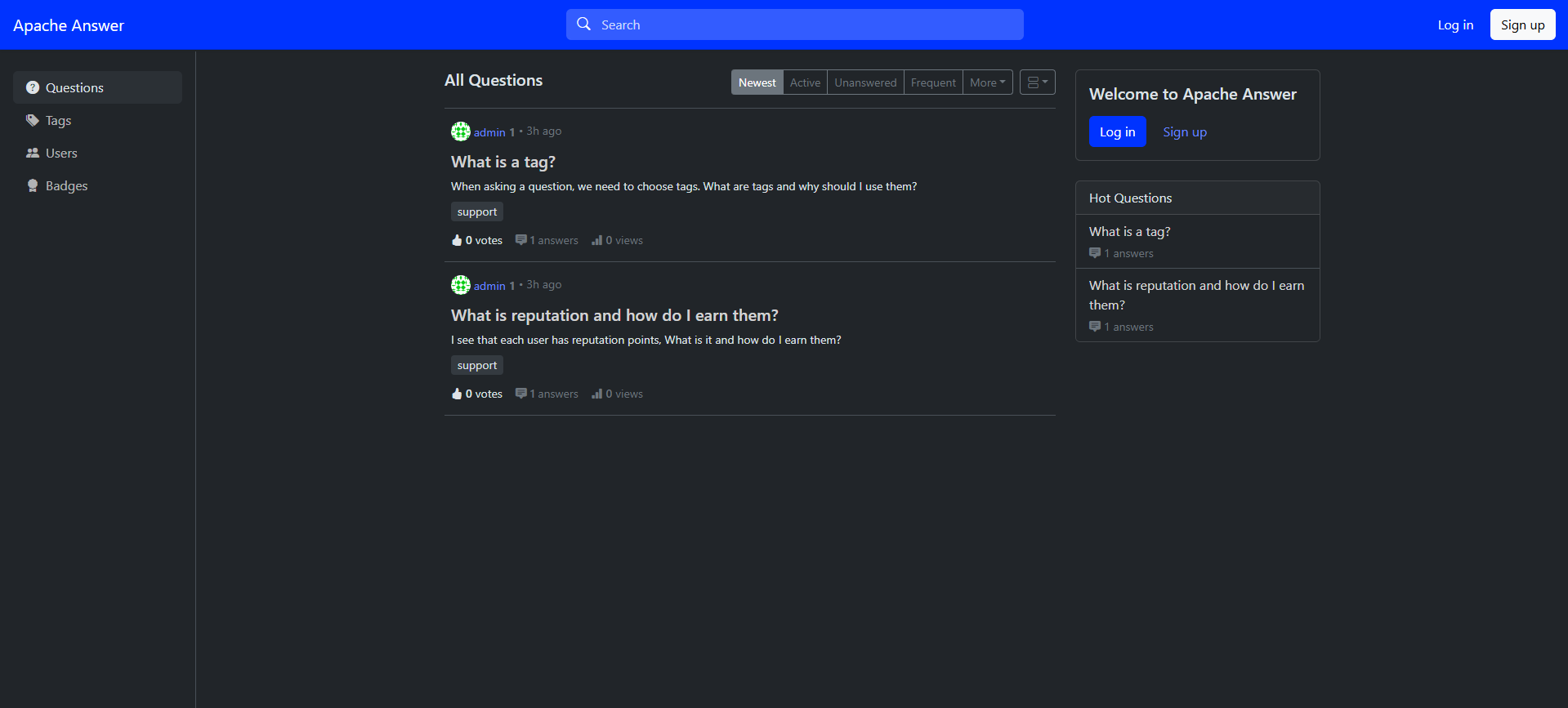
About Hosting Apache Answer
Apache Answer is a modern Q&A platform built with Go and React, designed for teams at any scale. Whether you need an internal knowledge base, a customer support forum, or a developer community hub, Apache Answer provides the structured question-and-answer format that makes knowledge discoverable.
Key features:
- Reputation system — gamified engagement with upvotes, badges, and privilege levels
- Tagging and search — organize content by topics with full-text search
- Plugin architecture — extend with OAuth login (Google, GitHub), S3 storage, Algolia search, anti-spam (Akismet)
- Multi-language support — 40+ language packs included out of the box
- Markdown editor — rich text editing with code syntax highlighting
- RESTful API — programmatic access to all platform data
Why Deploy Apache Answer on Railway
- One-click deployment with automated database provisioning and setup
- Persistent volume storage for uploads and configuration across redeploys
- PostgreSQL backend for production-grade data reliability
- No licensing fees — Apache 2.0 open-source license
- Scale resources on demand without infrastructure management
Common Use Cases for Self-Hosted Apache Answer
- Internal knowledge base — replace scattered Slack threads and wiki pages with searchable Q&A for engineering teams
- Customer support community — let users ask questions and find answers without creating support tickets
- Developer documentation hub — complement docs with community-driven troubleshooting and best practices
- Educational platform — build a Q&A space for courses, bootcamps, or study groups
Dependencies for Apache Answer on Railway
- Apache Answer —
apache/answer:latest(Go/React Q&A platform, ~58 MB image) - PostgreSQL — Railway-managed Postgres for persistent data storage
Environment Variables Reference for Apache Answer
| Variable | Description | Example |
|---|---|---|
AUTO_INSTALL | Skip install wizard | true |
DB_TYPE | Database backend | postgres |
DB_HOST | Postgres host with port | ${{Postgres.RAILWAY_PRIVATE_DOMAIN}}:5432 |
DB_USERNAME | Database user | ${{Postgres.PGUSER}} |
DB_PASSWORD | Database password | ${{Postgres.PGPASSWORD}} |
SITE_URL | Public URL with HTTPS | https://${{RAILWAY_PUBLIC_DOMAIN}} |
ADMIN_NAME | Admin username | admin |
ADMIN_PASSWORD | Admin password (bootstrap-only) | Static generated value |
SITE_NAME | Platform display name | Apache Answer |
Deployment Dependencies
- Runtime: Go 1.19+ / Node.js 16+ (pre-built in Docker image)
- Docker Hub:
apache/answer - GitHub:
apache/answer - Docs: answer.apache.org/docs
Hardware Requirements for Self-Hosting Apache Answer
| Resource | Minimum | Recommended |
|---|---|---|
| CPU | 1 vCPU | 2 vCPUs |
| RAM | 256 MB | 512 MB |
| Storage | 1 GB | 5 GB+ |
| Runtime | Docker 20+ | Docker 24+ |
Apache Answer is lightweight — the Go binary and React frontend have a small footprint. Storage needs grow with uploaded files and database size.
Self-Hosting Apache Answer with Docker
Run Apache Answer locally with Docker Compose and PostgreSQL:
version: "3"
services:
  answer:
    image: apache/answer:latest
    ports:
      - "9080:80"
    volumes:
      - answer-data:/data
    environment:
      - AUTO_INSTALL=true
      - DB_TYPE=postgres
      - DB_HOST=postgres:5432
      - DB_USERNAME=answer
      - DB_PASSWORD=changeme
      - DB_NAME=answer
      - SITE_NAME=My Q&A
      - SITE_URL=http://localhost:9080
      - ADMIN_NAME=admin
      - ADMIN_PASSWORD=securepassword123
      - ADMIN_EMAIL=admin@example.com
      - CONTACT_EMAIL=admin@example.com
      - LANGUAGE=en-US
      - EXTERNAL_CONTENT_DISPLAY=always_display
    depends_on:
      - postgres
  postgres:
    image: postgres:16
    volumes:
      - pgdata:/var/lib/postgresql/data
    environment:
      - POSTGRES_USER=answer
      - POSTGRES_PASSWORD=changeme
      - POSTGRES_DB=answer
volumes:
  answer-data:
  pgdata:
Or run with a single Docker command using SQLite:
docker run -d -p 9080:80 -v answer-data:/data --name answer apache/answer:latest
Then visit http://localhost:9080/install to complete setup.
How Much Does Apache Answer Cost to Self-Host?
Apache Answer is 100% free and open-source under the Apache License 2.0. There are no per-user fees, no enterprise tiers, and no feature gates. Self-hosting on Railway costs only the infrastructure resources consumed — typically under $5/month for small communities. The Apache Software Foundation guarantees that all Apache projects remain free to download and use forever.
Apache Answer vs Discourse
| Feature | Apache Answer | Discourse |
|---|---|---|
| Focus | Structured Q&A | General discussion forums |
| Format | Stack Overflow-style | Threaded conversations |
| License | Apache 2.0 | GPL 2.0 |
| Language | Go + React | Ruby on Rails + Ember.js |
| Resource usage | ~256 MB RAM | ~1 GB+ RAM |
| Plugin system | Built-in plugin architecture | Extensive plugin ecosystem |
| Best for | Knowledge bases, help centers | Community forums, discussions |
Apache Answer excels when you need structured, searchable answers. Discourse is better for open-ended community discussions.
FAQ
What is Apache Answer and why self-host it? Apache Answer is an open-source Q&A platform built by the Apache Software Foundation. Self-hosting gives you full control over your data, no vendor lock-in, unlimited users, and the ability to customize the platform with plugins and themes.
What does this Railway template deploy for Apache Answer?
This template deploys two services: the Apache Answer application (apache/answer:latest) and a Railway-managed PostgreSQL database. It includes a persistent volume for uploads and configuration, automated first-run setup, and a public HTTPS domain.
Why does Apache Answer on Railway need PostgreSQL instead of SQLite? While Apache Answer supports SQLite for development, PostgreSQL provides concurrent write support, better performance at scale, point-in-time recovery, and production-grade reliability. Railway's managed Postgres includes automatic backups and monitoring.
How do I enable OAuth login in self-hosted Apache Answer?
Apache Answer supports OAuth via its plugin system. After deploying, go to Admin → Plugins and enable the Google or GitHub connector plugin. Configure the OAuth client ID and secret in the plugin settings. Plugin images with OAuth pre-installed are available at apache/answer:latest-plugins.
How do I back up my self-hosted Apache Answer data on Railway?
Your Q&A data lives in the PostgreSQL database — use Railway's database backup features or connect via the public URL to run pg_dump. Uploaded files are stored on the persistent volume at /data/uploads. For automated backups, consider adding an S3 storage plugin.
Template Content
Apache Answer
apache/answer:latestADMIN_NAME
Admin account username
ADMIN_EMAIL
Admin account email
ADMIN_PASSWORD
Admin password (bootstrap-only)

