Deploy Apache Superset
Self-host Apache Superset BI with workers, PostgreSQL and Redis

Just deployed
/var/lib/postgresql/data
superset-worker
Just deployed
superset-beat
Just deployed
/app/superset_home
superset
Just deployed

Redis
Just deployed
/data
Deploy and Host Apache Superset on Railway
Apache Superset is an open-source business intelligence platform for exploring data with SQL, building charts and assembling dashboards on top of any database you can reach. It began at Airbnb, is now a top-level Apache project, and is used by data teams who want Tableau- or Looker-class exploration without per-seat licensing. Analysts write SQL in a browser IDE, save results as datasets, turn those into charts across roughly fifty visualization types, and publish dashboards with cross-filters.
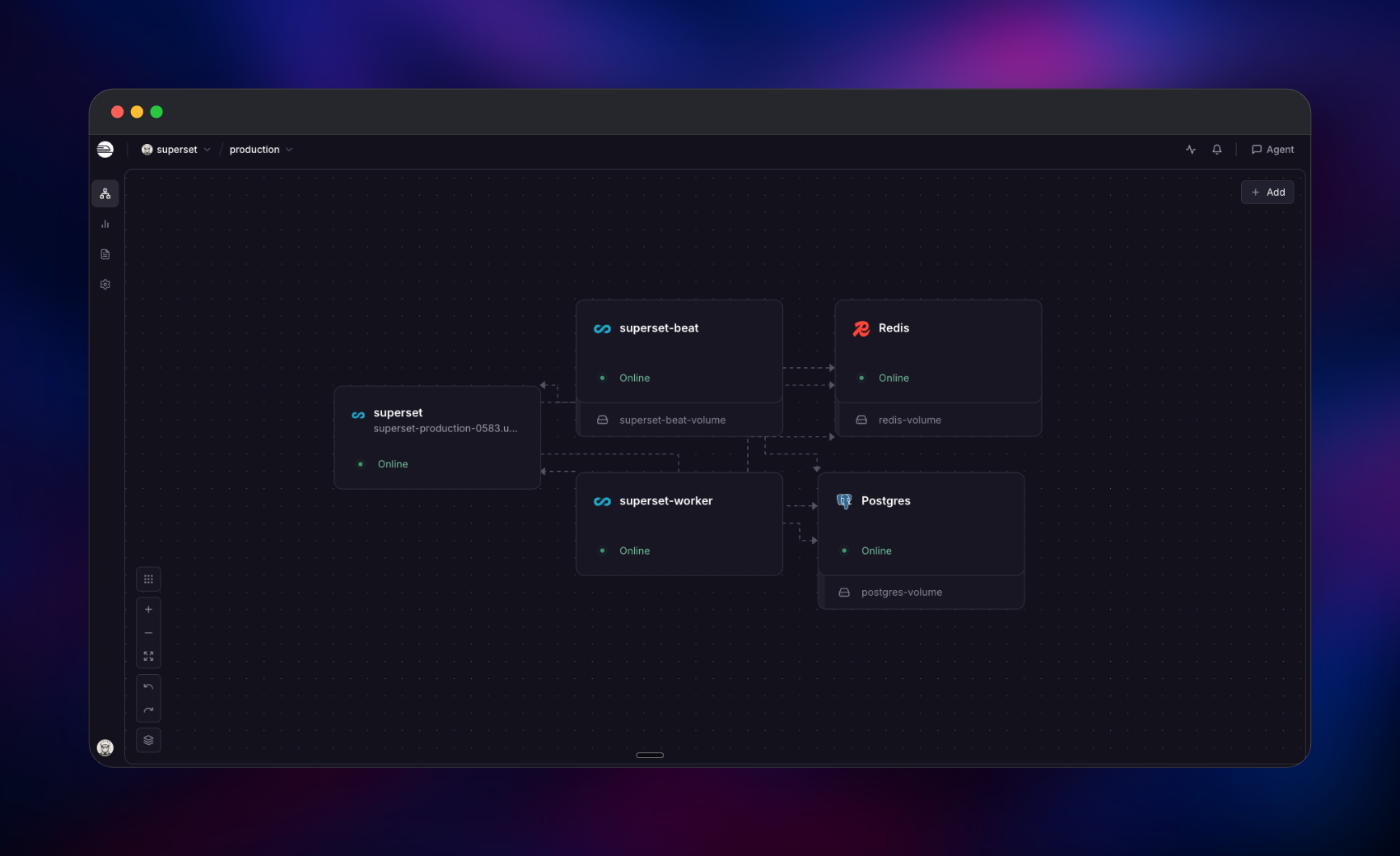
Self-host Superset on Railway in the shape its maintainers document for production, not one all-in-one container: a gunicorn web tier serving the UI and API, a Celery worker running asynchronous SQL Lab queries and reports, a beat scheduler firing those jobs, PostgreSQL for metadata, and Redis for the queue, query cache and SQL Lab results. Only the web service is public; everything else stays on Railway's private network.
Getting Started with Apache Superset on Railway
Open the deployed URL and you land on a sign-in form. Log in with ADMIN_USERNAME and ADMIN_PASSWORD — that account is created on first boot with the Admin role, and there is no public sign-up, so it is the only way in until you invite people under Settings → List Users. Change the password if you accepted a generated one.
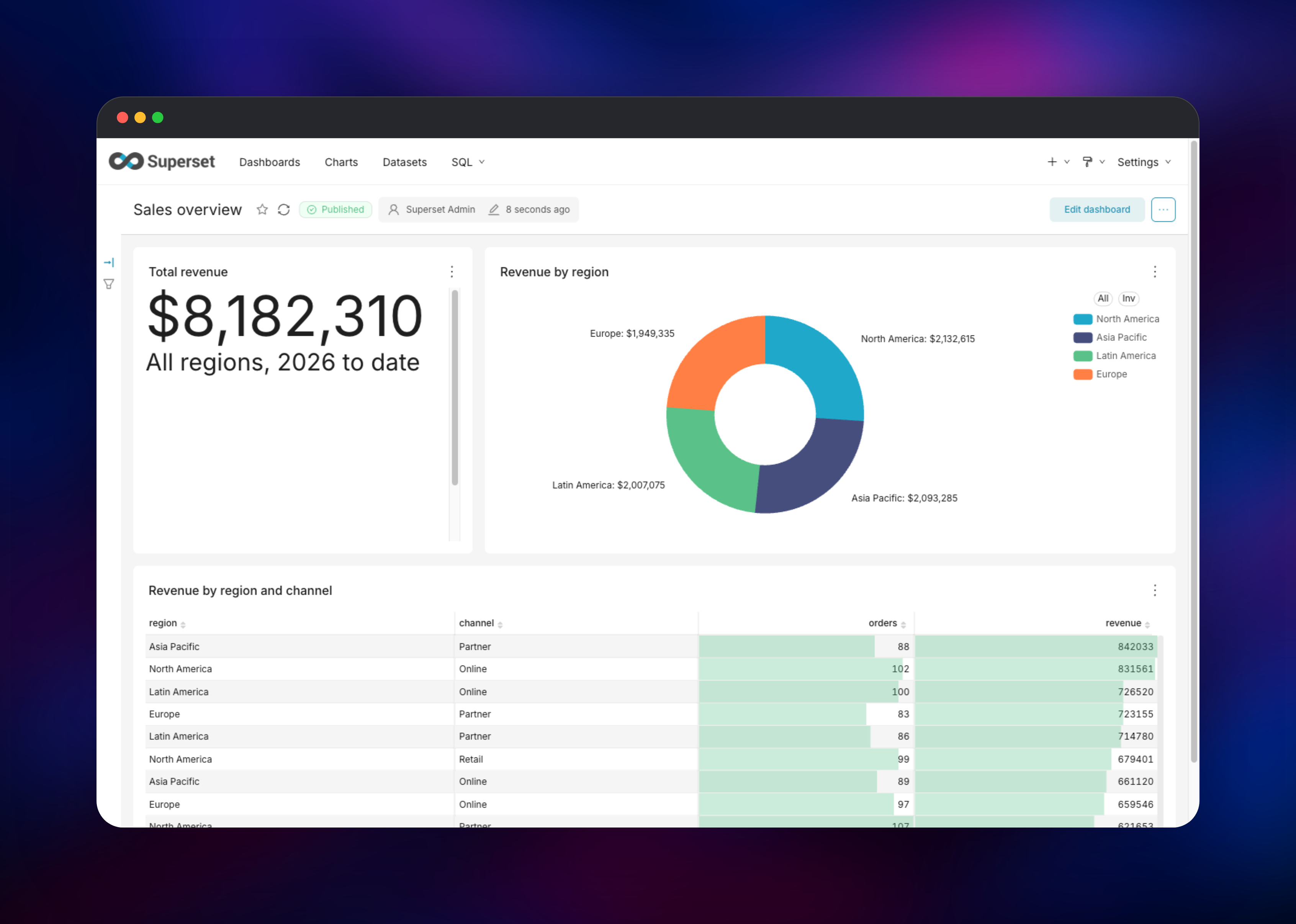
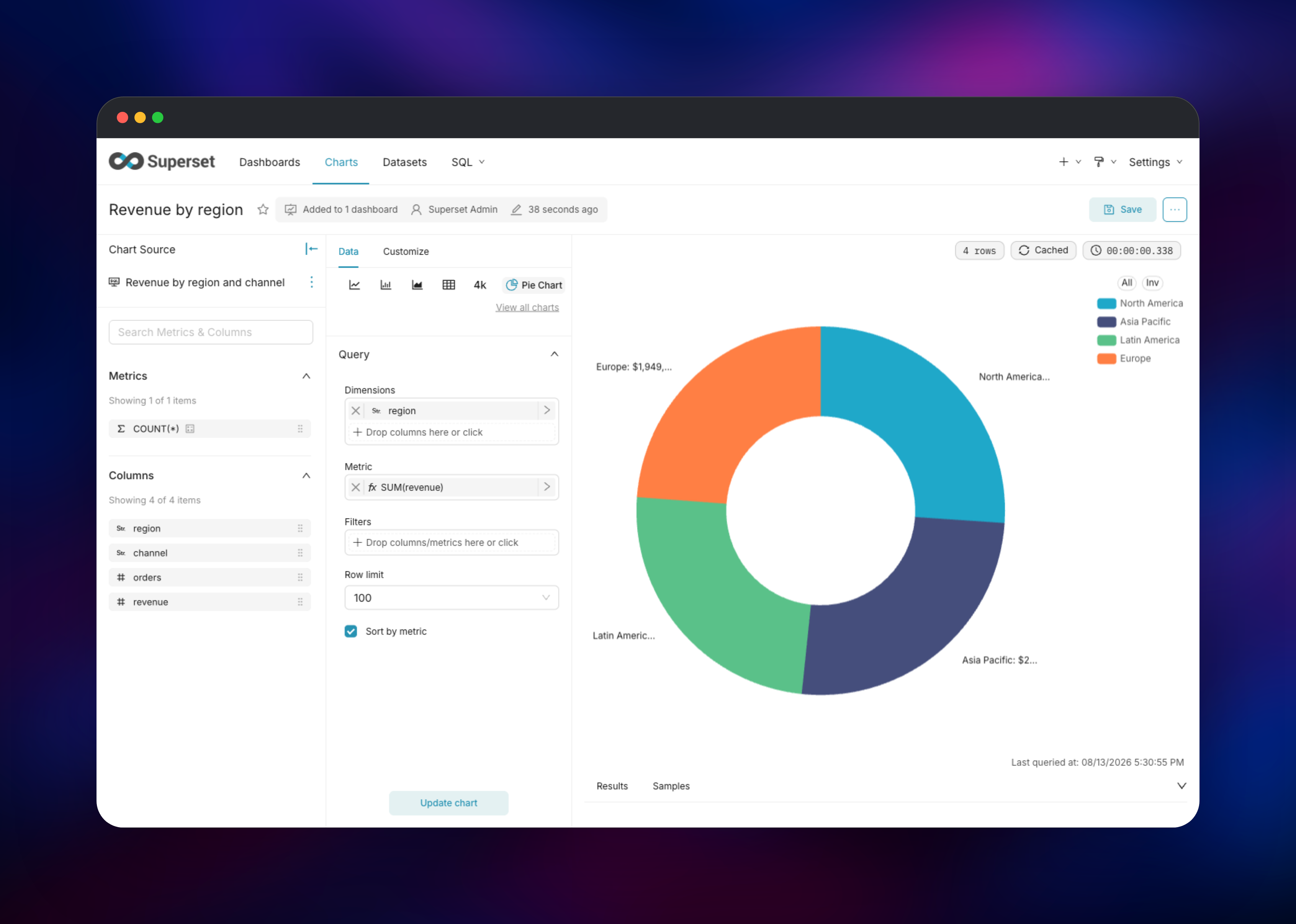
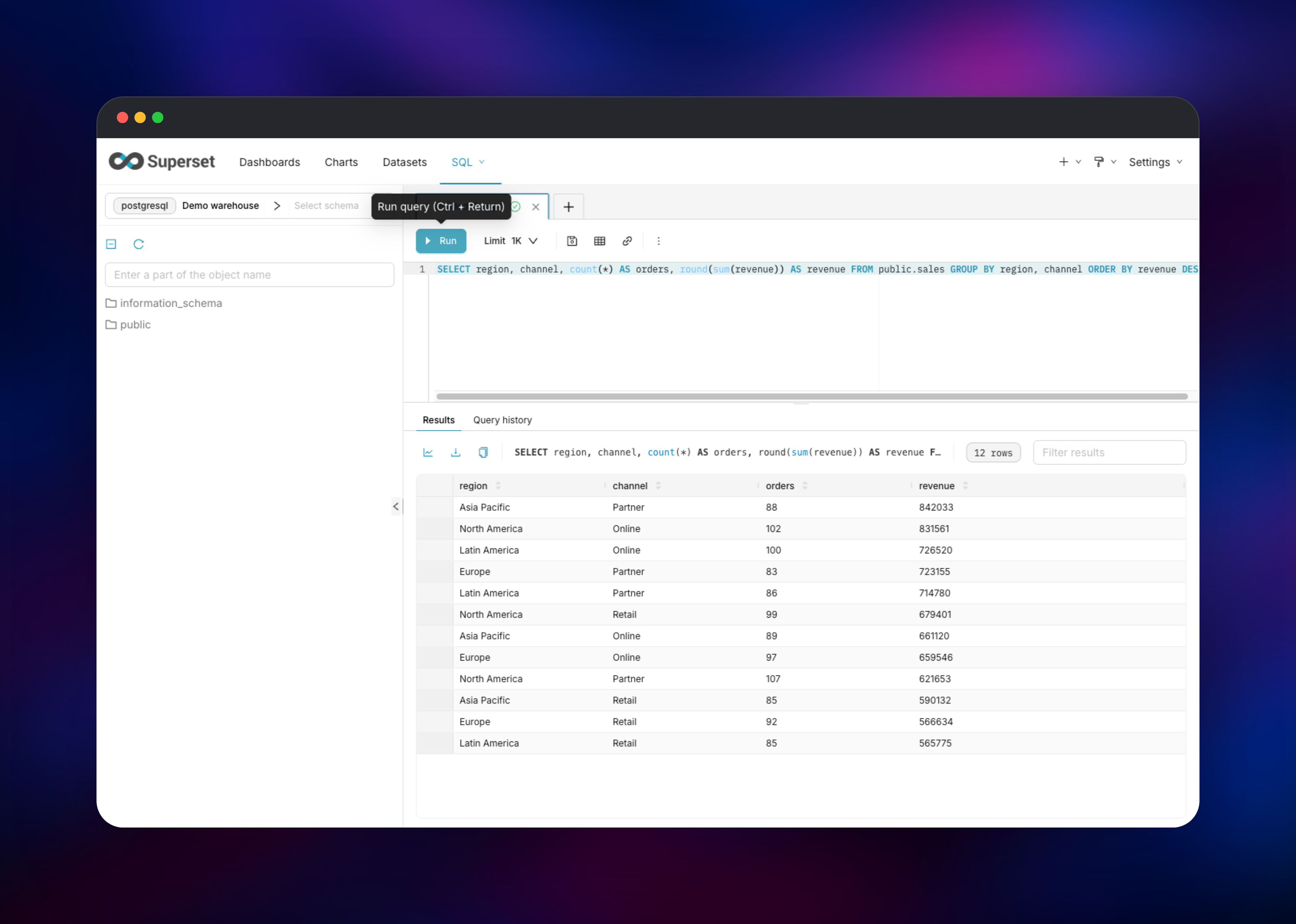
The first useful action is connecting a database. Go to Settings → Database Connections → + Database, pick your engine, and supply host, port, database, username and password; if that database also lives on Railway, use its private hostname such as warehouse.railway.internal. Tick Expose in SQL Lab, and leave DML off unless you want writes. Then open SQL → SQL Lab, run a query, and Save dataset to make the result chartable. Charts → + Chart then builds a visualization and Save drops it onto a dashboard — if that renders, every service is wired correctly.
About Hosting Apache Superset
Superset sits between your databases and the people who need answers from them. It does not copy your data; it issues SQL against the warehouses you connect and caches the results, so database access stays yours.
Key features:
- SQL Lab — a browser SQL IDE with schema browsing, query history and asynchronous execution
- No-code chart builder — around fifty visualizations, time series to geospatial
- Dashboards — drag-and-drop layouts with cross-filters, tabs and drill-to-detail
- Security model — role-based access and row-level security that rewrites queries per user
- Alerts and reports — scheduled SQL conditions and digests by email or Slack
- Broad database support — PostgreSQL, MySQL, BigQuery, Snowflake, ClickHouse, Trino and any SQLAlchemy dialect
The services divide the work cleanly. The web tier answers browser and API traffic. Redis is both the Celery broker and the cache, which is what lets the web tier read results the worker produced. The worker runs whatever should not block a request: asynchronous queries, report delivery, cache warm-up. Beat is the clock, and runs as one instance because two schedulers would fire every job twice.
Why Deploy Apache Superset on Railway
Railway removes the orchestration this architecture normally implies.
- Five services deploy together, already wired to each other
- Private networking keeps the worker, scheduler, database and cache off the internet
- Managed PostgreSQL and Redis, with backups and no tuning
- Scale the web tier and worker without editing configuration
- One-click redeploys and rollbacks for upgrades
Common Use Cases
- Internal analytics for a product team — connect the production replica and publish activation, retention and revenue dashboards without buying seats
- A self-hosted BI layer over a warehouse — put Superset in front of BigQuery, Snowflake or ClickHouse and give analysts SQL Lab plus a chart builder
- Customer-facing embedded dashboards — dashboard roles and row-level security so each tenant sees only its own rows
- Scheduled reporting — alert when a metric crosses a threshold, or email a digest weekly
Dependencies for Apache Superset
- Superset (web) —
apache/superset:6.1.0, extended with a PostgreSQL driver and a production configuration file - Superset Worker — the same image running a Celery worker
- Superset Beat — the same image running beat
- PostgreSQL — metadata for dashboards, charts, datasets and users
- Redis — Celery broker, result backend, query cache and SQL Lab results
Source repository: github.com/gridalpha/superset-railway.
Environment Variables Reference
| Variable | Purpose |
|---|---|
SUPERSET_SECRET_KEY | Encrypts stored database passwords; never change after first boot |
ADMIN_USERNAME / ADMIN_PASSWORD | The first administrator, created on first boot |
DATABASE_URL / REDIS_URL | Metadata store and cache/queue connections |
SERVER_WORKER_AMOUNT | gunicorn workers; defaults from the CPU quota |
CELERYD_CONCURRENCY | Celery concurrency; defaults from the CPU quota |
SMTP_HOST, SMTP_USER, SMTP_PASSWORD | Enables real delivery for alerts and reports |
ENABLE_THUMBNAILS | Thumbnails; needs a browser-enabled worker image |
Deployment Dependencies
- Image: apache/superset · Source: apache/superset
- Docs: superset.apache.org · Runtime: Python 3.11, gunicorn, Celery 5.5
Hardware Requirements for Self-Hosting Apache Superset
| Resource | Minimum | Recommended |
|---|---|---|
| CPU | 2 vCPU across web and worker | 4+ vCPU |
| RAM | 4 GB total | 8 GB total |
| Storage | Under 1 GB, metadata only | 5 GB with query history |
| Runtime | Python 3.11 | Python 3.11 |
Memory scales with concurrent users and gunicorn workers, not data volume — the heavy lifting happens in the databases you connect.
Self-Hosting Apache Superset
The official image needs a PostgreSQL driver and a configuration file before it is production-ready. To try it locally, use the compose file the maintainers ship:
git clone https://github.com/apache/superset.git
cd superset
docker compose -f docker-compose-image-tag.yml up
Superset reads any Python file on its PYTHONPATH named superset_config.py. The following is the minimum production configuration:
SECRET_KEY = os.environ["SUPERSET_SECRET_KEY"]
SQLALCHEMY_DATABASE_URI = os.environ["DATABASE_URL"]
CACHE_CONFIG = {"CACHE_TYPE": "RedisCache", "CACHE_REDIS_URL": "redis://redis:6379/2"}
RESULTS_BACKEND = RedisCache(host="redis", port=6379, db=4)
ENABLE_PROXY_FIX = True

class CeleryConfig:
    broker_url = "redis://redis:6379/0"
    result_backend = "redis://redis:6379/1"
    imports = ("superset.sql_lab", "superset.tasks.scheduler")

CELERY_CONFIG = CeleryConfig
Then run superset db upgrade, superset fab create-admin and superset init once before starting gunicorn. Deploying here does that at boot.
Is Apache Superset Free?
Superset is free and open source under the Apache License 2.0 — no paid tier, no seat count, no feature gating. Vendors such as Preset offer hosted Superset with support, but self-hosting costs only infrastructure: on Railway, the compute and storage the five services use, typically a few dollars a month for a small team.
FAQ
What is Apache Superset? An open-source business intelligence platform for exploring data with SQL, building charts and publishing dashboards over any SQL-speaking database — a self-hosted alternative to Tableau, Looker and Power BI.
What does this Railway template deploy? Five services: the Superset web app, a Celery worker, a beat scheduler, PostgreSQL for metadata and Redis for caching and the task queue. Only the web service gets a public URL.
Why does Superset need PostgreSQL and Redis? PostgreSQL stores Superset's own state — dashboards, charts, datasets, users — separately from the data you analyze. Redis is the Celery broker plus the query cache, which lets the web tier read results the worker produced.
Can I connect Superset to a database outside Railway? Yes — add any reachable PostgreSQL, MySQL, BigQuery, Snowflake, ClickHouse or Trino instance under Settings → Database Connections. Engines beyond PostgreSQL need their driver added to the image: one line in the source repository plus a redeploy.
How do I enable alerts and reports in self-hosted Superset?
Set SMTP_HOST, SMTP_USER, SMTP_PASSWORD and SMTP_MAIL_FROM, then redeploy. Reports capturing a chart or dashboard image, and thumbnails, also need a headless browser in the worker image.
How do I scale Superset for more users?
Raise SERVER_WORKER_AMOUNT and the web service's memory for concurrent browsing, and CELERYD_CONCURRENCY for heavier query loads. Leave beat at exactly one instance.
Template Content
superset-worker
gridalpha/superset-railwaysuperset-beat
gridalpha/superset-railwaysuperset
gridalpha/superset-railwayRedis
redis:8.2