
Deploy BookStack | Open Source Confluence Alternative
Self-host BookStack: Structured wiki with LDAP, SAML, API & more
Just deployed
/config

MySQL
Just deployed
/var/lib/mysql
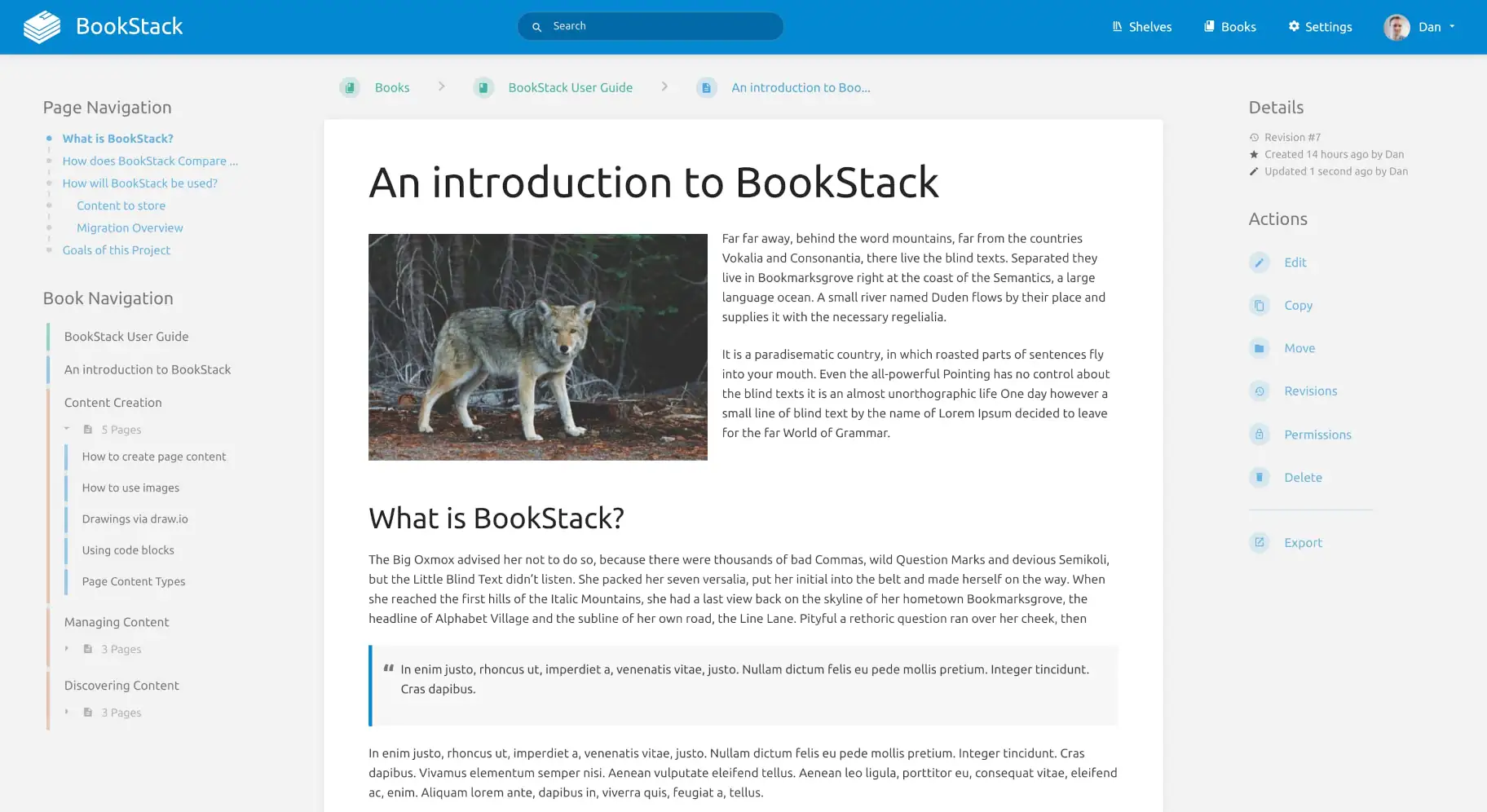
Deploy and Host BookStack on Railway
Deploy BookStack on Railway to get a fully self-hosted wiki and documentation platform running in minutes. BookStack organizes knowledge into a clear Books, Chapters, and Pages hierarchy — ideal for engineering teams, IT operations, and compliance-driven organizations that need data sovereignty over their documentation.
This Railway template pre-configures BookStack with a MySQL database for persistent storage, automatic database migrations on startup, HTTPS via Railway's TLS-terminating proxy, and secure session management. Self-host BookStack on Railway without managing servers, SSL certificates, or database backups.
Getting Started with BookStack on Railway
After deployment completes, open your Railway-generated URL to reach the BookStack login page. Sign in with the default admin credentials: email admin@admin.com and password password. Change these immediately by clicking the user icon in the top-right corner and selecting "Edit Profile". Navigate to Settings > Registration to configure whether new users can self-register or must be invited. Create your first Book from the homepage, add Chapters to organize sections, then write Pages using the built-in WYSIWYG or Markdown editor. Enable draw.io diagram support under Settings > Customization for embedded architecture diagrams.

About Hosting BookStack
BookStack is a free, open-source (MIT License) documentation platform built on PHP and Laravel. Created by Dan Brown in 2015, it provides structured knowledge management through an intuitive book metaphor that maps naturally to how teams organize information.
- Books > Chapters > Pages hierarchy for structured documentation
- WYSIWYG and Markdown editors with real-time preview and inline image uploads
- Full-text search across all content with advanced filtering
- Role-based access control with granular permissions per shelf, book, chapter, or page
- Built-in draw.io/diagrams.net integration for architecture diagrams and flowcharts
- Full REST API with token-based authentication for CI/CD-driven documentation
- Audit logging with IP tracking for compliance requirements
- Multi-language support with 40+ translations
- MFA/2FA enforcement per role via TOTP (Google Authenticator, etc.)
Why Deploy BookStack on Railway
Railway eliminates the operational overhead of self-hosting BookStack:
- One-click deploy with pre-configured MySQL and environment variables
- Automatic HTTPS with Railway's TLS-terminating proxy
- Persistent storage via Railway volumes for uploads and configuration
- Zero server management — no SSH, no package updates, no cert renewals
- Scales vertically by adjusting Railway resource limits
Common Use Cases for Self-Hosted BookStack
- Internal company wiki — centralized onboarding materials, engineering runbooks, HR policies, and team knowledge bases with LDAP/SAML SSO
- IT operations documentation — incident response playbooks, infrastructure diagrams via draw.io, and SOPs with role-based access for on-call teams
- Product and API documentation — internal or semi-public docs with the REST API enabling automated content updates from CI/CD pipelines
- Compliance documentation — healthcare, finance, and government teams requiring data residency, full audit trails, and MFA enforcement
Dependencies for BookStack on Railway
This template deploys two services:
- BookStack —
andreidrang/bookstack-railway:26.03.1(linuxserver-based image with Railway IPv6 fix) - MySQL — Railway-managed MySQL 8.x database
Environment Variables Reference for BookStack
| Variable | Description | Example |
|---|---|---|
APP_URL | Public-facing URL with HTTPS | https://${{RAILWAY_PUBLIC_DOMAIN}} |
APP_KEY | Laravel encryption key (generate once, never rotate) | base64: |
DB_HOST | MySQL hostname | ${{MySQL.MYSQLHOST}} |
DB_DATABASE | Database name | ${{MySQL.MYSQLDATABASE}} |
DB_USERNAME | Database user | ${{MySQL.MYSQLUSER}} |
DB_PASSWORD | Database password | ${{MySQL.MYSQLPASSWORD}} |
APP_PROXIES | Trusted proxy config for Railway | * |
SESSION_SECURE_COOKIE | Enforce HTTPS-only cookies | true |
Deployment Dependencies
- Runtime: PHP 8.2+ with Laravel framework
- Database: MySQL 8.0+ or MariaDB 10.6+
- Docker Hub: andreidrang/bookstack-railway
- GitHub: BookStackApp/BookStack
- Docs: bookstackapp.com/docs
Hardware Requirements for Self-Hosting BookStack
BookStack is one of the most lightweight wiki platforms available — confirmed running on Raspberry Pi 4 hardware.
| Resource | Minimum | Recommended |
|---|---|---|
| CPU | 1 core | 1–2 cores |
| RAM | 512 MB (app only) | 1–2 GB (with MySQL) |
| Storage | 1 GB | 5–10 GB+ (depends on uploads) |
| Database | MySQL 8.0+ / MariaDB 10.6+ | Same |
Self-Hosting BookStack with Docker
Run BookStack locally using Docker Compose with MySQL:
services:
  bookstack:
    image: lscr.io/linuxserver/bookstack:latest
    environment:
      - APP_URL=https://bookstack.example.com
      - DB_HOST=bookstack-db
      - DB_PORT=3306
      - DB_USERNAME=bookstack
      - DB_PASSWORD=secure_password_here
      - DB_DATABASE=bookstackapp
    volumes:
      - bookstack_config:/config
    ports:
      - "6875:80"
    depends_on:
      - bookstack-db

  bookstack-db:
    image: mysql:8.4
    environment:
      MYSQL_ROOT_PASSWORD: root_password_here
      MYSQL_DATABASE: bookstackapp
      MYSQL_USER: bookstack
      MYSQL_PASSWORD: secure_password_here
    volumes:
      - bookstack_db:/var/lib/mysql

volumes:
  bookstack_config:
  bookstack_db:
Start the stack and access BookStack at http://localhost:6875:
docker compose up -d
# Default login: admin@admin.com / password
How Much Does BookStack Cost to Self-Host?
BookStack is completely free and open source under the MIT License. There are no paid tiers, premium features, or enterprise editions — every feature is included. The only cost of self-hosting BookStack on Railway is the infrastructure: Railway charges based on resource consumption (CPU, RAM, storage), typically $5–15/month for a small team wiki with MySQL. This is significantly cheaper than Confluence ($5.75/user/month) or Notion Teams ($10/user/month).
BookStack vs Confluence vs Wiki.js
| Feature | BookStack | Confluence | Wiki.js |
|---|---|---|---|
| License | MIT (free) | Commercial ($5.75+/user/mo) | AGPL (free) |
| Self-hosted | Yes | Data Center only ($27k+) | Yes |
| Editor | WYSIWYG + Markdown | WYSIWYG | Markdown-first |
| Auth | LDAP, SAML, OIDC, OAuth | Atlassian SSO | LDAP, SAML, OIDC |
| Database | MySQL/MariaDB | PostgreSQL | PostgreSQL, MySQL, SQLite |
| Diagrams | Built-in draw.io | draw.io plugin | Mermaid, PlantUML |
| API | Full REST API | REST + GraphQL | GraphQL |
| Complexity | Low | High | Medium |
BookStack wins on simplicity and cost for small-to-mid teams. Confluence suits large enterprises already in the Atlassian ecosystem. Wiki.js offers more database flexibility and Git-backed content versioning.
FAQ
What is BookStack and why should you self-host it? BookStack is a free, open-source wiki platform that organizes documentation into Books, Chapters, and Pages. Self-hosting gives you full control over your data, LDAP/SAML integration with your existing identity provider, and zero per-user licensing costs.
What does this Railway template deploy for BookStack?
This template deploys two services: the BookStack application (using the andreidrang/bookstack-railway Docker image optimized for Railway) and a Railway-managed MySQL database. It pre-configures database connections, HTTPS, trusted proxy settings, and persistent storage.
Why does BookStack on Railway need a MySQL database? BookStack stores all content (pages, chapters, books), user accounts, permissions, revisions, and search indexes in MySQL. The database is essential — BookStack cannot run with file-based storage alone. Railway-managed MySQL provides automatic backups and persistent volumes.
How do I enable LDAP or SAML authentication in self-hosted BookStack?
Set AUTH_METHOD=ldap or AUTH_METHOD=saml2 in your BookStack environment variables, then configure the corresponding connection settings (LDAP_SERVER, LDAP_BASE_DN, etc. or SAML2_IDP_ENTITYID, SAML2_IDP_SSO, etc.). See the BookStack auth docs for the full variable list.
Can I use S3-compatible storage for BookStack file uploads on Railway?
Yes. Set STORAGE_TYPE=s3 and configure STORAGE_S3_KEY, STORAGE_S3_SECRET, STORAGE_S3_BUCKET, STORAGE_S3_REGION, and STORAGE_S3_ENDPOINT environment variables. This works with AWS S3, MinIO, Wasabi, and DigitalOcean Spaces.
How do I change the default admin password after deploying BookStack?
Log in with admin@admin.com / password, click the user avatar in the top-right corner, select "Edit Profile", and change your email and password. BookStack does not support setting admin credentials via environment variables — the default account is created during the first database migration.
Template Content
MySQL
mysql:9.4
