
Deploy Botpress
Build chatbots with a visual flow editor and built-in NLU

Just deployed
/var/lib/postgresql/data
botpress
Just deployed
/botpress/data
botpress-lang
Just deployed
/botpress/lang
Deploy and Host Botpress on Railway
Botpress is an open-source platform for building and running chatbots. A visual flow editor, a natural language understanding engine, a content manager and a webchat widget ship in one server, so a designer can draw a dialogue while a developer drops into JavaScript where it is needed. This is Botpress v12, the AGPL-licensed self-hostable server — your intents, conversations and transcripts stay in a database you own.
Deploy Botpress on Railway and the stack arrives wired together: the Botpress Server with the Duckling entity extractor beside it, a private Language Server holding the word embeddings the NLU engine needs, and PostgreSQL. Browser traffic reaches only the Botpress Server, which talks to the Language Server privately and writes every bot, conversation and message to Postgres. Nothing calls out to a hosted service, so you can self-host Botpress without chat data leaving the project.
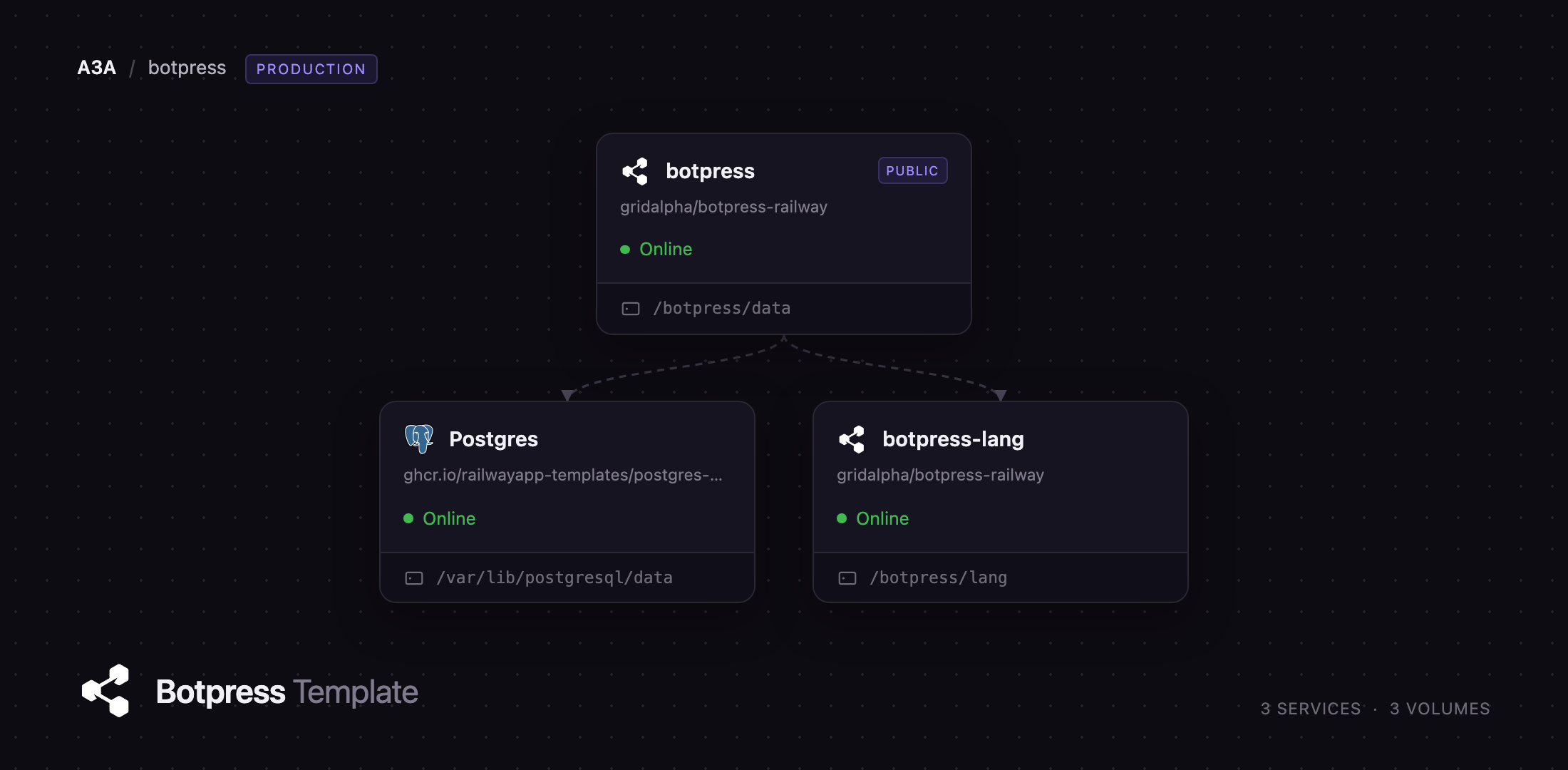
Getting Started with Botpress on Railway
Set BP_ADMIN_EMAIL and BP_ADMIN_PASSWORD before deploying and the server creates that super admin on first boot, closing the sign-up form for good. Leave them blank and the first visitor to /admin registers the owner account instead — do that immediately, because until someone claims it, anyone with the URL can. Signing in lands you on the bot list.
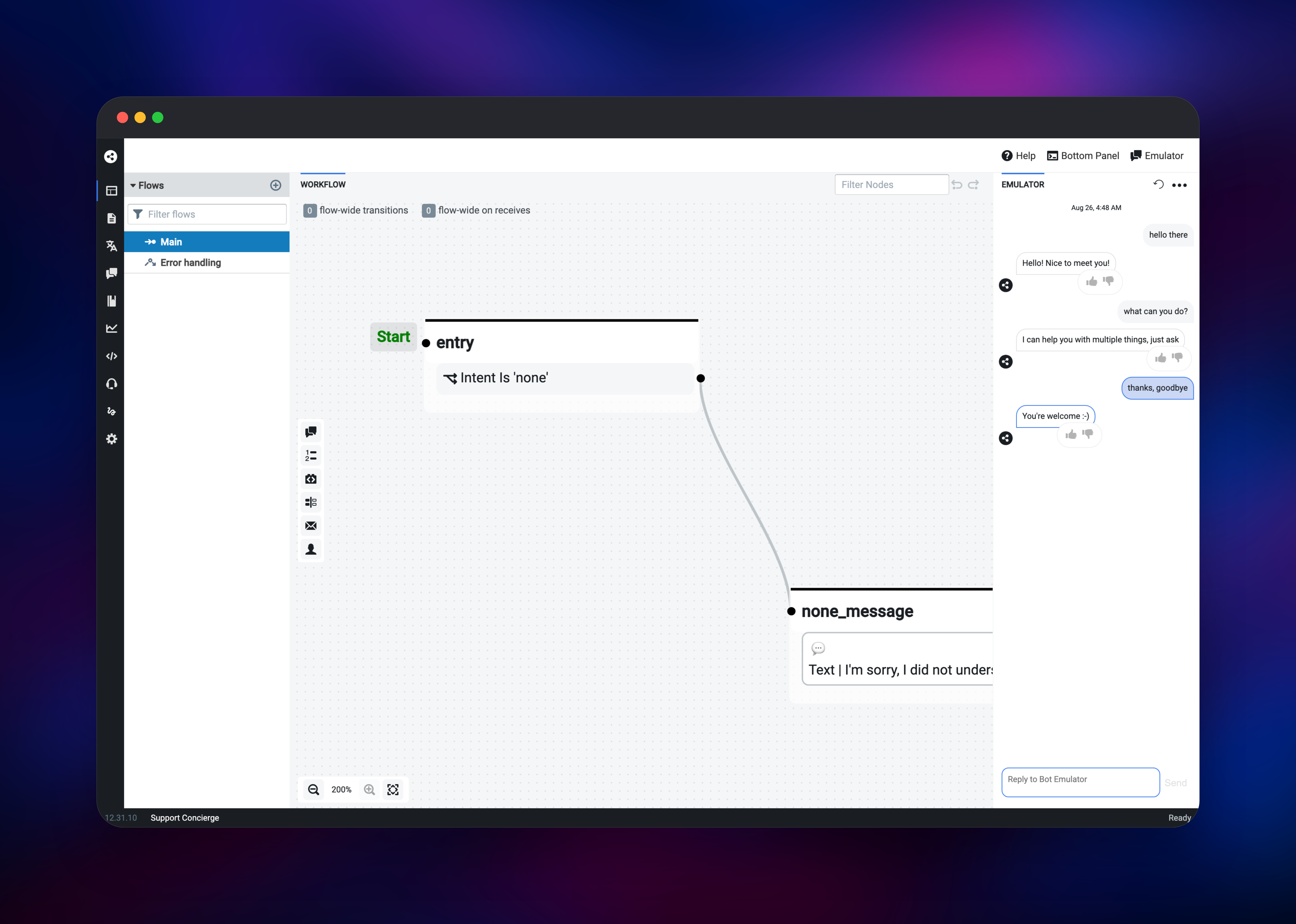
Click Create Bot → New Bot, name it, and pick a starter such as Small Talk. Opening it loads the Studio, flow editor on the left and emulator on the right. Press Train Chatbot in the bottom-right corner and wait for the label to read Ready — that round trip proves the Language Server and the NLU engine both work. Type a greeting into the emulator and an answer should come straight back.
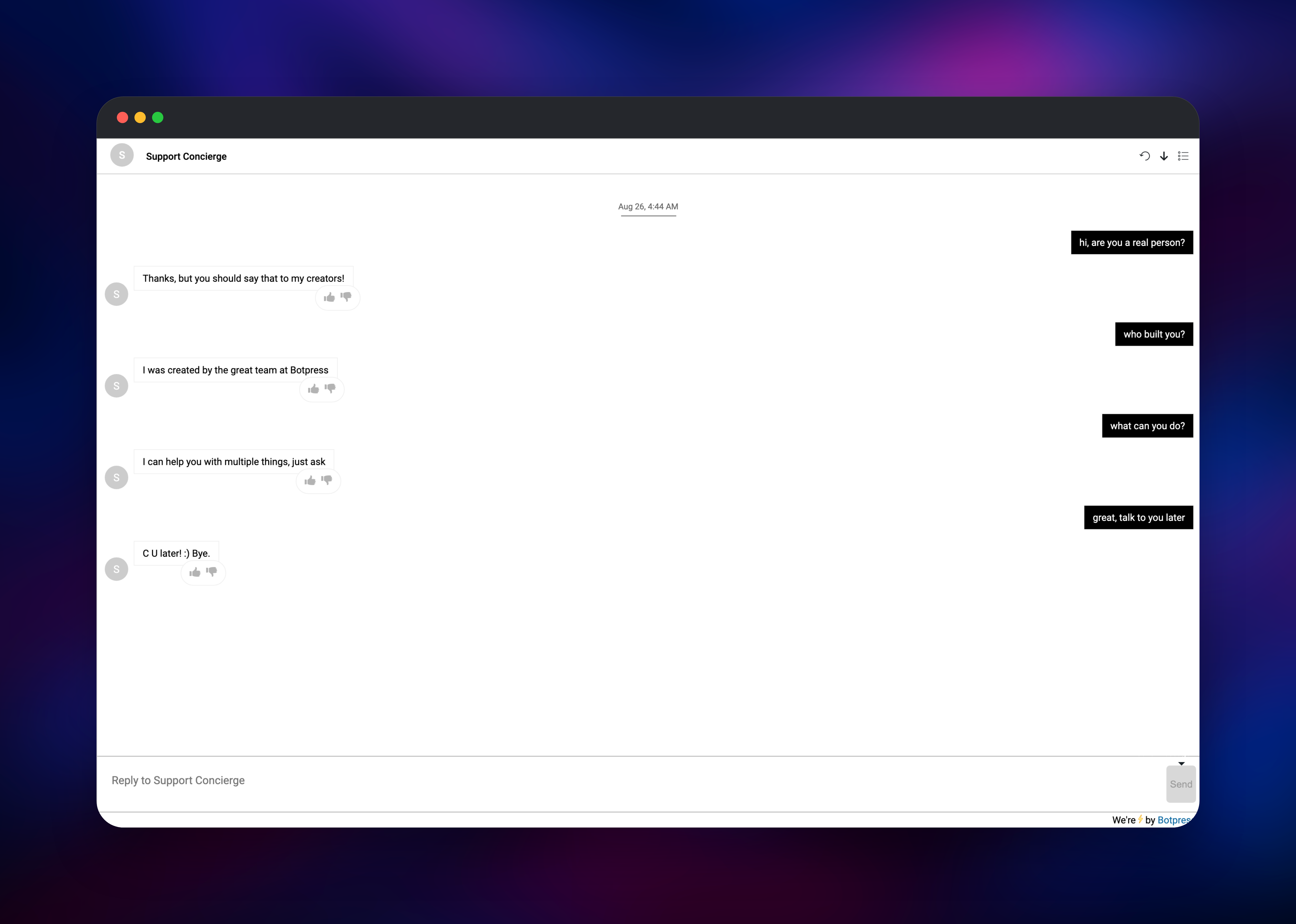
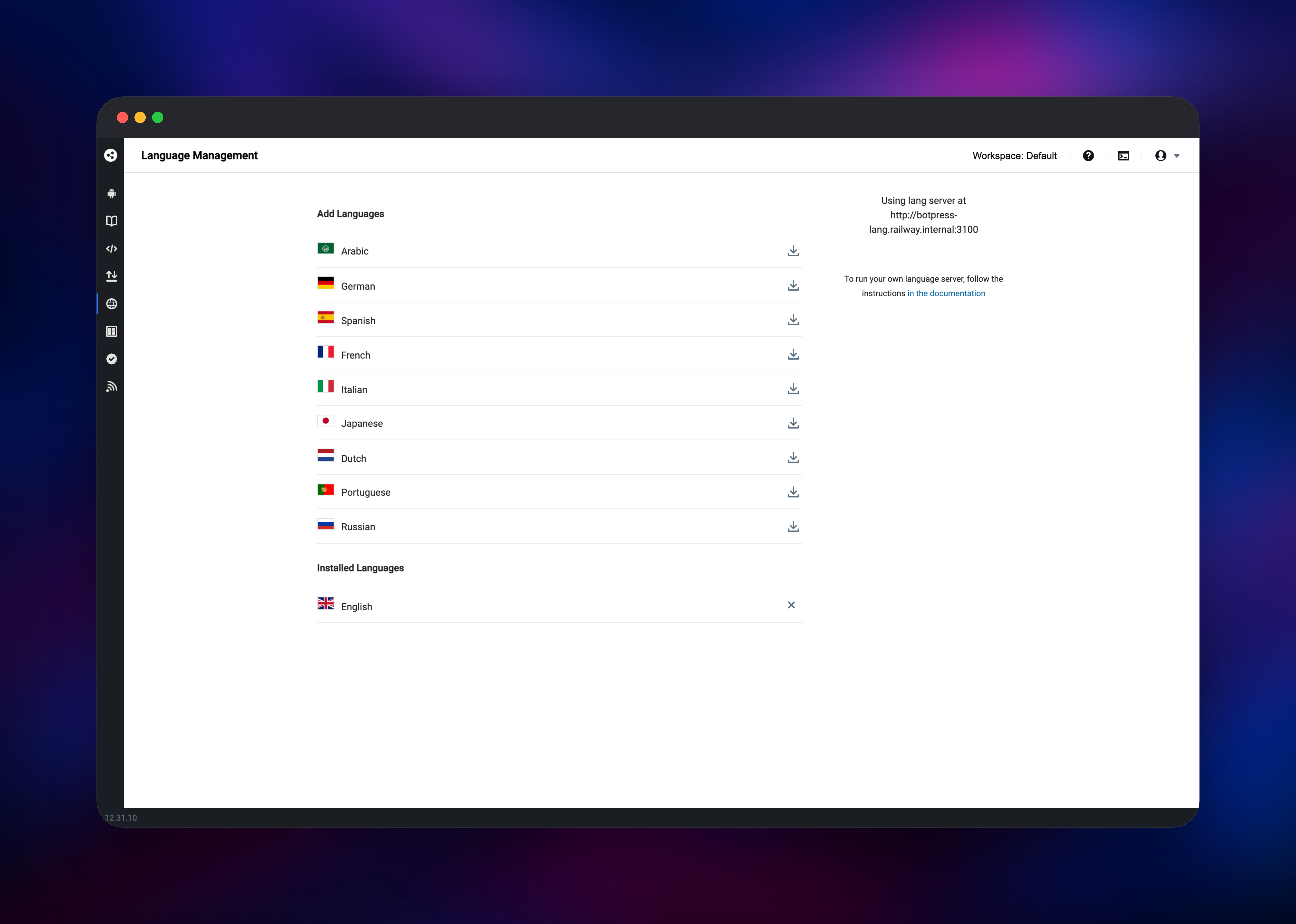
The bot is publicly reachable at /s/ as a full-page webchat, and the same widget embeds anywhere via a script tag from Config → Channels. Languages should report the private lang server with English installed, and Production Checklist flags anything unhardened.
About Hosting Botpress
Most chatbot builders are hosted products: training data, transcripts and customer messages live on someone else's infrastructure, and pricing scales with volume. Botpress v12 inverts that — models, flows and message history run in containers you control. Teams reach for it when conversations carry personal data or when per-message pricing stops making sense.
Key capabilities:
- Visual flow editor with nodes, transitions, skills and sub-flows
- On-premise NLU — intents, entities, slot filling and spell-checking, with no external API call per message
- Content management for text, images, cards and carousels, separate from flow logic
- Channels for webchat, Messenger, Slack, Teams, Telegram and Twilio SMS, plus human handoff and analytics
This template runs the shape Botpress documents for production. The Botpress Server serves the admin panel, the Studio, the webchat and the messaging API, with Duckling — which extracts dates, amounts, emails and phone numbers — beside it. The Language Server is separate because it is the memory-hungry part: it holds the word embeddings and serves vectors privately. PostgreSQL stores bots, users, conversations, messages and trained models.
Why Deploy Botpress on Railway
Railway removes the plumbing this stack normally needs.
- Private networking between Botpress, the Language Server and Postgres
- Managed PostgreSQL with backups, provisioned and connected
- Persistent volumes for the language models and bot data
- HTTPS on a generated domain, or your own
- Health checks and restarts on every service
- Vertical scaling from the dashboard when a bot gets busy
Common Use Cases
- Customer support deflection — answer the repeat questions in webchat and hand anything else to a human with the transcript attached
- Lead qualification — run a scripted dialogue on a marketing site and post the answers into your CRM from a JavaScript action
- Internal helpdesk — an HR or IT bot in Slack or Teams answering policy questions and opening tickets
- Data-sensitive assistants — healthcare, finance and public-sector bots whose transcripts stay in-house
Dependencies for Botpress
- Botpress Server + Duckling — built from
gridalpha/botpress-railwayon the officialbotpress/serverimage. Public, port 3000, volume at/botpress/data. - Botpress Language Server — the same image run as
bp lang, private on port 3100, volume at/botpress/lang. - PostgreSQL — Railway's managed
postgres-ssl:18. Botpress creates its schema and runs its migrations on first boot.
Environment Variables Reference
| Variable | Service | Purpose |
|---|---|---|
DATABASE_URL | Botpress | Postgres connection string; replaces SQLite |
EXTERNAL_URL | Botpress | Public base URL for webchat and channel callbacks |
BPFS_STORAGE | Botpress | database keeps bots and revisions in Postgres |
AUTO_MIGRATE | Botpress | Applies data migrations when the image updates |
BP_ADMIN_EMAIL / BP_ADMIN_PASSWORD | Botpress | Creates the super admin, closes registration |
BP_LANG_ENDPOINT | Botpress | Private address of the Language Server |
BP_LANG_DIM | Language Server | Embedding size — 100 default, 300 for accuracy |
BP_LANG_PRELOAD | Language Server | Language codes fetched at first boot |
Deployment Dependencies
- Source repo: gridalpha/botpress-railway
- Upstream: botpress/v12, AGPL-3.0
- Image: botpress/server
- Docs: v12.botpress.com
Hardware Requirements for Self-Hosting Botpress
The Language Server dominates the memory bill: each model loads fully into RAM.
| Resource | Minimum | Recommended |
|---|---|---|
| CPU | 2 vCPU total | 4 vCPU total |
| RAM | 1 GB app + 2 GB Language Server | 2 GB + 4 GB |
| Storage | 5 GB embeddings + 1 GB bot data | 10 GB for several languages |
| Database | PostgreSQL 11+ | PostgreSQL 16+ with backups |
| Runtime | Docker | Docker |
One English model at 100 dimensions is about 1 GB on disk and 1.3 GB in RAM; BP_LANG_DIM=300 raises that to roughly 3.1 GB and 3.5 GB per language.
Self-Hosting Botpress
The quickest local trial runs Botpress on SQLite against its public NLU endpoints:
docker run -d --name botpress -p 3000:3000 \
  -v botpress_data:/botpress/data botpress/server:latest
For anything real, run your own Language Server and point Botpress at Postgres — the two containers this template mirrors:
docker run -d --name botpress-lang -v botpress_lang:/botpress/lang \
  botpress/server:latest bash -c "./bp lang --langDir /botpress/lang"

docker run -d --name botpress \
  -p 3000:3000 -v botpress_data:/botpress/data \
  -e DATABASE_URL=postgres://user:pw@postgres:5432/botpress \
  -e BP_PRODUCTION=true -e BPFS_STORAGE=database \
  -e BP_MODULE_NLU_LANGUAGESOURCES='[{"endpoint":"http://botpress-lang:3100"}]' \
  botpress/server:latest \
  bash -c "./duckling & ./bp"
Once the Language Server is up, install a language from the Languages page and restart Botpress so the NLU engine loads it.
How Much Does Botpress Cost to Self-Host?
Botpress v12 is free and open source under AGPL-3.0, with no seat, bot or message limits. A paid Pro licence unlocks multi-node clustering with Redis, several workspaces and multilingual bots — none of which the community edition needs for a production bot. Botpress Cloud is a separate hosted product with usage-based pricing. Self-hosting on Railway costs only the compute, memory and storage the three services consume.
FAQ
What is Botpress?
Botpress is an open-source chatbot platform combining a visual flow editor, an on-premise natural language understanding engine, a content manager and channel connectors for webchat, Slack, Messenger, Teams and Telegram. v12 is the self-hostable edition.
What does this Railway template deploy?
The Botpress Server with Duckling on a public domain, a private Language Server serving word embeddings, and managed PostgreSQL. Both Botpress services get a volume.
Why does the template include a separate Language Server?
The NLU engine turns every message into word vectors, and those models are large — about 1 GB of RAM per language. Splitting it out lets you scale that memory on its own and keeps a model reload from restarting the chatbot.
Why does Botpress need PostgreSQL instead of SQLite?
SQLite is fine on a laptop, but a container recreated on every deploy needs its state elsewhere. Postgres holds bots, users, conversations, messages and trained models, so a redeploy never loses a transcript.
How do I add a language other than English to self-hosted Botpress?
Set BP_LANG_PRELOAD to a list such as en,fr,es before deploying, or install extras later from the Languages page. Check the volume has room — each model is roughly 1 GB.
Template Content
botpress
gridalpha/botpress-railwaybotpress-lang
gridalpha/botpress-railway