Deploy Bugsink
Error tracking that shows you the stacktrace behind every crash

Just deployed
/var/lib/postgresql/data
bugsink
Just deployed
/data

mailpit
Just deployed
/data
Deploy and Host Bugsink on Railway
Bugsink is self-hosted error tracking that speaks the Sentry protocol. Point any Sentry SDK — Python, JavaScript, PHP, Go, Ruby, Java, Rust — at a Bugsink DSN instead of Sentry's, and exceptions arrive with the full stacktrace, the source line that raised, tags, breadcrumbs and release. Teams pick this Sentry alternative when they want crash reports on their own infrastructure without Sentry's forty-container install. It is a small Django application: one web process, one background worker, one database.
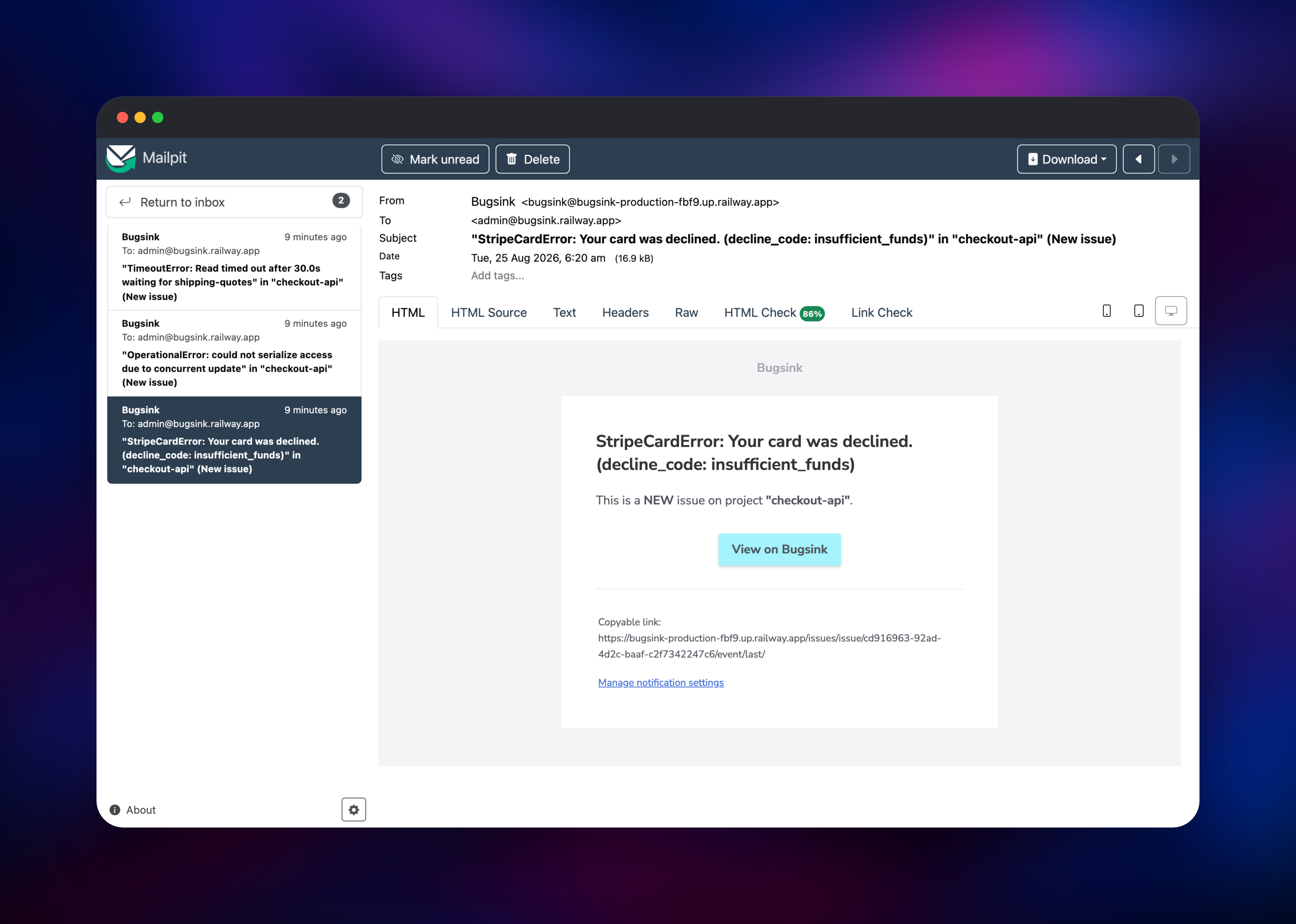
Deploying Bugsink on Railway gives you three services wired together and ready to receive events. Bugsink serves the web UI and the ingest API behind a public HTTPS domain, with its background task runner in the same container. PostgreSQL stores issues, event metadata, tags, users and sessions. Mailpit captures the alert email sent on each new issue, so notifications work the moment the deploy finishes and can later relay to a real provider. A volume holds event payloads and uploaded artifacts as flat files.
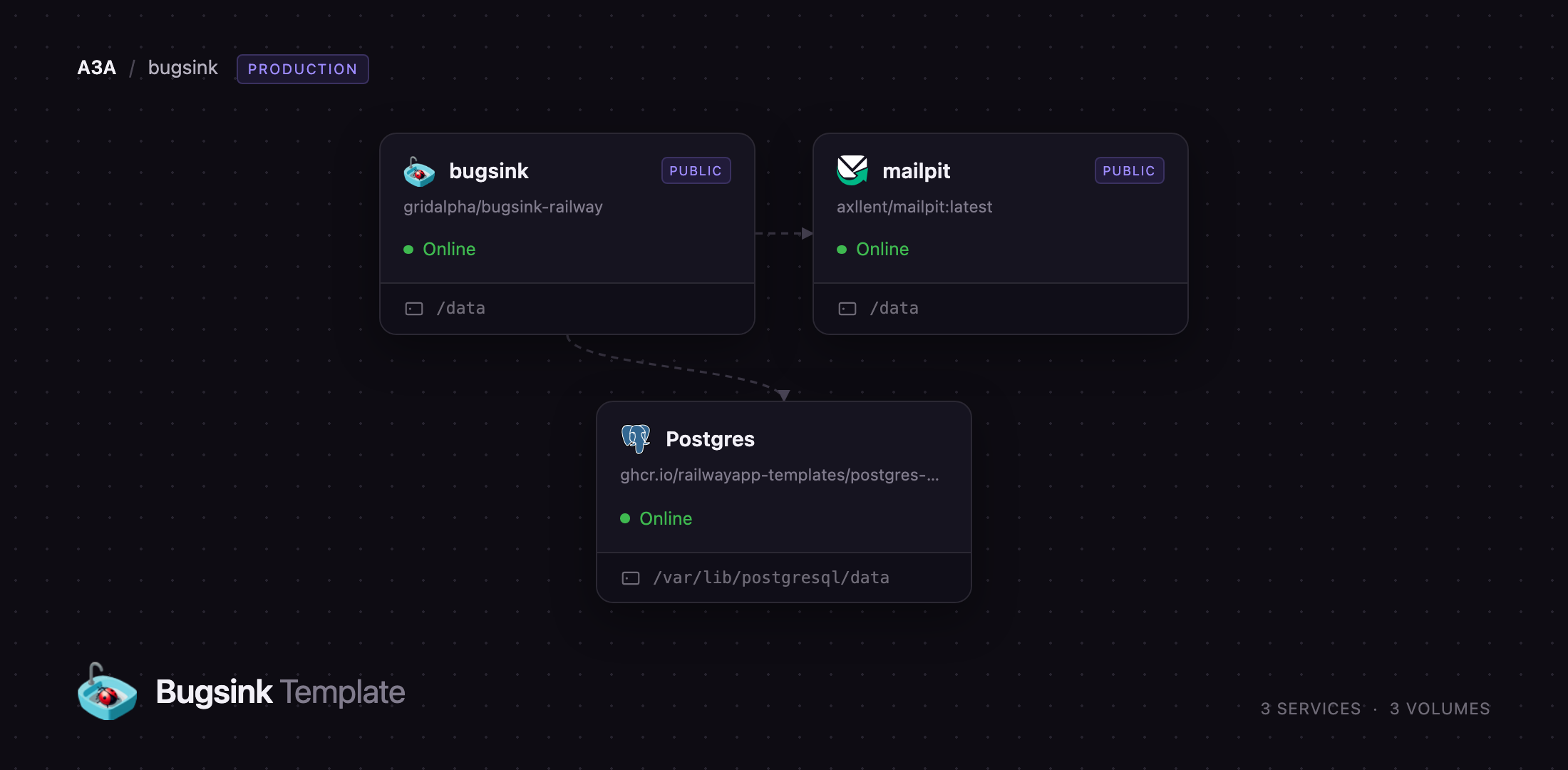
Getting Started with Bugsink on Railway
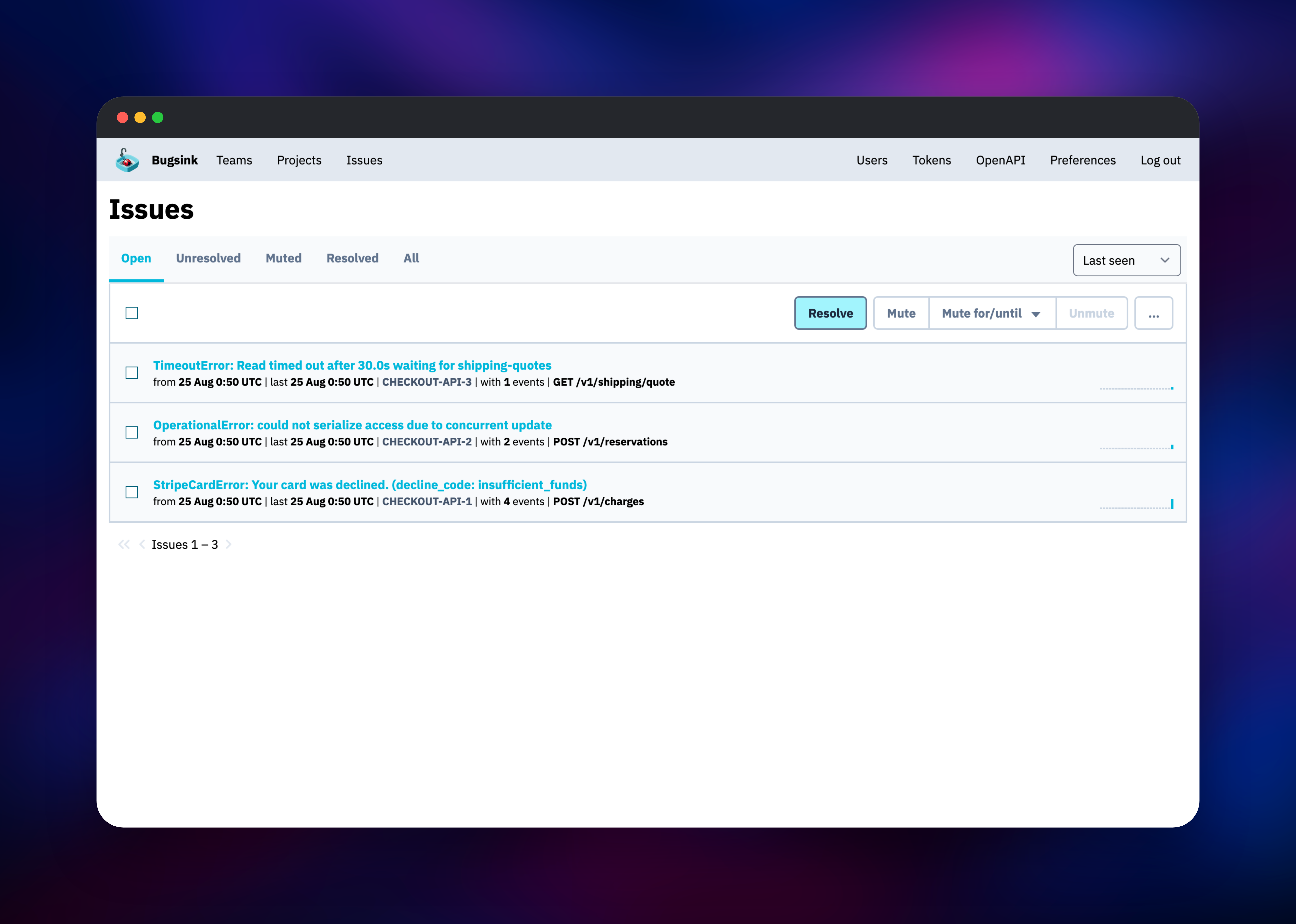
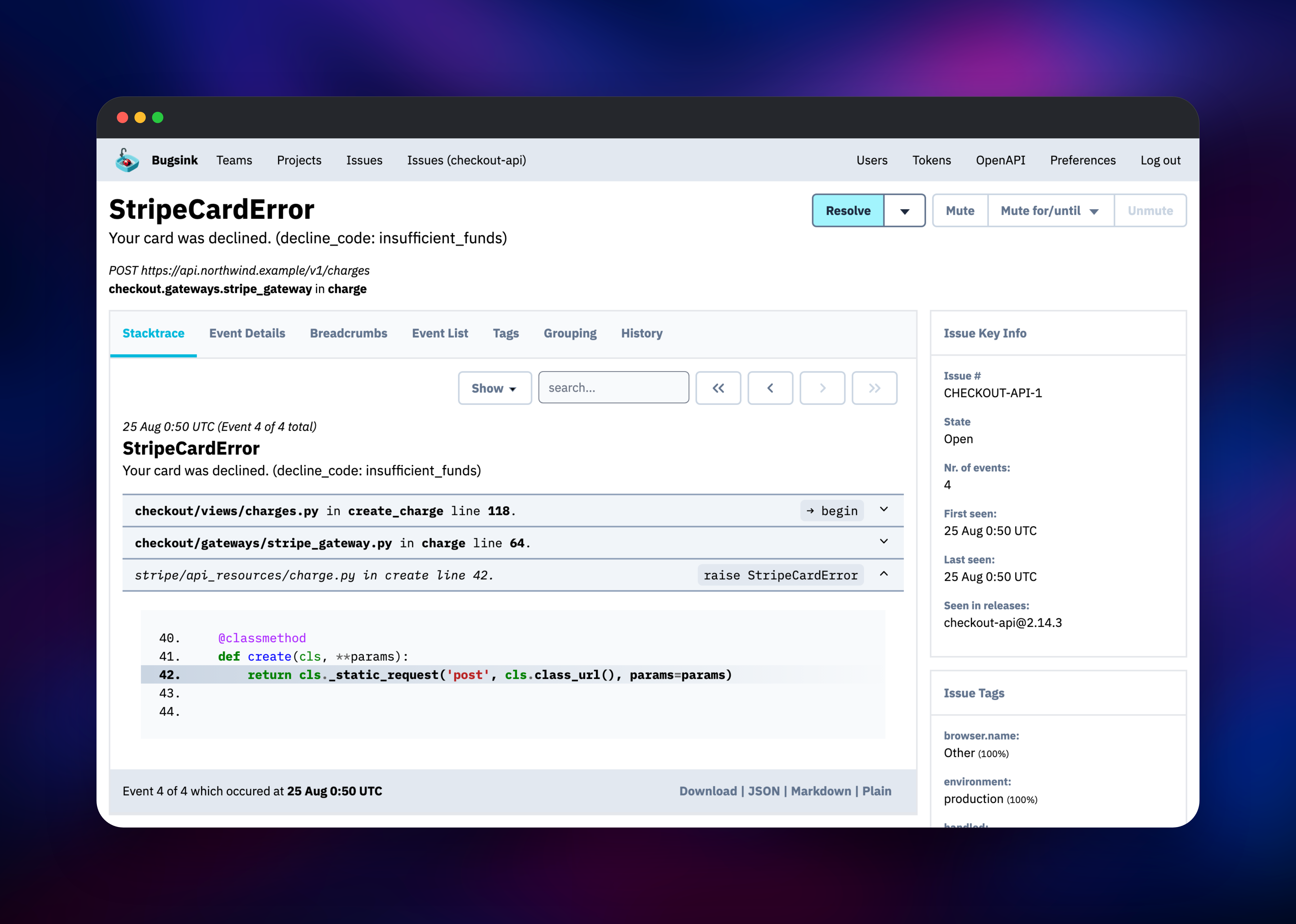
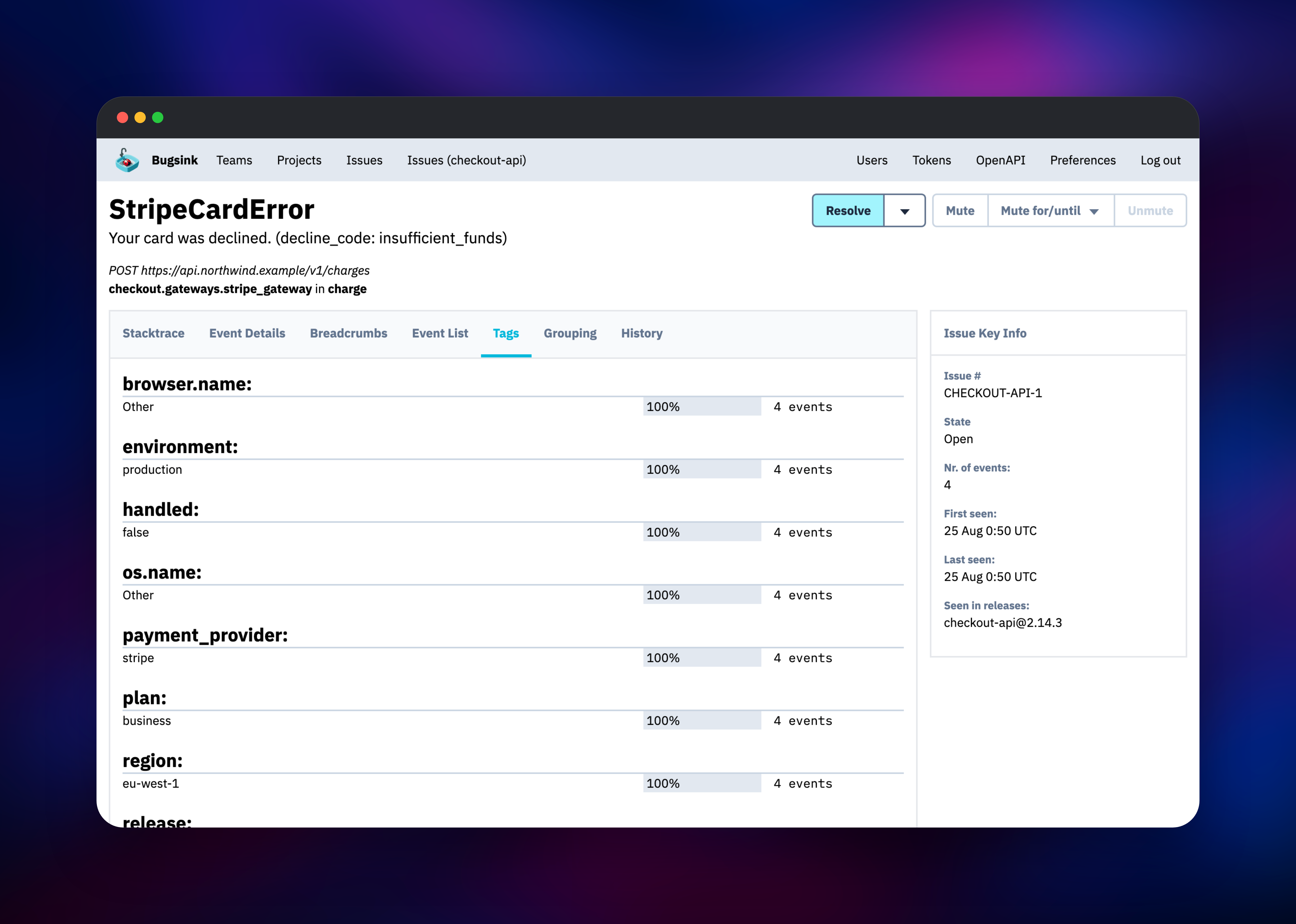
Set CREATE_SUPERUSER to your@email.address:a-strong-password before deploying — that pair becomes the first administrator, and it is read only while the user table is empty, so it never overwrites a later password change. When the deploy finishes, open the public URL and sign in; there are no default credentials, and public signup is closed. Create a team, then a project, and Bugsink shows that project's DSN. Put it in your Sentry SDK configuration where the Sentry one would go, and trigger a deliberate exception. It appears under Issues within a second or two, repeat occurrences grouped into one issue with an event count. Open it for the stacktrace and source lines, check Tags for the release or environment the error clusters in, then Resolve or Mute it. Each new issue also emails an alert, readable in the Mailpit inbox.
About Hosting Bugsink
Error tracking answers one question well: what broke, where, and how often. Bugsink does that and stops there — no tracing, no session replay, no metrics — which is why it fits in one container while Sentry's self-hosted distribution needs Kafka, ClickHouse, Snuba, Relay and a fleet of consumers. Crash reports carry stack frames, local variables, request URLs and user identifiers, and self-hosting keeps that off third-party servers.
Key features:
- Full compatibility with the open-source Sentry SDKs — migration is a DSN change
- Stacktraces with source context, local variables and column-accurate frames
- Grouping that ignores variable values such as IDs and IP addresses
- Email alerts on new and regressed issues, with a per-hour limit
- Tags, search, releases, sourcemaps and a REST API with auth tokens
Of the Sentry-compatible trackers, Bugsink is the smallest:
| Bugsink | Sentry (self-hosted) | GlitchTip | |
|---|---|---|---|
| Containers | 1 | 40+ | 4 |
| RAM (documented) | 512 MB | 16 GB | 256 MB |
| Scope | Errors | Errors, tracing, replay | Errors, uptime |
The architecture is deliberately flat. Snappea, Bugsink's task runner, uses a container-local queue and its authors require one web process, one task runner and one container per instance, so there is no worker tier to scale. The volume at /data takes event payloads and uploads, which is what Bugsink recommends once ingestion grows.
Why Deploy Bugsink on Railway
Railway removes the infrastructure work around a small, stateful Django application:
- One click provisions the app, PostgreSQL and Mailpit already wired together
- Automatic HTTPS on a generated domain; custom domains supported
- Persistent volumes for event payloads and captured mail
- Managed PostgreSQL with backups and no database administration
- Private networking, so only the web UI is public
Common Use Cases
- Replacing a paid Sentry plan for a team that wants crash reports without per-event billing
- Keeping stack frames, request data and user identifiers on your own infrastructure
- Giving each environment — staging, production, a customer deployment — its own tracker
- Monitoring background jobs and CLI tools with nowhere else to report failures
Dependencies for Bugsink
-
Bugsink — built from gridalpha/bugsink-railway on top of the official
bugsink/bugsinkimage. Serves the web UI and the ingest API on port 8000, Snappea alongside it. -
PostgreSQL — Railway's managed database, holding issues, event metadata, tags, teams, users and sessions. Bugsink also supports MySQL and SQLite; PostgreSQL is the default for real traffic.
-
Mailpit —
axllent/mailpit, an SMTP server with a web inbox, so alerting works without a mail provider.
Environment Variables Reference
| Variable | Service | Purpose |
|---|---|---|
CREATE_SUPERUSER | Bugsink | First admin; read only while no user exists |
SECRET_KEY | Bugsink | Signing key; 50+ characters or startup fails |
BASE_URL | Bugsink | Public URL used to build DSNs and email links |
BEHIND_HTTPS_PROXY | Bugsink | Secure cookies and correct client IPs |
FILE_EVENT_STORAGE_PATH | Bugsink | Volume directory for event payloads |
MP_UI_AUTH | Mailpit | Credentials protecting the mail inbox |
Deployment Dependencies
- Source:
- Image:
- Docs:
- Runtime: Python 3.12, Django 5.2, Gunicorn
Hardware Requirements for Self-Hosting Bugsink
| Resource | Minimum | Recommended |
|---|---|---|
| CPU | 1 vCPU | 2 vCPU |
| RAM | 512 MB | 2 GB |
| Storage | 1 GB volume | 10 GB+, sized to retention |
| Runtime | Python 3.12 container | Python 3.12 plus managed PostgreSQL |
Bugsink is unusually light; the practical limit is disk, since each retained event payload is a file on the volume. Set MAX_EVENT_AGE_DAYS once you know your traffic.
Self-Hosting Bugsink with Docker
The quickest local run uses SQLite inside the container. The signing key needs 50+ characters:
docker run -p 8000:8000 \
  -e SECRET_KEY=$(openssl rand -base64 50) \
  -e CREATE_SUPERUSER=you@example.com:change-me \
  -e PORT=8000 \
  bugsink/bugsink:latest
For anything real, use PostgreSQL and a volume. A minimal Docker Compose file:
services:
  db:
    image: postgres:18-alpine
    environment: { POSTGRES_USER: bugsink, POSTGRES_PASSWORD: pw, POSTGRES_DB: bugsink }
    volumes: ["db-data:/var/lib/postgresql/data"]
  web:
    image: bugsink/bugsink:latest
    ports: ["8000:8000"]
    volumes: ["events:/data"]
    environment:
      SECRET_KEY: replace-with-50-plus-random-characters
      CREATE_SUPERUSER: you@example.com:change-me
      DATABASE_URL: postgresql://bugsink:pw@db:5432/bugsink
      BASE_URL: https://errors.example.com
      BEHIND_HTTPS_PROXY: "true"
      FILE_EVENT_STORAGE_PATH: /data/events
      FILE_EVENT_STORAGE_USE_FOR_WRITE: "true"
volumes: { db-data: {}, events: {} }
How Much Does Bugsink Cost to Self-Host?
Bugsink's source is on GitHub under the PolyForm Shield licence, and self-hosting is free with unlimited users, unlimited projects and every feature enabled — no paid tier and no event cap beyond your hardware. The company sells a hosted service from €16/month for 75,000 events, which you do not need to run your own. On Railway you pay only for the compute, database and volume.
FAQ
What is Bugsink? A self-hosted error and crash reporting tool. Applications report exceptions with the Sentry SDKs, and it groups them into issues carrying stacktraces, source context, tags and email alerts.
What does this Railway template deploy? Three connected services: Bugsink with a public HTTPS domain and a volume, managed PostgreSQL, and Mailpit for alert email — usable as soon as it goes live.
Why does the template include PostgreSQL and Mailpit? Bugsink falls back to SQLite, which is no home for production error data, so PostgreSQL is provisioned instead. Mailpit is there because new-issue alerts are how the product delivers value, and an instance with nowhere to send mail notifies nobody.
How do I point my application at self-hosted Bugsink?
Create a project in the UI, copy the DSN it shows, and set it as the dsn in your existing Sentry SDK configuration. No other code change is needed.
Can I use my own SMTP server instead of Mailpit?
Yes — set EMAIL_HOST, EMAIL_PORT, EMAIL_HOST_USER, EMAIL_HOST_PASSWORD and EMAIL_USE_TLS on Bugsink. Or keep Mailpit and relay through your provider, keeping a local copy of everything sent.
How do I add teammates when signup is closed? Invite them from the team page. Each invitation is emailed, and the link is also shown in the interface for installs without mail delivery.
How much traffic can one instance handle? Bugsink measures ingestion near 50 events per second on modest hardware, and the shipped caps of 5,000 events per hour and a million per month can be raised.
Template Content