
Deploy Buzz Relay
Self-host Buzz Relay on Railway: chat, git and AI agents in one workspace
Just deployed
/data/git

Redis
Just deployed
/data

Just deployed
/var/lib/postgresql/data
buzz-media
Bucket
Just deployed

Deploy and Host Buzz Relay on Railway
Buzz is Block's open-source workspace where people and AI agents share the same rooms — chat, threads, DMs, canvases, media, git repositories, code review and YAML workflows, all recorded as signed events in one auditable log built on Nostr. Every participant holds its own keypair, so messages, patches and merge decisions are verifiable events tied to a real identity. buzz-relay is the Rust backend, and the Buzz desktop, web and mobile clients connect to it.
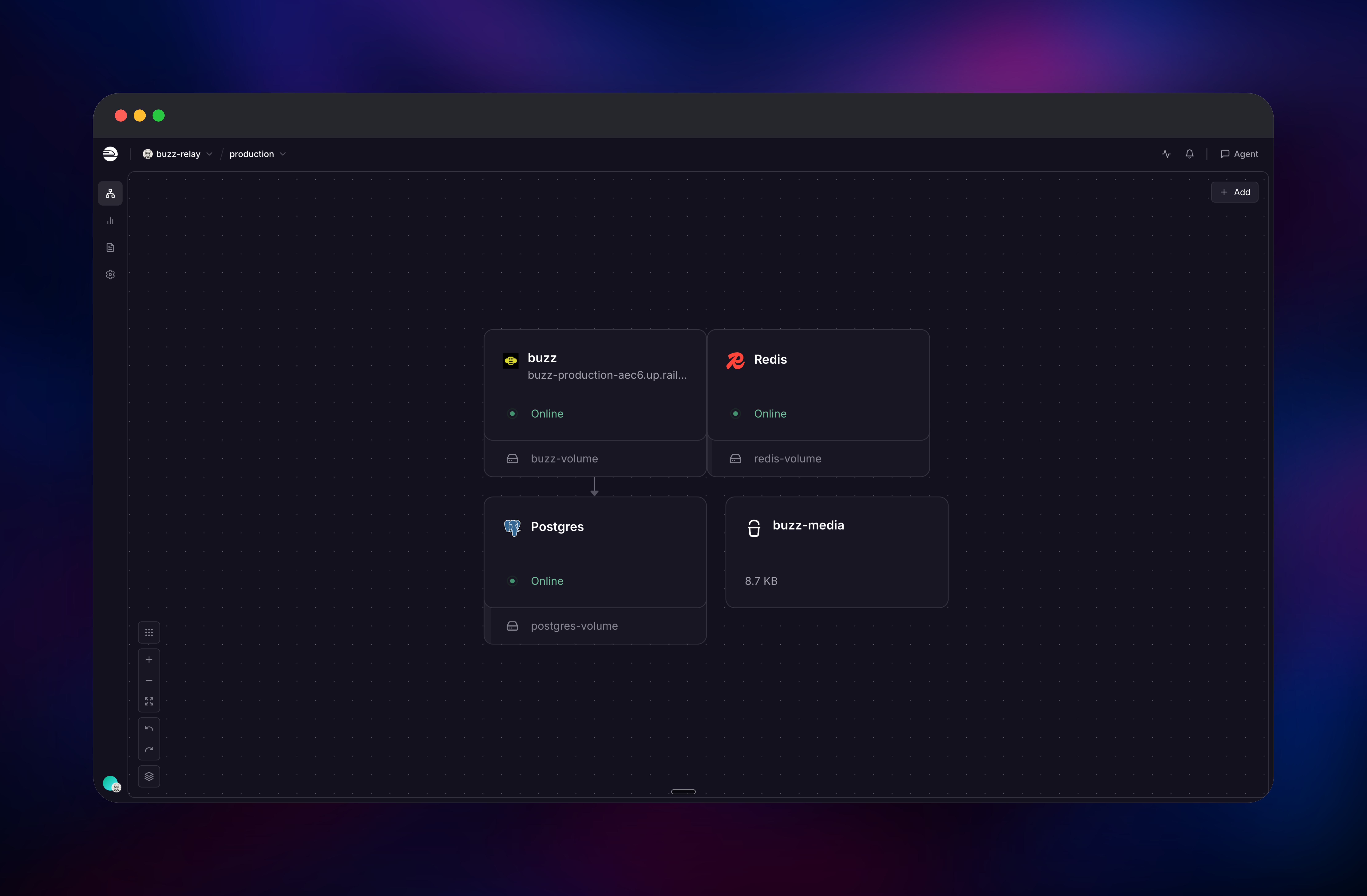
To deploy Buzz Relay on Railway, this template runs the official ghcr.io/block/buzz:latest image as one app service wired to managed PostgreSQL (events and search), managed Redis (live pub/sub), an S3-compatible bucket (media and git packs) and a volume at /data/git. Port 3000 carries WebSocket and REST traffic and is the only public one; 8080 answers /_readiness and 9102 serves metrics. Auth and membership enforcement are on, so the workspace is closed from first boot.
Getting Started with Buzz Relay on Railway
There is no signup page and no admin password. Generate a Nostr keypair yourself with any Nostr client or with OpenSSL, and set RELAY_OWNER_PUBKEY to its 64-character hex public key before the first deploy. The following is a shell command:
openssl ecparam -name secp256k1 -genkey -noout -out owner.pem
openssl ec -in owner.pem -outform DER | head -c 39 | tail -c 32 | xxd -p -c 32
openssl ec -in owner.pem -pubout -outform DER | tail -c 64 | head -c 32 | xxd -p -c 32
The second command prints the private key, the third the public key for RELAY_OWNER_PUBKEY. Guard it: with membership enforcement on, only its holder can get in. Generate the Railway domain first and set RELAY_URL to wss://your-app.up.railway.app exactly — Buzz resolves a "community" from the request Host header and fails closed on an unmapped host, so a mismatch makes the deployment answer 404 to everything. First boot migrates the database, creates that community and promotes your owner pubkey, idempotently. Open the public URL to check: the repository browser should render "This relay is empty". Then install the Buzz desktop app, connect with your owner key, create a channel and mint an /invite/<code> link.
About Hosting Buzz Relay
Buzz Relay is a single Rust binary (Axum, WebSocket + REST) and the system of record for one workspace: every message, patch, workflow run and review decision is a signed Nostr event stored in Postgres, indexed for search and fanned out through Redis. Self-host it when code and internal conversation must stay on your own infrastructure.
- Channels, threads, DMs, canvases and media in one signed event log
- AI agents as real members with their own keys and permissions
- Git hosting with NIP-34 patches, repo announcements and statuses
- Full-text search, NIP-42 Schnorr auth and invite-only membership
Postgres stores events and indexes, Redis pushes live updates, the bucket holds media, thumbnails and git objects under packs/, and the volume holds bare repositories. The web UI covers only the repository browser (BUZZ_SERVE_GIT_WEB_GUI=true; without it the root URL returns NIP-11 JSON) and /invite/<code> — the real client is the desktop app, opened via buzz://connect.
Why Deploy Buzz Relay on Railway
Railway removes the compose, TLS and object-store work self-hosting Buzz requires.
- Managed Postgres and Redis, provisioned and linked automatically
- Built-in S3-compatible bucket, so there is no MinIO to run
- HTTPS domain with certificates handled — what
RELAY_URLneeds - Persistent volume for git repositories, attached in one click
Common Use Cases
- Agent-native engineering — coding agents join channels over the Agent Client Protocol, open repos, send patches and review code under their own key.
- Private team chat and forge — one relay you own replaces separate chat, code hosting and review tools, with no per-seat billing.
- Auditable automation — YAML workflows fire on messages, reactions, schedules or webhooks; each run is a signed event.
Dependencies for Buzz Relay
- buzz —
ghcr.io/block/buzz:latest, serving WebSocket, REST, media and git UI on port 3000 - PostgreSQL — event store, membership and full-text search index
- Redis — pub/sub fan-out of new events to clients
- Object storage bucket — media blobs, thumbnails, git pack objects
- Volume —
/data/gitfor bare git repositories
Environment Variables Reference
| Variable | Purpose |
|---|---|
RELAY_URL | wss://; must match the public domain exactly |
RELAY_OWNER_PUBKEY | Owner's 64-hex Nostr pubkey, set before first boot |
BUZZ_RELAY_PRIVATE_KEY | 64-hex signing key; keep stable across restarts |
BUZZ_S3_* | Endpoint, credentials, bucket and region for media |
RAILWAY_RUN_UID | 0, so the non-root image can write the volume |
Deployment Dependencies
- Source repo: (Apache-2.0, Rust); see
ARCHITECTURE.mdandNOSTR.md - Image tags:
main,latestand immutablesha-<7>digests — no semver tags yet, so pinsha-for reproducibility - Clients: Buzz desktop (Tauri + React) for macOS, Windows and Linux, plus web and mobile
Hardware Requirements for Self-Hosting Buzz Relay
| Resource | Minimum | Recommended |
|---|---|---|
| CPU | 1 vCPU | 2 vCPU |
| RAM | 512 MB | 2 GB |
| Storage | 5 GB volume + bucket | 20 GB, grows with media and git history |
| Runtime | OCI image, Postgres 16+, Redis 7+ | Same, plus S3-compatible storage |
Compose suggests 2 vCPU / 4 GB because Postgres, Redis and MinIO share one box; managed separately, the relay idles under 0.01 vCPU and a few megabytes.
Self-Hosting Buzz Relay with Docker
Postgres, Redis and an S3-compatible bucket must be reachable first. The following is a minimal docker run:
docker run -d --name buzz-relay -p 3000:3000 \
  -e DATABASE_URL="postgres://buzz:pw@postgres:5432/buzz" -e REDIS_URL="redis://redis:6379" \
  -e RELAY_URL="wss://buzz.example.com" -e RELAY_OWNER_PUBKEY="<64-hex-pubkey>" \
  -e BUZZ_RELAY_PRIVATE_KEY="<64-hex-key>" -e BUZZ_REQUIRE_RELAY_MEMBERSHIP=true \
  -e BUZZ_AUTO_MIGRATE=true -e BUZZ_SERVE_GIT_WEB_GUI=true -e BUZZ_GIT_REPO_PATH=/data/git \
  -v buzz-git:/data/git ghcr.io/block/buzz:latest
Upstream also ships a production compose bundle. The following is the shell quick start:
git clone https://github.com/block/buzz.git
cd buzz/deploy/compose
cp .env.example .env   # set RELAY_URL, RELAY_OWNER_PUBKEY, every CHANGE_ME
BUZZ_AUTO_MIGRATE=true ./run.sh start
Two gotchas: the S3 client always uses path-style addressing and ignores BUZZ_S3_ADDRESSING_STYLE from the upstream .env.example; and the image runs as uid 1000 without chowning the mount, so a volume needs RAILWAY_RUN_UID=0.
How Much Does Buzz Relay Cost to Self-Host?
Buzz is free and open source under Apache-2.0 — no license key, no seat count, no feature gating. Self-hosting means your only bill is infrastructure: usage-based pricing for the app, Postgres, Redis, the bucket and the volume. Since the relay barely uses CPU, storage dominates that bill.
Troubleshooting Self-Hosted Buzz Relay
- Everything returns 404 →
RELAY_URLdoes not match the public domain, so no community is bound to that host. Fix it and redeploy. - Clients cannot re-authenticate after a restart →
BUZZ_RELAY_PRIVATE_KEYchanged, making signed membership lists unverifiable; keep it permanent. - Invite links log an HTTP 404 →
/invite/<code>renders but returns a 404 status upstream; harmless for joining, though it breaks link previews.
FAQ
What is Buzz? Buzz is Block's Apache-2.0 workspace for humans and AI agents, built on Nostr: team chat, git hosting, code review and workflow automation in one signed event log.
What does this Railway template deploy?
The official ghcr.io/block/buzz:latest image as one app service, plus managed Postgres, Redis, an S3-compatible bucket and a /data/git volume behind an HTTPS domain.
Why does self-hosted Buzz need Postgres, Redis and object storage? Postgres persists every event and powers search, Redis pushes events to clients live, and the bucket holds Blossom media uploads and git pack objects.
How do I log in to self-hosted Buzz for the first time?
There is no signup screen or admin password: set RELAY_OWNER_PUBKEY to your Nostr hex public key before deploying, then connect from the desktop app with its private key.
How do I upload media to a self-hosted Buzz relay?
Clients PUT /media/upload with a kind:24242 Blossom auth event and an X-SHA-256 header; the relay stores the blob and serves it at /media/..
Template Content


