
Deploy Cal.com
Open-source scheduling, Calendly alternative
calcom
Just deployed
Just deployed

Just deployed
/var/lib/postgresql/data
Deploy and Host Cal.com on Railway
Cal.com is open-source scheduling infrastructure — the self-hosted alternative to Calendly and Acuity. It gives every person or team a public booking page, applies real availability rules across working hours, buffers, minimum notice and connected calendars, and turns an accepted slot into a confirmed meeting. Because it runs from one container plus a database, you can self-host Cal.com and keep booking data and calendar credentials on infrastructure you control.
This template runs Cal.com on Railway as three services. The Cal.com web service is the whole product — booking pages, organiser dashboard, availability engine and REST API — from the official calendso/calendso image on port 3000 behind a managed HTTPS domain. A Postgres database holds every user, event type, schedule and booking, and the app migrates it on each boot. A cron service calls Cal.com's scheduled-job endpoints every 15 minutes over the private network, delivering reminders, firing webhooks and sending workflow emails. Only the web service is public.
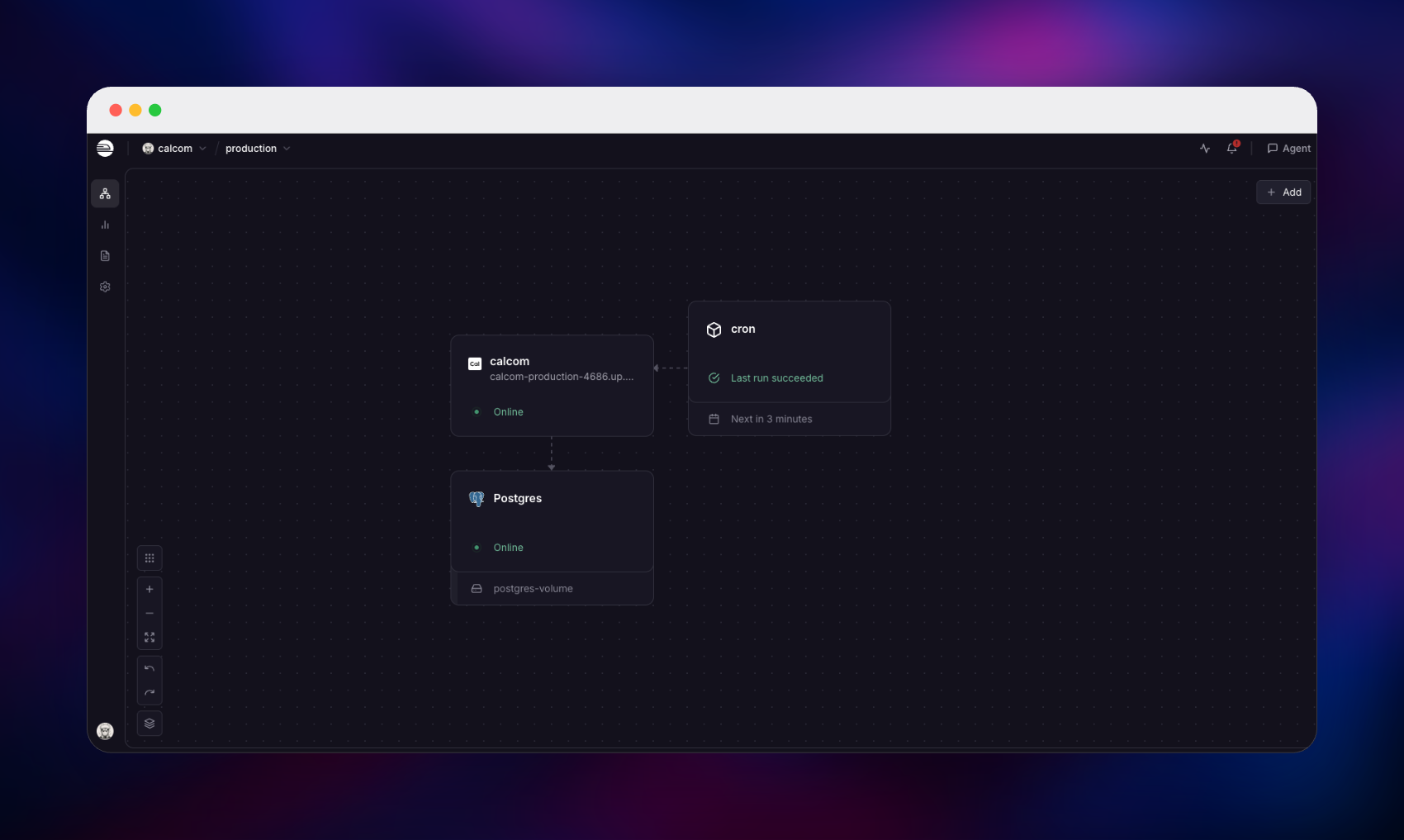
Getting Started with Cal.com on Railway
Once the deploy is green, open the public URL. A fresh instance has no users, so every route redirects to /auth/setup, the one-time administrator wizard — there are no default credentials, and none are created for you. It asks for a username, full name, email and password; the rule is enforced server-side, so use at least 15 characters with mixed case and one digit. A license step follows, where the free option is preselected and no key is needed. Finishing it signs you in and walks you through your display name, booking slug and availability.
You land on Event types, pre-seeded with 15- and 30-minute meetings. To prove the deployment works end to end, open https:/// in a private window, pick an event type and book as a guest. A working instance shows This meeting is scheduled, lists it under Bookings → Upcoming, and drops that slot from the public calendar on refresh.
Two things to do before sharing the link: add SMTP credentials (EMAIL_SERVER_HOST, EMAIL_SERVER_PORT, EMAIL_SERVER_USER, EMAIL_SERVER_PASSWORD, EMAIL_FROM) so confirmations get delivered, and close self-registration — open by default — with the disable-signup flag under Settings → Admin → Feature flags.
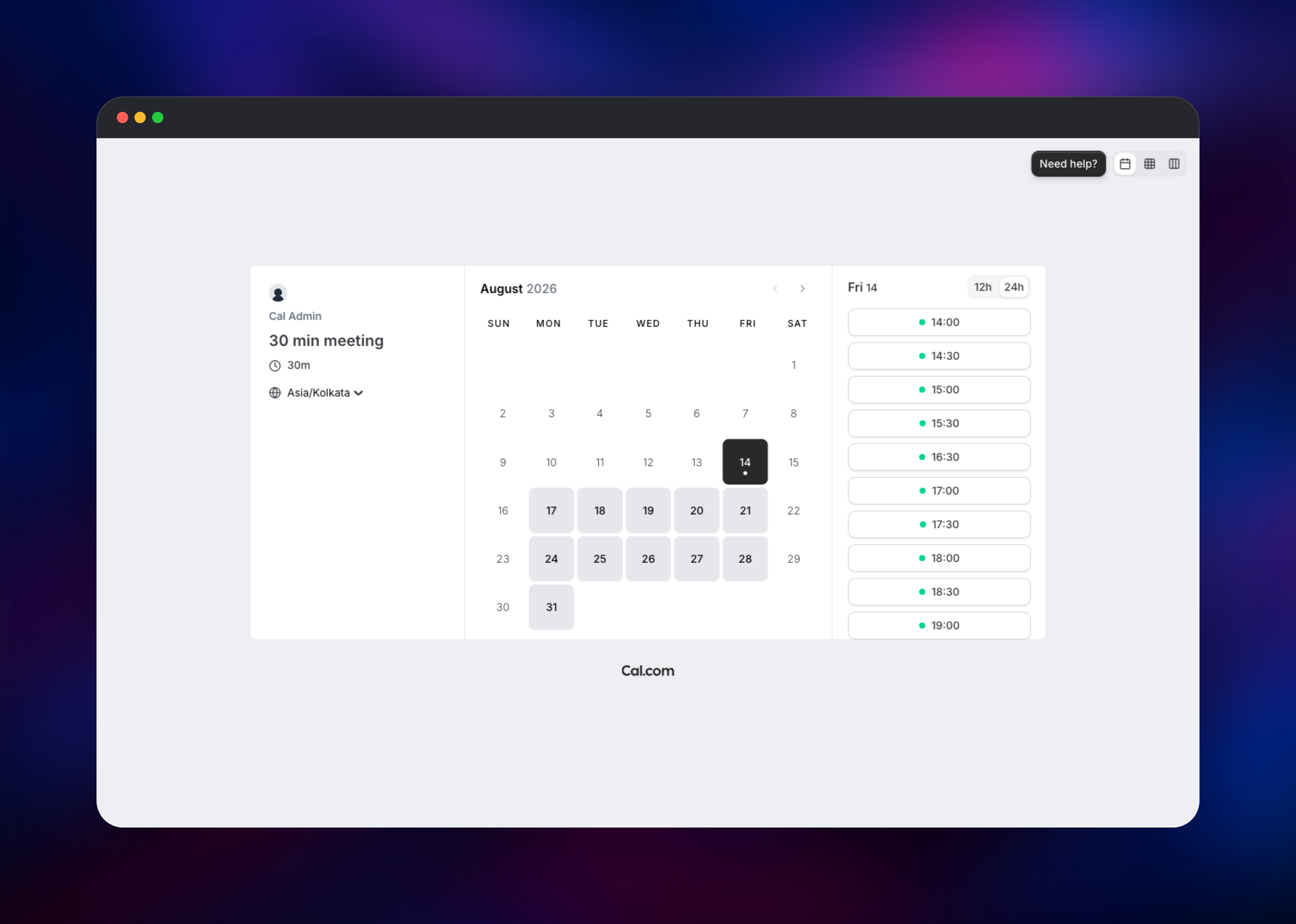
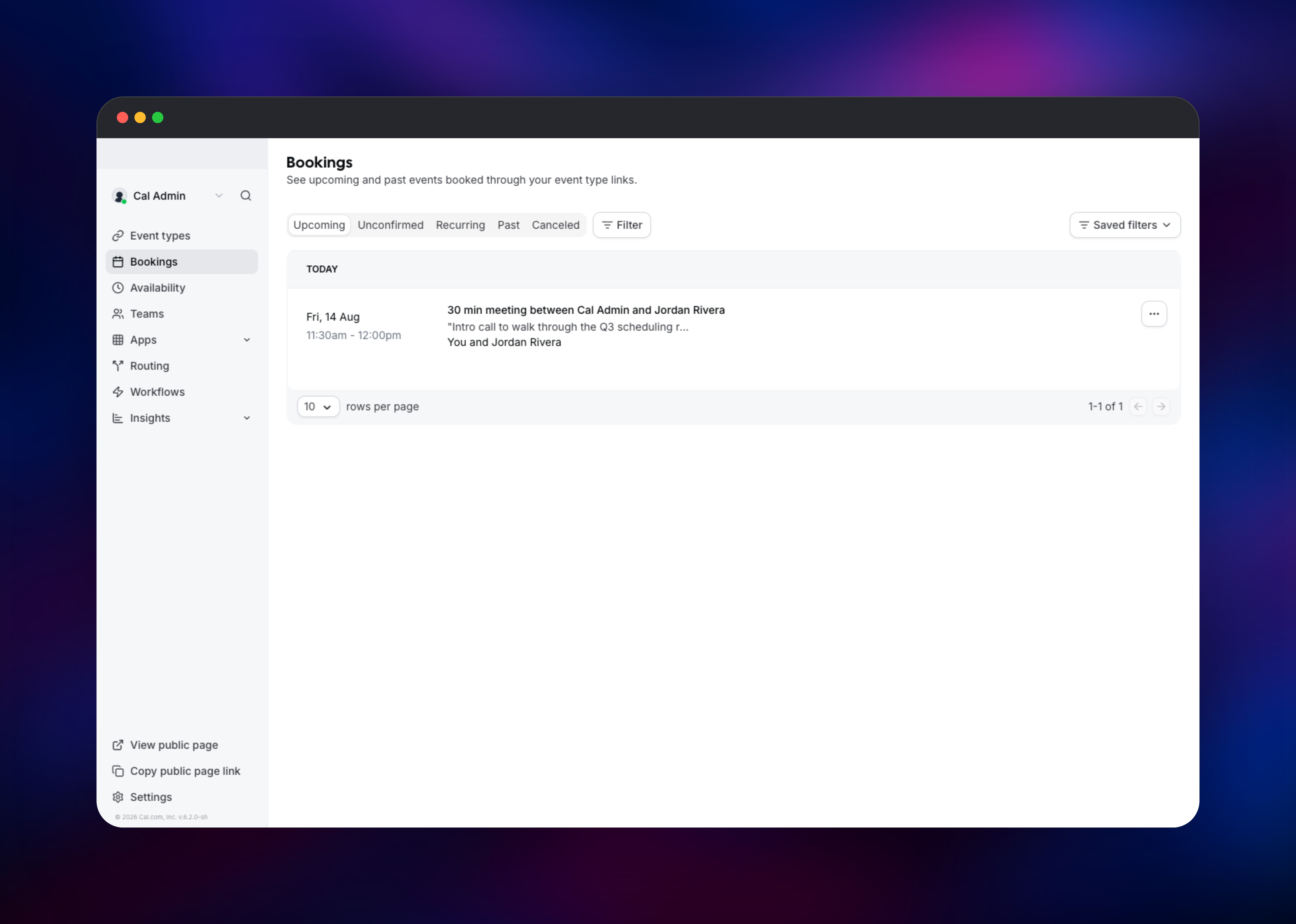
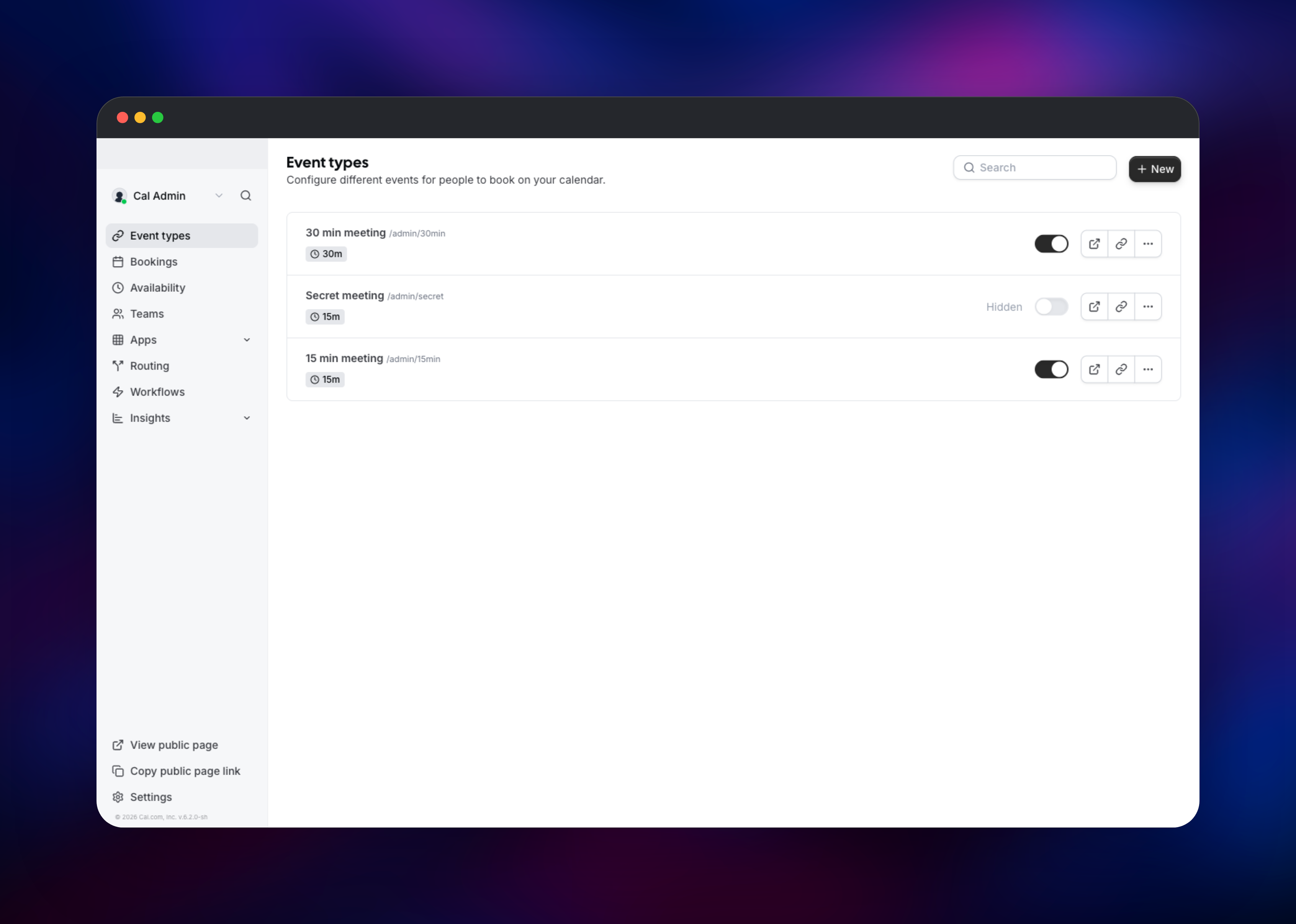
About Hosting Cal.com
Cal.com turns "when are you free?" into a booked, calendared meeting, reading connected calendars for conflicts and projecting your rules into the visitor's timezone. Teams self-host it when booking data is sensitive, when scheduling must be embedded in their own product, or to avoid per-seat pricing.
Key features:
- Personal and team booking pages with per-event durations, buffers and minimum notice
- Two-way calendar sync with Google Calendar, Outlook/Office 365, CalDAV and Apple
- Round-robin and collective team events for sales rotations and interview panels
- Built-in Cal Video plus Zoom, Google Meet and other conferencing integrations
- Custom booking questions, routing forms, recurring and Stripe-paid bookings
- Reminder workflows, webhooks, a REST API and embeddable widgets
The web service is a Next.js app serving the public booking pages and the dashboard from one process, so there is no separate frontend to keep in sync. Postgres is the only durable store, so no volume is attached.
Why Deploy Cal.com on Railway
Railway removes the operational work around a scheduling app that must stay reachable.
- Managed Postgres provisioned and wired to the app automatically
- HTTPS domain issued on deploy, used directly for booking links
- Private networking keeps the database and scheduler off the internet
- Built-in cron scheduling, so no external job runner is needed
- Scaling, metrics and redeploys that reapply migrations safely
Common Use Cases
- Sales teams running round-robin demo booking with lead-routing questions
- Recruiting where panel availability spans several interviewers
- Embedded scheduling — a booking widget under your own domain
- Privacy-sensitive practices that cannot send client details to a third party
Dependencies for Cal.com
- Cal.com —
calendso/calendso:latest, the full web application on port 3000 - Postgres — Railway managed PostgreSQL, storing users, event types, schedules, bookings and encrypted calendar credentials. Cal.com runs
prisma migrate deployon every boot, so the schema upgrades automatically. - cron —
curlimages/curl:lateston*/15 * * * *, calling/api/cron/*with a shared API key privately
Environment Variables Reference
| Variable | Purpose |
|---|---|
DATABASE_URL | Postgres connection string used by the app |
DATABASE_HOST | host:port awaited before migrations run |
NEXT_PUBLIC_WEBAPP_URL | Public base URL; rewritten into the frontend on boot |
NEXTAUTH_SECRET | Signs session cookies — changing it logs everyone out |
CALENDSO_ENCRYPTION_KEY | Encrypts calendar credentials; exactly 32 characters |
CRON_API_KEY | Authenticates the scheduled-job endpoints |
Deployment Dependencies
- Source: github.com/calcom/cal.diy · image: calendso/calendso · docs: cal.com/docs/self-hosting
- Runtime: Node.js 20, Next.js, Prisma, PostgreSQL
Hardware Requirements for Self-Hosting Cal.com
Cal.com is a Next.js application, so memory matters more than CPU. First boot is heaviest, applying the full migration history.
| Resource | Minimum | Recommended |
|---|---|---|
| CPU | 1 vCPU | 2 vCPU |
| RAM | 2 GB | 4 GB |
| Storage | 1 GB (database only) | 5 GB+ as bookings grow |
| Runtime | Node.js 20 + PostgreSQL 13+ | Node.js 20 + PostgreSQL 16+ |
No volume is required — Postgres holds all state, including avatars.
Self-Hosting Cal.com with Docker
To run Cal.com elsewhere, point the official image at a PostgreSQL database:
docker run -d --name calcom -p 3000:3000 \
  -e DATABASE_URL="postgresql://user:pass@db:5432/calcom" \
  -e DATABASE_DIRECT_URL="postgresql://user:pass@db:5432/calcom" \
  -e DATABASE_HOST="db:5432" \
  -e NEXT_PUBLIC_WEBAPP_URL="https://cal.example.com" \
  -e NEXTAUTH_URL="https://cal.example.com" \
  -e NEXTAUTH_SECRET="$(openssl rand -base64 32)" \
  -e CALENDSO_ENCRYPTION_KEY="$(openssl rand -base64 24)" \
  calendso/calendso:latest
CALENDSO_ENCRYPTION_KEY must be exactly 32 characters, which is what openssl rand -base64 24 produces — a longer value breaks credential encryption.
Background jobs are not scheduled inside the container, so call the endpoints on a timer:
*/15 * * * * curl -sS -X POST \
  -H "authorization: $CRON_API_KEY" \
  https://cal.example.com/api/cron/bookingReminder
How Much Does Cal.com Cost to Self-Host?
Cal.com is open source and free to self-host — main is MIT licensed and the published release is AGPLv3, with no license key required for booking pages, teams, calendar sync or workflows. Paid cloud plans and the enterprise license cover hosted convenience plus extras such as SAML single sign-on and organizations. Self-hosting on Railway costs only infrastructure: a small web container, a managed Postgres instance and a briefly-running cron container.
FAQ
What is Cal.com? Cal.com is open-source scheduling infrastructure. It publishes booking pages, calculates availability from your rules and connected calendars, and creates confirmed meetings — Calendly's job, but self-hostable.
What does this Railway template deploy?
Three services: the Cal.com web app from the calendso/calendso image with a public HTTPS domain, a managed PostgreSQL database, and a cron service calling the scheduled-job endpoints every 15 minutes.
How do I create the first admin account on self-hosted Cal.com?
Open the deployed URL and you are redirected to /auth/setup, which creates the first administrator. It works only while the instance has zero users, and the password must be 15+ characters with mixed case and a digit.
Why does this template include a PostgreSQL database? Postgres is the only place Cal.com keeps state — users, event types, schedules, bookings and encrypted calendar credentials. The app migrates it at startup, so no manual setup is needed.
Do I need an SMTP server to run Cal.com? No — email verification is off by default when self-hosting, so signup and booking work without one. Nobody receives confirmations until you add SMTP credentials.
Why is there a separate cron service in this template?
Cal.com does not run background jobs in-process. Reminders, webhooks and workflow emails are endpoints under /api/cron/ that something external must call on a schedule.
How do I stop strangers from signing up on my instance?
Sign in as the administrator, open Settings → Admin → Feature flags and enable disable-signup. That flag blocks both the signup page and the registration API. The equivalent environment variable is baked in at build time and has no runtime effect.
Template Content


