
Deploy Cap
Screen recorder that turns recordings into shareable video links
cap-web
Just deployed
cap-scheduler
Just deployed

MySQL
Just deployed
/var/lib/mysql
cap-media-server
Just deployed
cap-storage
Bucket
Just deployed
Deploy and Host Cap on Railway
Cap is an open-source screen recorder and video-sharing platform — the self-hostable answer to Loom. You record a walkthrough with the Cap desktop app or browser extension, it uploads to your own server, and anyone with the link watches it in a player with comments, reactions, and analytics. Teams use it for async standups, bug reports, and support replies. Self-host Cap when recordings show customer data or unreleased work that should not sit on a vendor's servers: the videos stay in your own database and object storage, and share links point at your own domain.
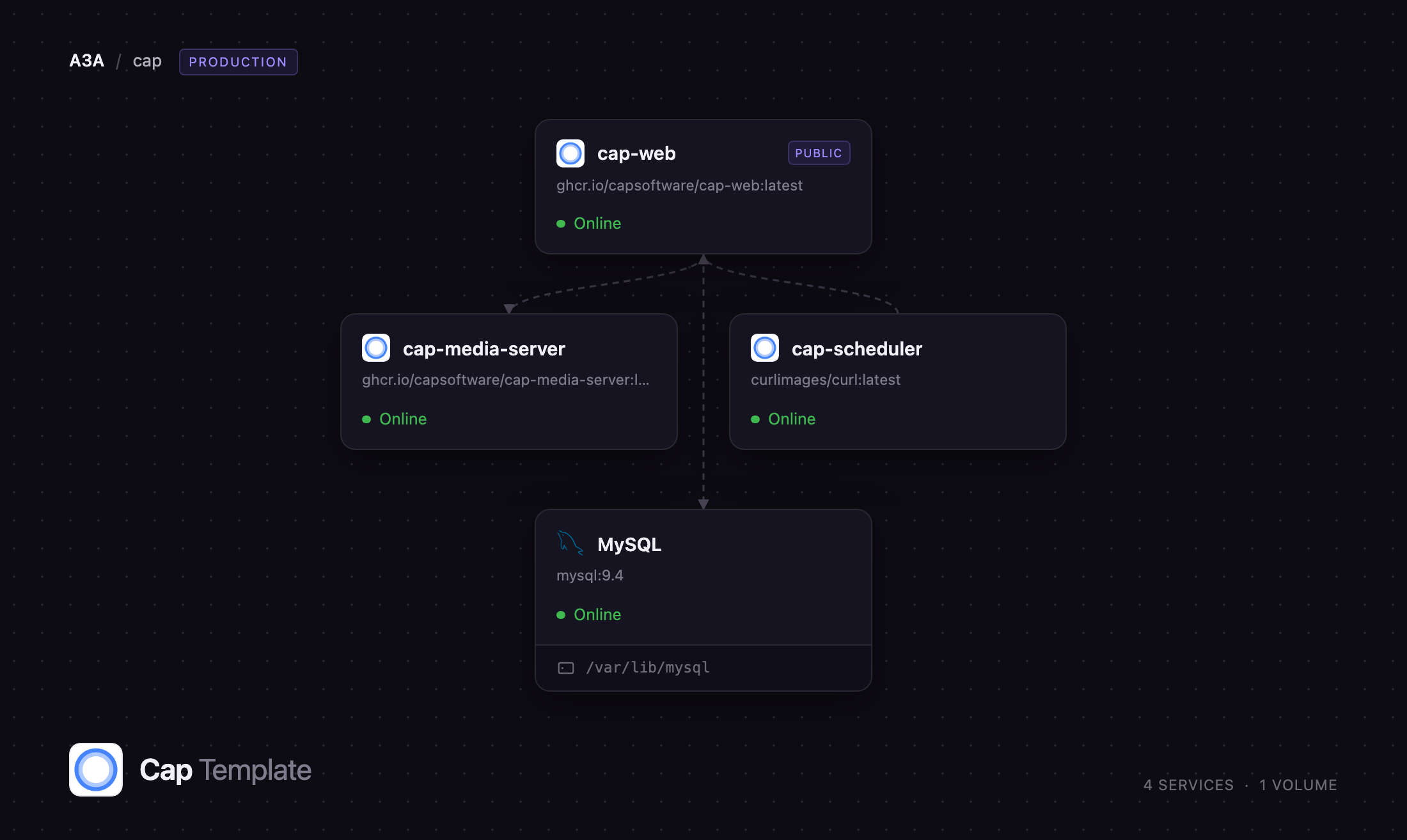
Deploy Cap on Railway and the stack is wired up before you open it: the cap-web app (Next.js) serves the dashboard, share pages, and API on a public URL; a private cap-media-server (Bun + FFmpeg) transcodes each upload into a streamable MP4 with thumbnails and previews; MySQL holds accounts, organizations, video metadata, and comments; and a managed object storage bucket holds the media. A private cap-scheduler calls Cap's recovery endpoints every 15 minutes, so a stalled upload is retried rather than left broken. Uploads and playback use presigned URLs straight to the bucket, so the app never proxies video.
Getting Started with Cap on Railway
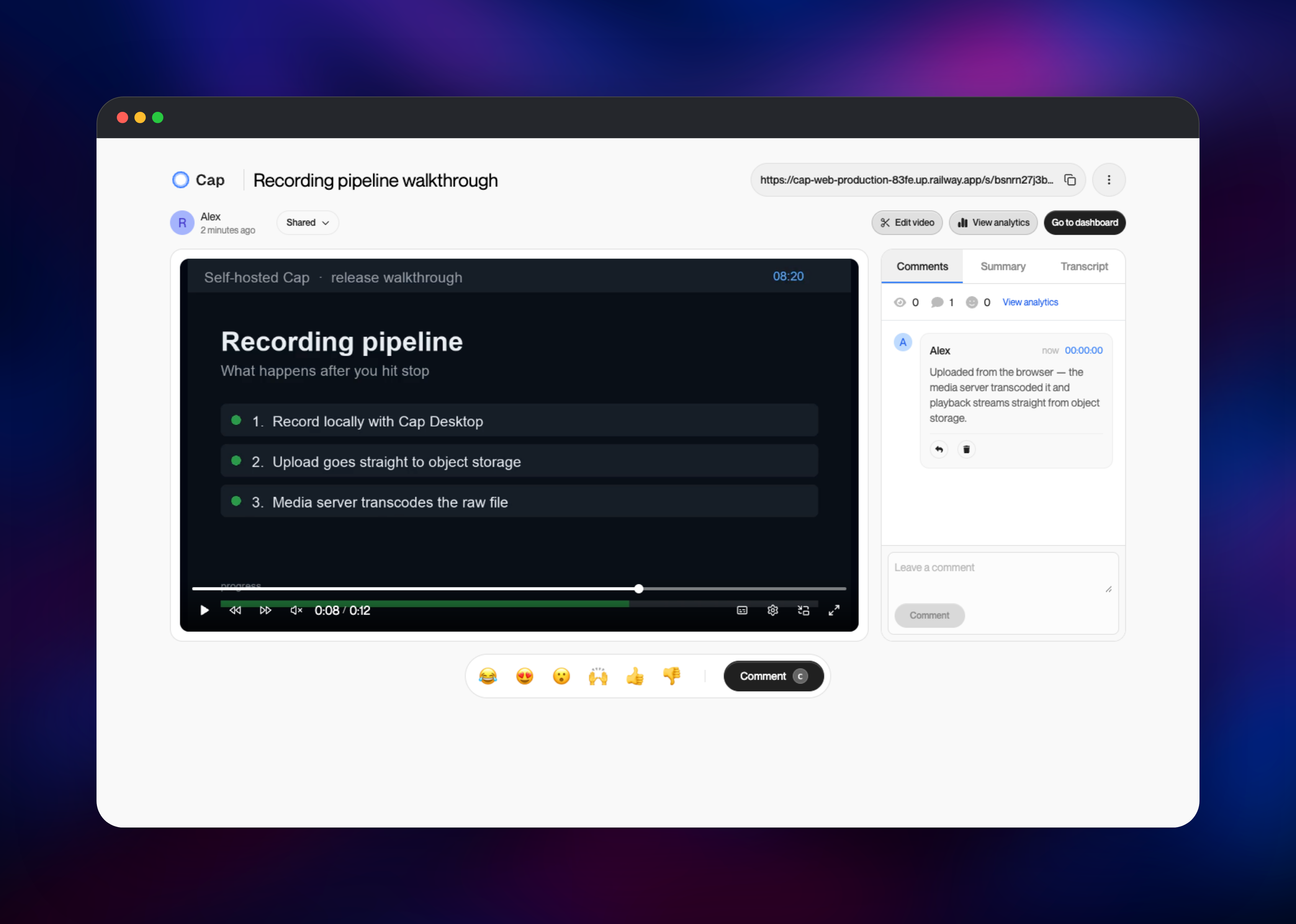
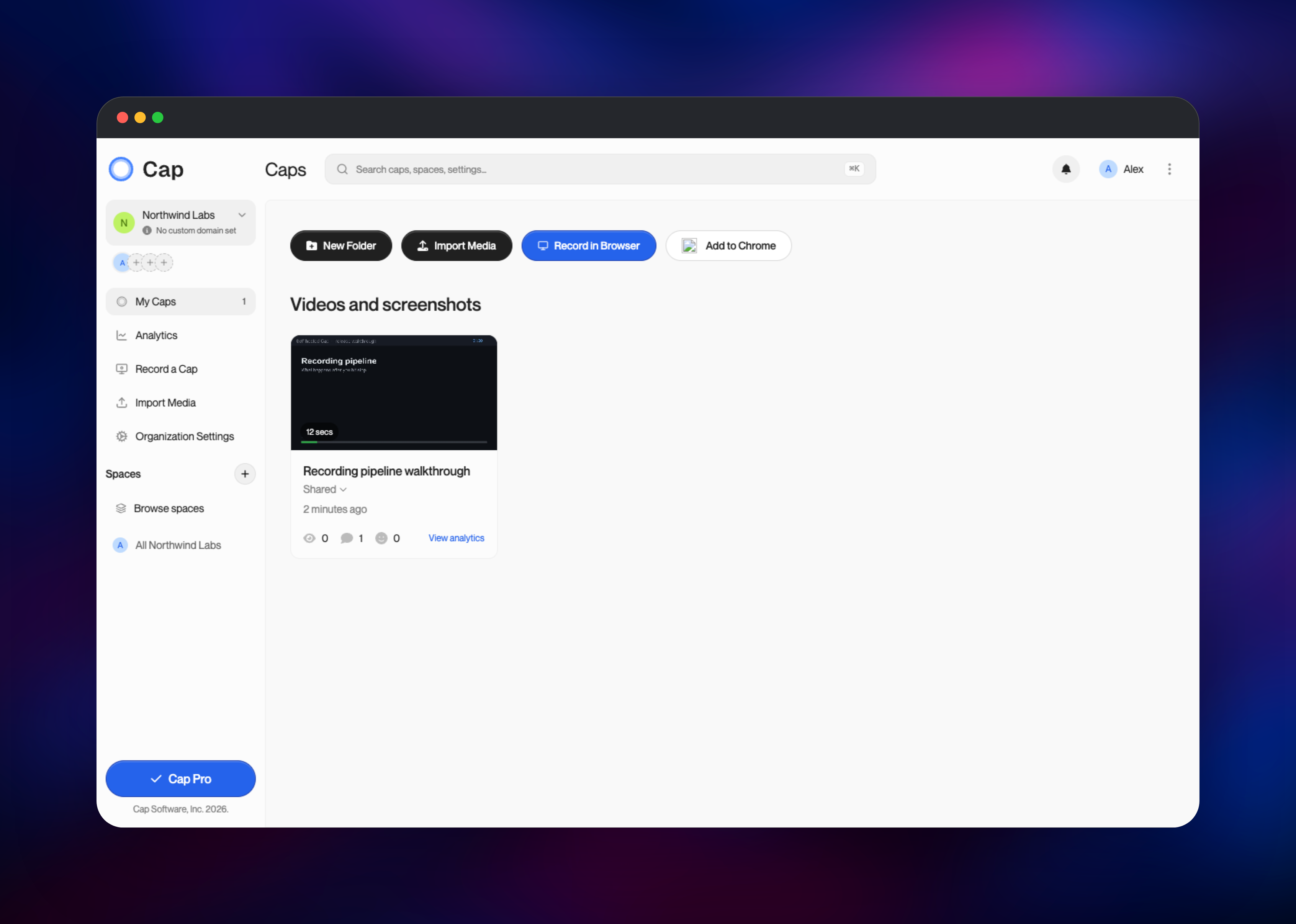
Open the deployed URL and you land on the sign-in page. Cap authenticates with a six-digit email code, and the template ships with no email provider configured, so the first code appears in the cap-web service's Deploy Logs: enter your email, open the logs, and find the VERIFICATION CODE block. That also keeps the instance closed on day one: anyone can type an email, but only someone who can read your logs finishes signing in. The first account through is yours, and onboarding asks for your name and an organization. To check the stack end to end, click Import Media, choose Upload File, and pick any MP4: it uploads to the bucket, the media server transcodes it, and a thumbnail appears within seconds. Open the video, rename it, comment, and try the share link in a logged-out browser. Then point Cap Desktop's Cap Server URL at your deployment, and add RESEND_API_KEY and RESEND_FROM_DOMAIN when teammates need login codes by email.
About Hosting Cap
Cap Web is the server half of Cap: the desktop and mobile apps record locally, then hand the file to this service, which stores it, processes it, and hosts the share page. Self-hosting matters more here than for most tools, since a screen recording is often the most sensitive artifact a team produces.
Key features:
- Share pages with threaded comments, emoji reactions, and timestamped replies
- Organizations, spaces, and folders for grouping recordings
- Custom domains for share links, and Loom import for an existing library
- Optional transcription and AI summaries with a provider key
The architecture splits the work: cap-web handles requests and signs storage URLs; the media server does the CPU-heavy FFmpeg work in its own container, so a long transcode never blocks the app; MySQL is the source of truth for everything but the media; the bucket holds raw uploads, transcoded MP4s, thumbnails, and previews; the scheduler re-runs Cap's recovery jobs.
Why Deploy Cap on Railway
Railway removes the parts of self-hosting Cap that are not about video:
- TLS, a public domain, and private networking are set up for you
- Managed MySQL on a persistent volume for your metadata
- Managed object storage — no MinIO container, no second volume
- Transcoding runs in its own service you can scale independently
- One-click redeploys when a new Cap image ships
Common Use Cases
- Async engineering updates — demo a branch, drop the link in a pull request, collect timestamped comments instead of a call
- Customer support replies — send a walkthrough instead of numbered steps
- Internal documentation — keep onboarding and runbook videos in your own infrastructure
Dependencies for Cap
ghcr.io/capsoftware/cap-web:latest— the Next.js app: dashboard, share pages, API, and the migrations that run at bootghcr.io/capsoftware/cap-media-server:latest— Bun + FFmpeg service that transcodes uploads and makes thumbnailscurlimages/curl:latest— loop that calls Cap's recovery endpoints on a schedule- Railway managed MySQL 9.4 — users, organizations, videos, comments
- Railway managed object storage bucket — uploads, MP4s, thumbnails, previews
Environment Variables Reference
| Variable | Purpose |
|---|---|
WEB_URL / NEXTAUTH_URL | Public URL for share links and sessions |
NEXTAUTH_SECRET | Signs session tokens |
DATABASE_ENCRYPTION_KEY | Encrypts stored credentials, 64 hex characters |
CAP_AWS_* / S3_* | Bucket name, region, keys, and endpoints |
MEDIA_SERVER_URL / MEDIA_SERVER_WEBHOOK_SECRET | Address of the transcoder and its shared secret |
CAP_VIDEOS_DEFAULT_PUBLIC | New recordings shareable by link |
CAP_ALLOWED_SIGNUP_DOMAINS | Optional allow-list of email domains |
RESEND_API_KEY / RESEND_FROM_DOMAIN | Optional email delivery for login codes |
Deployment Dependencies
- Source repository:
- Self-hosting documentation:
- Container images:
- Desktop apps:
Hardware Requirements for Self-Hosting Cap
| Resource | Minimum | Recommended |
|---|---|---|
| CPU | 2 vCPU total | 4+ vCPU, most of it on the media server |
| RAM | 2 GB total | 4–8 GB, media server scaled first |
| Storage | 1 GB MySQL volume | 5 GB+ volume, bucket grows with your library |
| Runtime | Node 24 / Bun 1.3 with FFmpeg | Same, provided by the images |
Transcoding is the only expensive step and reads the container's limits directly, so give the media server more resources before the app.
Self-Hosting Cap with Docker
Upstream ships a Compose file that runs the same pieces locally, with MySQL and MinIO instead of managed services:
git clone https://github.com/CapSoftware/Cap.git
cd Cap
docker compose up -d
To point the published image at a database and bucket you already run, pass its URL, secrets, and S3 settings:
docker run -d --name cap-web -p 3000:3000 \
  -e WEB_URL=https://cap.example.com -e NEXTAUTH_URL=https://cap.example.com \
  -e NEXTAUTH_SECRET=$(openssl rand -hex 32) \
  -e DATABASE_ENCRYPTION_KEY=$(openssl rand -hex 32) \
  -e DATABASE_URL=mysql://cap:password@mysql:3306/cap \
  -e CAP_AWS_BUCKET=cap -e CAP_AWS_REGION=us-east-1 \
  -e CAP_AWS_ACCESS_KEY=key -e CAP_AWS_SECRET_KEY=secret \
  -e S3_PUBLIC_ENDPOINT=https://s3.example.com \
  ghcr.io/capsoftware/cap-web:latest
DATABASE_ENCRYPTION_KEY must be exactly 64 hexadecimal characters; the template generates one, so there is nothing to compute before deploying.
How Much Does Cap Cost to Self-Host?
Cap is open source, and self-hosting Cap Web costs nothing in licence fees; the hosted plan and desktop licence at cap.so are optional. On Railway you pay for what the four services and the bucket consume — a few dollars a month plus storage for a small team, since transcoding is the only bursty part. Recording, sharing, comments and analytics need no third-party keys; transcription and AI summaries bill against whichever provider key you add.
FAQ
What is Cap?
Cap is an open-source screen recording and video-sharing platform, a Loom alternative. You record with the desktop app or extension and share a link that plays in any browser, with comments and analytics attached.
What does this Railway template deploy?
Four services and one bucket: the web app on a public URL, a private media server for FFmpeg transcoding, a private scheduler for Cap's recovery jobs, managed MySQL, and managed object storage for the videos.
How do I sign in to a self-hosted Cap for the first time?
Enter any email on the sign-in page, then read the six-digit code from the cap-web Deploy Logs. Add RESEND_API_KEY and RESEND_FROM_DOMAIN to deliver codes by email instead, and CAP_ALLOWED_SIGNUP_DOMAINS to restrict who may register once email works.
Why does the template include MySQL and object storage?
Cap keeps two kinds of state: accounts, organizations, videos and comments live in MySQL, while the recordings are large files that belong in object storage, where uploads and playback run on presigned URLs.
Can I scale Cap on Railway?
Scale the media server freely — it is stateless and does the heavy work. Keep the web app at one replica, since it runs migrations at startup; raise its CPU and memory instead.
Troubleshooting
"Record in Browser" does nothing — that button loads a WebAssembly module the current published image does not serve correctly. Record with Cap Desktop or use Import Media; both work normally.
A video stays on "processing" — look for POST /video/process in the media server's logs. If it never arrives, MEDIA_SERVER_URL or the shared secret is wrong; the scheduler retries stalled uploads every 15 minutes once that is fixed.
Template Content
cap-scheduler
curlimages/curl:latestMySQL
mysql:9.4cap-media-server
ghcr.io/capsoftware/cap-media-server:latestcap-storage
Bucket


