
Deploy Cobalt Tools + YT - Complete Setup
Complete Cobalt web UI with reliable long-form YouTube support
Cobalt Tools - Complete Setup

Just deployed
Just deployed
Deploy and Host Cobalt Tools + YT - Complete Setup on Railway
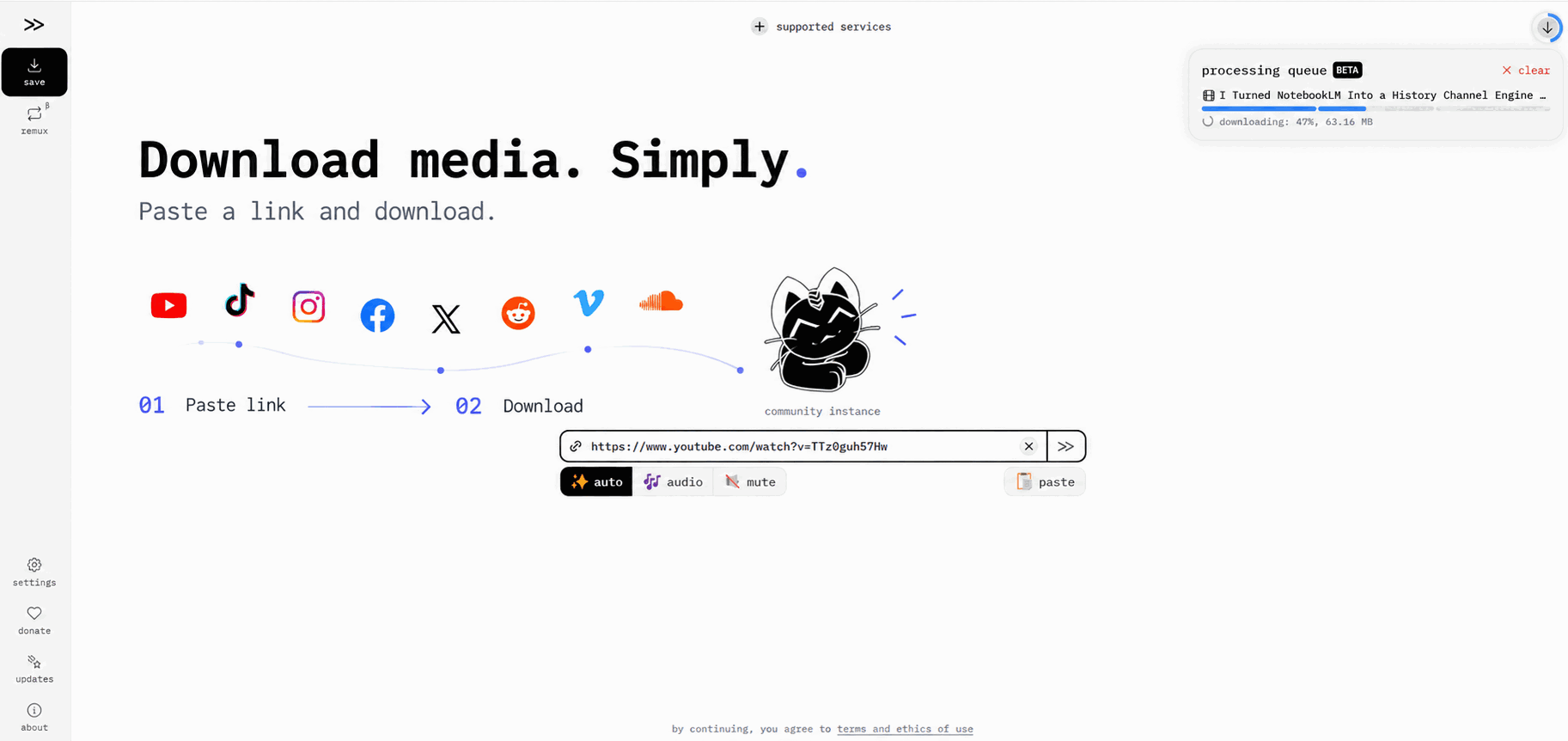
Deploy a complete, browser-ready Cobalt media downloader with a responsive web interface and improved YouTube support. Paste a supported public-media link, select video, audio, or mute, choose the available quality, and download directly from your browser. This setup is designed to handle both ordinary long-form YouTube videos and Shorts—not just API requests.
About Hosting Cobalt Tools + YT - Complete Setup
Cobalt is an open-source media processing service that turns supported public-media links into downloadable video or audio. This Railway template deploys the complete user-facing experience as two coordinated services:
- web — the responsive Cobalt interface where users paste links and select download options.
- api — the processing service that resolves media, streams downloads, remuxes video and audio when required, and exposes an API for integrations.
Railway generates HTTPS domains automatically and connects the web interface to the API with reference variables. Ports, CORS, health checks, processing limits, and YouTube compatibility settings are preconfigured.
The default deployment requires no database, Redis instance, persistent volume, cookie file, external API key, or manual variable entry.
What Makes This Template Different
Many basic Cobalt deployments can download from several platforms but fail on normal YouTube videos with an empty file tunnel, a zero-byte file, or a bot-verification error. Shorts may still work, which can hide the problem during a quick test.
This template uses the actively maintained zImPatrick Cobalt compatibility branch with:
- Dynamic YouTube proof-of-origin token generation
- The
TV_SIMPLYInnerTube client - YouTube Onesie media delivery
- Server-side video/audio processing and remuxing
- A ready-to-use browser UI
The configuration was validated on Railway with both a YouTube Short and a normal long-form YouTube video. The long-form test completed successfully at 1080p as a 529.71 MB MP4 without enabling a custom processing server in the browser.
YouTube changes frequently, so no self-hosted template can promise permanent compatibility with every video, region, account restriction, or future platform update. This setup provides a materially stronger starting point than the standard API-only or static-session configuration.
Common Use Cases
- Download videos you own or are authorized to save
- Export publicly available media in supported video or audio formats
- Run a private, browser-based downloader for personal or internal team use
- Connect n8n, scripts, agents, or internal applications to your own Cobalt API
- Avoid dependence on a shared public processing instance
- Inspect requests, deployments, resource usage, and errors through Railway
- Use one deployment for YouTube, TikTok, Instagram, Facebook, X, Reddit, Vimeo, SoundCloud, and other services supported by the included Cobalt build
Production Architecture
Browser → web (public HTTPS, port 8787) → api (public HTTPS, port 9000)
The frontend receives the API domain automatically through WEB_DEFAULT_API. The API generates fresh YouTube PoTokens internally when required and uses the Onesie path for protected long-form streams. There is no separate session-generator service to configure or maintain.
Preconfigured Defaults
- API port:
9000 - Web port:
8787 - Public API URL: generated automatically by Railway
- Maximum media duration:
10800seconds - Standard API rate limit: 20 requests per 60 seconds
- Session rate limit: 10 requests per 60 seconds
- Tunnel rate limit: 40 requests per 60 seconds
- Tunnel metadata lifespan: 90 seconds
- CORS wildcard: enabled for the bundled web interface
- YouTube InnerTube client:
TV_SIMPLY - Dynamic YouTube PoToken generation: enabled
- YouTube Onesie delivery: enabled
- ffmpeg processing priority:
10 - Local/server processing behavior: selectable by the client
Every required variable has a Railway Marketplace description. All service URLs use Railway reference variables, so deployers do not need to copy domains manually.
Dependencies for Cobalt Tools + YT - Complete Setup Hosting
- A Railway account with sufficient usage allowance for two continuously running services
- Public access to
ghcr.io/spotdemo4/cobalt-web:latestfor the browser interface - Public access to
ghcr.io/zimpatrick/cobalt:stagingfor the YouTube-compatible processing API - Outbound internet access from Railway to supported media platforms
The API image is a community-maintained fork of imputnet/cobalt, not an official image from the upstream Cobalt team. Its source is public and retains Cobalt's AGPL-3.0 licensing. Review the source, image provenance, licenses, and update policy before operating a public or commercial instance.
Implementation Details
After deployment, open the public domain attached to the web service. The interface is already connected to the api service; do not enable “use a custom processing server” for the normal template setup.
The API service is also publicly reachable for approved integrations. The default rate limits are intended for light personal or internal use. Before opening an instance to a large audience, add access controls such as Cloudflare Turnstile, API keys, restricted CORS, or an upstream gateway, and monitor bandwidth because large downloads can consume significant Railway egress.
The stack is stateless. Cobalt proxies and processes media without maintaining a permanent media library. Redeploying does not require database migrations or volume recovery.
Responsible Use
Use this template only for media you own, public-domain material, or content you have permission and a lawful right to download. You are responsible for copyright compliance, the source platform's terms, and applicable local law.
This template does not grant rights to third-party content, bypass private or paid content, or guarantee access to every URL.
Why Deploy Cobalt Tools + YT - Complete Setup on Railway?
Railway is a singular platform to deploy your infrastructure stack. Railway will host your infrastructure so you don't have to deal with configuration, while allowing you to vertically and horizontally scale it.
By deploying Cobalt Tools + YT - Complete Setup on Railway, you get the browser interface, processing API, automatic HTTPS, health checks, service discovery, observability, and stronger long-form YouTube compatibility in one reproducible project.
The result is ready to use after deployment without manual domain wiring or browser instance configuration.
Open-Source Projects
- Upstream Cobalt: https://github.com/imputnet/cobalt
- YouTube-compatible Cobalt fork: https://github.com/zImPatrick/cobalt
- Cobalt web image: https://github.com/spotdemo4/cobalt-web
Cobalt and the included fork are licensed under the GNU Affero General Public License v3. Review all included projects and licenses before deployment.
Template Content


