
Deploy ContextForge
Gateway and registry that unifies MCP servers behind one endpoint

Redis
Just deployed
/data

Just deployed
/var/lib/postgresql/data
mcp-context-forge
Just deployed
Deploy and Host MCP Context Forge on Railway
MCP Context Forge — IBM's ContextForge — is an open-source AI gateway and registry for the Model Context Protocol. It sits in front of every MCP server, A2A agent and REST API your team uses and publishes them as one authenticated endpoint, so Claude Desktop, VS Code, Cursor or your own agent framework connects once instead of holding a dozen server definitions and a dozen credentials. It federates remote servers, discovers their tools, composes subsets into virtual servers, and puts JWT auth, rate limiting and metrics in front of all of it.
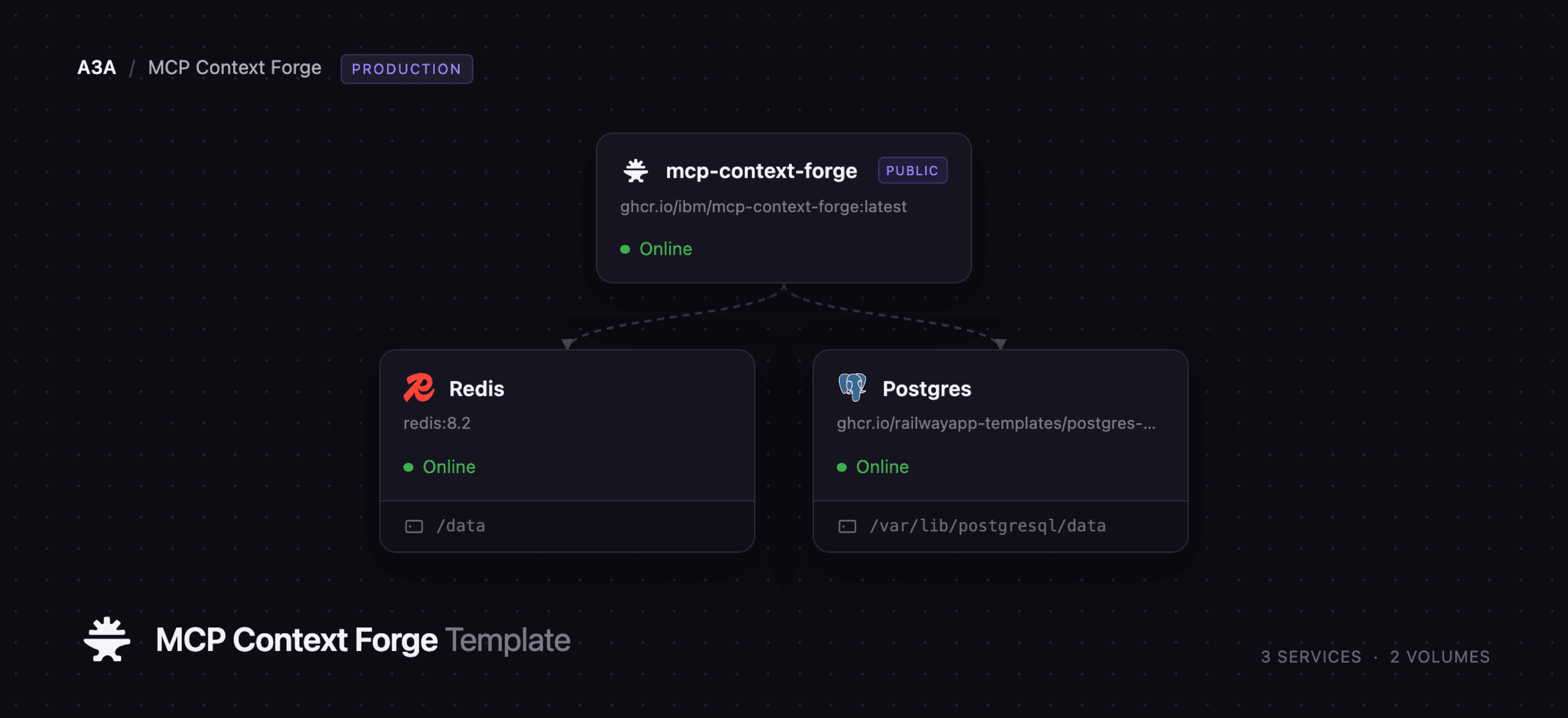
Deploy MCP Context Forge on Railway and you get the production shape, not a single container: mcp-context-forge, the gateway itself, on a public HTTPS URL; Postgres, holding the registry of servers, tools, prompts, users, teams and API tokens; and Redis, backing the cache, the MCP session registry, session affinity across workers and leader election. Browsers and MCP clients arrive over the public domain; everything else stays private. Self-host MCP Context Forge this way and you supply only an admin email and password.
Getting Started with MCP Context Forge on Railway
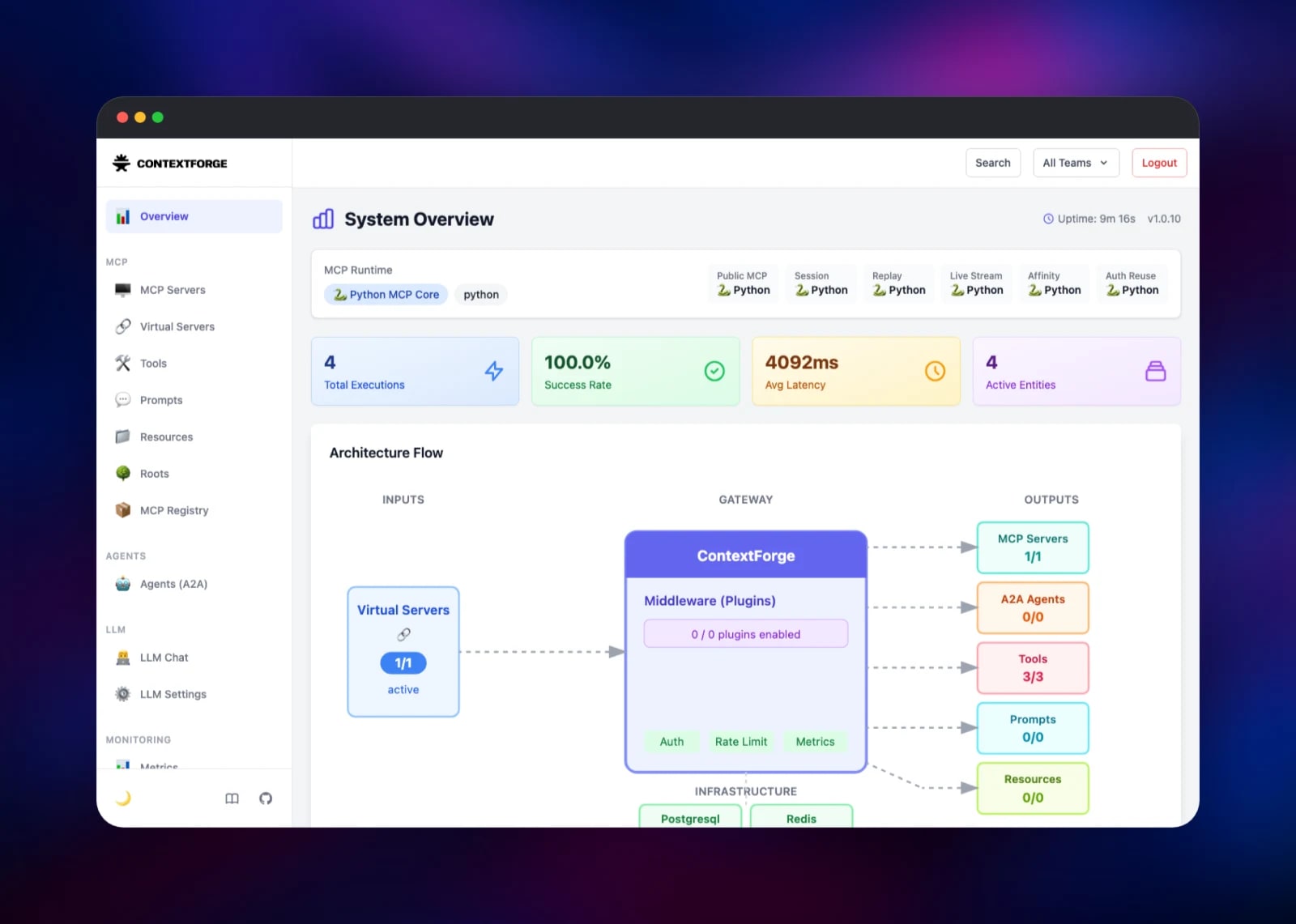
Set PLATFORM_ADMIN_EMAIL and PLATFORM_ADMIN_PASSWORD when you deploy — that account is created on first boot and there is no open registration, so nobody else can claim the instance. Once the deploy is live, open your Railway URL at /admin and sign in. The gateway asks you to set a new password of at least 22 characters mixing three of uppercase, lowercase, digits and symbols, then drops you on the System Overview, where Postgres and Redis should read Connected.
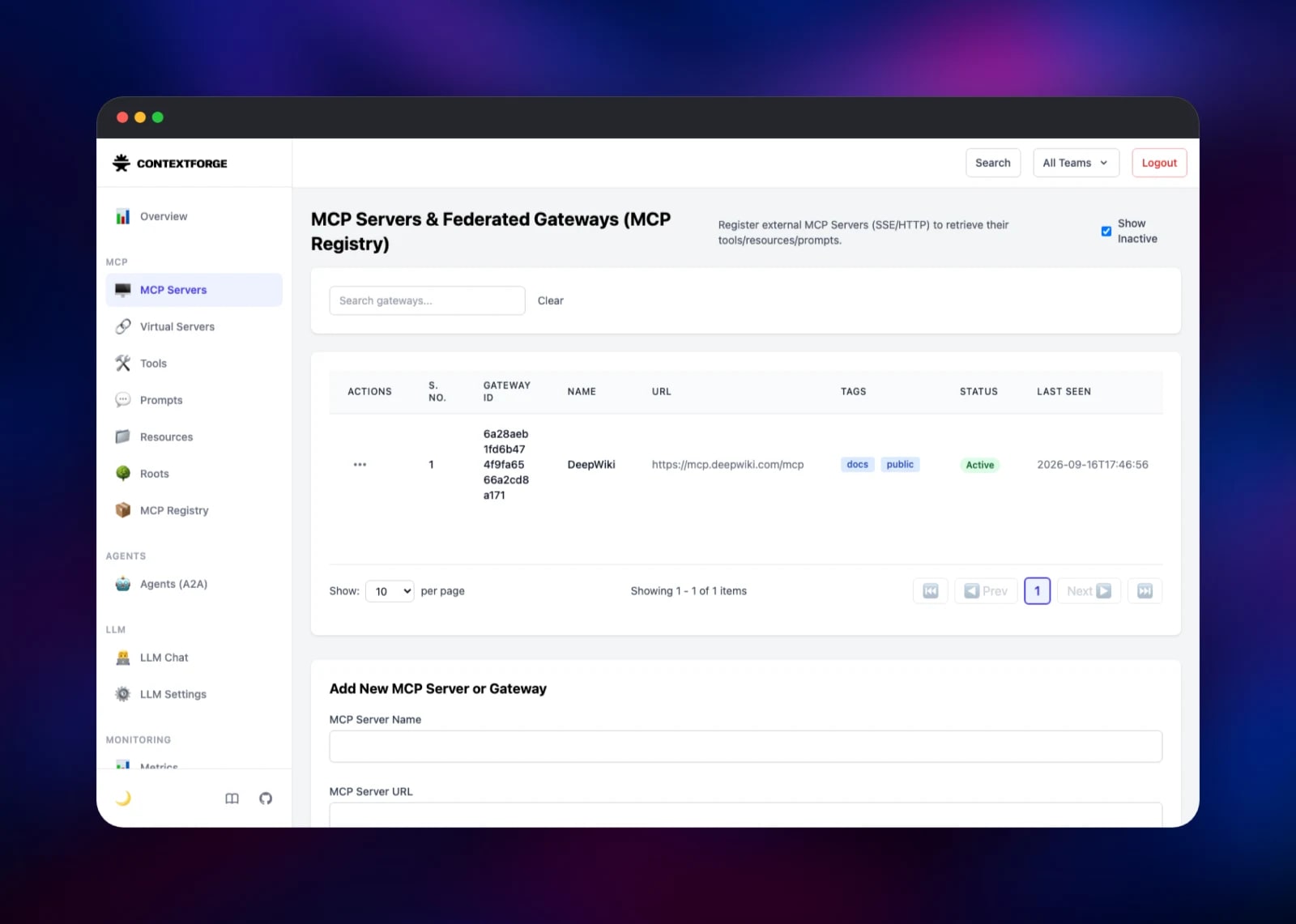
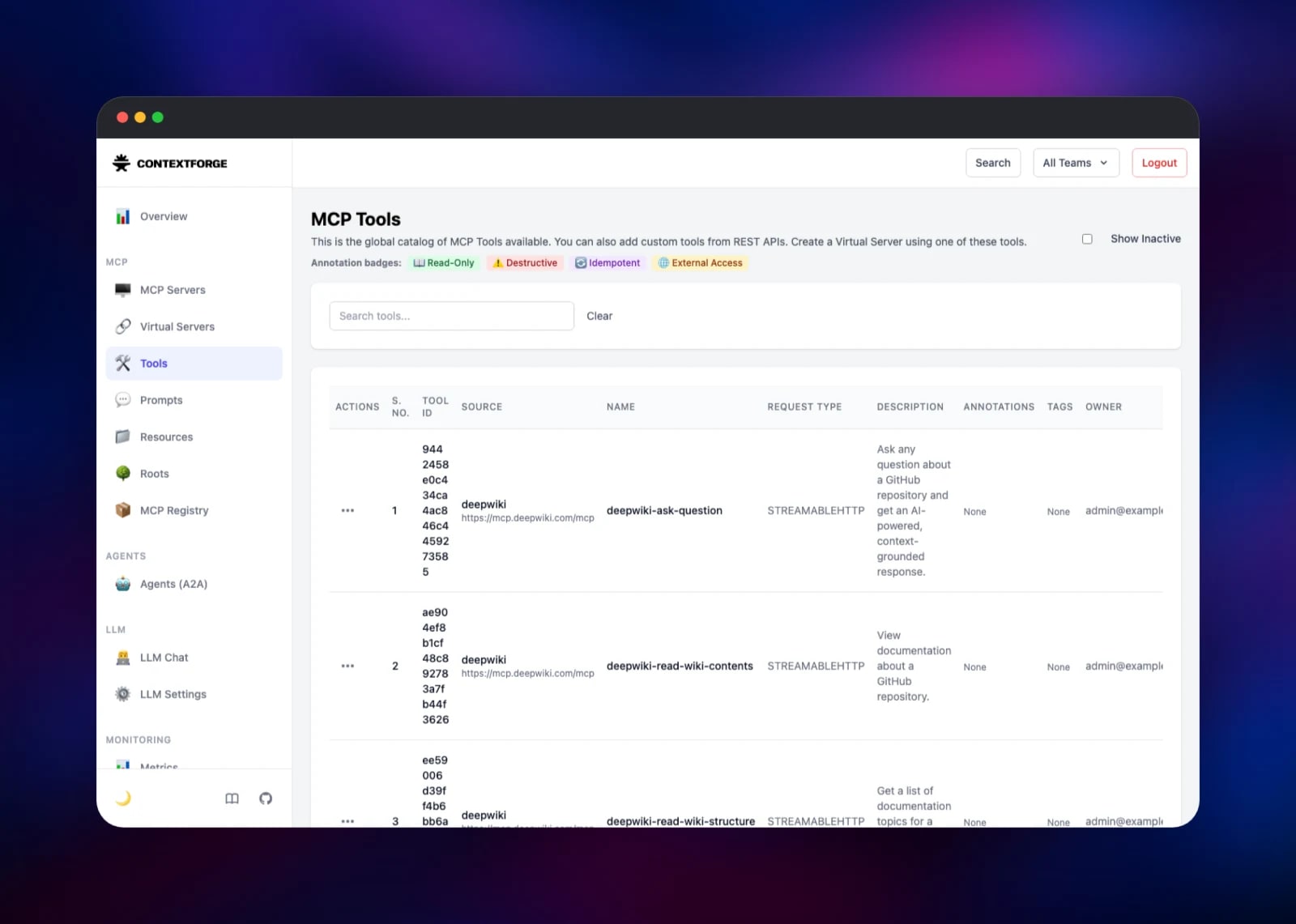
The first useful action is registering an MCP server. Open MCP Servers, scroll to Add New MCP Server or Gateway, and enter a name and URL — https://mcp.deepwiki.com/mcp is a good no-auth server to test with. ContextForge handshakes it, marks it Active and pulls its tools into the Tools catalogue within seconds. Then open Virtual Servers, pick that server, tick the tools to expose and save: that bundle is the endpoint you hand an agent, so a client sees only the tools you chose.
To verify end to end, mint a token under API Tokens and point an MCP client at https://your-app.up.railway.app/mcp with Authorization: Bearer ; every surface except /health answers 401 without one. MCP Registry ships a catalogue of roughly 200 public servers, and Metrics records each invocation.
About Hosting MCP Context Forge
MCP clients were designed to talk to one server at a time, usually a local process. That breaks the moment a team has twenty servers, some remote, some behind OAuth, each with its own credential. ContextForge registers them once, keeps their tool catalogues fresh, and re-publishes everything through one MCP endpoint with real authentication and observability in the path.
- Federation — register remote MCP servers over Streamable HTTP or SSE; tools, prompts and resources are discovered and refreshed automatically
- Virtual servers — compose a subset of federated tools into one named endpoint per team
- REST, gRPC and A2A wrapping — turn an API or agent endpoint into MCP tools
- Auth and multi-tenancy — email login, SSO, scoped JWT tokens, teams, per-token IP limits
- Plugins and observability — PII-redaction and OPA hooks, per-tool metrics, Prometheus
The gateway is a FastAPI application served by Gunicorn with Uvicorn workers. It runs its own Alembic migrations on boot under a database advisory lock, so there is no manual migration step.
Why Deploy MCP Context Forge on Railway
Railway removes most of the setup this stack normally needs:
- Postgres and Redis provisioned and wired over private networking, not by hand
- A free HTTPS domain, so clients reach the gateway over TLS immediately
- Health checks and restarts run against the real
/healthroute - Secrets generated at deploy, versioned per environment
- Scaling is a dashboard change, not a rebuild
Common Use Cases
- One MCP endpoint for a whole org — register every internal and SaaS server once, then hand each team a virtual server scoped to the tools they should see
- Auth in front of tools that have none — many MCP servers ship none; front them with scoped, expiring tokens and per-IP rate limits
- Governance and audit — per-tool metrics, structured logs and hooks that redact PII before a call leaves your network
Dependencies for MCP Context Forge
- mcp-context-forge —
ghcr.io/ibm/mcp-context-forge:latest, the gateway, admin UI and MCP endpoint. Source: IBM/mcp-context-forge (Apache-2.0) - Postgres — Railway managed PostgreSQL 18, storing the registry, identities and metrics
- Redis — Railway managed Redis 8, holding the cache, MCP sessions and affinity routing
Environment Variables Reference
| Variable | Purpose |
|---|---|
PLATFORM_ADMIN_EMAIL | Admin account created on first boot |
PLATFORM_ADMIN_PASSWORD | Its password; 12 chars minimum, rotated at first login |
JWT_SECRET_KEY | Signs API tokens and sessions; 32 characters minimum |
AUTH_ENCRYPTION_SECRET | Encrypts stored upstream credentials; rotating it breaks them |
APP_DOMAIN | Public base URL, for CORS, cookie scope and generated links |
MCPGATEWAY_SESSION_AFFINITY_ENABLED | Routes a session to the worker holding it; required above 1 worker |
GUNICORN_WORKERS | Worker count; each opens its own database pool |
SSRF_ALLOW_PRIVATE_NETWORKS | Set true only for servers on Railway's private network |
Deployment Dependencies
- Image: ghcr.io/ibm/mcp-context-forge · Docs: ibm.github.io/mcp-context-forge · Spec: modelcontextprotocol.io
Hardware Requirements for Self-Hosting MCP Context Forge
| Resource | Minimum | Recommended |
|---|---|---|
| CPU | 1 vCPU | 2–4 vCPU |
| RAM | 1 GB | 2–4 GB |
| Storage | Postgres volume, 1 GB | 5 GB+ as metrics accumulate |
| Runtime | Python 3.12, PostgreSQL 15+, Redis 7+ | — |
Memory scales with GUNICORN_WORKERS; four workers on 2 GB suits a team deployment.
Self-Hosting MCP Context Forge with Docker
The gateway ships as a multi-architecture image, so one container plus Postgres and Redis is enough to try locally. This shell command runs it against an existing database:
docker run -p 4444:4444 -e HOST=0.0.0.0 \
  -e DATABASE_URL="postgresql+psycopg://user:pass@postgres:5432/mcp" \
  -e REDIS_URL="redis://redis:6379/0" -e CACHE_TYPE=redis \
  -e JWT_SECRET_KEY="$(openssl rand -hex 32)" \
  -e AUTH_ENCRYPTION_SECRET="$(openssl rand -hex 32)" \
  -e PLATFORM_ADMIN_EMAIL=admin@example.com \
  -e PLATFORM_ADMIN_PASSWORD="change-this-password" \
  ghcr.io/ibm/mcp-context-forge:latest
To build from source, clone the repository and use the bundled compose stack:
git clone https://github.com/IBM/mcp-context-forge.git
cd mcp-context-forge && make setup && docker compose up -d
make setup writes a .env with generated secrets. The gateway listens on 4444 by default; on Railway it moves to PORT behind the platform's TLS edge.
Is MCP Context Forge Free?
MCP Context Forge is open source under Apache 2.0, with no paid tier, seat limits or feature gating — every capability described here is in the public image. Hosting on Railway costs only the compute and storage the three services use. There is no licence key and no vendor account.
FAQ
What is MCP Context Forge? IBM's open-source gateway, registry and proxy for the Model Context Protocol. It aggregates MCP servers, A2A agents and REST APIs behind one authenticated endpoint with discovery, access control and metrics.
What does this Railway template deploy? Three services: the gateway on a public HTTPS domain, managed PostgreSQL and managed Redis. It migrates its own schema and creates the admin account on first boot.
Why does the template include Postgres and Redis? Postgres is the registry — servers, tools, users, teams, tokens and metrics persist there. Redis is not optional above one worker: it holds MCP sessions, routes affinity traffic between workers and elects one to run background health checks.
How do I connect Claude Desktop or another MCP client to self-hosted MCP Context Forge?
Create an API token in the admin UI, then point the client at https://your-app.up.railway.app/mcp with an Authorization: Bearer header. SSE-only clients use /sse instead.
Can I register an MCP server running elsewhere on Railway?
Yes, but SSRF protection blocks private addresses by default. Set SSRF_ALLOW_PRIVATE_NETWORKS=true to register a sibling by its *.railway.internal hostname; leave it off otherwise.
How do I scale MCP Context Forge?
Raise GUNICORN_WORKERS first, adjusting DB_POOL_SIZE and DB_MAX_OVERFLOW with it — total connections are workers times their sum and must stay under the database limit. Keep session affinity on.
Template Content
Redis
redis:8.2mcp-context-forge
ghcr.io/ibm/mcp-context-forge:latest

