
Deploy Convex Backend
Reactive database and backend for building realtime apps

convex-postgres
Just deployed
/var/lib/postgresql/data
Just deployed
Just deployed
/convex/data
Deploy and Host Convex on Railway
Convex is an open-source reactive backend combining a document database, TypeScript server functions, a scheduler and file storage behind one API. Its defining feature is live queries: when a mutation changes a document, every client subscribed to a query that read it is pushed the new result automatically. Teams building collaborative tools, dashboards and AI chat apps use it to skip REST endpoints, cache invalidation and WebSocket plumbing. You can self-host Convex instead of the managed cloud, keeping data and functions on your own hardware.
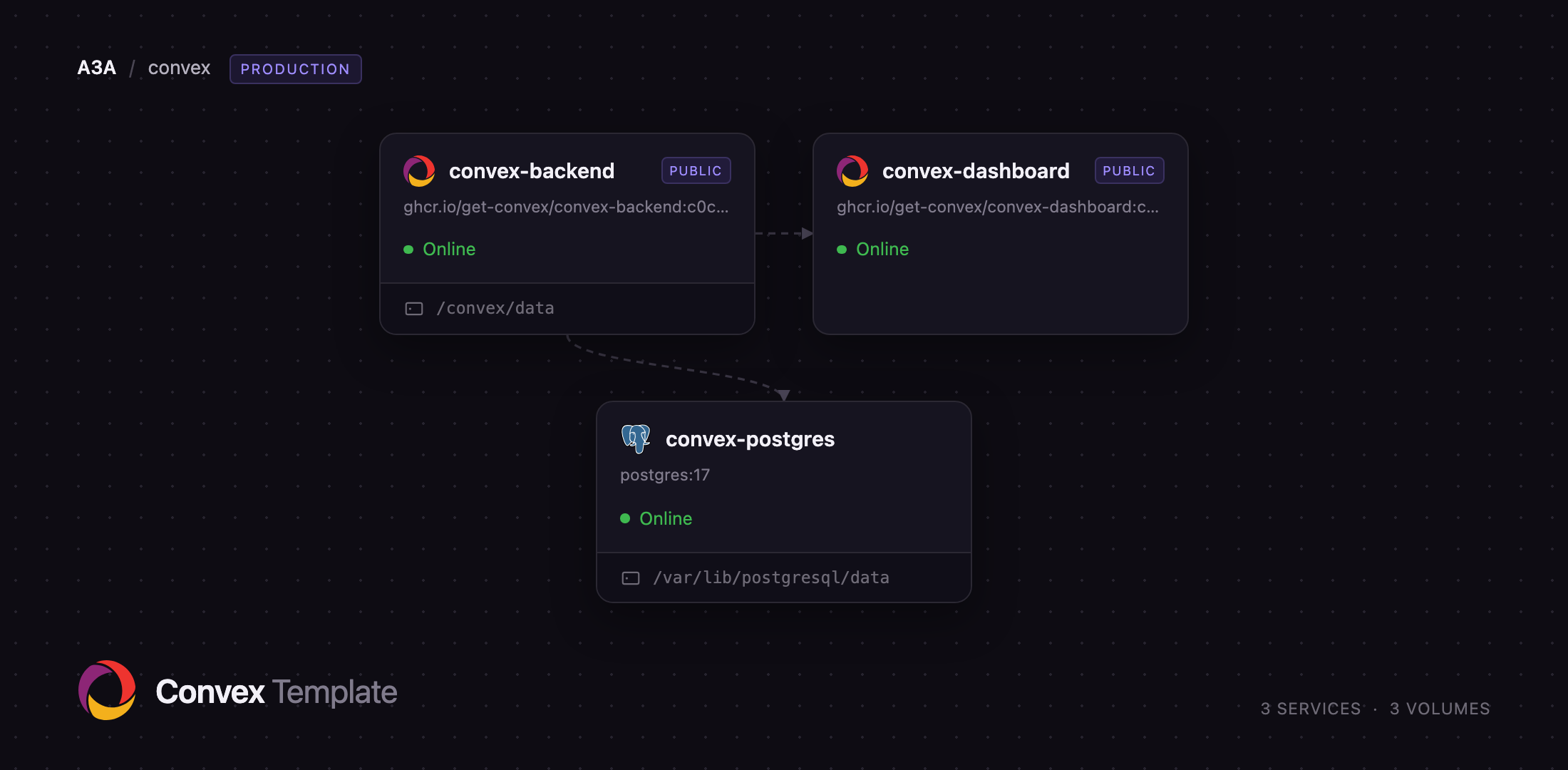
This template deploys a self-hosted Convex stack on Railway as three services. convex-backend stores documents, runs your queries, mutations and actions, and serves the reactive sync protocol on a public URL. convex-postgres is a PostgreSQL 17 database holding every document and index, reachable only on the private network. convex-dashboard is the official admin UI on its own URL, for browsing data, inspecting schema and running functions.
Getting Started with Convex on Railway
When the deploy finishes, open the convex-backend deploy logs and find the block marked ===== CONVEX ADMIN KEY =====. That key is the credential for both the dashboard and the command line, so copy it somewhere safe. Open the convex-dashboard URL: it asks for a deployment URL, pre-filled with your backend address, and an admin key. Paste the key and press Log In. Convex has no default usernames or passwords: the admin key is the whole authentication story, so anyone holding it controls the deployment.
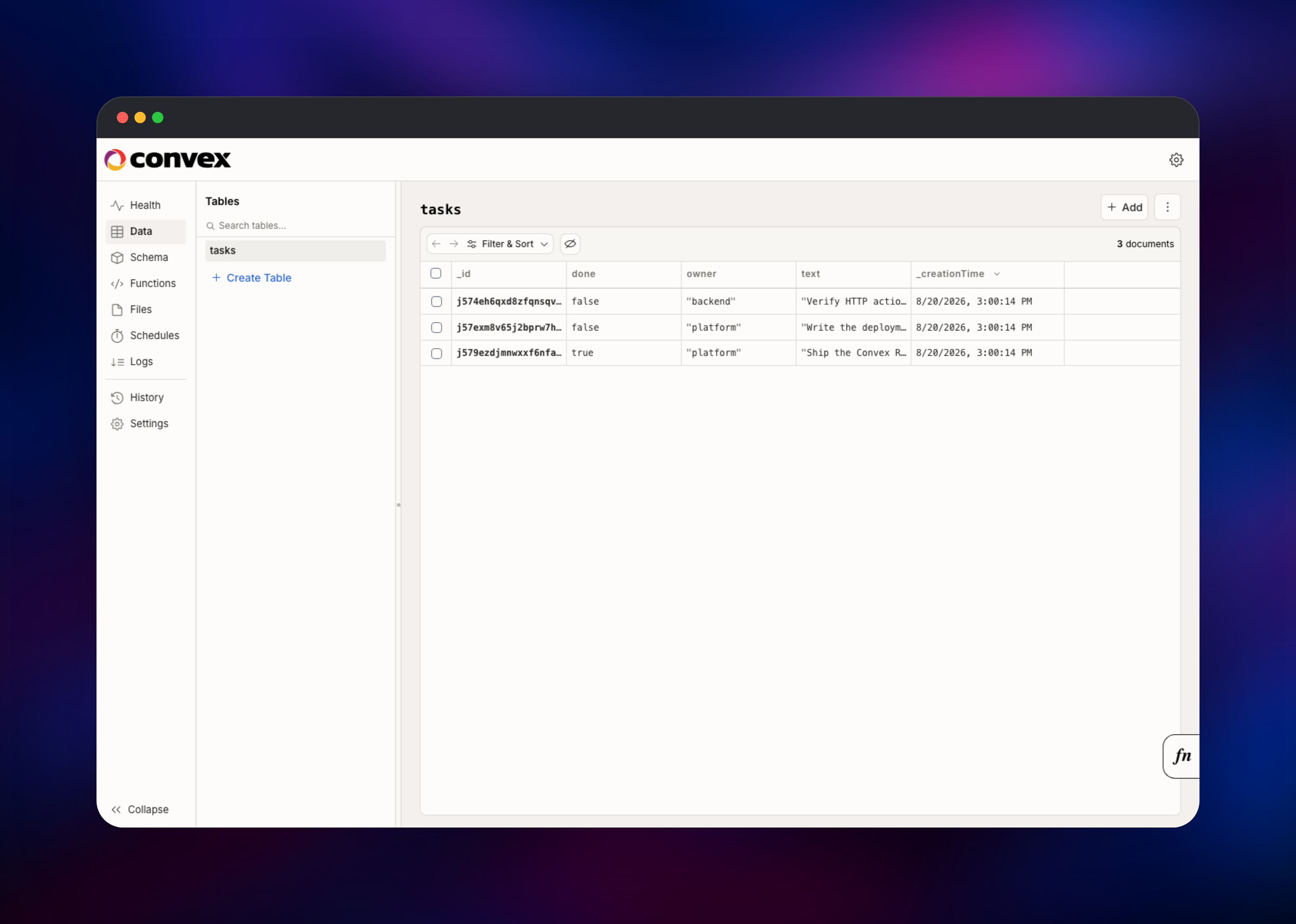
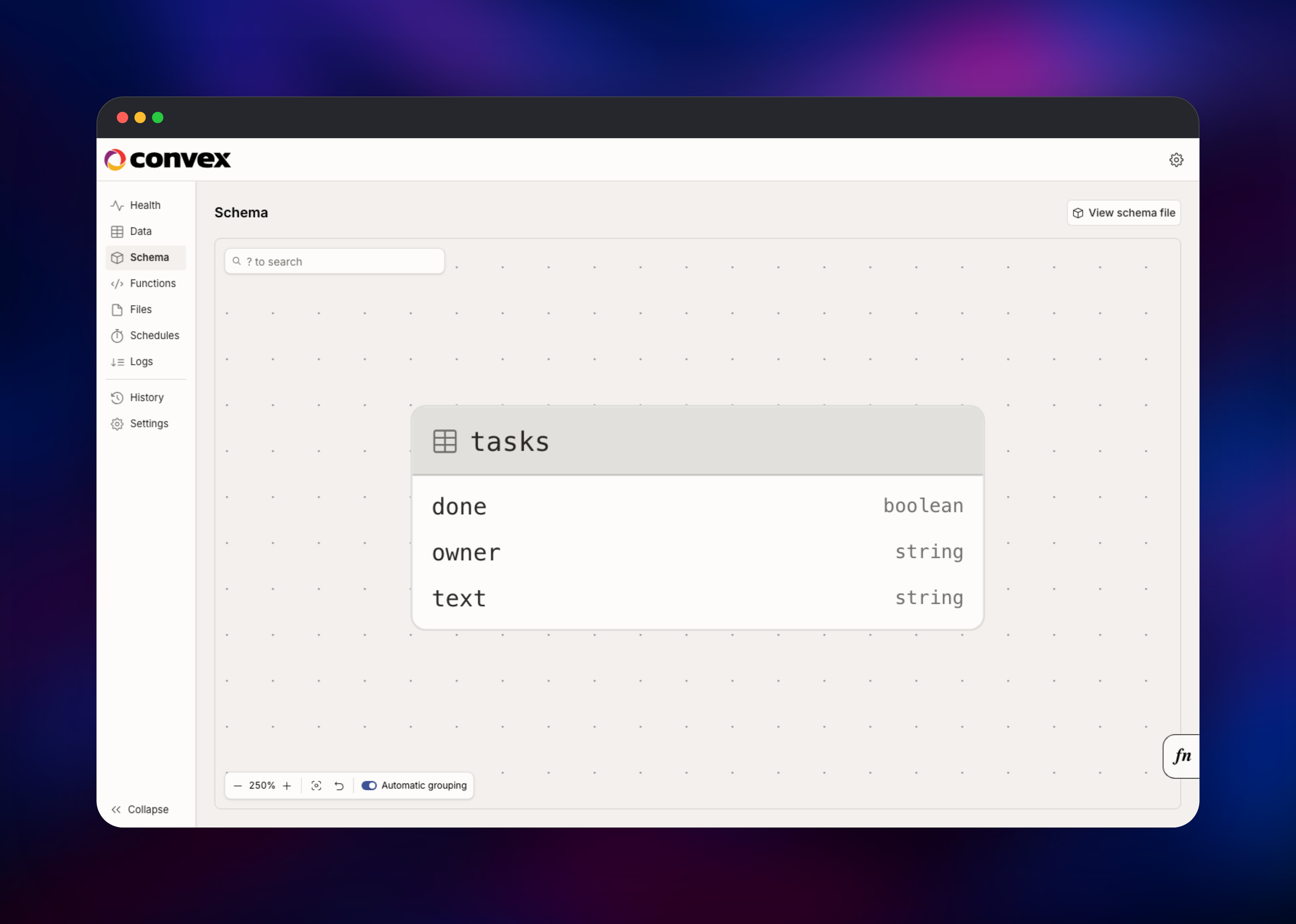
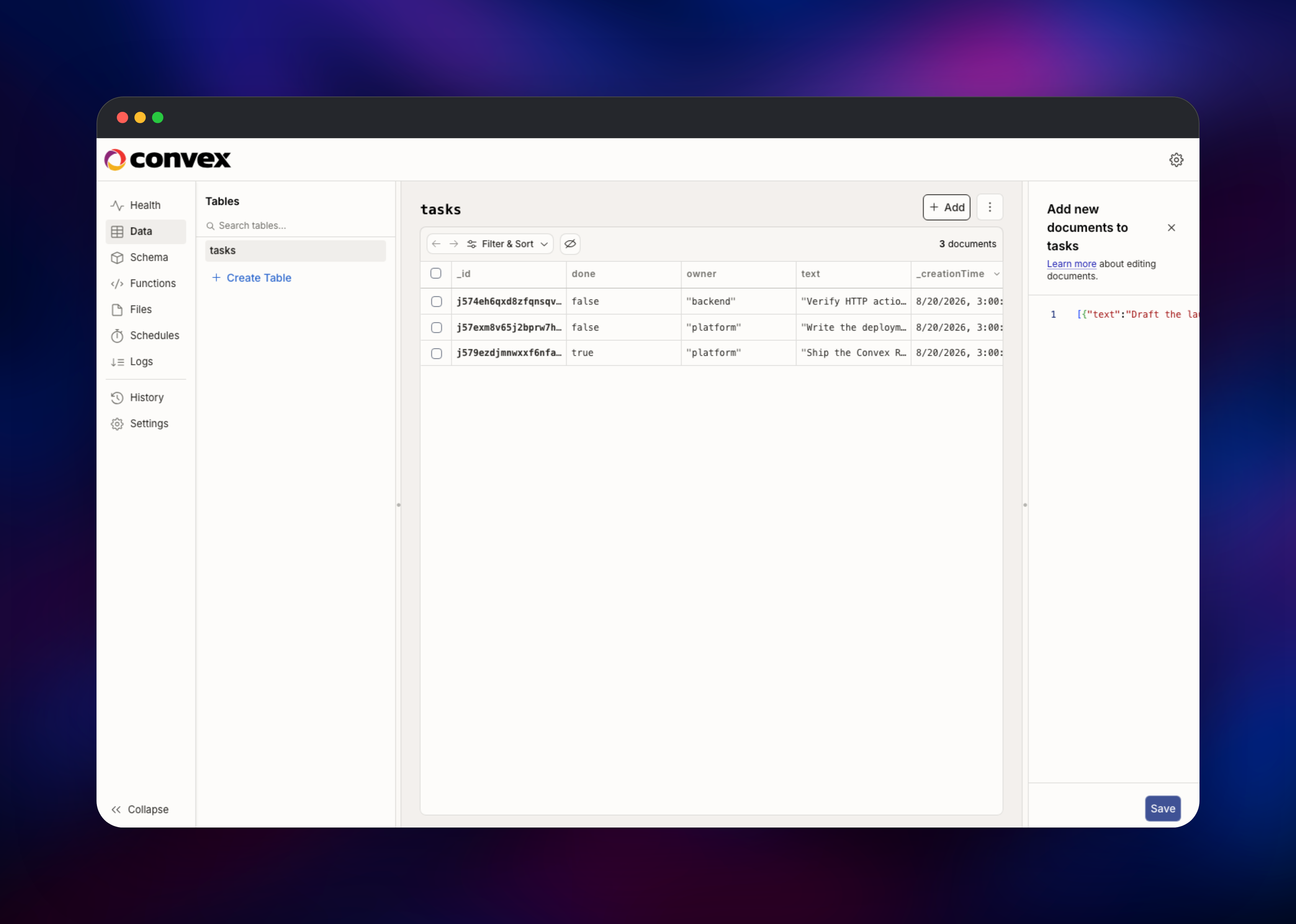
You land on the Health page. Click Data, then Create Table, name it tasks, and use Add Documents to paste a JSON array such as [{"text":"Try Convex","done":false}]. Saving writes through to PostgreSQL, and the Schema tab shows the field types Convex inferred — the quickest check that the deployment is healthy. To connect a project, run npm install convex@latest, set CONVEX_SELF_HOSTED_URL and CONVEX_SELF_HOSTED_ADMIN_KEY in .env.local, then run npx convex dev.
About Hosting Convex
Convex replaces the database, API layer and realtime layer with one system. You write TypeScript functions that run inside the backend next to the data: queries are read-only and cached, mutations run as serialisable transactions, and actions can call third-party APIs. The backend tracks which documents each query read, so a write re-runs only the subscriptions it invalidated.
Key features:
- Reactive queries that push updates to clients with no polling or cache invalidation
- ACID transactions: a mutation either fully applies or not at all
- TypeScript end to end, with a built-in scheduler, cron jobs and HTTP actions for webhooks
- Full-text and vector search indexes for AI retrieval
The backend keeps durable records in PostgreSQL rather than the container filesystem, the configuration Convex recommends for production; the alternative is a SQLite file tied to one disk. It still mounts a volume at /convex/data for uploaded files, search indexes and first-boot credentials. The dashboard holds no state and can be redeployed freely.
Why Deploy Convex on Railway
Railway removes the setup work behind a self-hosted Convex stack:
- PostgreSQL, the backend and dashboard are provisioned and wired together in one deploy
- Private networking keeps the database off the public internet, with volumes attached for files and the database cluster
- Public HTTPS domains and certificates issued for you
- Scaling CPU and memory is a slider, not a migration
Common Use Cases
- Collaborative products — shared documents, kanban boards and multiplayer editors where everyone sees changes instantly
- AI chat and agent backends — streaming responses into a table while clients watch it update, with vector search over your documents
- Live dashboards and internal tools — metrics, order queues and support consoles that refresh without polling
Dependencies for Convex
ghcr.io/get-convex/convex-backend— the engine: database access, function execution and the sync protocolghcr.io/get-convex/convex-dashboard— the official admin UI for data, schema, logs and functionspostgres:17— the system of record for all documents and indexes
Both images are pinned to the same build, because Convex states that mismatched backend and dashboard versions are not guaranteed to be compatible — when upgrading, move both to the same newer tag together. To keep files in S3-compatible storage instead of the volume, set AWS_REGION, AWS_ACCESS_KEY_ID, AWS_SECRET_ACCESS_KEY and all five S3_STORAGE_*_BUCKET variables; Convex only switches when the complete set is present.
Environment Variables Reference
| Variable | Service | Purpose |
|---|---|---|
INSTANCE_NAME | backend | Deployment name; also the database name, - replaced by _ |
INSTANCE_SECRET | backend | 64 hex characters signing admin keys; changing it invalidates every key |
POSTGRES_URL | backend | Connection string, no database name or query string |
CONVEX_CLOUD_ORIGIN | backend | Public API URL clients connect to |
NEXT_PUBLIC_DEPLOYMENT_URL | dashboard | Backend URL pre-filled on the dashboard login screen |
POSTGRES_DB | postgres | Database created on first boot; must match the instance name |
Deployment Dependencies
- Source and self-hosting guide: https://github.com/get-convex/convex-backend
- Documentation: https://docs.convex.dev
- Client library: https://www.npmjs.com/package/convex
Hardware Requirements for Self-Hosting Convex
| Resource | Minimum | Recommended |
|---|---|---|
| CPU | 1 vCPU | 2–4 vCPU |
| RAM | 1 GB | 4 GB or more |
| Storage | 5 GB volume | 20 GB or more, grown with your data |
| Runtime | Docker | Docker with PostgreSQL 17 |
The backend runs a V8 isolate pool and a Node.js runtime for actions, so memory scales with concurrent function count.
Self-Hosting Convex
Both ship as container images, so the smallest local setup is two containers. Save this as docker-compose.yml:
services:
  backend:
    image: ghcr.io/get-convex/convex-backend:latest
    ports: ["3210:3210", "3211:3211"]
    volumes: ["data:/convex/data"]
    environment:
      - CONVEX_CLOUD_ORIGIN=http://127.0.0.1:3210
      - CONVEX_SITE_ORIGIN=http://127.0.0.1:3211
  dashboard:
    image: ghcr.io/get-convex/convex-dashboard:latest
    ports: ["6791:6791"]
    environment:
      - NEXT_PUBLIC_DEPLOYMENT_URL=http://127.0.0.1:3210
volumes:
  data:
Bring it up and mint an admin key with the script inside the image:
docker compose up -d
docker compose exec backend ./generate_admin_key.sh
For PostgreSQL instead of the default SQLite file, create a database whose name matches the instance name with underscores, then set POSTGRES_URL to the server address without the database name or query string.
How Much Does Convex Cost to Self-Host?
The backend and dashboard are open source under the Functional Source License, which permits self-hosting for anything except a competing commercial product and converts to Apache 2.0 after two years. There are no licence fees, seat charges or function-call metering — your only cost is the Railway infrastructure. Convex Cloud is free to a generous limit, then bills on function calls, bandwidth and storage.
FAQ
What is Convex?
An open-source reactive backend combining a document database, TypeScript server functions, scheduling and file storage. Queries subscribe to data, so clients update automatically when a mutation changes a document they read.
What does this Railway template deploy?
The Convex backend, a PostgreSQL 17 database on a private network, and the official dashboard on its own public URL. Volumes, domains, health checks and the wiring are configured for you.
Why does this template include a PostgreSQL database?
By default the backend keeps everything in a SQLite file tied to one disk. Convex recommends PostgreSQL or MySQL for production, so this template ships PostgreSQL as the system of record and leaves the volume for files and search indexes.
How do I get the admin key for the self-hosted Convex dashboard?
The backend prints it in its deploy logs on every boot, between lines reading ===== CONVEX ADMIN KEY =====, and writes it to /convex/data/credentials/admin_key. A fresh key is minted each boot and all stay valid, because keys are verified against INSTANCE_SECRET rather than stored — one saved earlier keeps working until that secret changes.
How do I deploy my Convex functions to a self-hosted deployment?
Install convex@latest, set CONVEX_SELF_HOSTED_URL and CONVEX_SELF_HOSTED_ADMIN_KEY in .env.local, then run npx convex dev while developing or npx convex deploy to push. Use the same variables in your frontend host's build settings.
Where do HTTP actions live on a self-hosted Convex deployment?
Convex serves them on a second internal port, exposed here under the /http path of the backend's public domain — an action routed to /sendEmail is reachable at https://your-backend-domain/http/sendEmail.
Template Content
convex-postgres
postgres:17