
Deploy Coolify
Dashboard that deploys apps and databases to your own servers

Just deployed
/var/lib/postgresql/data
coolify-realtime
Just deployed
coolify
Just deployed
/var/www/html/storage/app

Just deployed

Redis
Just deployed
/data

Deploy and Host Coolify on Railway
Coolify is an open-source, self-hostable platform-as-a-service: a dashboard that connects over SSH to servers you already own and deploys applications, databases and one-click services onto them. It gives small teams the Heroku workflow — push a repository, get a container with TLS, logs, backups and rollbacks — without the per-seat bill, and suits a solo developer with one VPS as readily as an agency running a dozen clients.
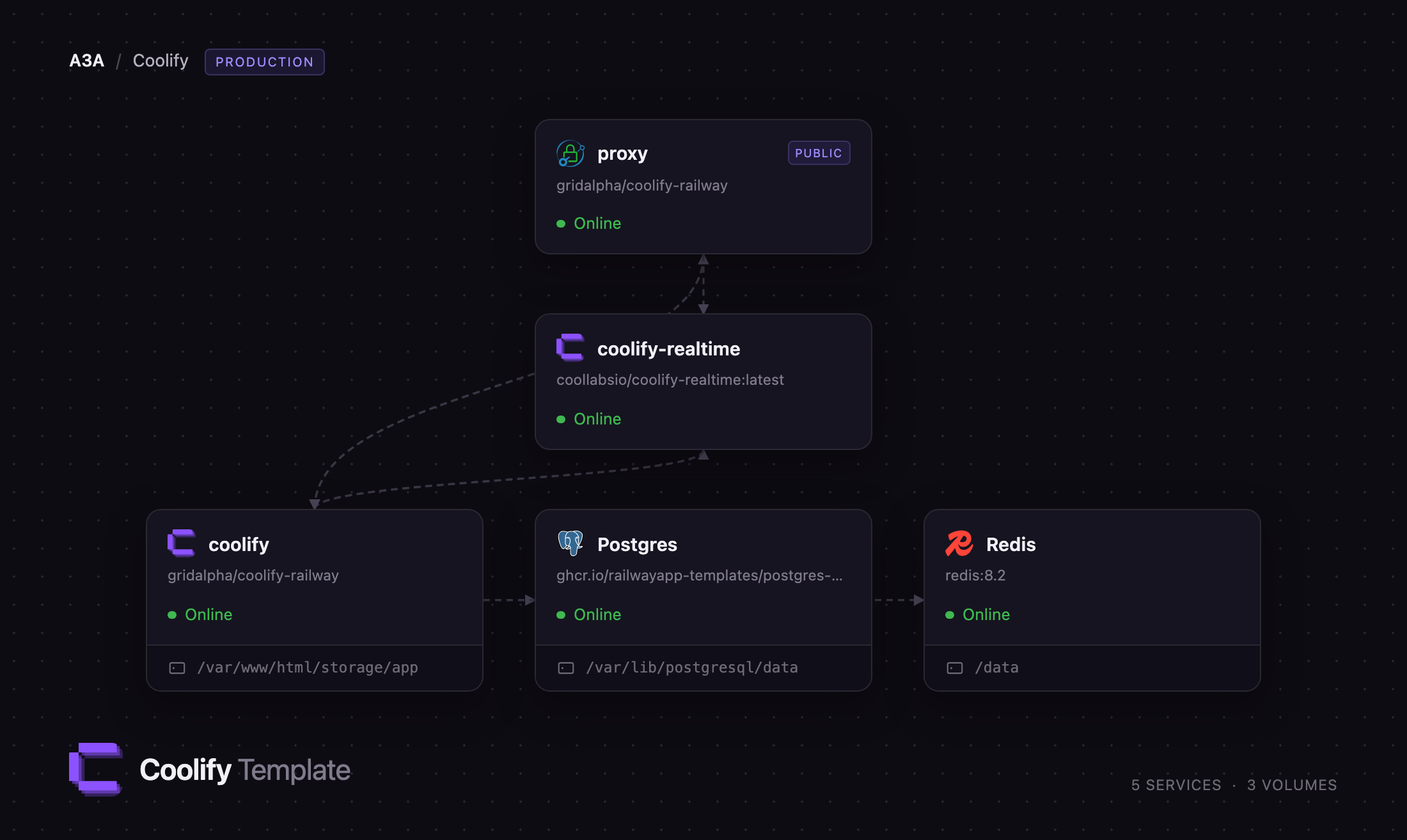
Deploy Coolify on Railway and the control plane lives here while your workloads stay on your own machines. This template runs the dashboard, its realtime tier, a Caddy router, PostgreSQL and Redis. The router sends the dashboard to the Coolify container and the websocket paths to the realtime container, so build logs stream live. PostgreSQL holds every project, server and encrypted SSH key; Redis carries the queue Horizon drains. To self-host Coolify without dedicating a server to the dashboard, this is the shape.
Getting Started with Coolify on Railway
Open the public URL and sign in with the ROOT_USER_EMAIL and ROOT_USER_PASSWORD you set before deploying. That account is created on first boot and registration closes at the same moment, so nobody who finds the URL can claim the instance. There are no default credentials.
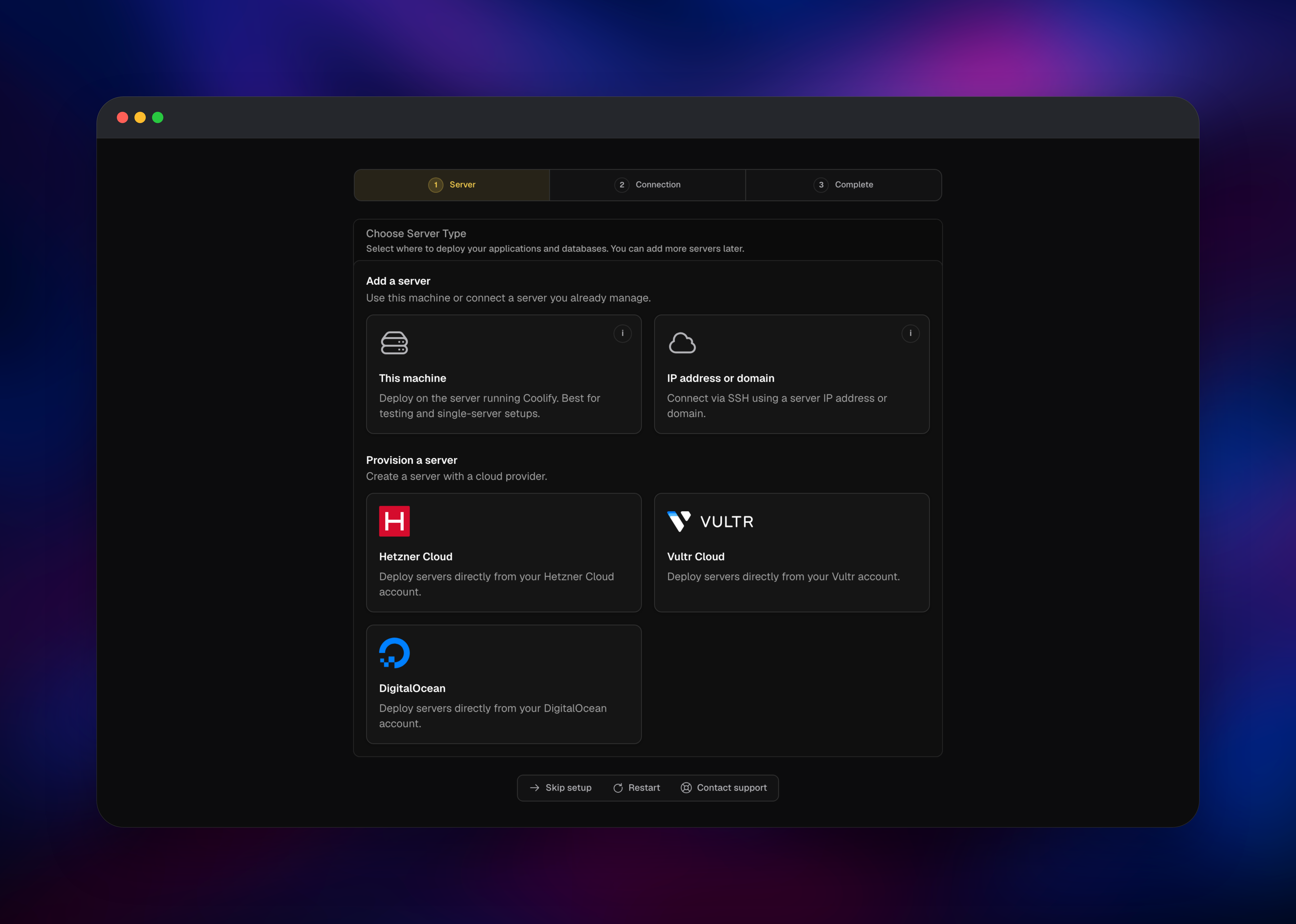
The onboarding wizard opens on Choose Server Type. Pick IP address or domain, let Coolify generate an ED25519 key, and copy the public half into ~/.ssh/authorized_keys on the server you want to manage — it needs Docker and SSH for root or a user in the docker group. Click Validate Connection: Coolify installs its proxy and starts reporting that server's disk and memory.
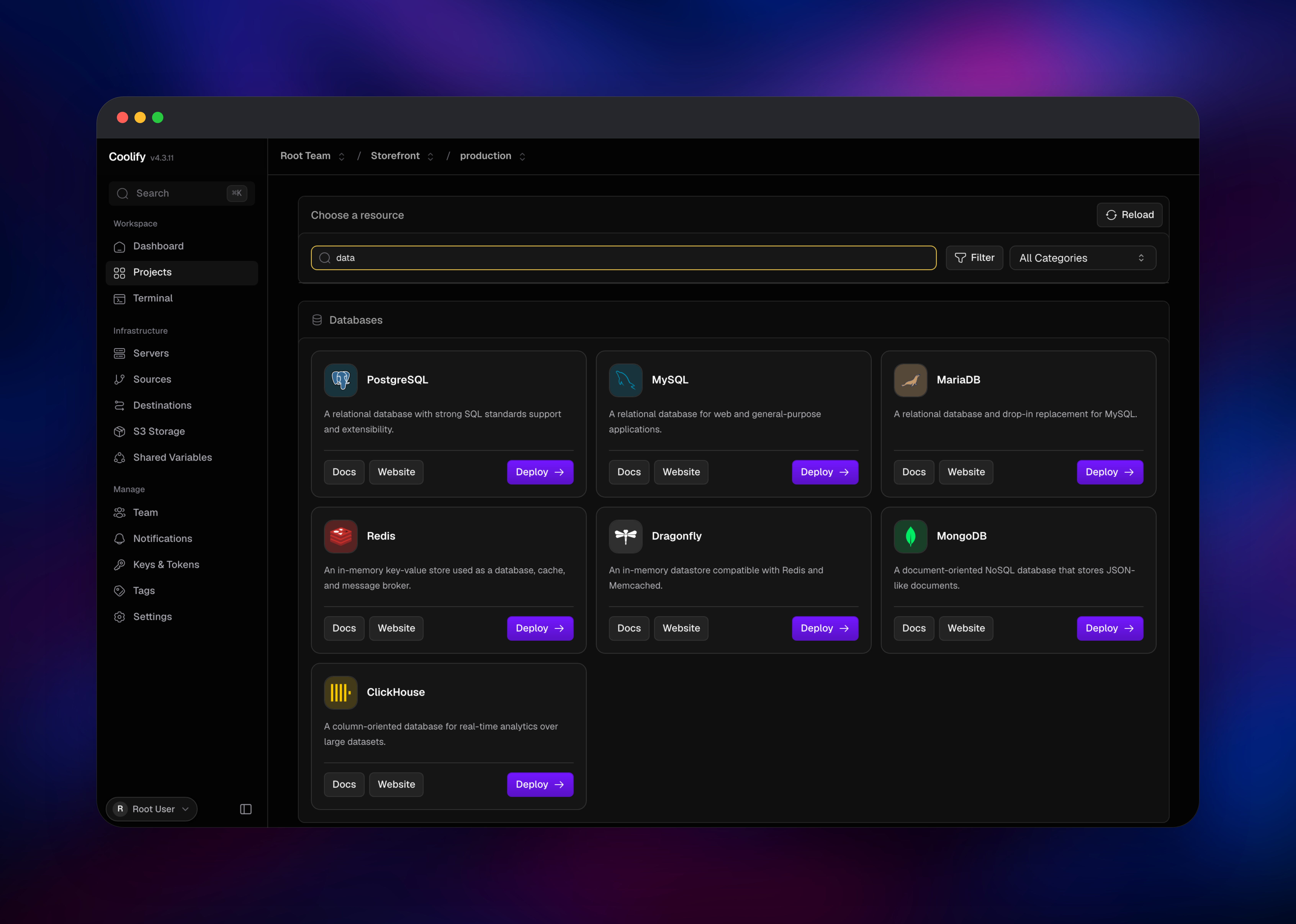
Then create a project, open its production environment and choose Add resource. The catalogue lists Git and Docker sources alongside several hundred one-click services, and deploying one lands the container on your server, not on Railway. Skip setup goes straight to the dashboard.
Two checks confirm the deployment is healthy: a resource's status dot updates without a page refresh, meaning the websocket tier is reachable, and /api/health returns OK.
About Hosting Coolify
Coolify replaces the pile of scripts most teams accumulate around a VPS. It watches a Git repository, builds with Nixpacks, a Dockerfile or a Compose file, runs the container behind Traefik or Caddy with Let's Encrypt certificates, and keeps the previous release so a rollback is one click. It also backs databases up to S3 on a schedule.
Self-hosting it pays off when you want the workflow but not the platform bill, when data residency rules pin workloads to specific machines, or when you already pay for idle servers.
Key features:
- Git-driven deployments from GitHub, GitLab, Gitea and Bitbucket, with per-branch previews
- One-click databases — PostgreSQL, MySQL, MariaDB, MongoDB, Redis, Dragonfly, ClickHouse
- Hundreds of packaged services, from n8n and Ghost to Supabase and Plausible
- Automatic TLS, custom domains and per-resource environment variables
- Scheduled S3 backups, scheduled tasks, teams, roles, API tokens and a full REST API
Three parts sit above the datastores. The Coolify container runs the Laravel application, its Horizon queue workers and the scheduler. The realtime container runs a Pusher-compatible websocket server that pushes build logs into the browser. The proxy owns the public domain and splits it: /app/* reaches the websocket server, everything else the dashboard — necessary because the browser derives its socket address from the page it is on.
Why Deploy Coolify on Railway
Railway solves the bootstrap problem: a control plane needs somewhere to live before it can manage anything.
- PostgreSQL and Redis are provisioned, backed up and on the private network
- The dashboard, realtime tier and datastores are reachable only through the router
- TLS, a public hostname and custom domains are handled for you
- A volume keeps SSH keys and build artefacts across redeploys
- Upgrades are a redeploy, not an SSH session
Common Use Cases
- Running a personal or agency PaaS across several VPS providers from one place
- Giving a team preview environments per pull request on fixed-cost hardware
- Consolidating self-hosted tools — Ghost, n8n, Umami — onto servers you own
- Keeping regulated workloads on specific machines while the dashboard sits elsewhere
Dependencies for Coolify
- Coolify — built from
coollabsio/coolify:latest, the 4.x stable line (nextcarries prereleases). Dashboard, REST API, queue workers and scheduler. - Coolify Realtime —
coollabsio/coolify-realtime:latest: soketi on 6001, terminal server on 6002. - Proxy —
caddy:2-alpine, holding the public domain, routing by path. - PostgreSQL — Railway managed. Projects, servers, resources, encrypted keys.
- Redis — Railway managed. Horizon's queue and the scheduler's locks.
Environment Variables Reference
| Variable | Service | Purpose |
|---|---|---|
ROOT_USER_EMAIL | Coolify | Login for the admin created on first boot |
ROOT_USER_PASSWORD | Coolify | 8+ chars, mixed case, a number and a symbol |
APP_KEY | Coolify | Encrypts stored SSH keys; changing it makes them unreadable |
APP_URL | Coolify | Public dashboard URL |
DATABASE_URL | Coolify | PostgreSQL connection string |
REDIS_URL | Coolify | Redis connection string |
PUSHER_APP_KEY | Coolify | Shared with the realtime service; both must match |
Deployment Dependencies
- Source: github.com/coollabsio/coolify
- Images: coollabsio/coolify, coollabsio/coolify-realtime
- Docs: coolify.io/docs
- Runtime: PHP 8.4 on Laravel, PostgreSQL, Redis, Node.js
Hardware Requirements for Self-Hosting Coolify
| Resource | Minimum | Recommended |
|---|---|---|
| CPU | 1 vCPU | 2 vCPU |
| RAM | 1 GB | 2 GB |
| Storage | 5 GB volume | 10 GB volume |
| Runtime | PHP 8.4, PostgreSQL, Redis | Same |
The dashboard is light: builds run on the servers it manages, not here. The volume holds SSH keys and build artefacts; the database grows with deployment history.
Self-Hosting Coolify
Upstream's installer sets up Docker, generates secrets and starts the stack on one machine. Run this shell command as root:
curl -fsSL https://cdn.coollabs.io/coolify/install.sh | bash
To assemble it yourself, clone the repository and use its production Compose file, which starts the app, the realtime container, PostgreSQL and Redis:
git clone https://github.com/coollabsio/coolify.git
cd coolify
cp .env.production .env
docker compose -f docker-compose.yml -f docker-compose.prod.yml up -d
Set APP_KEY to base64: plus 32 random bytes, fill DB_PASSWORD, REDIS_PASSWORD and the three PUSHER_* values, and set ROOT_USER_EMAIL and ROOT_USER_PASSWORD before first boot. The dashboard listens on port 8000.
Is Coolify Free?
Coolify is free and open source under the Apache 2.0 licence, and every feature is in the self-hosted build — no seat limits, no paid tier gating deployments. The company sells a hosted version for people who would rather not run the control plane. On Railway you pay for the resources this template uses, plus the servers Coolify deploys onto.
FAQ
What is Coolify?
An open-source platform-as-a-service. It connects to servers over SSH and deploys applications, databases and packaged services onto them, with Git integration, TLS, backups and rollbacks.
What does this Railway template deploy?
Five services: the Coolify dashboard, its realtime websocket tier, a Caddy router holding the public domain, and managed PostgreSQL and Redis. Only the router is public.
Why does the template include PostgreSQL and Redis?
Coolify keeps all state in PostgreSQL — projects, servers, resources and encrypted SSH keys — and cannot start without it. Redis carries the Horizon queue that runs deployments and the locks that stop the scheduler double-running a job during a restart.
Can Coolify deploy applications onto Railway itself?
No. Coolify deploys Docker containers onto servers it reaches over SSH, and containers cannot be created inside a Railway service. Add your own VPS from any provider and the dashboard manages it.
Does the built-in web terminal work in this deployment?
No. The terminal needs the dashboard and websocket containers to share one SSH key directory, and a volume attaches to a single service. Deployments, server checks and log streaming are unaffected — use SSH for a shell.
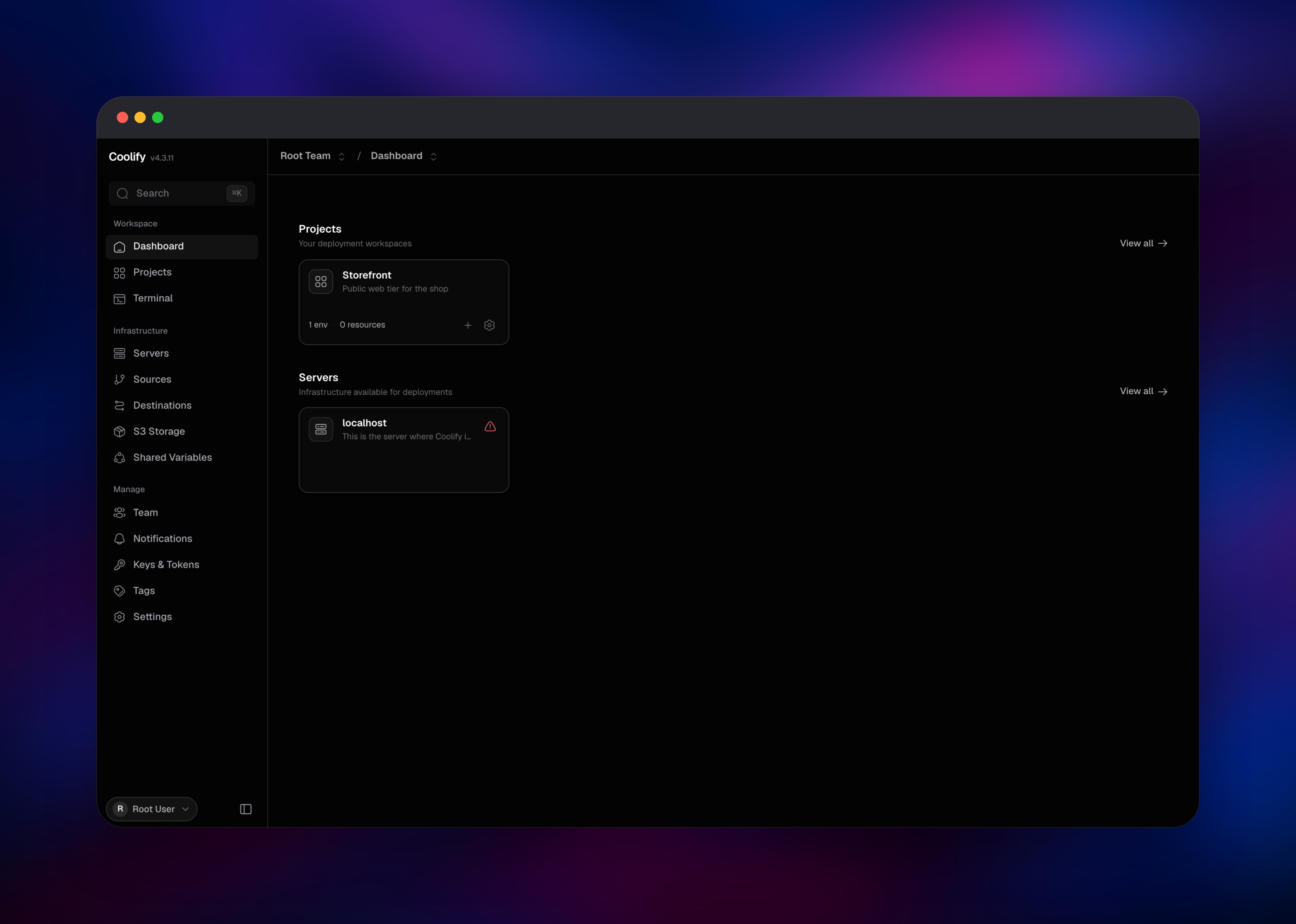
What happens to the localhost server Coolify creates?
Coolify always seeds a server row for the machine it expects to run on. There is none here, so it stays unreachable and can be ignored; add your own servers instead.
How do I upgrade self-hosted Coolify on Railway?
Redeploy the service. The image tracks the stable 4.x line and migrations run at boot, so a redeploy pulls the current release and applies schema changes.
Template Content


