Deploy Countly
Product analytics for mobile, web and desktop apps
countly
Just deployed
countly-api
Just deployed
countly-frontend
Just deployed

MongoDB
Just deployed
/data/db
Deploy and Host Countly on Railway
Countly is an open-source product analytics platform for mobile, web and desktop applications. Its SDKs report sessions, screen views, custom events, user profiles and crashes to a server you control, and the dashboard turns those into retention curves, event breakdowns, geo maps and crash groups. Teams pick it over Google Analytics or Mixpanel when raw behavioural data must stay on infrastructure they own — health, finance and public-sector products, or anyone whose GDPR posture rules out a third-party vendor. It also handles push notifications, remote config and in-app feedback, making it an analytics-plus-engagement stack, not a page-view counter.
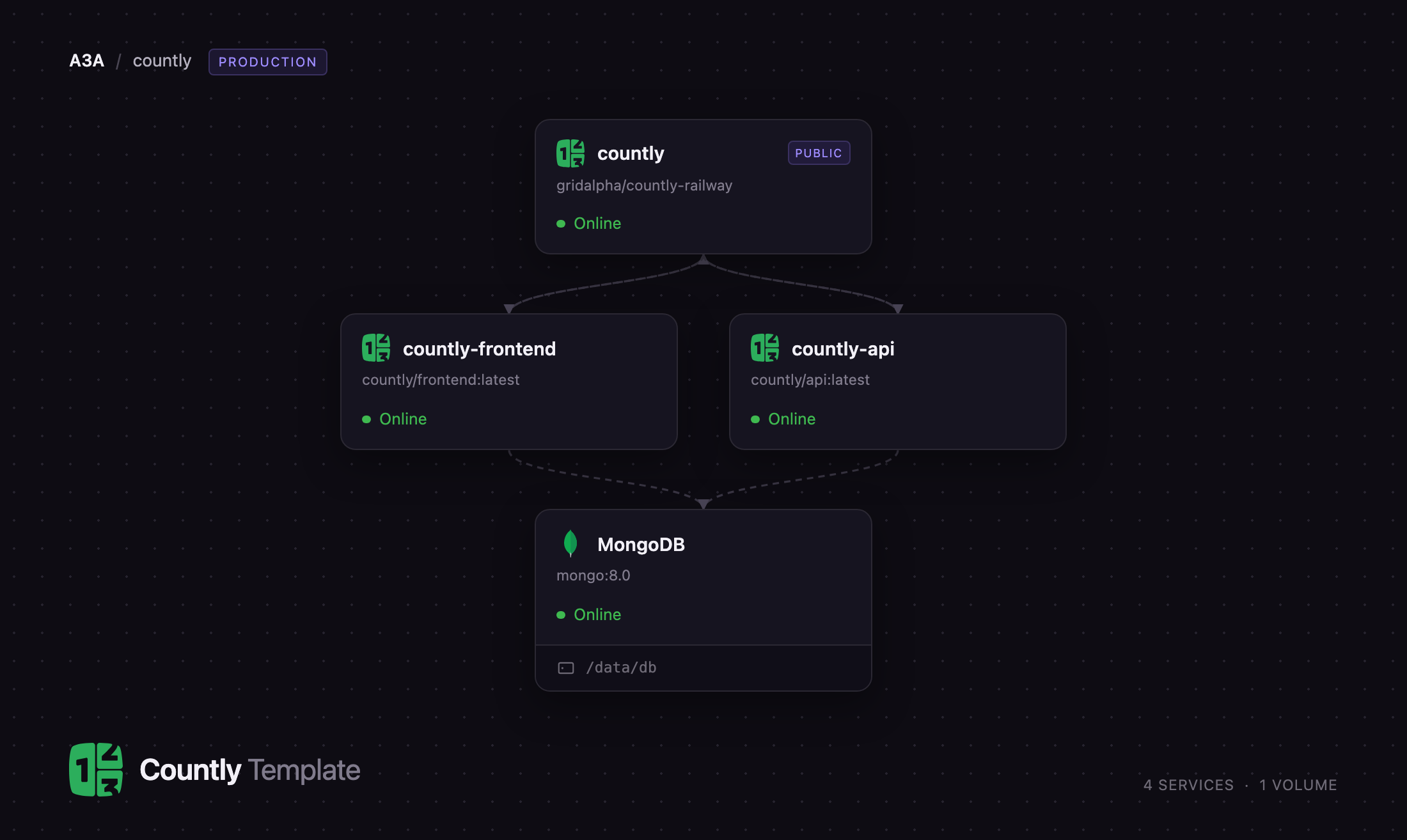
Self-host Countly on Railway and this template gives you the production topology from upstream's own Docker Compose file, not an all-in-one container. Four services are pre-wired: countly-api runs the ingestion and read API your SDKs talk to, countly-frontend serves the dashboard, a Caddy router publishes both on one domain, and MongoDB stores every event, aggregate and file. When you deploy Countly on Railway only the router has a public URL — it sends /i and /o to the API and everything else to the dashboard, exactly as upstream's bundled nginx does, keeping the database and both app containers private.
Getting Started with Countly on Railway
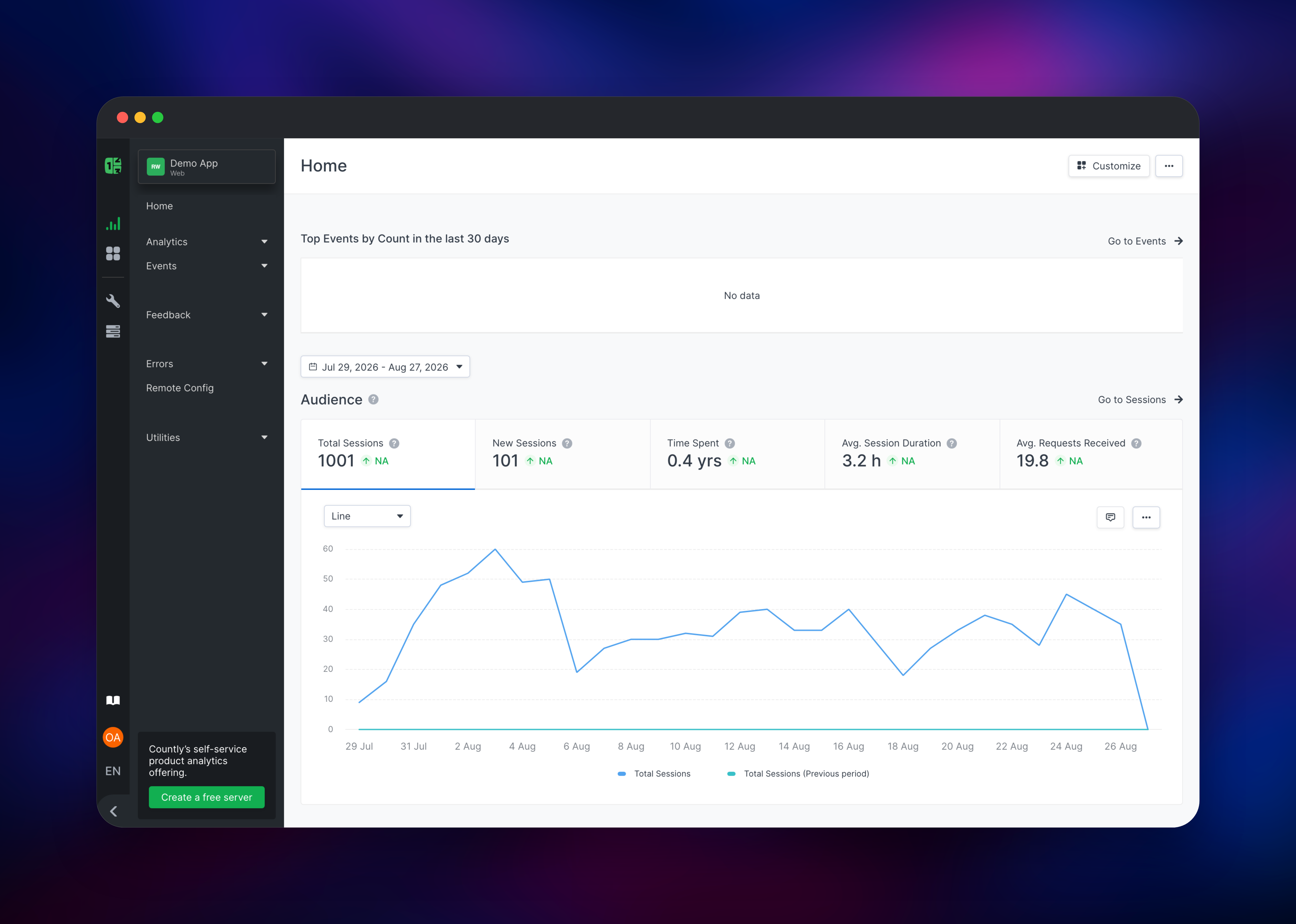
Open the public URL once all four services are green. Countly ships with no default credentials: the first visit lands on a setup screen that creates the global administrator, and it disappears the moment a user exists — so complete it right after deploying. Enter a name, email, username and password, then pick "Continue with a demo app" for a dashboard pre-populated with a month of realistic sessions and events, or "I want to create my own app" to start clean.
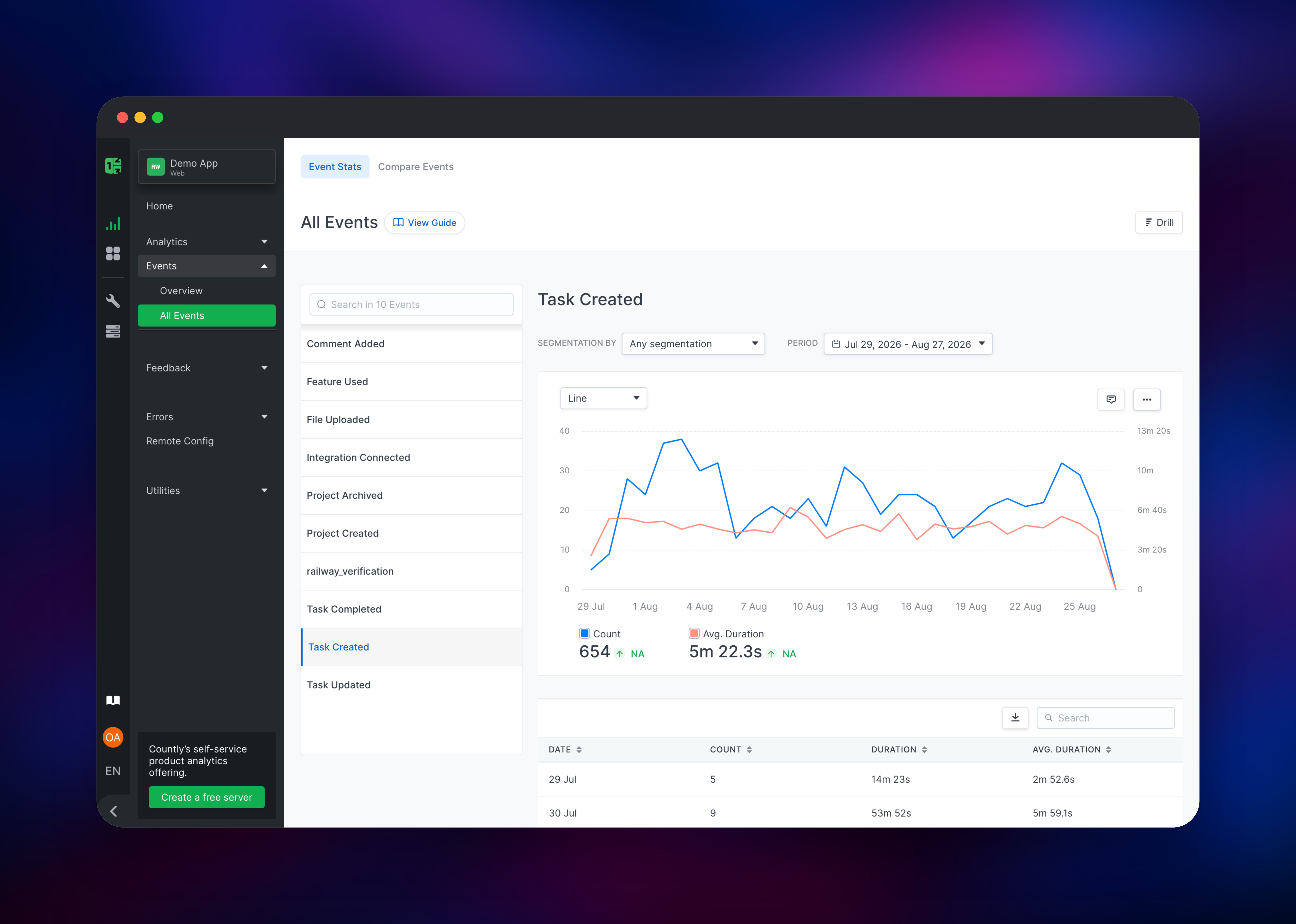
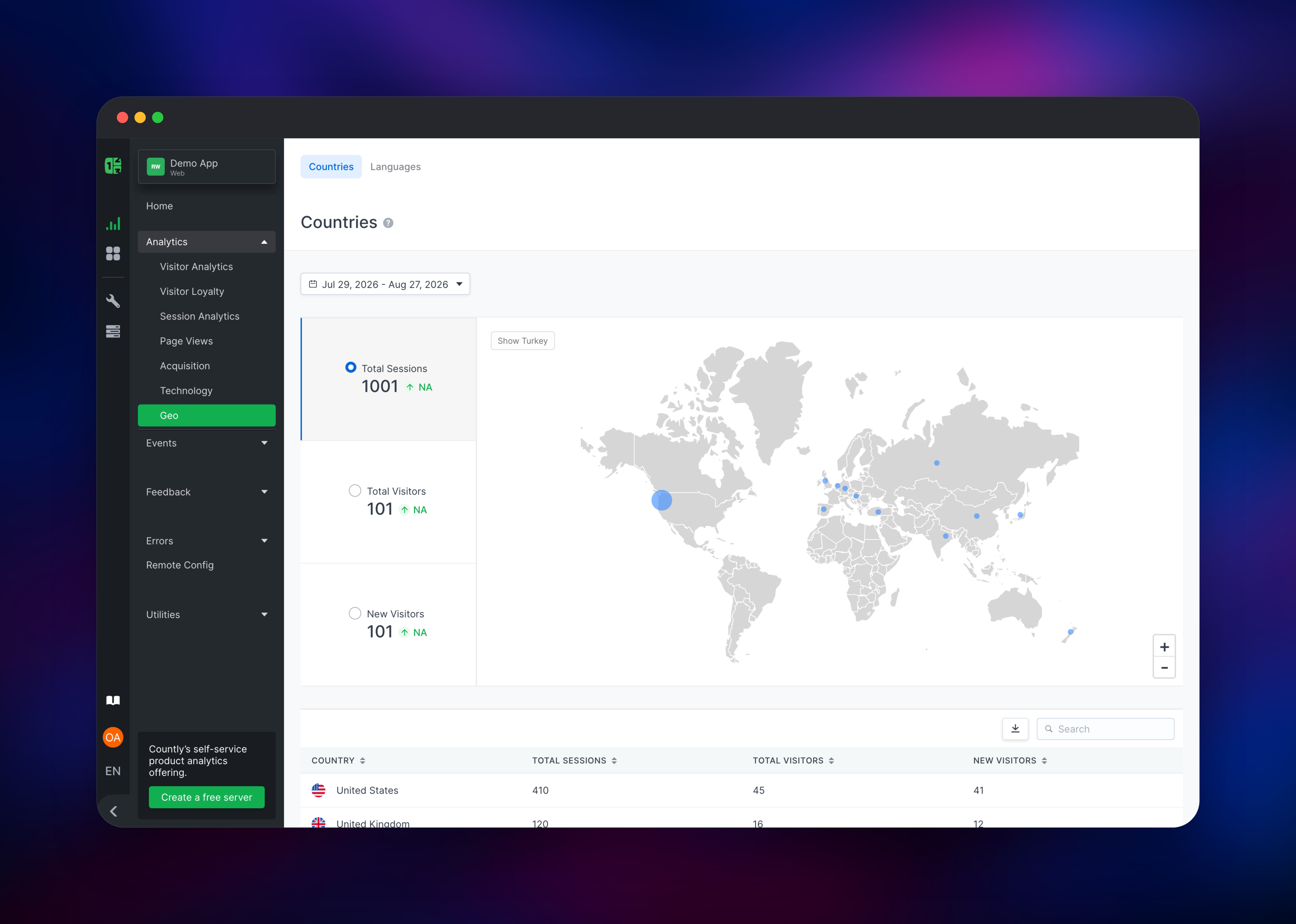
Next, grab the application's write key under Utilities → Applications and drop it into a Countly SDK — or verify the deployment from a terminal by pushing a session and watching it land under Analytics → Session Analytics within seconds. Events → All Events then lists every event key with counts, durations and per-day tables, and Analytics → Geo maps sessions to countries. Add teammates under Utilities → Manage Users; there is no open registration, so only an admin creates accounts.
About Hosting Countly
Countly is built around a write endpoint and a read endpoint. SDKs post to /i with an application key and a device identifier; the API adds geography, device and browser metadata, writes the raw document, and updates pre-aggregated collections so the dashboard answers date-range questions without scanning raw events. The dashboard queries /o. Self-host when you need unsampled data, unlimited retention, or a guarantee that behavioural data stays on your own infrastructure.
Key capabilities in the open-source edition:
- Session, user, retention and loyalty analytics across mobile, web and desktop SDKs
- Custom events with segmentation, plus per-event duration and sum metrics
- Crash reporting with grouping, and error tracking for web applications
- Push notifications, remote config and star-rating feedback widgets
- Views, acquisition, technology and geo breakdowns, custom dashboards and a REST API
countly-api is the busy service — SDK traffic, aggregation and scheduled jobs — and where you add CPU first. countly-frontend serves the dashboard and holds sessions. MongoDB is the only stateful component, holding three databases on a persistent volume. The countly router exists because a browser must reach the dashboard and the API on one origin.
Why Deploy Countly on Railway
Railway removes the server administration self-hosted analytics drags along.
- MongoDB is provisioned with a persistent volume and wired in automatically
- Every service gets a health check, HTTPS and automatic restarts
- The API scales independently of the dashboard as ingestion grows
- Only the router is exposed; database and app containers stay private
- Uploaded files live in MongoDB, so no shared filesystem is needed
Common Use Cases
- Privacy-first mobile analytics — ship iOS and Android SDKs to a server you own, keeping device identifiers and location data on your own infrastructure.
- Product analytics for regulated SaaS — track feature adoption and retention where a data processing agreement is not an option.
- Crash and error monitoring — group native crashes and browser errors by app version, beside the usage data explaining them.
Dependencies for Countly
countly/api:latest— ingestion and read API on port 3001countly/frontend:latest— dashboard on port 6001mongo:8.0— MongoDB storing events, aggregates and filescaddy:2-alpine— router, from gridalpha/countly-railway
Environment Variables Reference
| Variable | Service | Purpose |
|---|---|---|
COUNTLY_CONFIG__MONGODB | api, frontend | Connection string; the path is rewritten per database, so authSource goes in the query |
COUNTLY_CONFIG__FILESTORAGE | api, frontend | gridfs keeps uploaded files in MongoDB, not on disk |
COUNTLY_CONFIG_API_API_WORKERS | api | Worker processes; unset, Countly forks one per core |
COUNTLY_CONFIG_FRONTEND_WEB_SESSION_SECRET | frontend | Signs the dashboard session cookie |
COUNTLY_API_HOST / COUNTLY_FRONTEND_HOST | router | Private upstreams the router forwards to |
Deployment Dependencies
- Source: github.com/Countly/countly-server, images on Docker Hub
- Documentation: support.countly.com
- Runtime: Node.js 20 (Iron LTS) on Debian, MongoDB 8
Hardware Requirements for Self-Hosting Countly
| Resource | Minimum | Recommended |
|---|---|---|
| CPU | 2 vCPU | 4+ vCPU, weighted toward the API |
| RAM | 2 GB | 4–8 GB, MongoDB taking the larger share |
| Storage | 5 GB | 20 GB+, growing with event retention |
| Runtime | Node.js 20, MongoDB 6+ | Node.js 20, MongoDB 8 |
Storage is the number to watch: Countly keeps raw event documents beside its aggregates, so the MongoDB volume grows steadily. Set a retention window under Utilities → Data Manager early.
Self-Hosting Countly with Docker
Countly publishes an all-in-one image bundling MongoDB, the API and the dashboard behind an internal nginx — the fastest way to try it locally:
docker run -d --name countly -p 8080:80 \
  -e COUNTLY_CONFIG_HOSTNAME=localhost \
  countly/countly-server:latest
Beyond a trial, upstream splits the roles:
services:
  mongodb: { image: mongo:8.0 }
  countly-api:
    image: countly/api:latest
    environment:
      - COUNTLY_CONFIG__MONGODB=mongodb://mongodb:27017
      - COUNTLY_CONFIG_API_API_WORKERS=4
      - COUNTLY_CONFIG__FILESTORAGE=gridfs
  countly-frontend:
    image: countly/frontend:latest
    environment:
      - COUNTLY_CONFIG__MONGODB=mongodb://mongodb:27017
  nginx: { image: bitnami/nginx, ports: ["80:8080"] }
That split is what this template deploys, Caddy replacing nginx.
How Much Does Countly Cost to Self-Host?
Countly Lite, the open-source edition this template runs, is free, under AGPL-3.0 with a modified Section 7 requiring you to keep Countly's branding in the dashboard. There are no seat limits or event caps on the plugins included here. Countly also sells Flex, a managed private cloud from around $175/month, and a self-hosted Enterprise edition with drill, funnels, cohorts and A/B testing that this template does not include. On Railway you pay only for the compute and storage the four services use.
FAQ
What is Countly? Countly is an open-source product analytics and engagement platform. SDKs for iOS, Android, web, desktop and several game engines send sessions, custom events, user profiles and crash reports to a server you host yourself. Connect one by pasting your Railway URL and an application key into the SDK's initialiser.
What does this Railway template deploy? The Countly API, the Countly dashboard, a MongoDB database with a persistent volume, and a Caddy router publishing both on one public domain. Only the router is reachable from the internet.
Why does this template include MongoDB? MongoDB is Countly's only datastore: raw events, the pre-aggregated collections the dashboard reads, and — because file storage is set to GridFS — uploaded app icons and attachments, which lets the two app containers share files without a shared disk.
Will visitor IP addresses be recorded correctly behind Railway's proxy?
Yes. Countly reads the leftmost X-Forwarded-For entry and the router forwards the original header, so geography breakdowns reflect the real visitor, not the platform's edge.
Can I scale Countly if ingestion grows?
Raise COUNTLY_CONFIG_API_API_WORKERS and the memory on countly-api first — it handles SDK traffic and aggregation, while the dashboard stays idle by comparison. Keep the dashboard at one instance and grow MongoDB's storage before the volume fills.
Template Content
countly
gridalpha/countly-railwaycountly-api
countly/api:latestcountly-frontend
countly/frontend:latestMongoDB
mongo:8.0