
Deploy CyberChef
Web app for encoding, encryption and data analysis in your browser
CyberChef
Just deployed
Deploy and Host CyberChef on Railway
CyberChef is the "Cyber Swiss Army Knife" — a browser-based workbench, open-sourced by GCHQ, that chains 504 operations into repeatable recipes for encryption, encoding, compression and data analysis. Analysts, incident responders, CTF players and developers use it to decode obfuscated payloads, parse certificates and protocol dumps, convert character sets and timestamps, and pull structure out of awkward data. Every operation runs in the visitor's own browser, so no server ever sees your input — which is why teams handling sensitive material want their own instance rather than a shared public one.
Self-host CyberChef on Railway with a single service. The template deploys CyberChef, an nginx container serving the official GCHQ build, and nothing else — no database, no queue, no volume, because the application keeps no server-side state. What it adds is the production configuration the stock image leaves out: pre-compressed assets so the 12 MB JavaScript bundle ships as 3.6 MB, security response headers including HSTS and a Content-Security-Policy, cache headers matched to CyberChef's filenames, nginx workers sized from the container's real CPU quota, and optional HTTP basic auth.
Getting Started with CyberChef on Railway
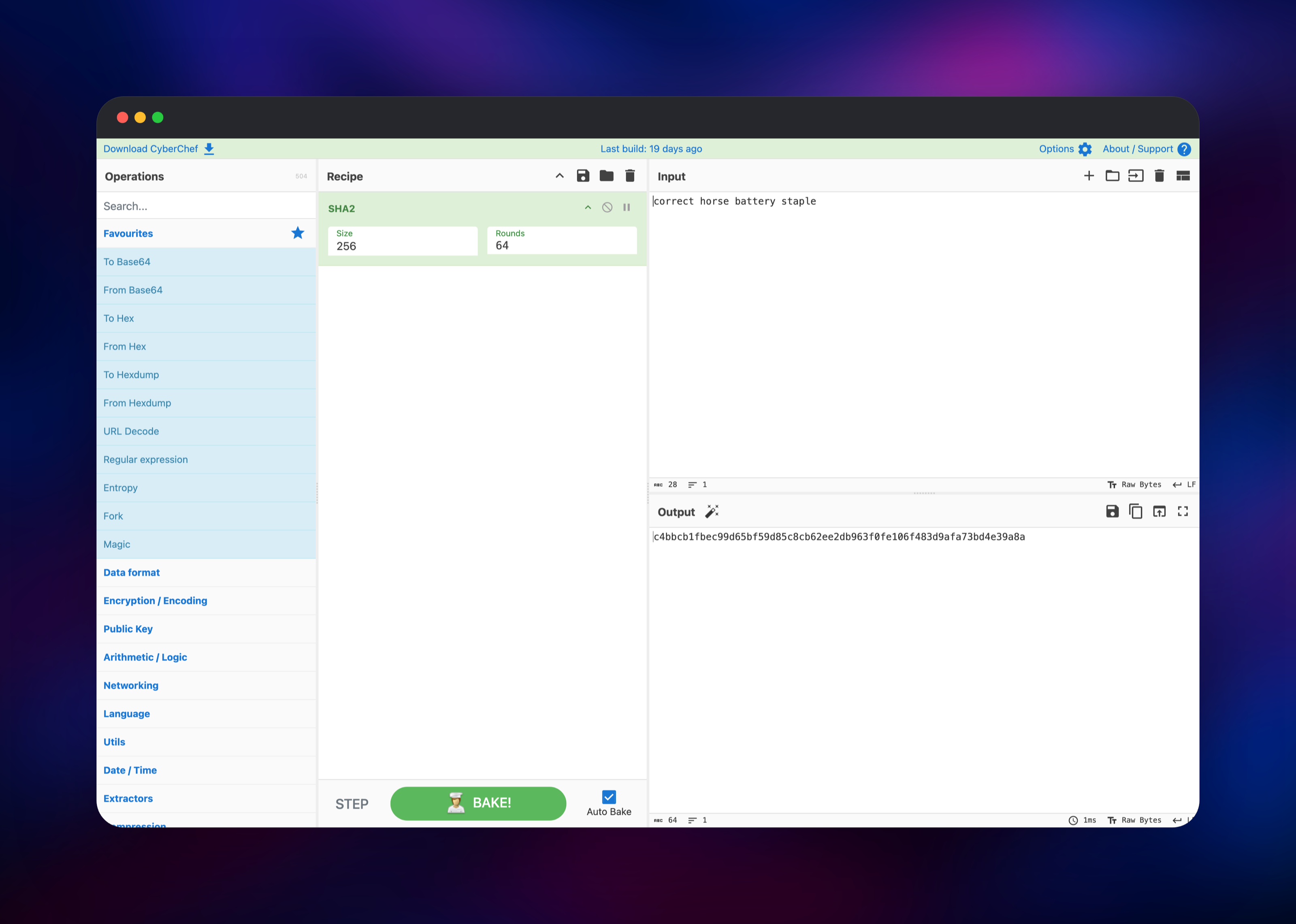
Deploy the template and open the generated *.up.railway.app URL. There is no installer, no sign-up and no admin account — CyberChef loads straight into its working view, so it is live the moment the page renders. The window splits into four panes: Operations listing all 504 operations by category, Recipe where you assemble them, and Input and Output on the right.
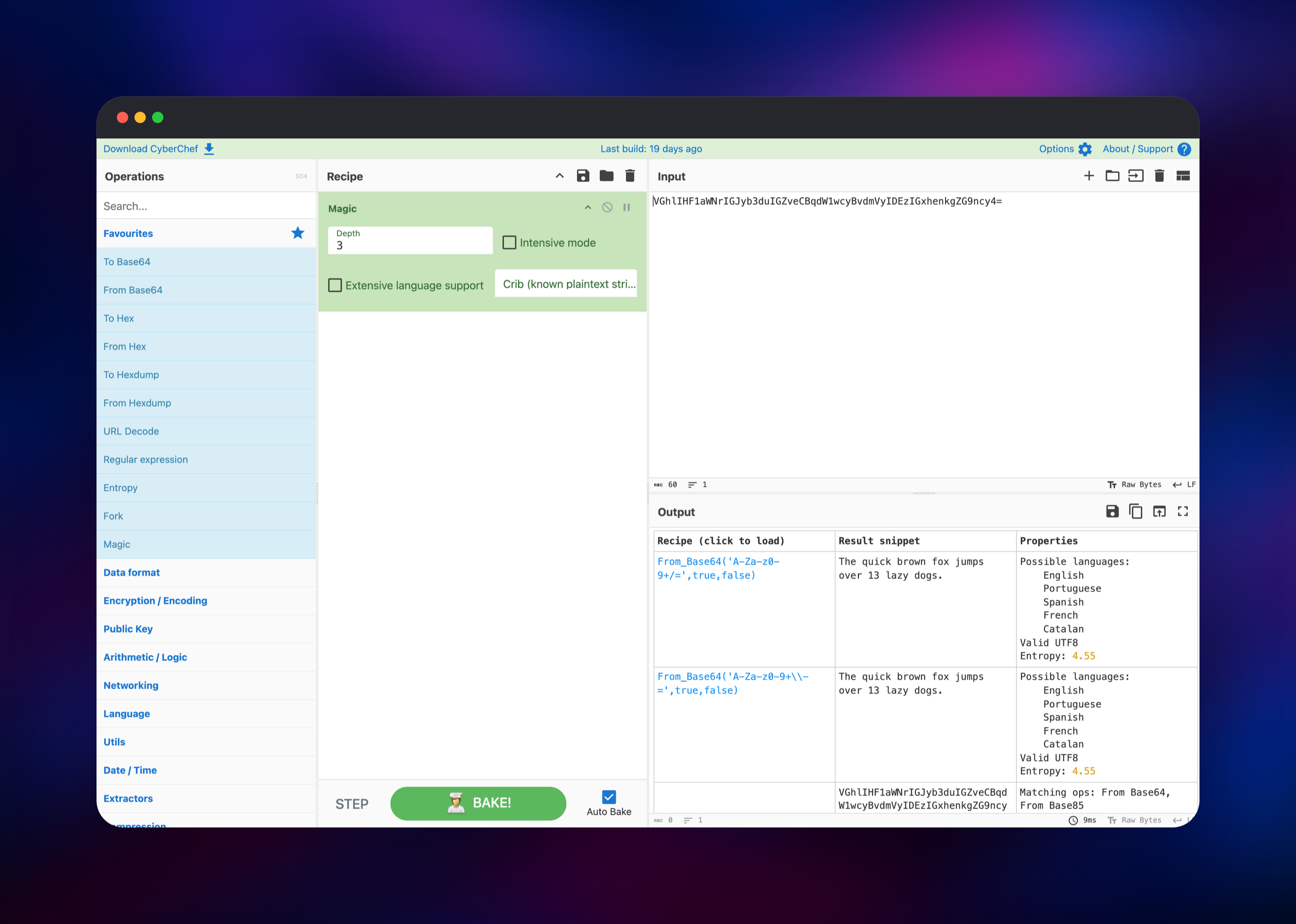
For a first action, type correct horse battery staple into Input, search for SHA2 in Operations and double-click it into the Recipe. With Auto Bake ticked, Output shows c4bbcb1f…4e39a8a — confirming the bundle loaded and the engine works. Then try Magic: paste a Base64 string and add it, and CyberChef identifies the encoding, suggests the decoding recipe, and reports language candidates and entropy.
Recipes are shareable: the recipe and input are encoded into the URL fragment, so you can bookmark a decoder or send a colleague a link that opens pre-loaded. To lock the instance down, set CYBERCHEF_USERNAME and CYBERCHEF_PASSWORD and redeploy.
About Hosting CyberChef
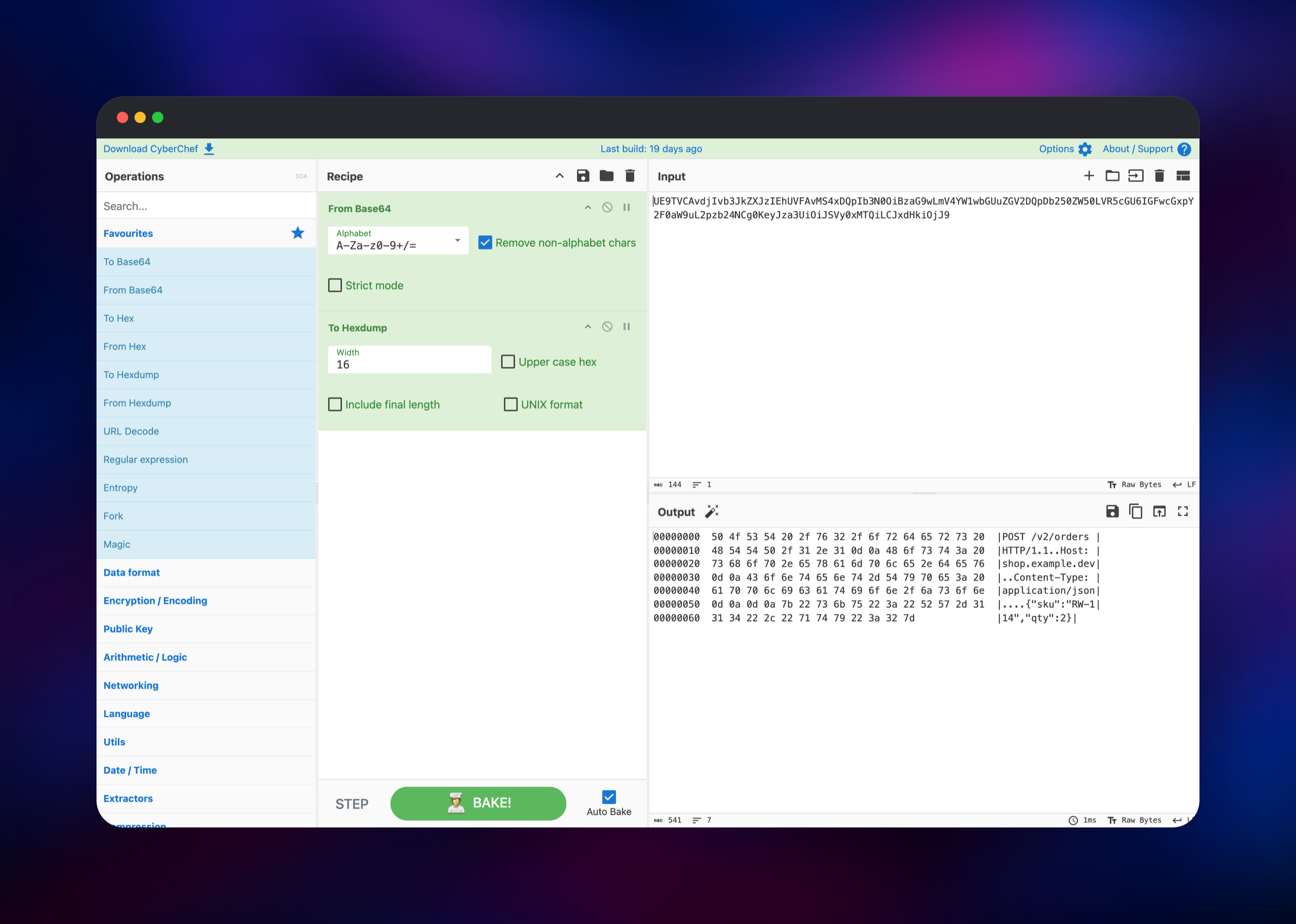
Data arrives base64-wrapped inside a gzip stream inside a URL-encoded parameter, and unpicking it by hand across three tools is slow and error-prone. CyberChef turns that into a recipe you build once and reuse.
- Encoding — Base64/32/85, hex, URL, HTML entities, character encodings, punycode
- Cryptography — AES, DES, Blowfish, RSA, PGP, JWT signing and verification, X.509 parsing
- Hashing — MD5, the SHA family, BLAKE, bcrypt, CRC, and hash identification
- Compression — gzip, zlib, bzip2, LZMA, raw deflate, and archive extraction
- Analysis — entropy plots, file-type detection, regular expressions,
strings, x86 disassembly, hexdumps - Magic — automatic detection of how data was encoded, with suggested recipes
- Flow control — Fork, Merge, Jump, Label and Register for branching multi-step recipes
Every operation runs client-side in a Web Worker, so the Railway service does nothing but serve static files — one container, and your data never touches it.
Why Deploy CyberChef on Railway
Railway gives this static application a production front end with no work on your part:
- One-click deploy with HTTPS and a public domain provisioned automatically
- Pre-compressed assets served directly, cutting the main bundle from 12 MB to 3.6 MB
- Security headers and a Content-Security-Policy configured out of the box
- Optional HTTP basic auth from two environment variables
- No database, volume or backup strategy to manage
Common Use Cases
- Malware and phishing triage — unwrap layered base64, hex and gzip payloads without pasting them into a third-party website
- CTF and security training — one environment for classical ciphers, modern crypto, encodings and disassembly, shareable by URL
- Developer debugging — decode JWTs, inspect certificates, convert timestamps, pretty-print JSON, beautify minified payloads
- DFIR and log work — parse protocol dumps, extract indicators with regular expressions, turn hexdumps back into bytes
Dependencies for CyberChef
- CyberChef —
ghcr.io/gchq/cyberchef:latest, the official GCHQ build, packaged intonginxinc/nginx-unprivilegedand served on port 8080 as a non-root user
CyberChef needs no database, cache, queue, worker or object storage, so nothing else needs provisioning or backing up.
Environment Variables Reference
| Variable | Default | Description |
|---|---|---|
PORT | 8080 | Port nginx listens on; set by Railway |
CYBERCHEF_USERNAME | unset | Enables HTTP basic auth; set with the password |
CYBERCHEF_PASSWORD | unset | Bcrypt-hashed into an htpasswd file at startup |
CSP_CONNECT_SRC | * blob: data: | Where the page may open connections. 'self' blob: data: seals the instance |
CSP_FRAME_ANCESTORS | 'none' | Set to allow embedding CyberChef in another site |
CONTENT_SECURITY_POLICY | derived | Replaces the whole policy; off disables the header |
Setting only one of the two auth variables stops the container at startup rather than silently leaving the site open.
Deployment Dependencies
- Source repository: github.com/gchq/CyberChef (Apache-2.0)
- Container image:
ghcr.io/gchq/cyberchef - Reference instance: gchq.github.io/CyberChef
- Runtime: nginx serving a static build; no language runtime at request time
Hardware Requirements for Self-Hosting CyberChef
Serving static files is cheap; the work happens on the visitor's machine.
| Resource | Minimum | Recommended |
|---|---|---|
| CPU | 0.5 vCPU | 1 vCPU |
| RAM | 256 MB | 512 MB |
| Storage | 300 MB image | 300 MB image, no volume |
| Runtime | nginx 1.30 (in image) | nginx 1.30 (in image) |
Browser-side requirements matter more: roughly 1 GB free for large inputs, since the whole file is held in memory while a recipe runs.
Self-Hosting CyberChef
The quickest way to run CyberChef outside Railway is the official image, which listens on port 8080 and runs unprivileged:
docker run -d --name cyberchef -p 8080:8080 ghcr.io/gchq/cyberchef:latest
To build it from source, which is how you confirm the bundle matches the published repository:
git clone https://github.com/gchq/CyberChef.git
cd CyberChef
npm install
npx grunt prod
The build lands in build/prod as plain HTML, CSS and JavaScript any web server can host. GCHQ also publishes a single-file download of each release, served here at /CyberChef_v11.4.0.zip for offline use.
Is CyberChef Free to Self-Host?
CyberChef is free and open source under Apache-2.0, with no paid tier, seat limits or feature gating — the public instance and your own run the same software. Self-hosting costs only the infrastructure, which for a static site is a small always-on container plus bandwidth. Bandwidth is the line worth watching: the offline bundle is a 73 MB download, so on an open instance enable basic auth or expect the occasional large transfer.
FAQ
What is CyberChef? CyberChef is an open-source web application from GCHQ for encryption, encoding, compression and data analysis. You chain operations into a "recipe" and it transforms your input step by step, entirely inside your browser.
What does this Railway template deploy?
A single service running the official ghcr.io/gchq/cyberchef image behind nginx, tuned for production: pre-compressed assets, security headers, cache control, and optional basic auth. No database or volume is created.
Why is there no database or storage service? CyberChef has no server-side state. Recipes and input live in the page URL and your browser, and every operation executes client-side, so there is nothing to persist — and nothing to back up.
Is my data sent to the server when I use self-hosted CyberChef?
No. Operations run in the browser and the server only sends static files. Two of the 504 are exceptions by design — HTTP request and DNS over HTTPS deliberately call a host you specify. Setting CSP_CONNECT_SRC to 'self' blob: data: blocks all outbound connections from the page, disabling those two in exchange for a guarantee that pasted data cannot leave.
How do I password-protect my self-hosted CyberChef instance?
Set CYBERCHEF_USERNAME and CYBERCHEF_PASSWORD and redeploy. nginx hashes the password with bcrypt at startup and requires credentials on every page, while the health check path stays open so Railway can still verify the service.
How do I share a CyberChef recipe with my team? CyberChef encodes the recipe and input into the URL fragment, so copying the address bar shares a link that opens pre-loaded. You can also save recipes to a file from the Recipe pane and load them back later.
Template Content
CyberChef
gridalpha/cyberchef-railway

