
Deploy FlowEngine
White-label client portal for automation agencies using n8n
flowengine
Just deployed
FlowEngine
White-label client portal for n8n agencies. Manage instances, invite clients, control what they see, and bill them via Stripe. Self-hosted, open source.



Demo: https://demo.flowengine.cloud
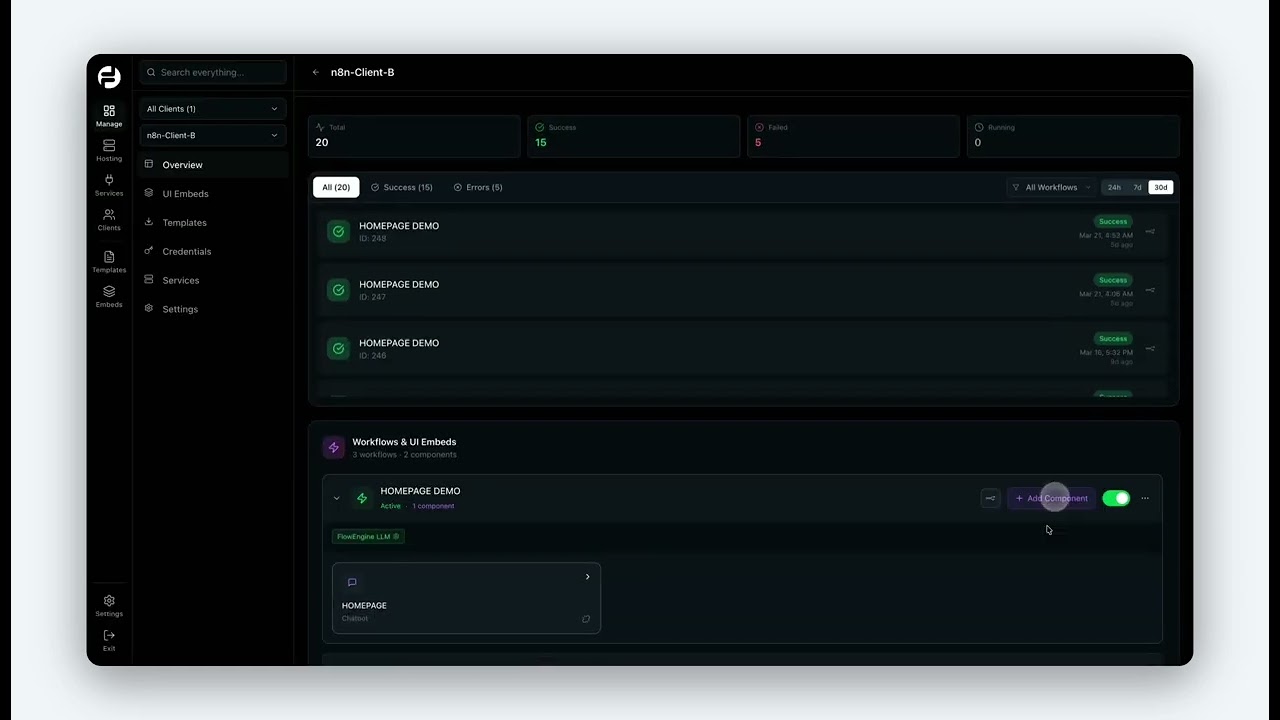
What It Does
You run the portal. Your clients log in and see only what you give them access to. You manage everything from behind the scenes.
Features
Manage
Built mainly for n8n — this is what your clients see. The hosting layer is hidden unless you choose to expose it. Also includes basic management for OpenClaw and Docker instances (status, URL, notes).
Overview
See detailed executions and workflows across all instances at once, with filters by workflow, status, and client.
UI Embeds
Build embeddable chatbots, forms, and UI elements and link them to n8n workflows in one click. Automatically detects the webhook and trigger type.
Templates
Set up once — clients browse and import workflows based on descriptions and see what credentials they need. Push updates so clients can update live workflows in one click, or push the same update to all clients at once.
Credentials
Clients add their API keys through the portal and they go straight into their n8n instance. Configure OAuth apps once under Settings (Microsoft, Google, Slack, X, Reddit, LinkedIn) and clients authenticate through the portal — tokens go directly to their n8n.
Services
Link a WhatsApp API to clients' instances.
Hosting
Deploy and manage instances. Not visible to clients by default.
- n8n — connect your own self-hosted instance or deploy via FlowEngine managed hosting
- OpenClaw — multi-channel bot platform (Telegram, Discord, Slack)
- Docker / Website — deploy any Docker image or static site
- Connect external — link any existing instance via URL + API key
Clients
Invite clients and control what they see:
- Assign which instances a client can access
- Clients get their own login and see only what is assigned to them
- Manage payments and subscriptions via Stripe
- Track AI usage
- Invite their team members
Settings
- Branding — logo and company name
- Authentication — Google/GitHub OAuth, signup restrictions
- SMTP — email for client invitations
- Stripe — connect your Stripe account to bill clients
- OAuth apps — configure Microsoft, Google, Slack, X, Reddit, LinkedIn for n8n client authentication
- Team — invite team members with role-based access
Deploy and Host
About Hosting
FlowEngine runs as a single Docker stack, Next.js portal + self-hosted Supabase (Postgres, Auth, Storage, Realtime) + Kong API gateway. Everything is included; no external Supabase account needed.
Why Deploy
Give your automation clients a branded portal without building one yourself. Keep all client data on your own infrastructure. Bill clients via Stripe. Manage multiple n8n instances from one place.
Common Use Cases
n8n agencies- white-label portal for clients, control access, push workflow templates Automation consultants- professional client experience with custom branding Internal teams- centralize n8n instance management with role-based access
Dependencies for flowEngine
Deployment Dependencies:
PostgreSQL (included supabase/postgres:15.8) GoTrue auth (included) PostgREST (included) Kong API gateway (included) Supabase Storage (included) Supabase Realtime (included)
Template Content
flowengine
FlowEngine-cloud/flowengine