
Deploy Dify
Visual builder for AI apps, chatbots and document workflows
Just deployed

Redis
Just deployed
/data
Just deployed
Just deployed

Just deployed
worker-beat
Just deployed

Just deployed
/var/lib/postgresql/data
Just deployed
api-websocket
Just deployed

ssrf-proxy
Just deployed
plugin-daemon
Just deployed
/app/storage
difystorage
Bucket
Just deployed
Deploy and Host Dify on Railway
Dify is an open-source platform for building applications on top of large language models. Instead of wiring prompts, retrieval and tool calls together in code, you compose them on a visual canvas: a workflow node graph, a chatflow for conversational products, agents that pick their own tools, and knowledge bases that answer from your documents. Every app is also an API, so a browser-designed prototype becomes a production endpoint without a rewrite. Dify is model-agnostic: you bring your own provider keys — OpenAI, Anthropic, Gemini, Bedrock, or a local OpenAI-compatible endpoint — and switch per node.
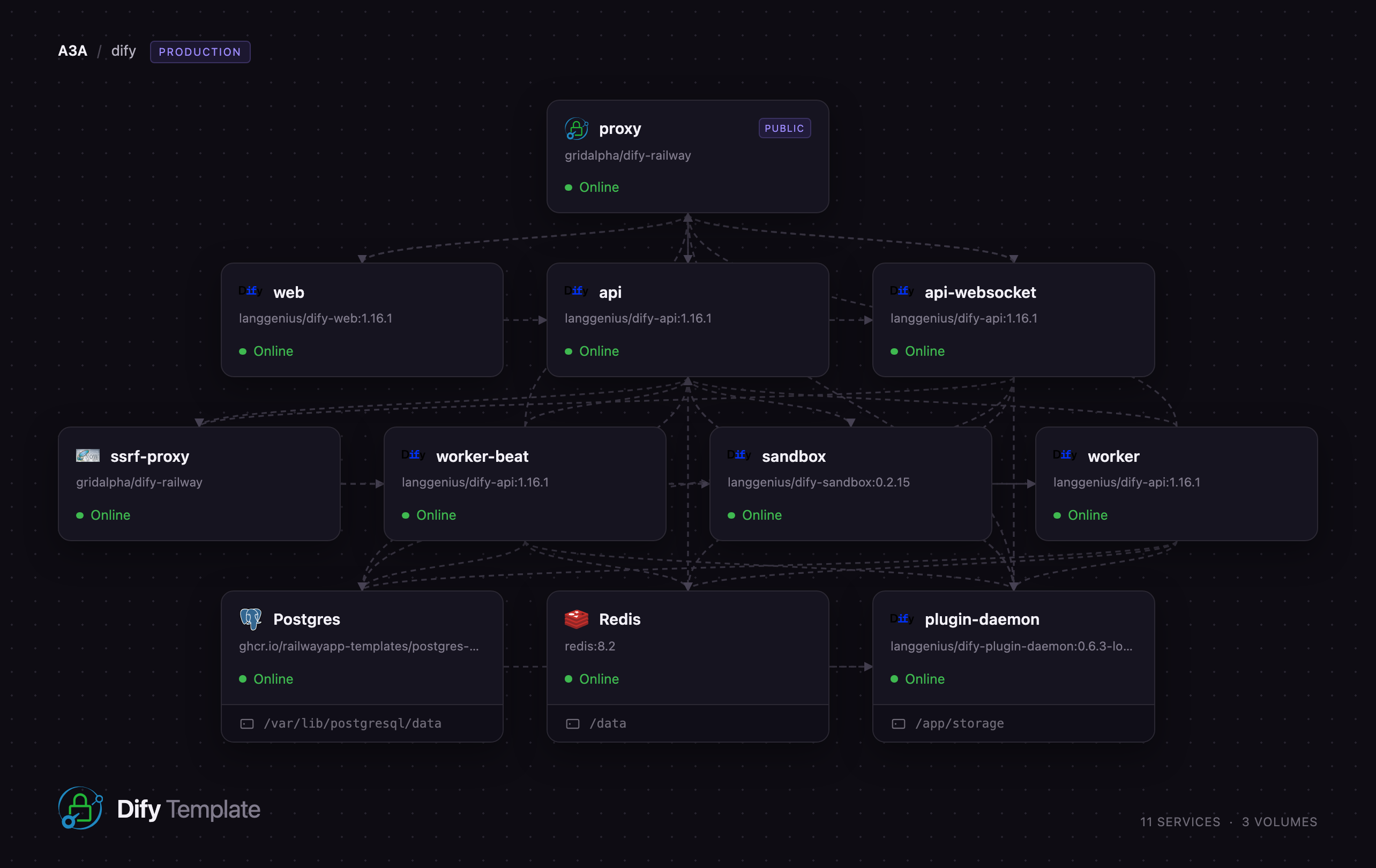
Self-host Dify on Railway and you get the full production topology, not a single container. A Caddy router is the one public service, forwarding the console, the console and service APIs, file endpoints, the collaboration websocket and plugin webhooks to the right backend on one origin. Behind it sit the Next.js frontend, the API server, a websocket service for multi-user editing, a Celery worker, a beat scheduler, the plugin daemon running model providers and tools, a code sandbox, and a Squid egress proxy blocking requests to private addresses. PostgreSQL stores apps, conversations and vectors via pgvector, Redis carries the queue and pub/sub, and a managed bucket holds uploads.
Getting Started with Dify on Railway
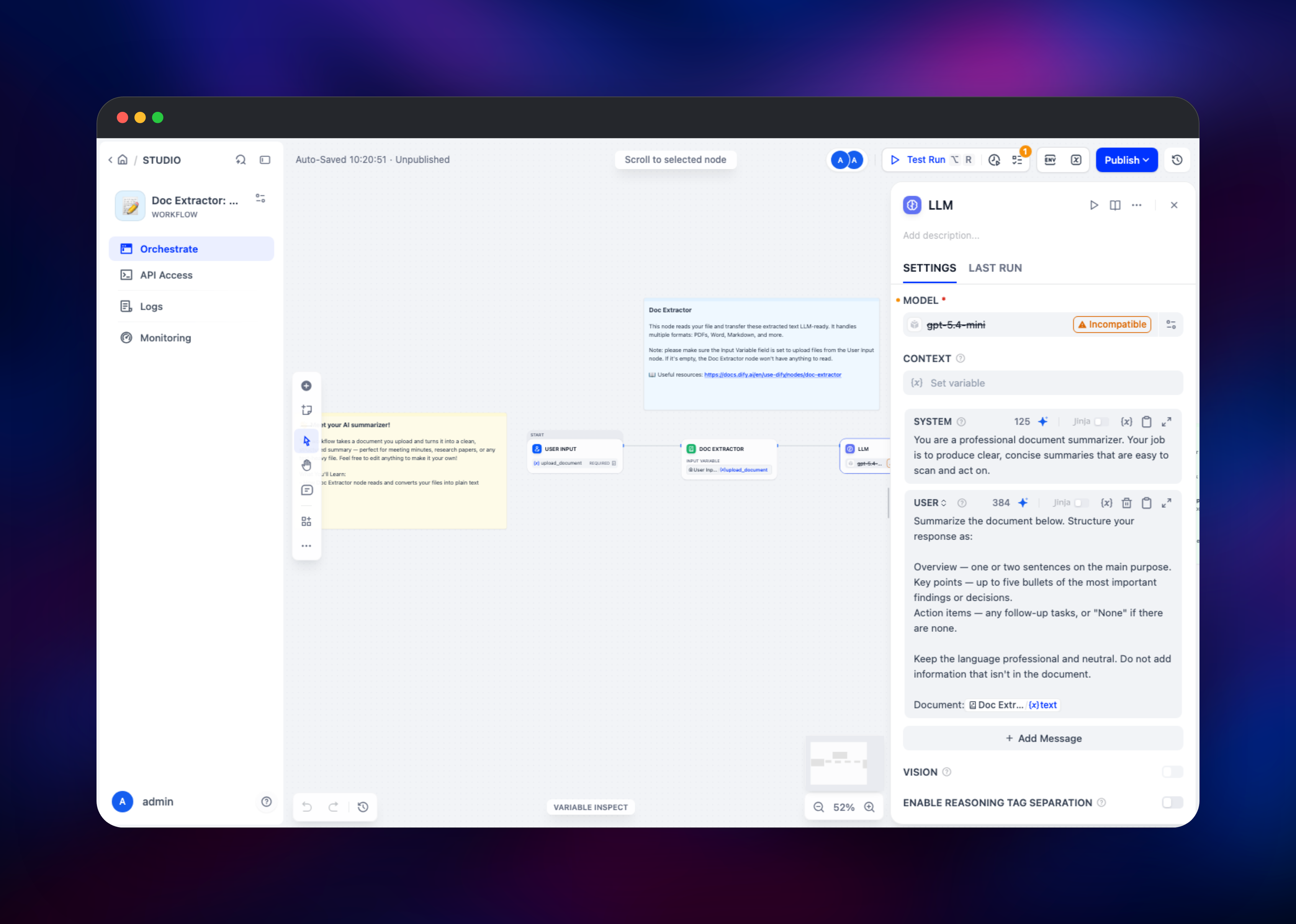
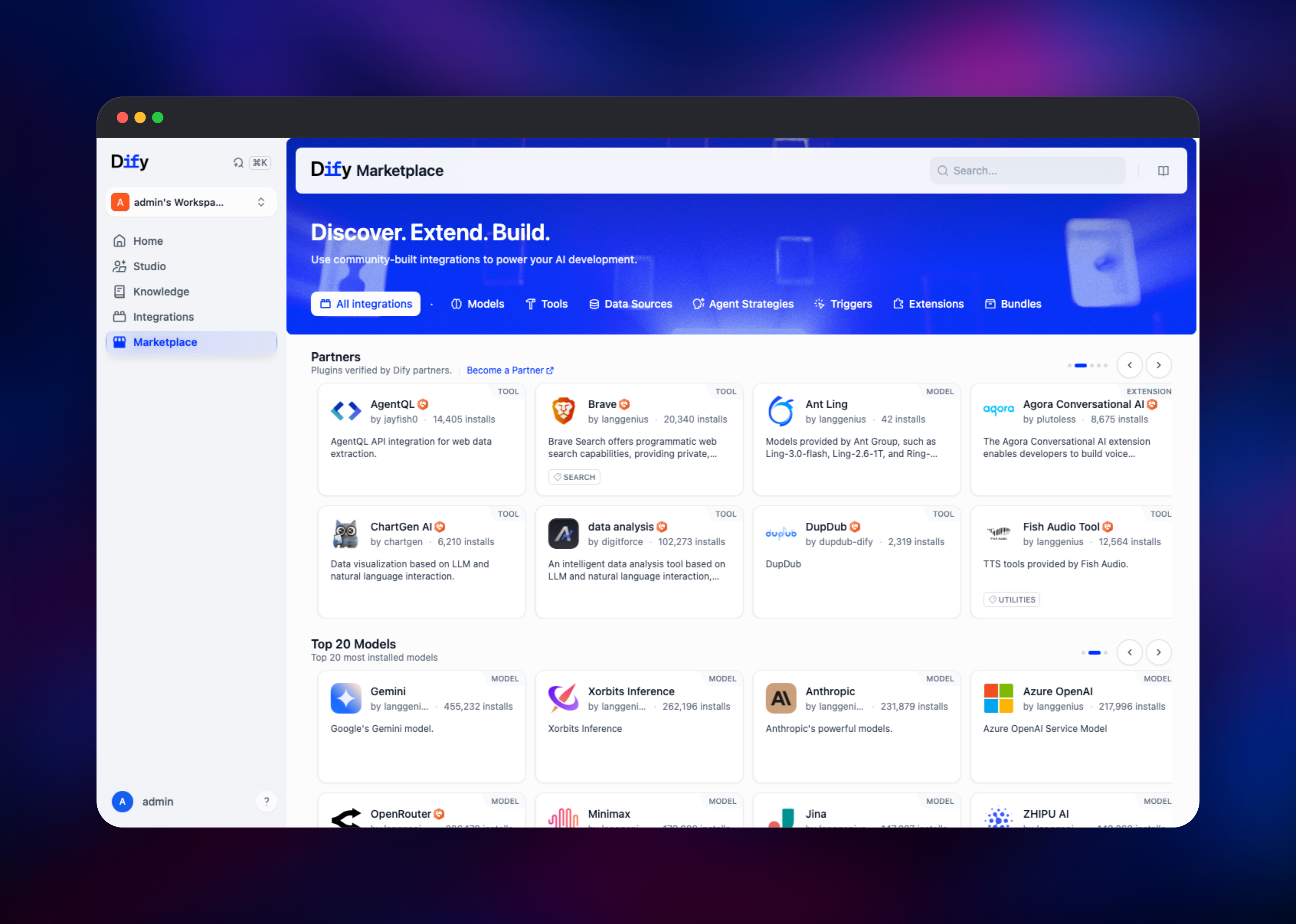
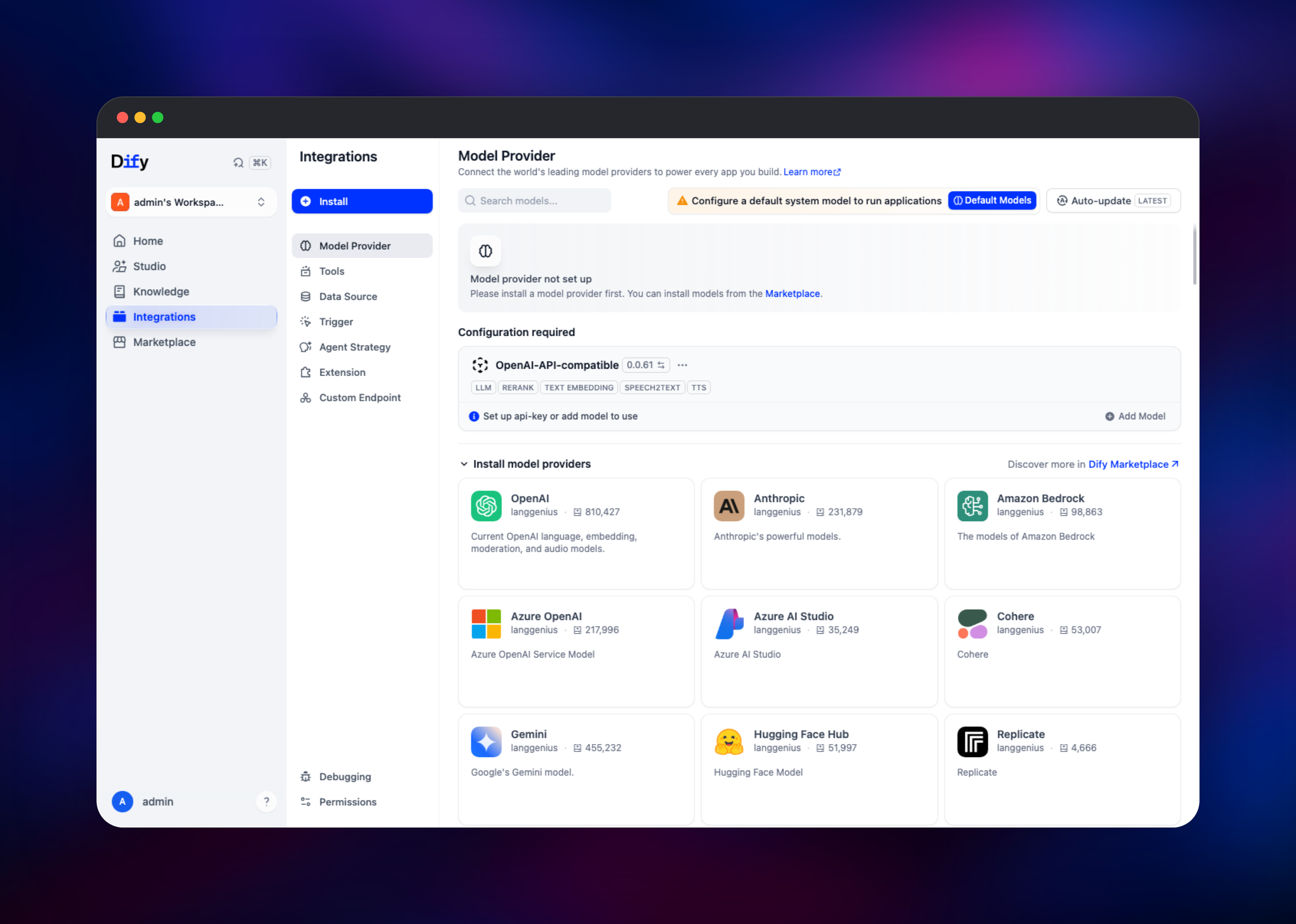
Open the deployed URL and you land on /init, which asks for the admin initialization password — the INIT_PASSWORD value on the api service, so read it there first. Enter it, then create the console account with your email, a username and a password of at least eight characters mixing letters and numbers; that first account becomes the workspace owner. Public registration is disabled, so nobody else can sign up unless invited. Next, give Dify a model: open Marketplace, install a provider plugin such as OpenAI, Anthropic or OpenAI-API-compatible, then in Integrations → Model Provider paste your API key and set a default system model — apps will not run without one. Then open Studio → Create from Template, pick a workflow such as the document summariser, and press Test Run to confirm the chain works. To verify retrieval, create a knowledge base under Knowledge and upload a PDF; watching that indexing job finish exercises the worker, the bucket and pgvector at once.
About Hosting Dify
Dify sits between a prompt playground and a full application framework, handling what every LLM product needs — prompt versioning, retrieval, tool calling, conversation state and observability — so your team writes product logic instead of plumbing. Self-hosting matters when prompts, documents or conversation logs cannot leave your infrastructure, or when per-seat pricing stops making sense.
Key capabilities:
- Visual workflow and chatflow builder with branching, loops and human-in-the-loop nodes
- Knowledge bases with configurable chunking, hybrid search and reranking
- Agents that select tools autonomously, plus a marketplace of models, tools and data sources
- Every app published as a REST API with its own keys, plus embeddable web apps
- Logs, annotations and evaluation over conversations
The multi-service shape is what makes it production-grade. The API server handles requests; the Celery worker runs indexing and scheduled triggers off the request path; the beat scheduler enqueues periodic work; the websocket service keeps canvas editing in sync; the plugin daemon isolates third-party code; and the sandbox runs code nodes away from your application. The Squid proxy in front of every outbound fetch is a real security control — it stops a workflow HTTP node being pointed at internal infrastructure.
Why Deploy Dify on Railway
Railway runs the whole topology as one project with no orchestration work.
- Every service, database, bucket and volume provisioned in one deploy
- Private networking between services; only the router is public
- Managed PostgreSQL with pgvector and managed Redis, both on volumes
- Object storage for uploads, so no shared filesystem is needed
- Scale per service — add worker replicas without touching the API
Common Use Cases
- Internal copilots — chat grounded in company handbooks and wikis, embedded for staff
- Document processing — batch summarisation, extraction and classification of contracts or tickets
- Support automation — a chatflow answering from product docs, escalating when confidence drops
- RAG-backed search — a knowledge base over catalogue content, queried through the service API
Dependencies for Dify
langgenius/dify-api:1.16.1— API server, plus the same image as worker and scheduler viaMODElanggenius/dify-web:1.16.1— Next.js console, pinned to the same release as the APIlanggenius/dify-plugin-daemon:0.6.3-local— installs and runs model, tool and data-source pluginslanggenius/dify-sandbox:0.2.15— runs Python and Node code from workflow code nodescaddy:2-alpine— public router giving all backends one originubuntu/squid— outbound proxy denying requests to private address space- PostgreSQL with pgvector, Redis, and an object storage bucket
Environment Variables Reference
| Variable | Purpose |
|---|---|
INIT_PASSWORD | Gates the first-run /init admin setup screen |
SECRET_KEY | Signs sessions, encrypts provider keys — never rotate |
CONSOLE_API_URL / APP_API_URL | Public base URLs; must match the router's domain |
ALLOW_REGISTER | Public sign-up, off by default |
VECTOR_STORE | pgvector, so no separate vector database is needed |
MIGRATION_ENABLED | Runs schema migrations at boot; on for the API only |
REDIS_SOCKET_TIMEOUT | Keep high on the API services or collaboration drops events |
Deployment Dependencies
- Source: github.com/langgenius/dify
- Images: langgenius on Docker Hub
- Docs: docs.dify.ai · marketplace.dify.ai
Hardware Requirements for Self-Hosting Dify
| Resource | Minimum | Recommended |
|---|---|---|
| CPU | 2 vCPU total | 4–8 vCPU across services |
| RAM | 4 GB total | 8–16 GB, most of it API and worker |
| Storage | 10 GB | 30 GB+, growing with plugins and documents |
| Runtime | Docker | Docker, PostgreSQL 14+, Redis 6+ |
Indexing large document sets is the heaviest operation; give the worker headroom.
Self-Hosting Dify with Docker
Upstream ships a Compose stack. Clone and start it:
git clone https://github.com/langgenius/dify.git
cd dify/docker
cp .env.example .env
docker compose up -d
Edit .env before first boot — set SECRET_KEY, INIT_PASSWORD and the database and Redis passwords. The console is then on http://localhost/init. To use object storage and pgvector instead of the bundled volumes and Weaviate, set these in the same file:
STORAGE_TYPE=s3
S3_ENDPOINT=https://your-endpoint
S3_BUCKET_NAME=your-bucket
S3_ACCESS_KEY=your-access-key
S3_SECRET_KEY=your-secret-key
VECTOR_STORE=pgvector
PGVECTOR_HOST=your-postgres-host
How Much Does Dify Cost to Self-Host?
Dify is open source and free to run, under a modified Apache 2.0 licence permitting self-hosting for your own use, with restrictions on reselling it as a multi-tenant service or removing the branding. There is no seat cost and no feature gate on the community edition. On Railway you pay only for the compute, storage and bandwidth used. The real running cost is the model provider bill, since inference is billed by whoever supplies your API key.
FAQ
What is Dify? An open-source platform for building LLM applications — workflows, chatflows, agents and RAG knowledge bases — with a visual builder, and every app also exposed as an API.
What does this Railway template deploy? A complete Dify stack: a public router, the web console, the API server, a websocket service for collaborative editing, a Celery worker and scheduler, the plugin daemon, a code sandbox, an egress proxy, PostgreSQL, Redis and a storage bucket.
Do I need an OpenAI key to use self-hosted Dify? You need a model provider, not specifically OpenAI. Install any provider plugin from the Marketplace, or use the OpenAI-API-compatible plugin to point Dify at Ollama or vLLM.
Why does the template include PostgreSQL and Redis? PostgreSQL stores apps, conversations, documents and — via pgvector — knowledge base embeddings, so no separate vector database is needed. Redis is the Celery broker and carries the pub/sub behind collaborative editing.
How do I call a Dify app from my own code? Publish the app, open API Access, and create an API key. The service API takes a bearer token and exposes streaming chat and completion endpoints. Public sign-up is off by default, so the only routes in are the setup screen and invitations.
How do I scale Dify for heavier document indexing?
Add replicas to the worker service and raise CELERY_WORKER_AMOUNT. Keep the scheduler at one replica — duplicating it duplicates every periodic job.
Template Content
Redis
redis:8.2worker-beat
langgenius/dify-api:1.16.1api-websocket
langgenius/dify-api:1.16.1ssrf-proxy
gridalpha/dify-railwayplugin-daemon
langgenius/dify-plugin-daemon:0.6.3-localdifystorage
Bucket


