
Deploy Dify | Open-Source AI/LLM App Builder
Self-host Dify on Railway — open-source LLM app builder with RAG and agents
DBs

Weaviate
Just deployed

MinIO
Just deployed
/data

Redis
Just deployed
/data

Just deployed
/var/lib/postgresql/data
Nginx
Just deployed

Just deployed
Plugin-Daemon
Just deployed
Dify-Web
Just deployed
Dify-API
Just deployed
Dify-Worker
Just deployed
Deploy and Host Dify on Railway

Dify is an open-source LLM application development platform that combines AI workflow design, RAG knowledge bases, agent tooling, and model management into a single self-hostable stack — letting teams ship production chatbots, copilots, and AI agents without writing orchestration code from scratch. The platform supports hundreds of proprietary and open-source models (OpenAI, Anthropic, Llama, Mistral, local Ollama) behind a unified plugin runtime.
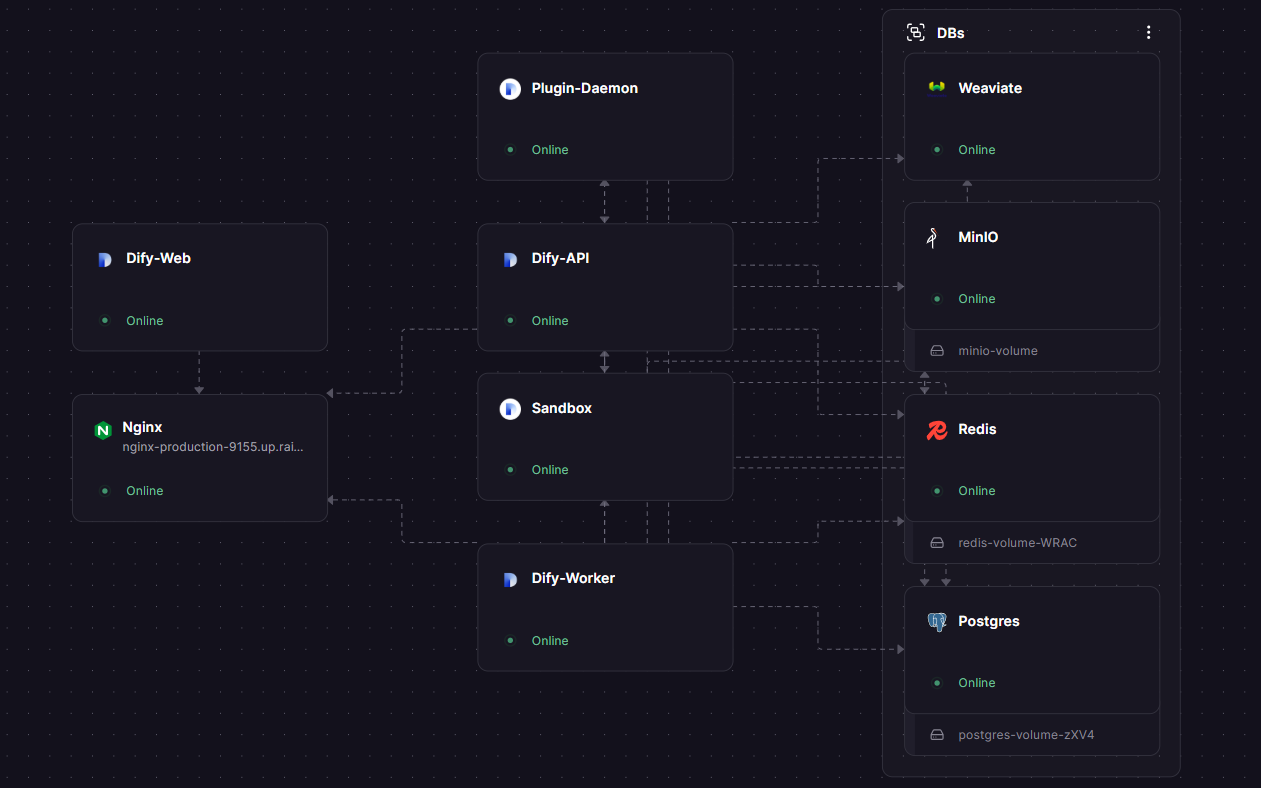
This Railway template self-hosts Dify with the full production architecture pre-wired: a Dify API + Worker + Web frontend, a Plugin Daemon for model providers, a Sandbox for code execution, Weaviate as the vector database, MinIO for shared file storage, PostgreSQL for metadata, Redis for queueing, and an Nginx reverse proxy that routes everything under one public domain. Deploy Dify on Railway in under five minutes — no docker-compose, no nginx.conf to mount, no S3 bucket to provision.
Getting Started with Dify on Railway
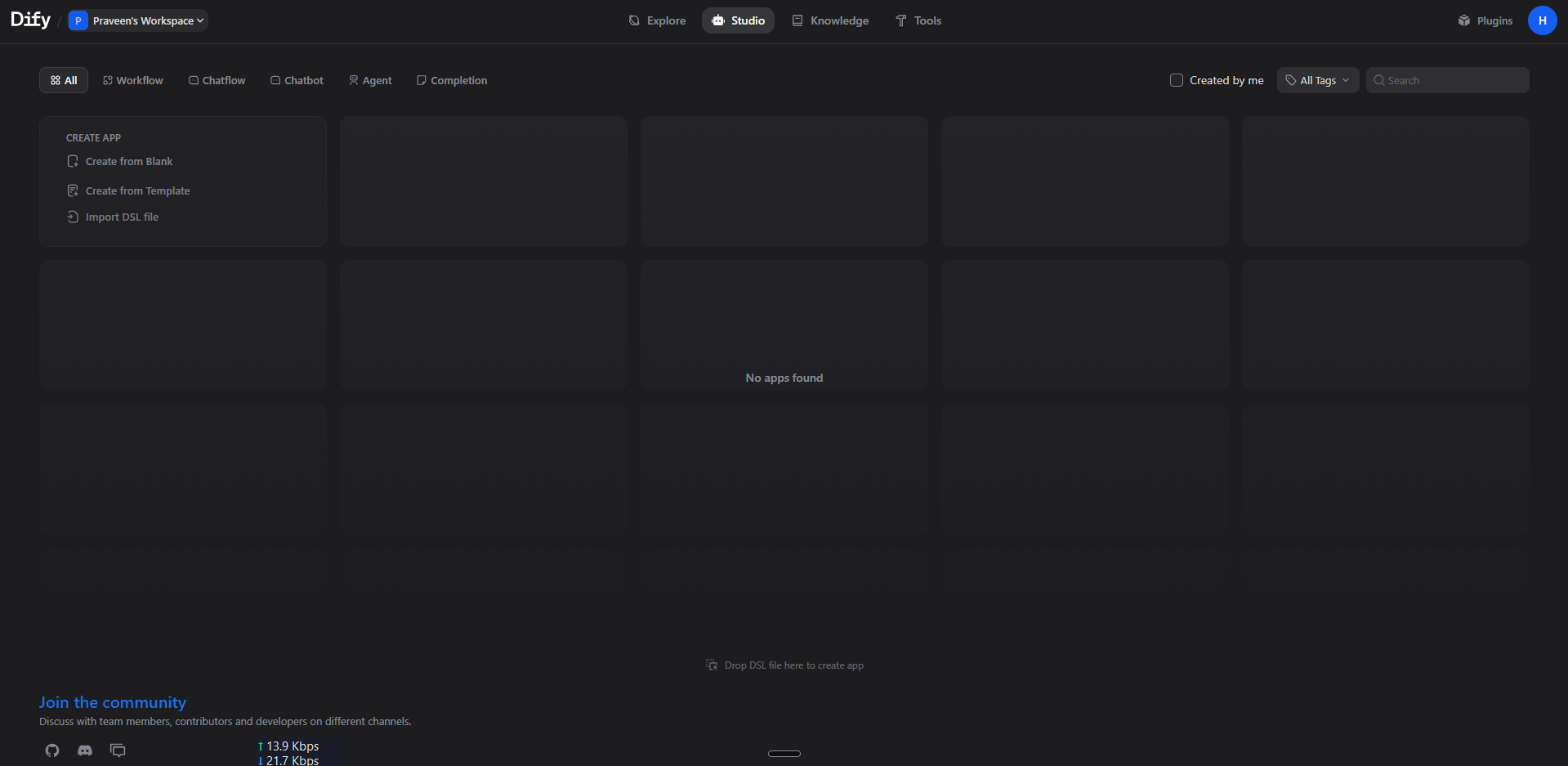
After clicking Deploy, wait roughly two minutes for all 10 services to build and become healthy. Visit the public Nginx domain in your browser — Dify will redirect you to /install for the first-run setup wizard. Create your admin account (email + password), then you'll land in the workspace dashboard. From the Settings → Model Providers page, add an API key for at least one provider (OpenAI, Anthropic, etc.) — Dify cannot generate completions without one. You can then build your first chatbot in Studio → Create App, upload PDFs to Knowledge for RAG, or assemble multi-step agents in the visual workflow editor.
About Hosting Dify
Dify (langgenius/dify) is a TypeScript + Python platform that bundles everything needed to ship LLM products: a low-code workflow builder, a RAG ingestion pipeline, an API gateway with rate limiting and observability, a plugin runtime for tools and model providers, and a sandbox for safely executing model-generated code.
Key features available in the self-hosted edition:
- Visual workflow builder for chains, agents, and conditional logic
- 50+ pre-built tools (web search, code interpreter, image generation, HTTP)
- Knowledge base with hybrid search (vector + keyword) over your private docs
- Built-in observability: per-request token counts, latency, cost
- API endpoints (REST + SSE streaming) for every published app
- Multi-tenant workspaces with role-based access control
Architecture: the Web frontend (Next.js) and API (Flask/Gunicorn) are separated; long-running tasks run in a Celery Worker pool; the Plugin Daemon (Go) runs model and tool plugins out-of-process; the Sandbox isolates user code; Weaviate stores vector embeddings; MinIO holds uploaded files (shared between API and Worker over the S3 protocol since Railway forbids cross-service volume mounts).
Why Deploy Dify on Railway
Railway turns the docker-compose-with-eleven-services nightmare into one click:
- One-click deploy of all 10 services with private networking pre-configured
- Auto-generated public domain on Nginx with TLS termination at the edge
- Per-service horizontal scaling without rewriting config
- Managed volumes for Postgres, Redis, Weaviate, MinIO, and the plugin store
- Pay only for the compute you use — no Kubernetes to operate
- Logs, metrics, and one-click rollbacks for every service
Common Use Cases
- Internal AI assistants — chat with your company wiki, Notion, or Confluence using RAG
- Customer-facing chatbots — embed a published Dify app on your website with one script tag
- Multi-step agents — automate workflows that combine LLMs, web search, code execution, and your own APIs
- Prompt experimentation — run side-by-side comparisons of GPT-4, Claude, and Llama on the same dataset
Dependencies for Dify
This template provisions ten services:
- Dify API —
langgenius/dify-api:1.13.3(MODE=api, port 5001) — Flask backend - Dify Worker —
langgenius/dify-api:1.13.3(MODE=worker) — Celery background jobs - Dify Web —
langgenius/dify-web:1.13.3(port 3000) — Next.js frontend - Plugin Daemon —
langgenius/dify-plugin-daemon:0.5.3-local(port 5002) — model/tool plugin runtime - Sandbox —
langgenius/dify-sandbox:0.2.14(port 8194) — isolated code execution - Weaviate —
semitechnologies/weaviate:1.27.0(port 8080) — vector database - PostgreSQL —
postgres:15-alpine— metadata + plugin tables - Redis —
redis:7-alpine— Celery broker + cache - MinIO —
minio/minio:latest— S3-compatible shared file storage (auto-createsdify-storagebucket) - Nginx —
nginx:latest— public reverse proxy routing/console/api,/api,/v1,/filesto API and/to Web
Deployment Dependencies for Dify
- Runtime: Python 3.12 (API/Worker), Node.js 20 (Web), Go 1.22 (Plugin Daemon)
- GitHub: github.com/langgenius/dify
- Docker Hub: langgenius/dify-api, langgenius/dify-web
- Docs: docs.dify.ai
Hardware Requirements for Self-Hosting Dify on Railway
| Resource | Minimum | Recommended |
|---|---|---|
| CPU | 4 vCPUs (combined) | 8+ vCPUs |
| RAM | 6 GB (combined) | 12+ GB |
| Storage | 10 GB (Postgres + MinIO + Weaviate volumes) | 50+ GB |
| Runtime | Linux x86_64 | Linux x86_64 |
Dify is heavy because it runs many cooperating processes. The Plugin Daemon and Worker each idle around 200 MB; Weaviate baseline is 500 MB; the API workers grow with concurrent requests. Plan for 12 GB RAM total once you load real models and a few thousand documents into the knowledge base.
Self-Hosting Dify with Docker
If you want to self-host Dify outside Railway, the official docker-compose.yaml runs all 11 services locally:
git clone https://github.com/langgenius/dify.git
cd dify/docker
cp .env.example .env
# Edit .env — set SECRET_KEY, DB_PASSWORD, REDIS_PASSWORD
docker compose up -d
# Visit http://localhost/install
To use Dify's API to deploy a published app from the command line:
curl -X POST 'https://your-dify.example.com/v1/chat-messages' \
  -H 'Authorization: Bearer app-XXXXXXXXXXXXXXXXXXXX' \
  -H 'Content-Type: application/json' \
  -d '{"inputs":{}, "query":"Hello", "user":"abc-123", "response_mode":"streaming"}'
How Much Does Dify Cost to Self-Host?
Dify is fully open-source under a permissive license — there are no per-seat fees, no token-based markups, and no enterprise gates on the self-hosted edition. Your only costs are the underlying LLM API calls (OpenAI, Anthropic, etc.) and the infrastructure to run the platform. On Railway you pay for usage of the 10 services — typically $20–$50/month for a small team, scaling with traffic and knowledge-base size. Dify Cloud (their hosted SaaS) starts at $0 for a free workspace and $59/month for the Professional plan; self-hosting on Railway is cheaper above ~5 active builders.
Dify vs LangChain
| Feature | Dify | LangChain |
|---|---|---|
| Visual workflow builder | ✅ Built-in | ❌ Code only |
| Multi-tenant workspace | ✅ | ❌ |
| Hosted RAG pipeline | ✅ | Build your own |
| Pre-built tools | 50+ | Via integrations |
| Self-hostable | ✅ | ✅ (library) |
Dify wraps LangChain-style primitives in a UI so non-developers can ship; LangChain is a developer library — pick LangChain when you need bespoke chains, Dify when you want speed-to-production.
FAQ
What is Dify and why self-host it? Dify is an open-source LLM application development platform. Self-hosting on Railway means your prompts, conversations, and uploaded knowledge documents never leave your own infrastructure — important for healthcare, finance, legal, and any regulated workload.
What does this Railway template deploy? Ten services: Dify API, Dify Worker, Dify Web, Plugin Daemon, Sandbox, Weaviate (vector DB), PostgreSQL, Redis, MinIO (S3 storage), and an Nginx reverse proxy that exposes one public URL.
Why does Dify need both Postgres and Weaviate? Postgres stores app metadata, users, conversations, and the queue. Weaviate stores embedding vectors for the knowledge base — purpose-built vector indexes are 10-100× faster for similarity search than a generic Postgres extension.
Why is MinIO included instead of using the local filesystem? Railway services cannot share volumes. The Dify API and Worker both need to read uploaded files (knowledge base ingestion runs in the worker). MinIO acts as a shared S3-compatible store so both services see the same files.
How do I add OpenAI, Anthropic, or another model provider in self-hosted Dify? After login, go to Settings → Model Providers, pick your provider, and paste the API key. The Plugin Daemon downloads the provider's plugin on demand from the Dify Marketplace.
Can I use Ollama or a local model with self-hosted Dify on Railway? Yes — install the Ollama plugin and point it at any HTTPS Ollama endpoint (your homelab, an Ollama instance running on another Railway service, or a remote inference server).
Does the Dify Marketplace work in the self-hosted edition?
Yes. MARKETPLACE_ENABLED=true is set by default — you can install community plugins (tools, model providers, datasource connectors) from marketplace.dify.ai directly inside the workspace.
Template Content
Nginx
nginx:latestPlugin-Daemon
langgenius/dify-plugin-daemon:0.5.3-localDify-Web
langgenius/dify-web:1.13.3Dify-API
langgenius/dify-api:1.13.3Dify-Worker
langgenius/dify-api:1.13.3Weaviate
semitechnologies/weaviate:1.27.0MinIO
minio/minio:latestRedis
redis:8.2.1

