
Deploy Directus | Open-Source Contentful & Strapi Alternative
Self Host Directus. Headless CMS, DAM, and automation engine

Just deployed
/var/lib/postgresql/data
Directus
Just deployed
/directus/uploads

Deploy and Host Directus on Railway
Deploy Directus on Railway to get a fully managed headless CMS with a visual data studio, REST and GraphQL APIs, and granular role-based access control. Self-host Directus on Railway with a pre-configured PostgreSQL database and persistent file storage — no Docker knowledge required.
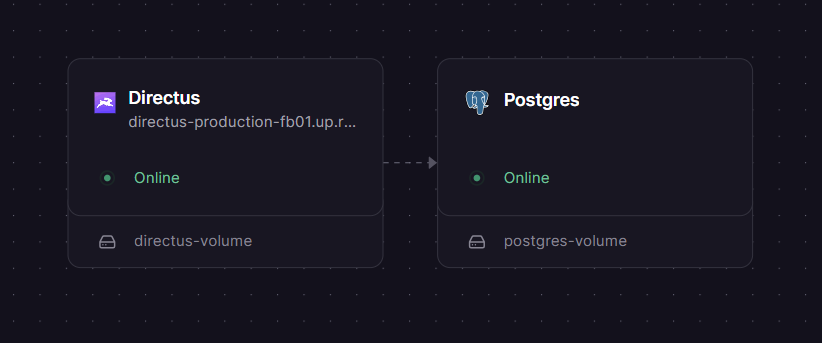
This template deploys two services: the Directus application server (directus/directus:latest) and a PostgreSQL 18 database with SSL. File uploads are persisted to a Railway volume mounted at /directus/uploads.
Getting Started with Directus on Railway
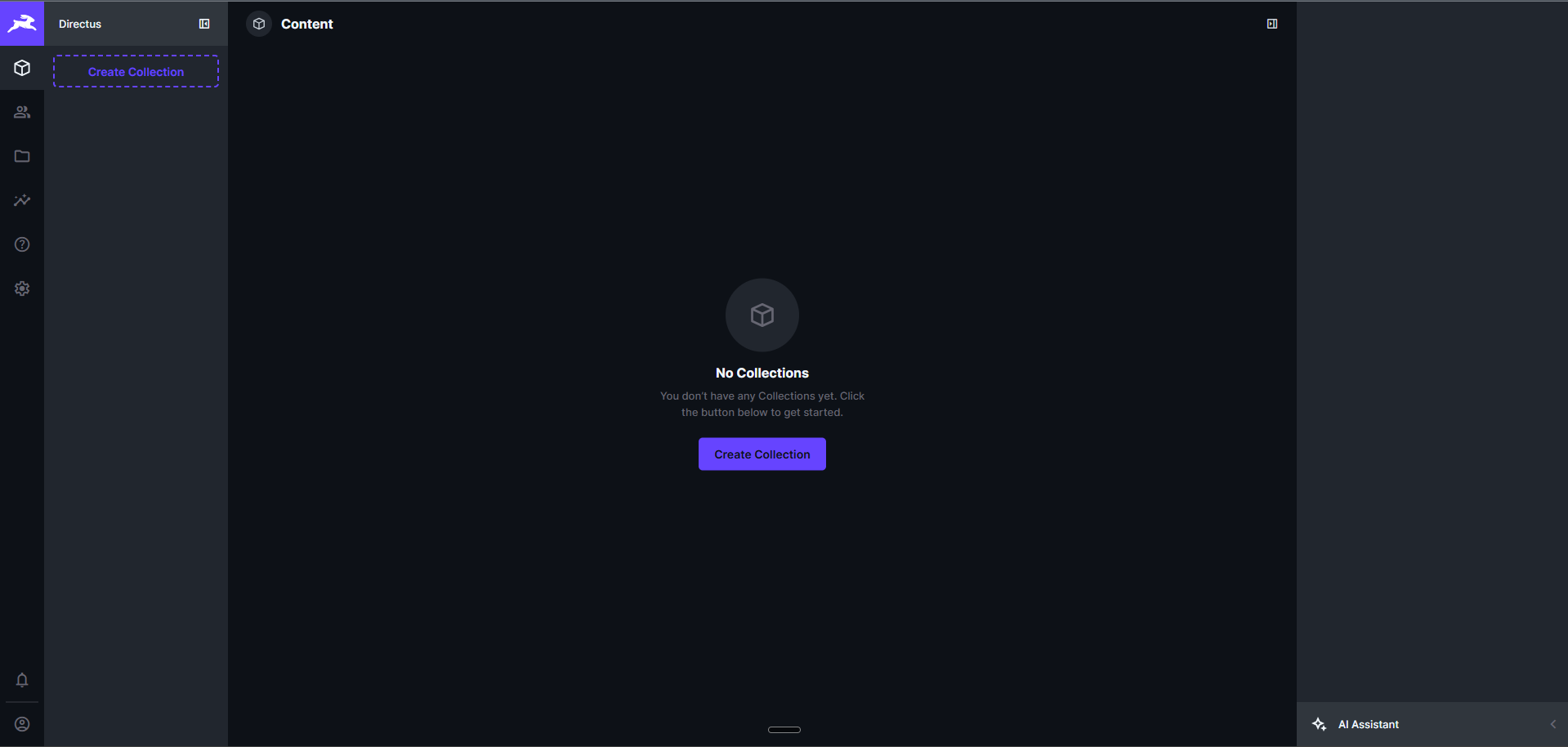
Once the deployment completes, open your Railway-generated URL. You will see the Directus admin login page. Sign in using the ADMIN_EMAIL and ADMIN_PASSWORD credentials set during deployment (visible in the Railway dashboard under service variables).
After logging in, the Data Studio opens. Create your first collection by clicking the "+" icon in the sidebar — define fields, set up relationships, and start adding content. The API is immediately available at /items/ for REST or /graphql for GraphQL queries.
To generate an API token, go to Settings > Access Tokens and create a static token, or use the /auth/login endpoint with your admin credentials. All content is accessible through the API with the permissions you configure under Settings > Roles & Permissions.
About Hosting Directus
Directus is an open-source data platform that wraps any SQL database with a real-time API and an intuitive no-code app. Unlike traditional CMS platforms, Directus doesn't impose a content model — it mirrors your database schema directly, giving you full control over your data architecture.
Key features:
- REST + GraphQL APIs auto-generated from your database schema
- Data Studio — drag-and-drop interface for managing content, files, and users
- Flows — visual automation engine with triggers, conditions, and operations
- Granular permissions — field-level access control with configurable roles
- File storage — built-in DAM with image transformations and metadata
- Extensions — custom modules, interfaces, displays, hooks, and endpoints via TypeScript/JavaScript
Why Deploy Directus on Railway
- One-click deploy with PostgreSQL and persistent storage pre-configured
- No Docker, Kubernetes, or infrastructure management needed
- Automatic SSL, custom domains, and private networking
- Scale vertically by adjusting Railway service resources
- Environment variable management through Railway dashboard
Common Use Cases for Self-Hosted Directus
- Headless CMS — power websites, mobile apps, and digital experiences with structured content delivered via API
- Internal tools — build custom dashboards, CRMs, inventory trackers, and admin panels without writing frontend code
- Digital asset management — organize, transform, and serve images and files with metadata and access controls
- E-commerce backend — manage product catalogs, categories, and order data with flexible relational schemas
Dependencies for Directus on Railway
- Directus —
directus/directus:latest(Node.js application, port 8055) - PostgreSQL —
ghcr.io/railwayapp-templates/postgres-ssl:18(managed database with SSL) - Volume — mounted at
/directus/uploadsfor persistent file storage
Environment Variables Reference for Directus
| Variable | Description |
|---|---|
SECRET | Access token signing key |
DB_CLIENT | Database driver (pg) |
DB_HOST | PostgreSQL hostname |
DB_PORT | PostgreSQL port |
DB_DATABASE | Database name |
DB_USER | Database username |
DB_PASSWORD | Database password |
ADMIN_EMAIL | Initial admin email |
ADMIN_PASSWORD | Initial admin password |
PUBLIC_URL | Public-facing URL of the Directus instance |
PORT | HTTP server port (8055) |
Deployment Dependencies
- Runtime: Node.js (bundled in Docker image)
- GitHub: github.com/directus/directus
- Docker Hub: hub.docker.com/r/directus/directus
- Docs: directus.io/docs
Hardware Requirements for Self-Hosting Directus
| Resource | Minimum | Recommended |
|---|---|---|
| CPU | 0.25 vCPU | 2 vCPU |
| RAM | 512 MB | 2 GB |
| Storage | 1 GB | 10 GB+ (depends on uploads) |
| Runtime | Node.js 18+ | Node.js 20+ |
Directus is lightweight — a basic instance with PostgreSQL runs comfortably on 512 MB RAM. Scale storage based on file upload volume.
Self-Hosting Directus with Docker
Pull and run Directus with Docker Compose:
services:
  directus:
    image: directus/directus:latest
    ports:
      - "8055:8055"
    environment:
      SECRET: "your-random-secret-key"
      DB_CLIENT: "pg"
      DB_HOST: "database"
      DB_PORT: "5432"
      DB_DATABASE: "directus"
      DB_USER: "directus"
      DB_PASSWORD: "change-me"
      ADMIN_EMAIL: "admin@example.com"
      ADMIN_PASSWORD: "change-me"
    volumes:
      - ./uploads:/directus/uploads
    depends_on:
      - database

  database:
    image: postgres:16
    environment:
      POSTGRES_DB: "directus"
      POSTGRES_USER: "directus"
      POSTGRES_PASSWORD: "change-me"
    volumes:
      - ./data:/var/lib/postgresql/data
Or run with a single Docker command:
docker run -d \
  -p 8055:8055 \
  -e SECRET="your-random-secret" \
  -e DB_CLIENT="pg" \
  -e DB_HOST="your-db-host" \
  -e DB_PORT="5432" \
  -e DB_DATABASE="directus" \
  -e DB_USER="directus" \
  -e DB_PASSWORD="your-db-password" \
  -e ADMIN_EMAIL="admin@example.com" \
  -e ADMIN_PASSWORD="change-me" \
  -v ./uploads:/directus/uploads \
  directus/directus:latest
How Much Does Directus Cost to Self-Host?
Directus is open-source under the BSL 1.1 license — free to self-host for organizations with under $5M annual revenue. There are no feature gates or artificial limitations in the self-hosted version. Managed Directus Cloud starts at $99/month. On Railway, you only pay for infrastructure (compute + storage + database), which starts around $5-10/month for a small instance.
Directus vs Strapi — Headless CMS Comparison
| Feature | Directus | Strapi |
|---|---|---|
| API Style | REST + GraphQL (auto-generated) | REST + GraphQL |
| Database | Any SQL (Postgres, MySQL, SQLite, MSSQL) | PostgreSQL, MySQL, SQLite |
| Content Modeling | Schema mirrors DB directly | Custom content types |
| License | BSL 1.1 | MIT (Community) |
| Admin UI | Data Studio (no-code) | Content Manager |
| Automation | Built-in Flows engine | Webhooks + plugins |
| File Management | Built-in DAM | Media Library |
Directus stands out by wrapping existing databases without imposing its own schema, making it ideal for projects with established data models or teams that want full database control.
FAQ
What is Directus and why should I self-host it? Directus is an open-source data platform that turns any SQL database into a full-featured API with a visual admin panel. Self-hosting gives you full control over your data, no vendor lock-in, and zero per-seat costs.
What does this Railway template deploy for Directus?
This template deploys two services: the Directus application server (Node.js, port 8055) and a PostgreSQL 18 database with SSL. It also provisions a persistent volume for file uploads at /directus/uploads.
Why does Directus need a PostgreSQL database on Railway? Directus requires a SQL database to store all content, user accounts, permissions, and configuration. PostgreSQL is the recommended production database for its reliability, JSON support, and full-text search capabilities.
How do I connect to the Directus API from my frontend application?
Use the generated Railway domain as your API base URL. Authenticate with a static token (created in Settings > Access Tokens) or via the /auth/login endpoint. The REST API is at /items/ and GraphQL at /graphql.
Can I install custom extensions in self-hosted Directus on Railway?
Yes. Mount a volume at /directus/extensions and add your custom modules, interfaces, displays, hooks, or endpoints. Directus auto-loads extensions on startup. You can build extensions using the @directus/extensions-sdk package.
How do I migrate from Directus Cloud to self-hosted Directus on Railway?
Export your database from Directus Cloud using pg_dump, import it into your Railway PostgreSQL instance, and update the PUBLIC_URL environment variable. File uploads need to be transferred separately to the Railway volume.
Template Content
Directus
directus/directus:latestADMIN_EMAIL
Admin email for initial login
ADMIN_PASSWORD
Admin password for dashboard access

