
Deploy dumpling
Self-hosted backups of your postgres, on a schedule, to any S3 storage
dumpling
dumpling
Just deployed
/data
Deploy and Host dumpling on Railway

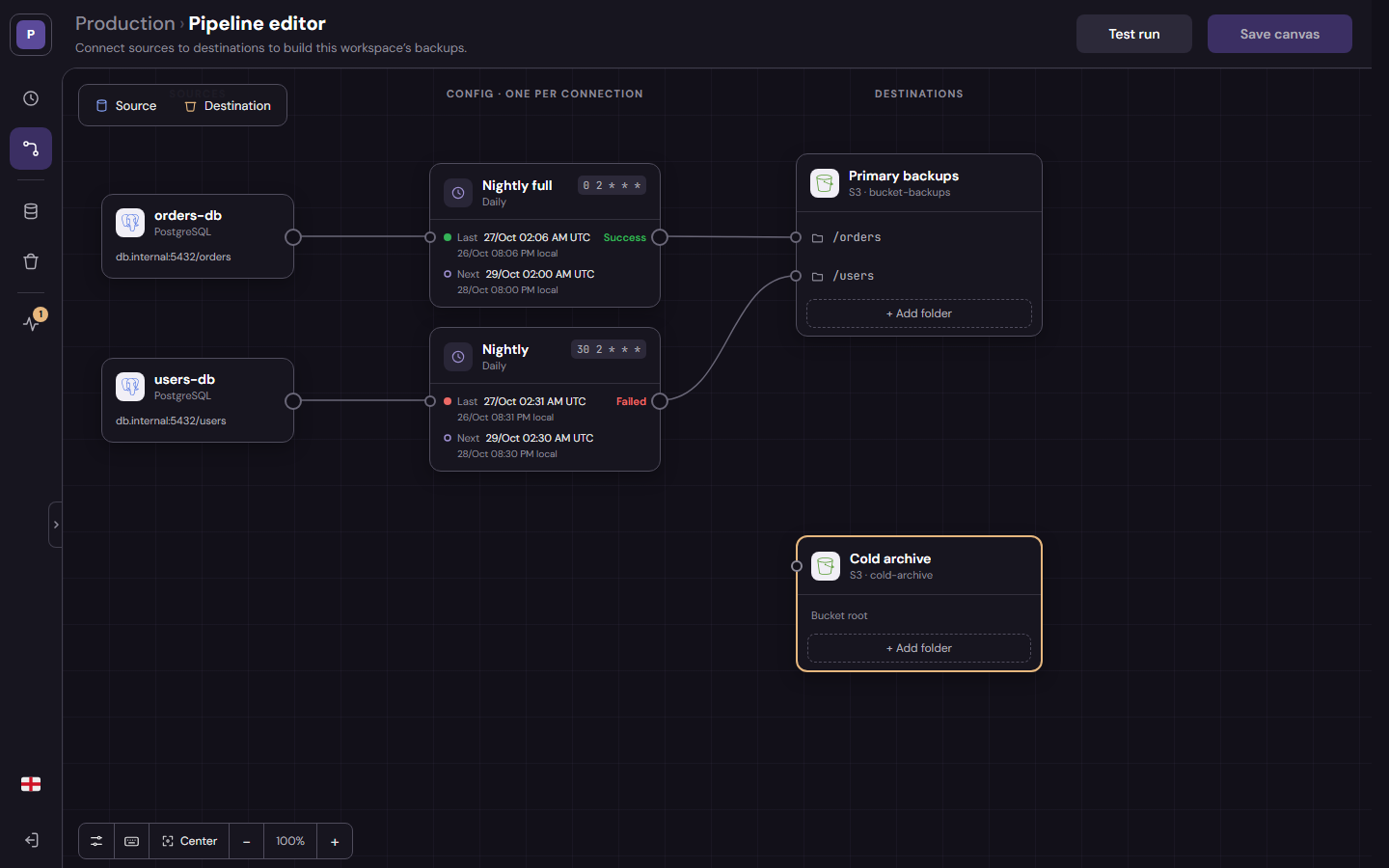
Dumpling backs up your databases on a schedule to the storage you choose. You draw what goes where on a canvas (a database, a storage and the backup between them) and Dumpling runs the database's own dump tool on that schedule and streams the dump to the storage, without touching the disk:
- 🧩 Canvas → Sources, destinations and the backups between them, connected by hand and saved in one go. A test run checks every flow first.
- 🐘 Sources → PostgreSQL today (up to the
pg_dumpof the image, 18 by default), over TLS by default. - 🪣 Destinations → Any S3-compatible storage (AWS S3, MinIO, feather-io…), at the root of a bucket or in folders.
- ⏱️ Backups → Cron schedules in UTC and Run now; gzip or none; object keys with placeholders (
{db}/{yyyy}-{MM}-{dd}); streamed in 16 MiB parts. - 📊 Monitoring → The health of every backup with its last and next run, and a run log with the log of each run.
- 🗂️ Workspaces → Separate canvases for environments, clients or projects.
- 🖥️ Web console → In English and Spanish, times in UTC with your local time next to them.
👉 Full docs, the API, the restore guide and everything else you need are in the official GitHub Repo.
About Hosting dumpling
Hosting Dumpling on Railway provisions the whole thing out-of-the-box, as a single service:
- The Dumpling service, one image with the backend, the web console it serves and
pg_dump: one container, one port. It runs the schedules and the backups, and serves the API (under/api) and the console (everything else). - A Railway volume mounted at
/datathat holds its SQLite database (workspaces, sources, destinations, backups and the run log). No external database needed.
The service gets a public domain, where you sign in to the console. Railway's edge provides TLS.
📌 The service rests at around 15 MiB of RAM, making it a very cheap way to back up the databases of your Railway project.
Common Use Cases
- Back up the databases of your Railway project → Point it at the PostgreSQL of your other services through Railway's private network and send the dumps to a bucket, on a schedule.
- Off-site backups → Keep the dumps in a storage outside the platform where the database runs (AWS S3, your own MinIO or feather-io).
- Several databases, several buckets → One canvas per environment or client, each with its own sources, destinations and schedules.
- A dump before a risky change → Run now on any backup, and check its log in the run log.
Dependencies for dumpling Hosting
- A Railway volume → Mounted at
/data; keeps the SQLite database with the encrypted credentials. That's it: no external database, cache or queue. - Dumpling service → Built from the
Dockerfileat the root of the repo (it builds the service and the console into one image). - Something to back up and somewhere to put it → A PostgreSQL database and an S3-compatible bucket, added from the console after deploying.
Implementation Details
-
Credentials. You sign in to the console with the admin user:
- User:
DUMPLING_ADMIN_USER - Password:
DUMPLING_ADMIN_PASSWORD
- User:
-
🔐 The variables of the template, with every secret generated for you. The secrets are filled with Railway's
${{secret()}}function, which creates a new random value on each deploy, so no two deployments share keys and there are no default credentials to forget; the rest have fixed values:DUMPLING_ADMIN_USER→${{secret(10, "ABCDEFGHIJKLMNOPQRSTUVWXYZ0123456789")}}: 10 chars, the user of the console.DUMPLING_ADMIN_PASSWORD→${{secret(20, "ABCDEFGHIJKLMNOPQRSTUVWXYZ0123456789")}}: 20 chars, its password.JWT_SECRET→${{secret(64, "abcdef0123456789")}}: 64 hex chars (256 bits).SECRETS_ENCRYPTION_KEY→${{secret(64, "abcdef0123456789")}}: 64 hex chars (256 bits).PORT→8080: the port of the API and the console; Railway's public domain points to it.PG_VERSION→18: thepg_dumpbuilt into the image (dumps PostgreSQL 18 and older).TRUSTED_PROXIES→1: Railway's edge, so the login lock and the rate limit see the client IP.
After deploying, copy DUMPLING_ADMIN_USER and DUMPLING_ADMIN_PASSWORD from the Variables tab of the service to sign in to the console. You can replace them with your own values at any time.
⚠️ Never change SECRETS_ENCRYPTION_KEY once deployed: the passwords of the databases and the keys of the buckets are encrypted with it, and changing it makes them unreadable (each source and destination would need its password again). Changing JWT_SECRET only signs everyone out of the console.
- The
pg_dumpversion.PG_VERSION(18) chooses thepg_dumpbuilt into the image, which dumps servers of that version or older. Raise it only for a newer server, and redeploy to rebuild the image. - Client IPs.
TRUSTED_PROXIESis the number of proxies in front of the service (1: Railway's edge). The service readsX-Forwarded-Foronly from connections that come from a private address, so a client can't pick its own IP. - The volume. Railway mounts it owned by root; the container gives
/datato its owndumplinguser when it starts and runs as that user, so nothing else is needed. - Connecting to a database. A source connects with TLS unless its TLS setting is turned off. A PostgreSQL in the same Railway project is reachable through the private network (
SERVICE-NAME.railway.internal); turn TLS off for it if it doesn't serve TLS. - Least privilege. Connect with a role that can only read (e.g. granted
pg_read_all_data, PostgreSQL 14+), and give Dumpling a bucket key limited tos3:PutObjectands3:AbortMultipartUpload. More inSECURITY.md. - Restoring. A backup is one file in your bucket: plain
pg_restore(custom format) orpsql(plain SQL) restores it. The run log shows where each run wrote, and the restore guide has the steps, tested against real backups. - Tested end to end: a real backup made, restored and compared against the original database.
- Not yet (planned for 0.2.0): more sources and destinations (MySQL, MongoDB, Google Drive…), retention of old backups, alerts and downloading a backup from the console. Today it has one user and doesn't verify the certificate of a database (
verify-full).
Why Deploy dumpling on Railway?
Railway is a singular platform to deploy your infrastructure stack. Railway will host your infrastructure so you don't have to deal with configuration, while allowing you to vertically and horizontally scale it.
By deploying dumpling on Railway, you are one step closer to supporting a complete full-stack application with minimal burden. Host your servers, databases, AI agents, and more on Railway.
Template Content
dumpling
Root-101/dumpling