
Deploy EMQX
MQTT broker that connects IoT devices and routes their messages

gateway
Just deployed
Just deployed
/opt/emqx/data
Deploy and Host EMQX on Railway
EMQX is an MQTT 5.0 broker built in Erlang/OTP for connecting large fleets of devices — industrial sensors, vehicles, smart meters, building controllers — and moving their messages to the systems that act on them. It speaks MQTT 5.0, 3.1.1 and 3.1 over TCP and WebSocket, holds retained messages and offline sessions, enforces per-user and per-topic access rules, and ships a Dashboard and REST API covering all of it.
Self-host EMQX on Railway and you get a broker with authentication already switched on, not an open relay you have to remember to lock down. The template runs two services: emqx, the broker, with a persistent volume for its built-in database, and gateway, a small Caddy proxy that is the only public service. Railway routes one domain to one container port, and EMQX serves its Dashboard on 18083 while MQTT-over-WebSocket lives on 8083 — so the gateway splits them on the Upgrade header. One hostname gives you https:// for the Dashboard and wss://.../mqtt as a TLS-terminated MQTT endpoint, and a TCP proxy exposes port 1883 for devices that speak only plain MQTT.
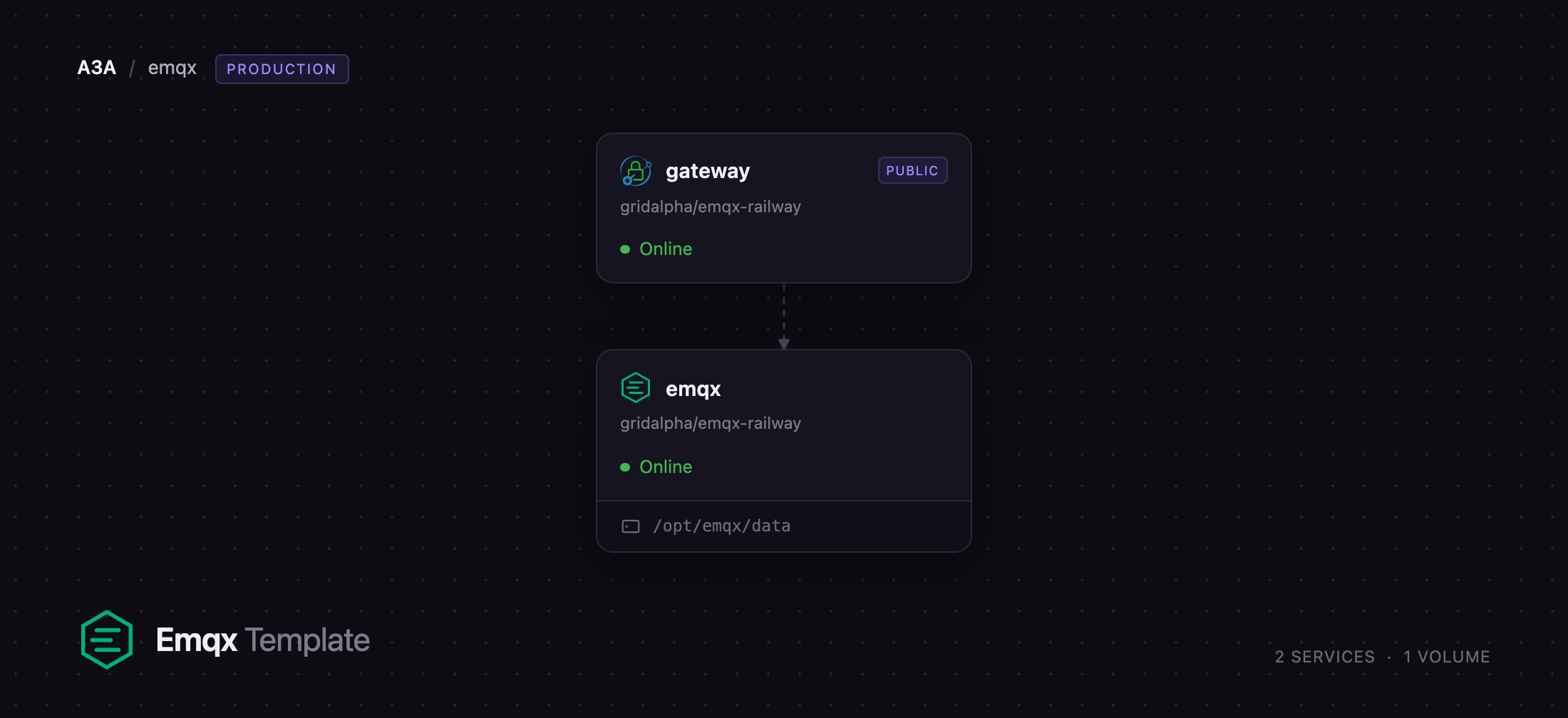
Getting Started with EMQX on Railway
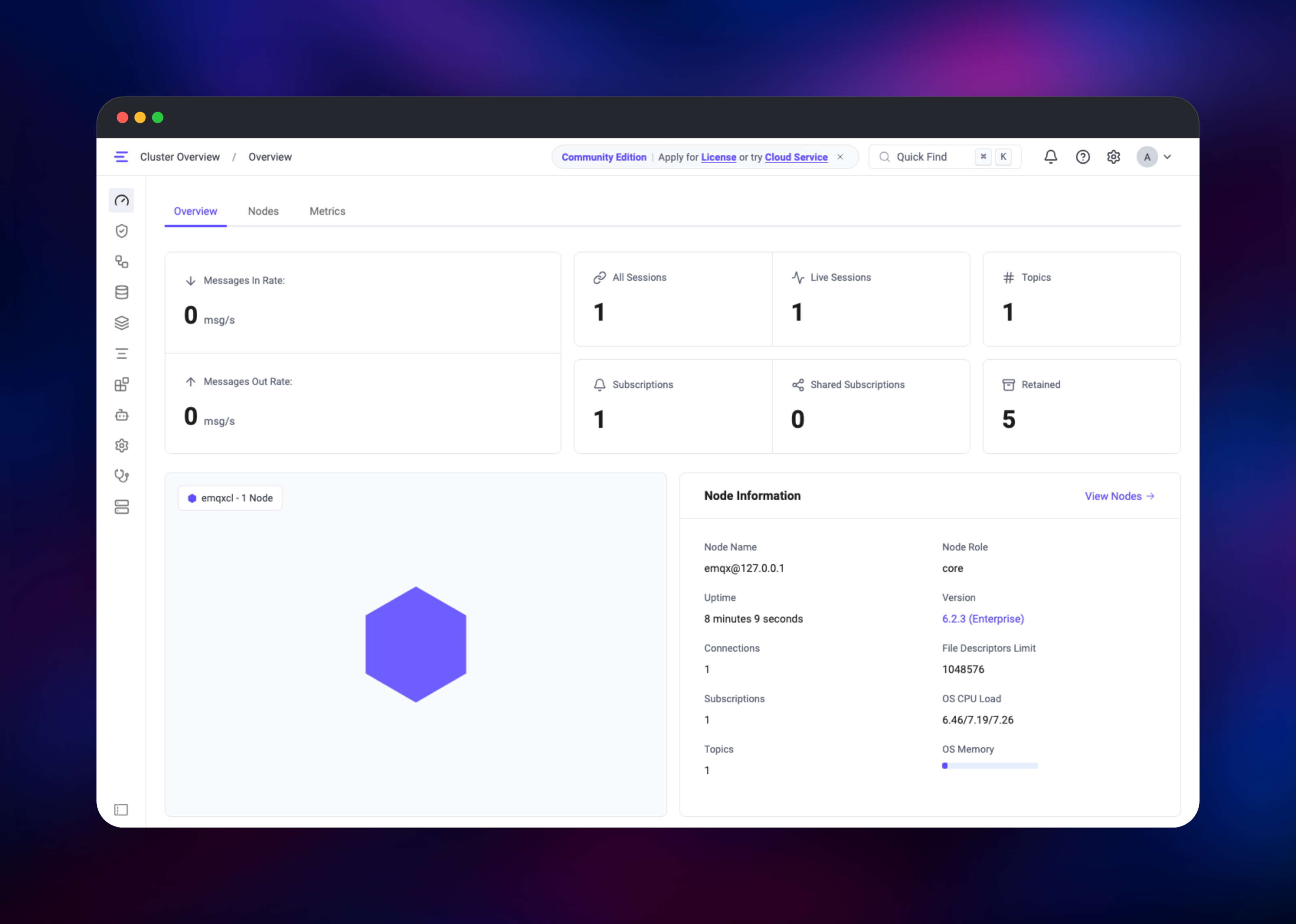
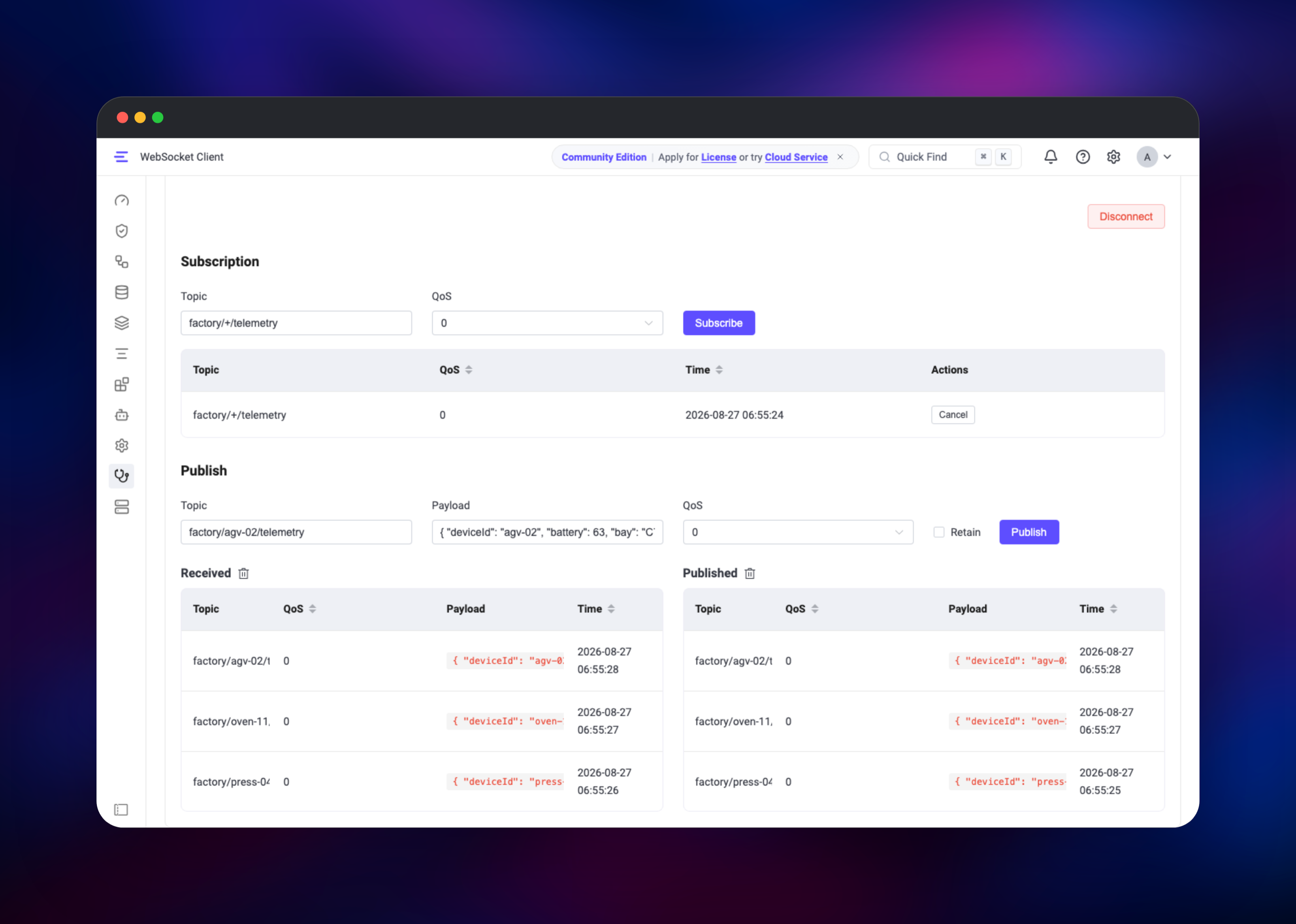
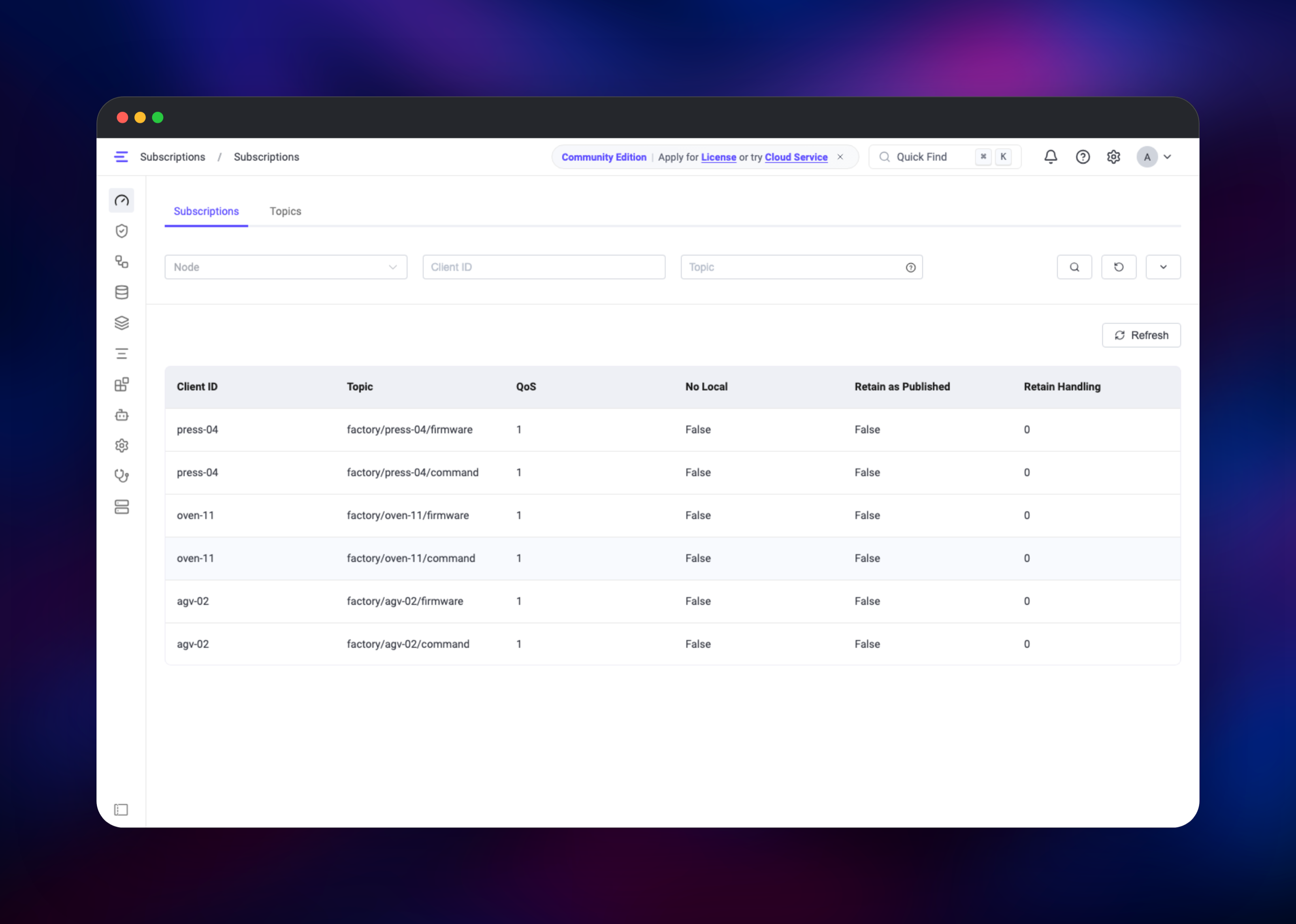
Open the public URL of the gateway service — that is the EMQX Dashboard. Sign in as admin with the password generated into EMQX_DASHBOARD__DEFAULT_PASSWORD, visible in the emqx service's variables. Acknowledge the one-time community licence notice and you land on Cluster Overview, where one healthy node means the broker is running. Your first MQTT credential already exists: MQTT_USERNAME and MQTT_PASSWORD seed a user on first boot, and more are added under Access Control → Authentication → Users. To prove the deployment end to end, open Diagnose → WebSocket Client, set Port to 443 and Path to /mqtt with TLS on, fill in that username and password, connect, subscribe to factory/+/telemetry, then publish a JSON payload to factory/press-04/telemetry and watch it arrive. Real devices connect to wss:///mqtt and show up under Monitoring → Clients. Anonymous connections are refused with Not authorized — that is the template working, not a fault.
About Hosting EMQX
MQTT is a publish/subscribe protocol designed for unreliable networks and small devices, and the broker is what everything else depends on. Self-hosting EMQX makes sense when device data should not leave your infrastructure, or when a managed broker's per-connection pricing stops adding up.
- MQTT 5.0, 3.1.1 and 3.1 over TCP, TLS, WebSocket and secure WebSocket
- Built-in credential database, plus PostgreSQL, MySQL, MongoDB, Redis, LDAP, JWT and HTTP auth backends
- Topic-level authorization with wildcards and
${username}/${clientid}placeholders - A SQL rules engine routing messages in flight to Kafka, PostgreSQL, webhooks and other sinks
- Retained messages, shared subscriptions, delayed publish and offline queues
The emqx service runs the official image with a small wrapper that prepares its volume and configuration at boot.
Why Deploy EMQX on Railway
Railway removes the parts of running a broker that have nothing to do with MQTT:
- TLS certificates issued and renewed automatically, so
wss://works on day one - A persistent volume for credentials, ACLs and retained messages
- A TCP proxy for plain MQTT clients, with no load balancer to configure
- Private networking between the broker and its gateway
- Redeploy on
git pushfrom the source repository
Common Use Cases
- Industrial and building telemetry — machines, PLCs and HVAC controllers publishing readings on per-device topics
- Connected products — hardware reporting state and taking commands over
wss://on 443, which passes restrictive networks - Browser realtime features — web apps subscribing over MQTT-over-WebSocket for status boards
- Ingestion front door — the rules engine enriching messages before forwarding them to Kafka or a webhook
Dependencies for EMQX
- EMQX —
emqx/emqx:6(github.com/emqx/emqx): broker, Dashboard and REST API - Caddy —
caddy:2-alpine: the public gateway splitting Dashboard traffic from MQTT-over-WebSocket - A volume at
/opt/emqx/datafor EMQX's embedded database
No external database is required; a PostgreSQL, MySQL or Redis auth backend can be added later from the Dashboard.
Environment Variables Reference
| Variable | Service | Purpose |
|---|---|---|
EMQX_DASHBOARD__DEFAULT_PASSWORD | emqx | Administrator password, read on first boot only. 8–64 characters mixing two of letters, digits, punctuation |
EMQX_DASHBOARD__DEFAULT_USERNAME | emqx | Administrator username, admin by default |
MQTT_USERNAME / MQTT_PASSWORD | emqx | Seeds one MQTT credential; never overwrites a password changed in the Dashboard |
EMQX_SECURITY_PROFILE | emqx | hardened refuses MQTT with no authenticator configured, refuses the shipped default password, fails closed on backend errors |
EMQX_NODE_NAME | emqx | Erlang node name. Must stay fixed — EMQX stores its database under it |
PORT | emqx | 18083, the Dashboard and REST API listener |
EMQX_WS_UPSTREAM / EMQX_DASHBOARD_UPSTREAM | gateway | Private host:port of the broker's HTTP listeners |
Any other EMQX_* variable passes through to EMQX's own configuration: mqtt.max_packet_size becomes EMQX_MQTT__MAX_PACKET_SIZE.
Deployment Dependencies
- Source repository: github.com/gridalpha/emqx-railway
- Upstream project: github.com/emqx/emqx
- Image: hub.docker.com/r/emqx/emqx
- Documentation: docs.emqx.com
Hardware Requirements for Self-Hosting EMQX
| Resource | Minimum | Recommended |
|---|---|---|
| CPU | 1 vCPU | 2–4 vCPU |
| RAM | 512 MB | 2 GB+ |
| Storage | 1 GB volume | 5 GB volume |
| Runtime | Erlang/OTP 28, in the image | same |
A single node idles under 512 MB and handles thousands of clients. Memory scales with concurrent sessions, subscriptions and queued offline messages.
Self-Hosting EMQX
The fastest local run uses the official image. This is a Docker command:
docker run -d --name emqx -p 1883:1883 -p 8083:8083 -p 18083:18083 \
  -v emqx-data:/opt/emqx/data emqx/emqx:6
The Dashboard is then on http://localhost:18083 with the documented defaults admin / public, which EMQX asks you to change on first sign-in. Any emqx.conf setting becomes an environment variable by upper-casing the path and replacing each dot with a double underscore, as in this Docker Compose fragment:
services:
  emqx:
    image: emqx/emqx:6
    environment:
      EMQX_SECURITY_PROFILE: hardened
      EMQX_DASHBOARD__DEFAULT_PASSWORD: change-me-8-plus
      EMQX_RETAINER__BACKEND__STORAGE_TYPE: disc
    volumes: ["emqx-data:/opt/emqx/data"]
    ports: ["1883:1883", "8083:8083", "18083:18083"]
volumes:
  emqx-data:
How Much Does EMQX Cost to Self-Host?
EMQX 5.9.0 and later is published under the Business Source License 1.1. Its Additional Use Grant permits production use of a single node free of charge, and the community licence bundled in the image allows up to 10 million concurrent sessions on that node with no key to apply for. Clustering, or offering EMQX to third parties as a hosted or embedded product, needs a commercial licence from EMQ. On Railway you pay only for the compute, volume and bandwidth the two services use.
FAQ
What is EMQX? An open-source MQTT broker written in Erlang/OTP. It accepts MQTT connections over TCP, TLS and WebSocket, routes published messages to subscribers by topic, and adds authentication, authorization, retained messages and a SQL rules engine on top of the protocol.
What does this Railway template deploy?
The EMQX broker from emqx/emqx:6 with a persistent volume, and a small Caddy gateway that is the only public service — serving the Dashboard and REST API over HTTPS and MQTT over wss:// on one hostname.
Why does the template need a volume?
EMQX keeps device credentials, ACL rules and retained messages in an embedded database on disk rather than an external system. Without the volume at /opt/emqx/data, every redeploy would come back with no users.
How do I connect a device to self-hosted EMQX on Railway?
Use wss:///mqtt on port 443 with the username and password from MQTT_USERNAME and MQTT_PASSWORD. Clients that cannot speak WebSocket use the TCP proxy on MQTT port 1883, whose host and port appear on the emqx service in the Railway dashboard.
Is MQTT over the TCP proxy encrypted?
No. TLS is terminated at Railway's edge, which covers https:// and wss:// but not the raw TCP proxy, so credentials sent to 1883 travel in the clear. Use wss:// across the internet.
Can I run an EMQX cluster on this template? Not on the community licence — EMQX 5.9.0 and later require a commercial key for more than one node, which is why this ships a single broker. One node still handles a very large number of sessions.
Template Content
gateway
gridalpha/emqx-railway

