
Deploy Ever Gauzy
Business platform for employees, projects, time tracking and invoicing

Redis
Just deployed
/data
Just deployed

Just deployed
/var/lib/postgresql/data
Just deployed
gauzy-storage
Bucket
Just deployed
Deploy and Host Ever Gauzy on Railway
Ever Gauzy is an open-source business management platform folding ERP, CRM, HRM, ATS and project management into one application. Agencies and product teams use it to keep employees, clients, projects, tasks, timesheets, expenses and invoices in one database rather than across a time tracker, a spreadsheet and an accounting tool. It is multi-tenant, so one installation can serve several companies, each with its own organizations and permissions.
Deploy Ever Gauzy on Railway and you get four services wired together. webapp serves the Angular front end through nginx and rewrites its API origin at container start. api is the NestJS server that runs every migration and seeds the first administrator before it opens its port. Postgres stores every record; Redis backs the session store, the two-layer cache and the API's atomic counters. Uploads go to an object storage bucket and come back through presigned URLs, keeping both app services stateless.
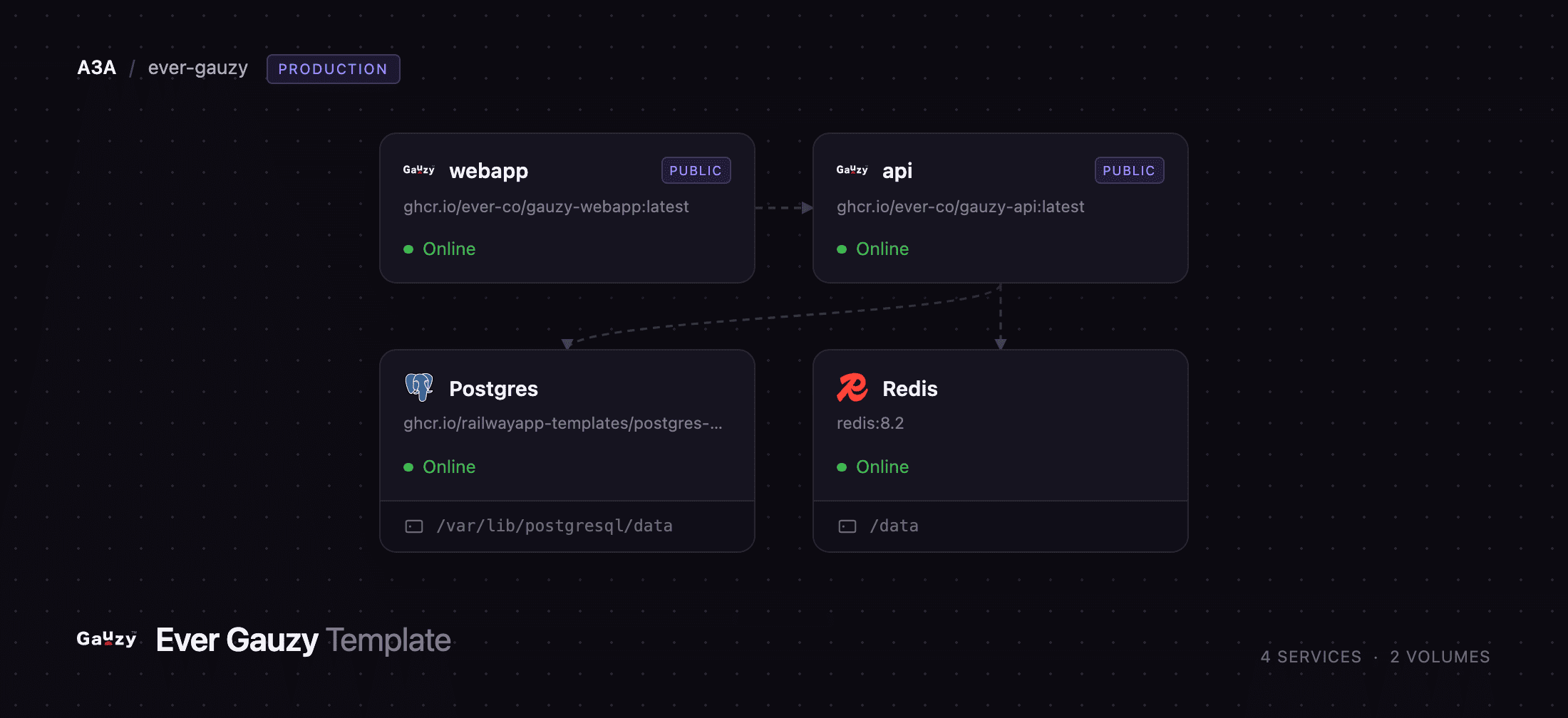
Getting Started with Ever Gauzy on Railway
Set DEMO_SUPER_ADMIN_EMAIL and DEMO_SUPER_ADMIN_PASSWORD before the first deploy — those become the owner account, created while the API boots, so the instance is never briefly open. The first deployment takes a few minutes: the API applies the full migration set and seeds countries, currencies, roles, email templates and a "Default Company" organization before it listens. Open the webapp URL, sign in, and you land on the time-tracking dashboard.
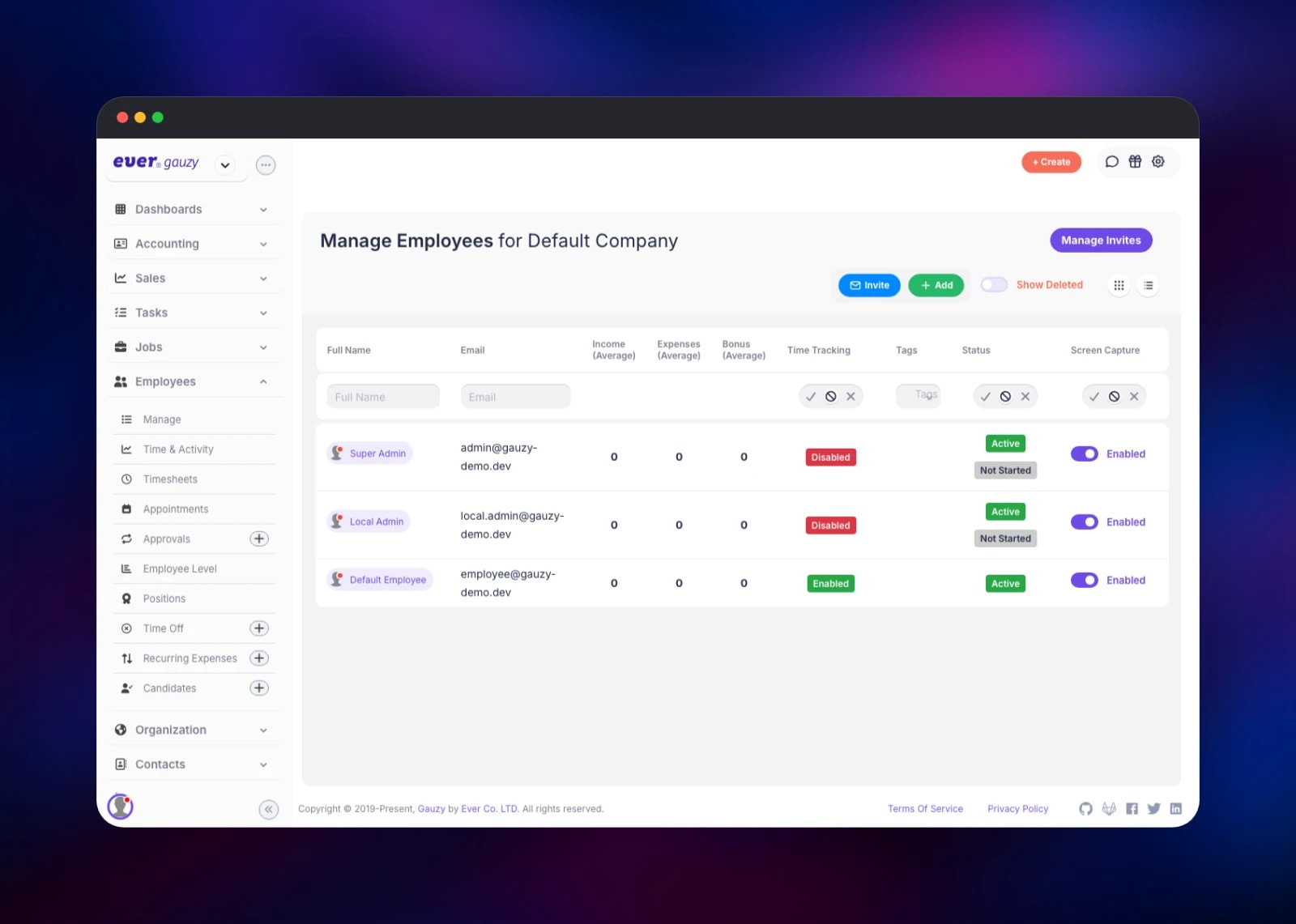
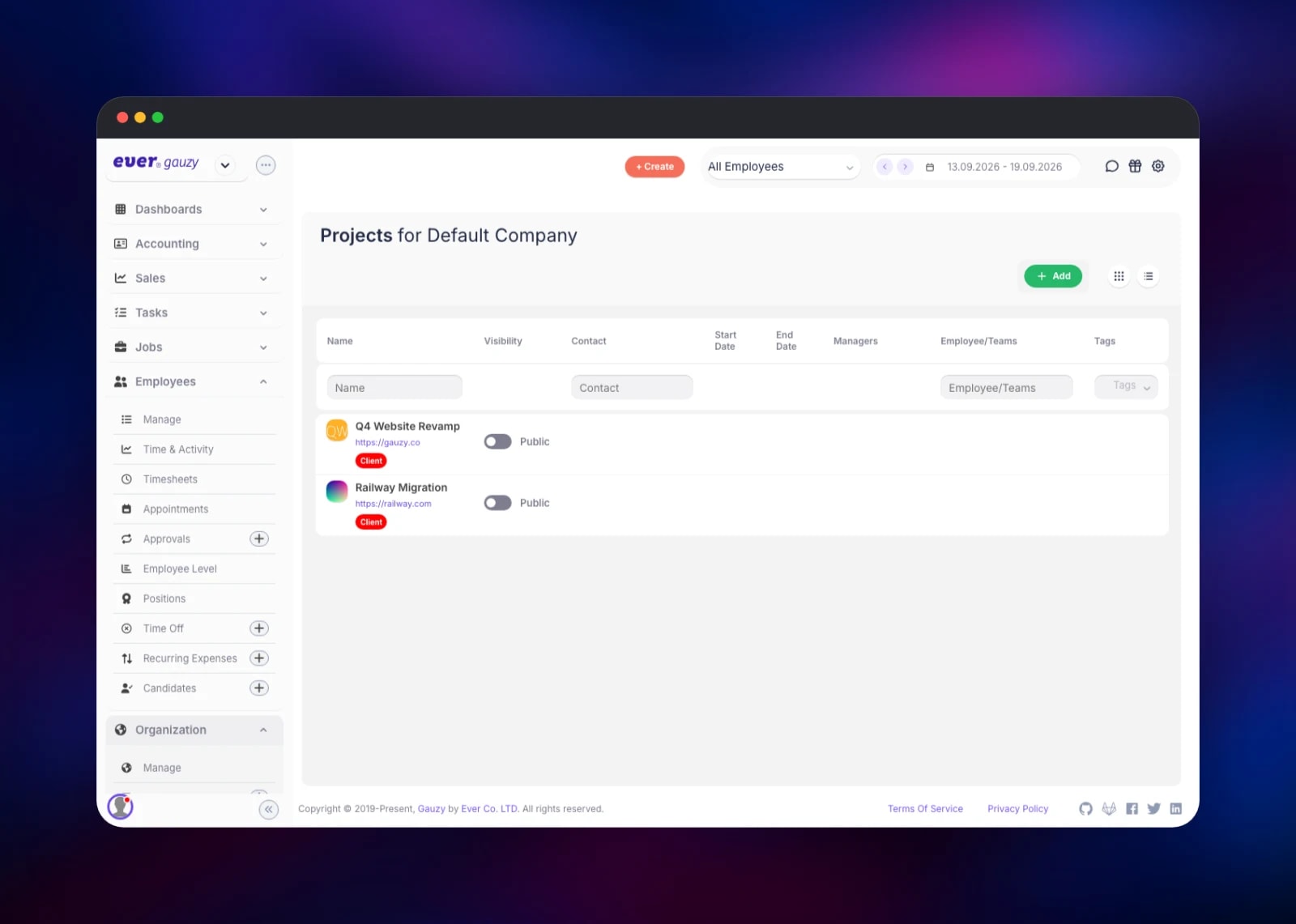
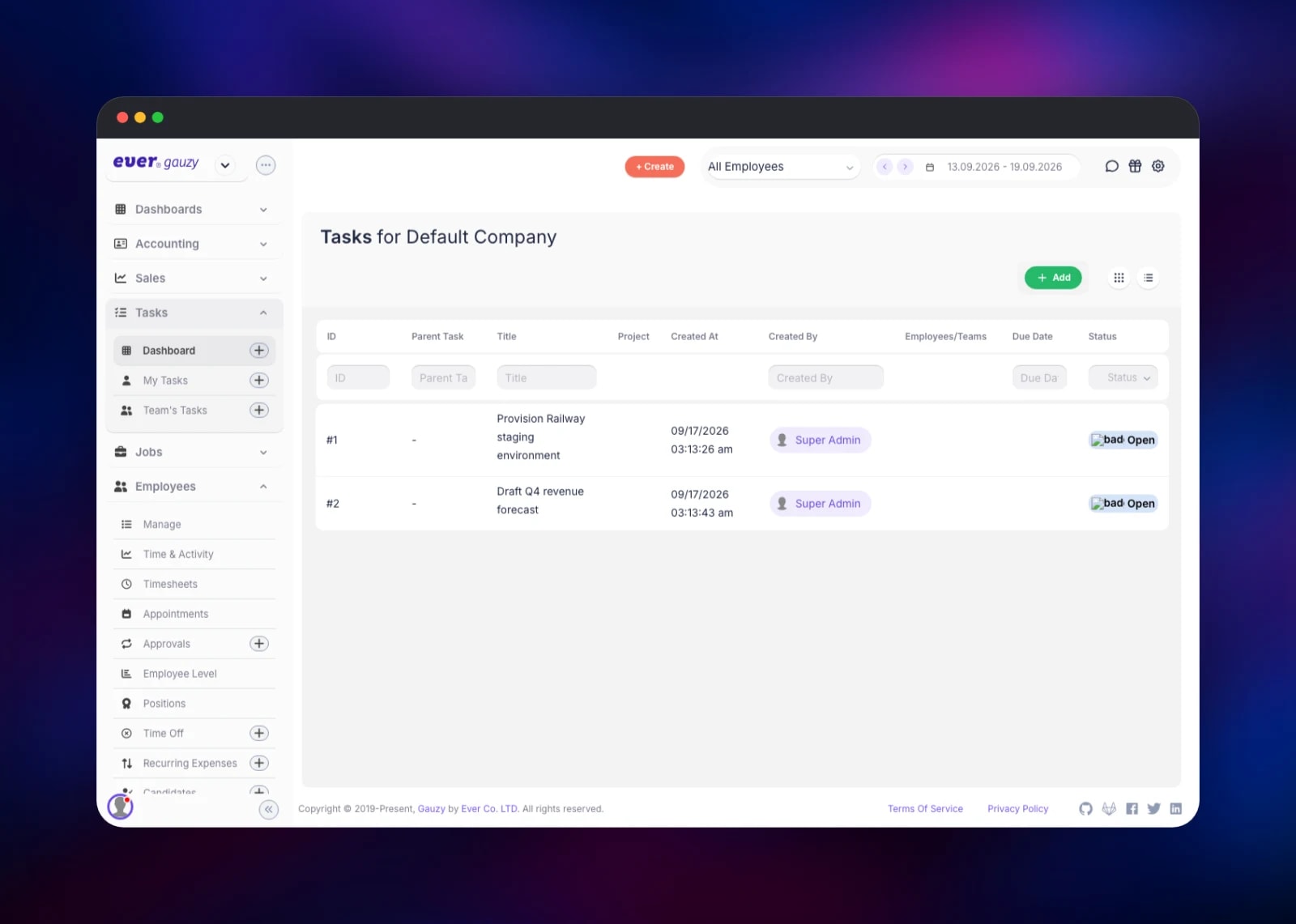
Go to Employees → Manage to confirm the seeded accounts, then Organization → Manage to rename the default company and set your currency and time zone. Create a project under Organization → Projects and a task under Tasks → Dashboard; if both survive a reload, the API, Postgres and Redis are wired correctly. Adding an image to a project confirms object storage — the thumbnail comes straight from the bucket. Invite colleagues from Employees → Manage Invites once the SMTP settings are filled in.
About Hosting Ever Gauzy
Most teams reach for Gauzy when three or four SaaS subscriptions stop talking to each other: hours logged in one tool, invoices raised in another, headcount in a third. Self-hosting puts employee records, client contracts and financial data on infrastructure you control, which matters when a privacy rule covers it.
Key features:
- Employee directory with levels, positions, employment types and time off
- Projects and tasks with teams, sprints, estimates and statuses
- Time tracking, timesheets and activity reports that feed billing
- Invoices, estimates, expenses, income, payments and recurring expenses
- Sales pipelines, deals, contacts, leads and candidate tracking
- Goals, KPIs and organization-wide reporting
- Multi-tenant, with a per-role permission matrix
The api service owns all business logic and is the only thing that talks to Postgres; it exposes a REST API under /api that the browser calls with a bearer token. The webapp service ships only static files and an nginx config, so it restarts instantly. Redis holds Passport sessions, the cache in front of hot queries and the API's atomic counters. Object storage takes every upload, so neither application service needs a volume.
Why Deploy Ever Gauzy on Railway
Wiring a four-service ERP by hand costs a weekend.
- Postgres and Redis provisioned, backed up and privately networked
- Object storage attached and its credentials injected, no bucket policy to write
- Both public URLs issued automatically and referenced across services
- Health checks watch the API's real boot path, migrations and seed included
- Horizontal scaling works: neither application service keeps local state
Common Use Cases for Self-Hosted Ever Gauzy
- A digital agency billing clients from tracked hours, invoicing from the same timesheets
- A consultancy running recruitment, onboarding and time off for a distributed team
- A software studio tracking sprint tasks and per-project profitability in one place
- A holding company running several legal entities as tenants on one install
Dependencies for Ever Gauzy
ghcr.io/ever-co/gauzy-webapp:latest— Angular front end on nginx, port 4200ghcr.io/ever-co/gauzy-api:latest— NestJS API on port 3000, source at github.com/ever-co/ever-gauzyghcr.io/railwayapp-templates/postgres-ssl:18— primary datastore for every recordredis:8.2— session store, cache layer and atomic operations- A Railway object storage bucket — uploads, served through presigned URLs
Environment Variables Reference
| Variable | Purpose |
|---|---|
DEMO_SUPER_ADMIN_EMAIL / _PASSWORD | Owner account created on first boot |
API_BASE_URL / CLIENT_BASE_URL | Public URLs the services use for each other |
JWT_SECRET and the other three signing keys | The API refuses to start without them |
DB_SYNCHRONIZE | Leave false — that is what runs migrations |
REDIS_ENABLED / REDIS_URL | Turns on the Redis session store and cache |
FILE_PROVIDER + DIGITALOCEAN_* | Selects the S3-compatible storage driver |
MAIL_HOST and the other SMTP settings | Relay for invitations and password resets |
Deployment Dependencies
- Source and docs: github.com/ever-co/ever-gauzy and gauzy.co
- Container images:
ghcr.io/ever-co/gauzy-apiandghcr.io/ever-co/gauzy-webapp - Runtime: Node.js 24 on Alpine, PostgreSQL 18, Redis 8
Hardware Requirements for Self-Hosting Ever Gauzy
| Resource | Minimum | Recommended |
|---|---|---|
| CPU | 2 vCPU | 4 vCPU |
| RAM | 2 GB for the API, 256 MB for the web app | 4 GB for the API |
| Storage | 5 GB for Postgres | 20 GB plus object storage |
| Runtime | Node.js 24, PostgreSQL 14+, Redis 6+ | PostgreSQL 18, Redis 8 |
The API is the memory-hungry half: its first boot runs every migration and the full seed, and the image sets a very high Node heap ceiling worth lowering to about half the container's memory.
Self-Hosting Ever Gauzy with Docker
The upstream repository ships a Compose file covering the API, web app, Postgres, Redis and a MinIO bucket:
git clone https://github.com/ever-co/ever-gauzy.git
cd ever-gauzy
cp .env.compose.sample .env.compose
docker compose up -d
To run the published images against your own Postgres and Redis, the API needs connection details, signing keys and the account to seed:
docker run -d --name gauzy-api -p 3000:3000 \
  -e API_HOST=0.0.0.0 -e API_PORT=3000 -e DB_TYPE=postgres \
  -e DB_HOST=postgres -e DB_NAME=gauzy -e DB_USER=postgres \
  -e DB_PASS=secret -e DB_SYNCHRONIZE=false \
  -e REDIS_ENABLED=true -e REDIS_URL=redis://redis:6379 \
  -e JWT_SECRET=... -e JWT_REFRESH_TOKEN_SECRET=... \
  -e JWT_VERIFICATION_TOKEN_SECRET=... -e EXPRESS_SESSION_SECRET=... \
  -e DEMO_SUPER_ADMIN_EMAIL=you@example.com \
  -e DEMO_SUPER_ADMIN_PASSWORD=... ghcr.io/ever-co/gauzy-api:latest
Point the web app at it with API_BASE_URL and expose port 4200. API_HOST is a bind address, not a hostname — the image's api default only works inside Compose.
How Much Does Ever Gauzy Cost to Self-Host?
Ever Gauzy is free and open source under AGPL-3.0 — no licence fee, no seat count. Ever Co. also runs a hosted version at app.gauzy.co with paid plans, but the self-hosted build is the same application. On Railway you pay only for the compute, storage and bandwidth the four services use, which grows with headcount and files rather than per user.
FAQ
What is Ever Gauzy? An open-source business management platform covering ERP, CRM, HRM, ATS and project management in one app, built with NestJS and Angular under AGPL-3.0.
What does this Railway template deploy? Four services — the Angular web app, the NestJS API, PostgreSQL and Redis — plus an object storage bucket. The API runs migrations and seeds the first administrator on first boot.
Why does the template include Redis as well as Postgres? Postgres holds the records. Redis holds Passport sessions, the query cache and the API's atomic counters — which is what lets you raise the API's replica count without losing anyone's session.
How do I create the first admin account in self-hosted Ever Gauzy?
Set DEMO_SUPER_ADMIN_EMAIL and DEMO_SUPER_ADMIN_PASSWORD before the first deploy. The API creates that account while it starts, before it accepts a request, so nobody can claim the instance first. Set DEMO_ADMIN_* and DEMO_EMPLOYEE_* too, or those seeded accounts keep their published default passwords.
Can I stop strangers registering on my Gauzy instance?
Not with a setting. POST /api/auth/register is public by design and each registrant gets their own isolated tenant, rate-limited to three attempts a minute. To close it, put a proxy in front of the API and block that route.
Where are uploaded files stored in self-hosted Ever Gauzy? In the attached object storage bucket, addressed in path style and read through presigned URLs. Neither app service needs a volume, so both can run several replicas.
Template Content
Redis
redis:8.2DEMO_ADMIN_PASSWORD
Seeded organization admin password
DEMO_EMPLOYEE_PASSWORD
Seeded employee password
DEMO_SUPER_ADMIN_PASSWORD
First owner account password
gauzy-storage
Bucket


