
Deploy FastMCP
A server that gives AI assistants tools and memory

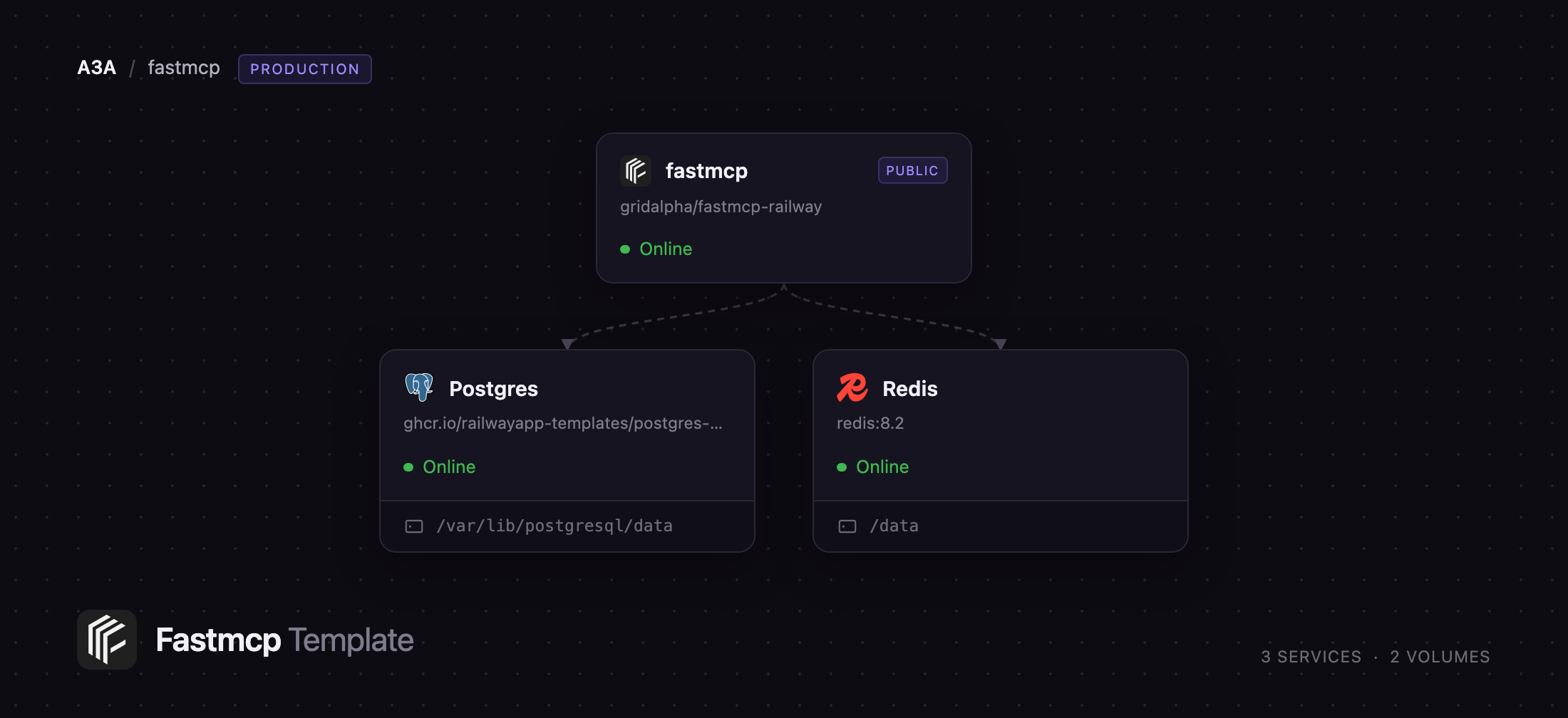
Redis
Just deployed
/data
fastmcp
Just deployed

Just deployed
/var/lib/postgresql/data
Deploy and Host FastMCP on Railway
FastMCP is the standard Python framework for building Model Context Protocol servers — the services that give Claude, ChatGPT, Cursor and any other MCP client real tools, data and prompts. Maintained by Prefect, it turns a Python function into a fully described MCP tool: schema, validation and docs come from the signature and docstring. Some version of it sits behind most MCP servers in the wild. The hard part was never writing the tools — it was hosting them where your assistant can reach them.
Deploy FastMCP on Railway and that part is done. This template runs a complete, authenticated MCP server over streamable HTTP, with Postgres for state and Redis for stream resumability. It ships a working toolset — a searchable notes and memory store — so the deployment is useful immediately, plus a playground for calling those tools before you wire up a client. Requests reach the FastMCP service, which authenticates each one against your API key, reads and writes notes in Postgres over the private network, and records streamed events in Redis so a dropped client resumes. Replace the tools in app/server.py with your own and push.
Getting Started with FastMCP on Railway
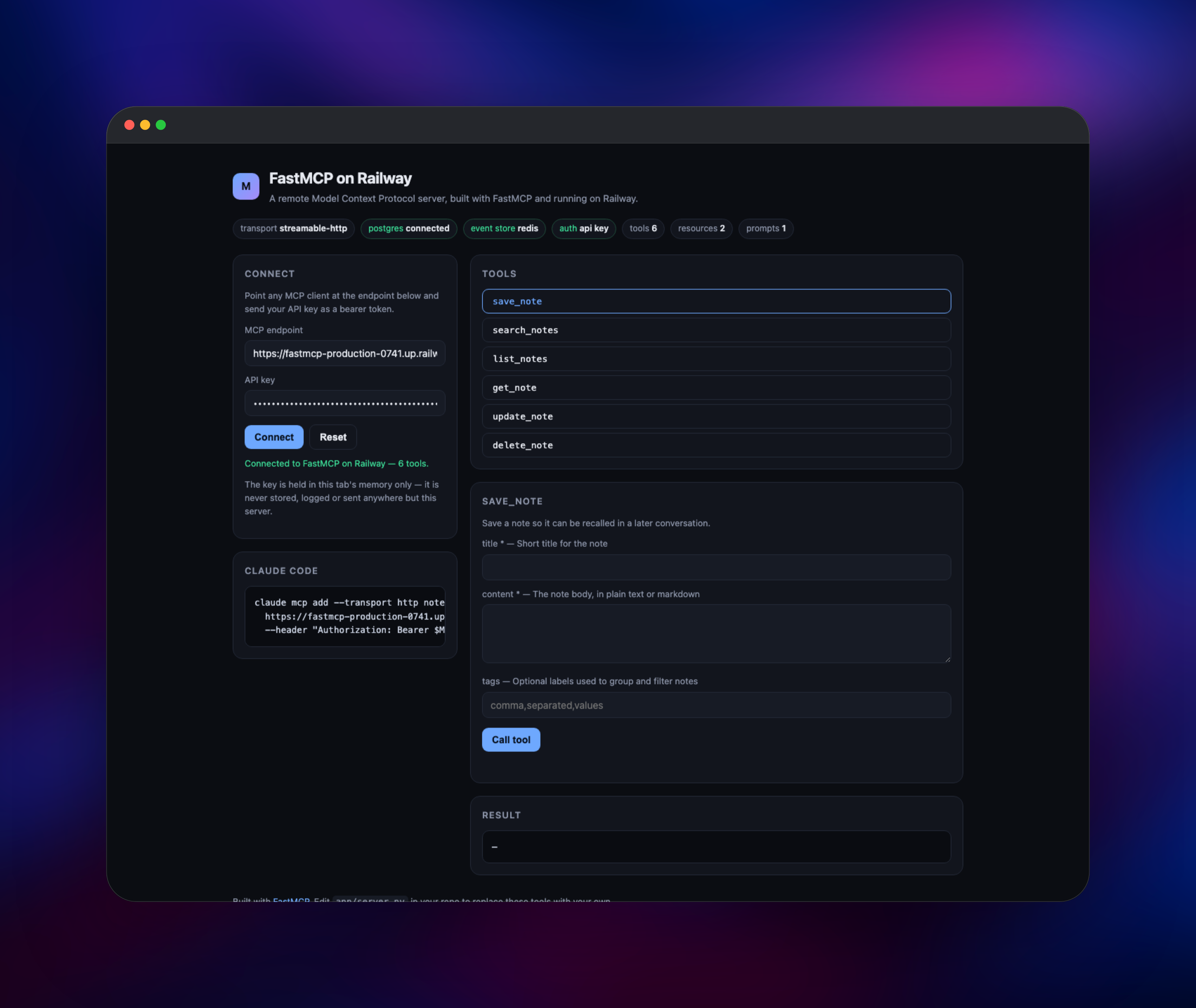
Deploy the template and open the generated public URL. There is no signup and no admin account: the key generated during deploy is the only credential, listed as MCP_API_KEY in the service's Variables tab. The landing page is a playground — paste the key in and press Connect. It runs a real MCP handshake against /mcp and lists the six tools the server advertises, confirming the server runs, auth works and Postgres is reachable.
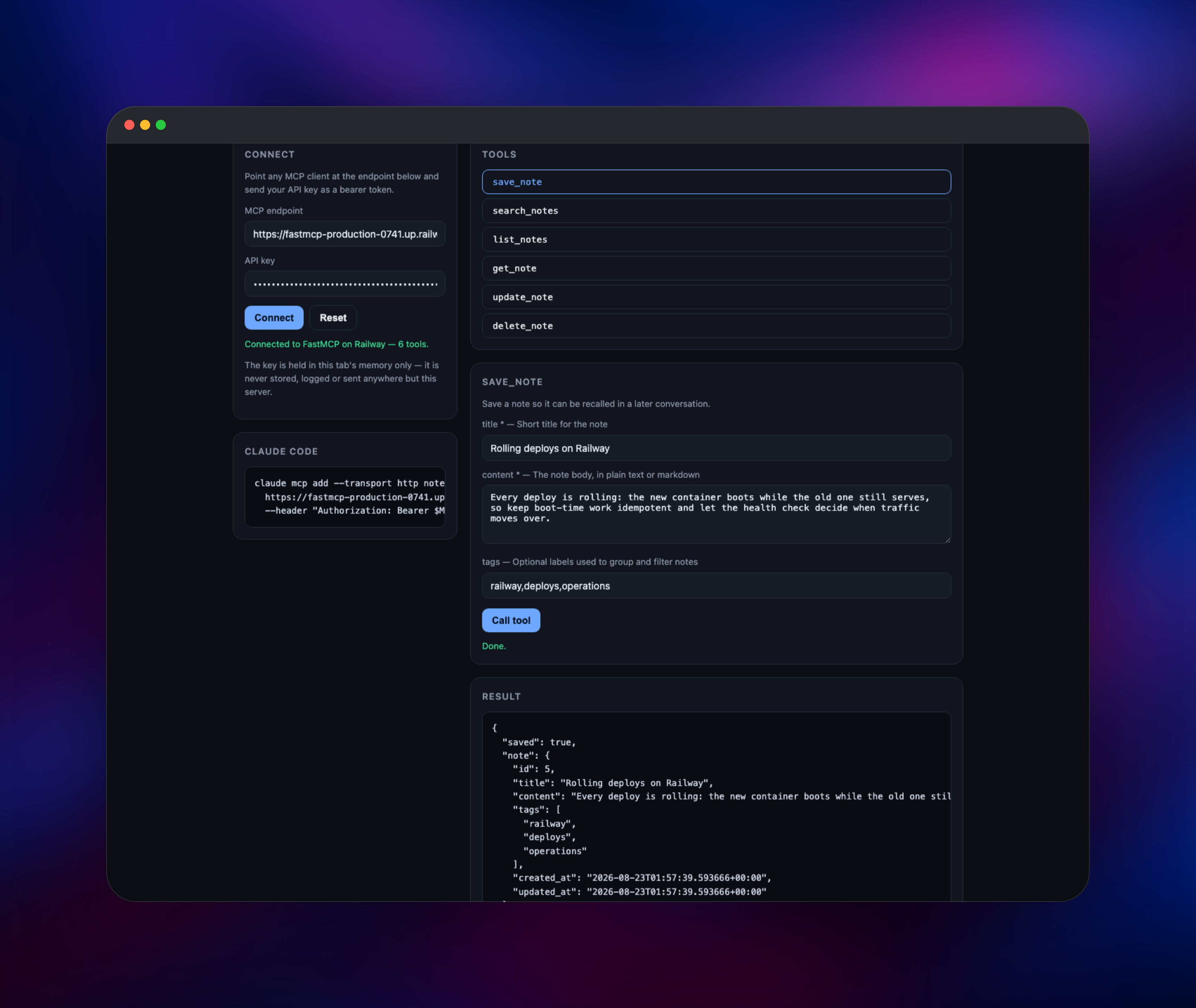
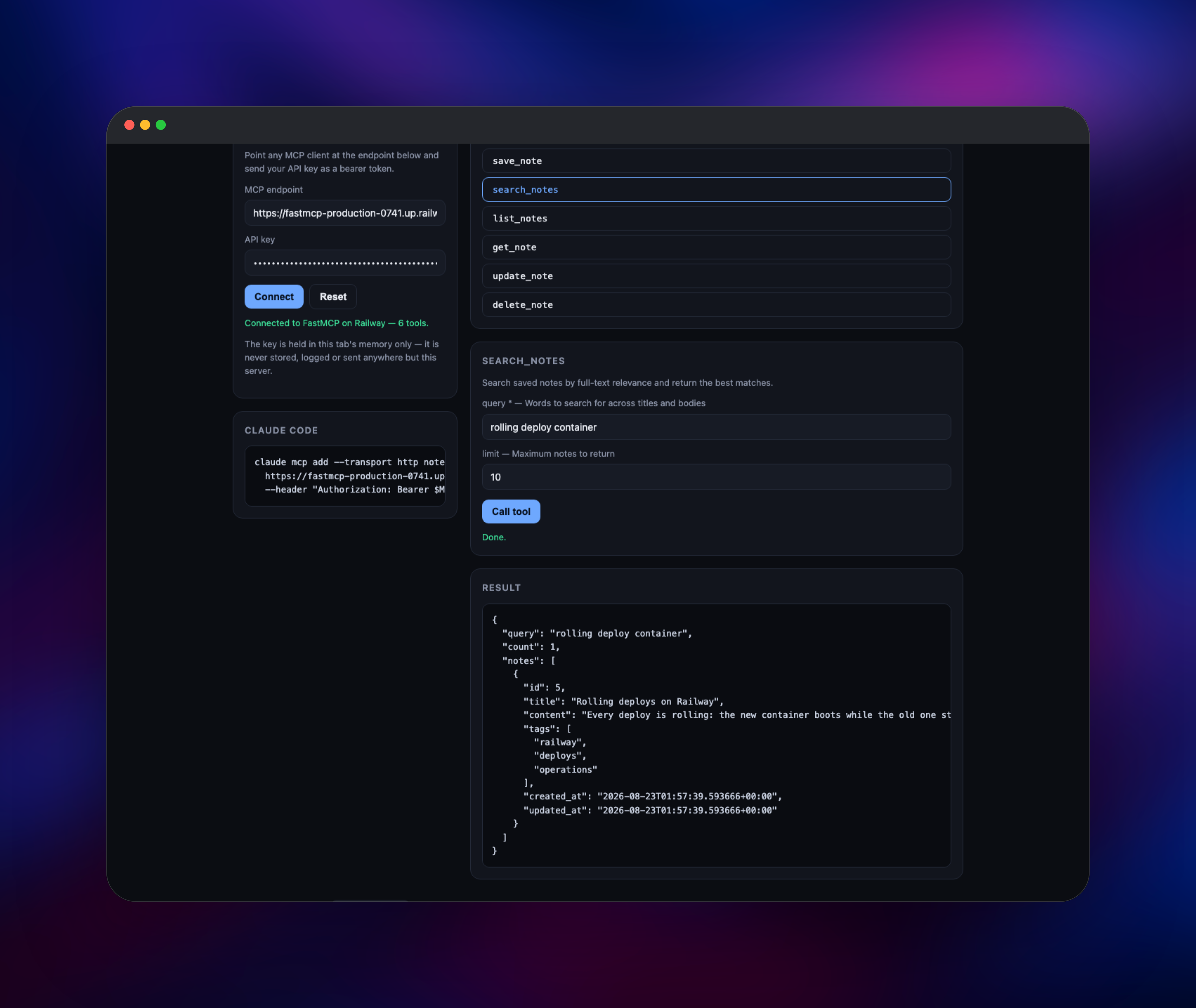
Pick save_note, fill in a title and body, and press Call tool; the form is generated from the tool's advertised schema, so it always matches what the server exposes. Then switch to search_notes and search a word from that note — a result proves the round trip through Postgres full-text search. To connect a real client, run this with your own domain and key:
claude mcp add --transport http notes https://your-app.up.railway.app/mcp \
  --header "Authorization: Bearer YOUR_MCP_API_KEY"
Any client supporting a remote HTTP server and a custom header connects the same way. A 401 means the header's key does not match MCP_API_KEY.
About Hosting FastMCP
An MCP server is only as useful as it is reachable. Running one locally over stdio ties it to one machine and one client; hosting it over HTTP makes the same tools available to every assistant you use, on any device, over one shared store — and raises the questions any public endpoint does: who may call it, where state lives, and what happens when a long call drops.
Key features of the deployed server:
- Streamable HTTP on
/mcp, the transport modern remote MCP clients speak - Bearer-token auth on every request, compared in constant time
- Optional JWT/JWKS verification alongside the API key
- Postgres-backed tools with full-text search, scoped per credential
- Redis-backed event store, so a cut stream resumes and replicas are safe
- An anonymous
/healthroute and a playground, neither able to read your data
The architecture is three services. FastMCP is the only public one: a Python 3.13 container running under uvicorn, holding no state on disk. Postgres stores the notes and their search index over the private network. Redis stores replayable stream events with a short TTL, letting the server deliberately close an idle connection — the trick that keeps long tool calls alive behind load balancers — and the client resume.
Why Deploy FastMCP on Railway
Railway removes the infrastructure work between a Python file and a live remote MCP server.
- Postgres and Redis provisioned and wired up, no connection strings to copy
- A public HTTPS domain and certificate as soon as the service deploys
- Private networking, so neither datastore is exposed
- Push to the repository and Railway rebuilds it
- Health checks and rolling deploys, with no downtime for clients
Common Use Cases
- Persistent memory for your assistant — a shared notes store every client can read and write, instead of context that dies with the conversation
- A private API bridge — wrap an internal REST or database API as MCP tools your assistants can call
- Team tooling behind one endpoint — issue each colleague or service its own key, data kept separate
- A starting point for a product — auth, storage and deploy are done; a new server is just new functions
Dependencies for FastMCP
- FastMCP application — built from
github.com/gridalpha/fastmcp-railwayonpython:3.13-slim, runningfastmcp3.x under uvicorn. Serves and authenticates the MCP endpoint; holds no local state. - Postgres — Railway's managed Postgres 18. Stores notes, tags and a generated
tsvectorsearch column, GIN-indexed. - Redis — Railway's managed Redis 8.2. Backs the event store for stream resumability.
Environment Variables Reference
| Variable | Required | Description |
|---|---|---|
MCP_API_KEY | Yes | Bearer token clients must send. Generated at deploy. |
DATABASE_URL | Yes | Postgres connection string. |
REDIS_URL | No | Enables the event store and multi-replica operation. |
PUBLIC_URL | No | Base URL advertised in resource metadata. |
MCP_API_KEYS | No | Extra named keys for rotation, name:key,name:key. |
MCP_PATH | No | Path the MCP endpoint is served on. Defaults to /mcp. |
MCP_JWKS_URI | No | Set to also accept JWTs from your identity provider. |
DB_POOL_MAX | No | Postgres pool ceiling per replica. |
Deployment Dependencies
- Source repository:
https://github.com/gridalpha/fastmcp-railway - Upstream:
https://github.com/PrefectHQ/fastmcp, docs athttps://gofastmcp.com - Protocol spec:
https://modelcontextprotocol.io
Hardware Requirements for Self-Hosting FastMCP
| Resource | Minimum | Recommended |
|---|---|---|
| CPU | 0.5 vCPU | 1–2 vCPU |
| RAM | 512 MB | 1 GB server, 1 GB Postgres |
| Storage | 1 GB | 5 GB, growing with your data |
| Runtime | Python 3.10+ | Python 3.13 |
An idle container sits under 200 MB; size for what your tools do in a call.
Self-Hosting FastMCP
The template builds from a public repository, so running the same server locally takes three commands. Clone it and install the dependencies:
git clone https://github.com/gridalpha/fastmcp-railway
cd fastmcp-railway
pip install -r requirements.txt
Point it at a Postgres database, give it a key and start it. REDIS_URL is optional locally:
export DATABASE_URL=postgresql://postgres:pw@localhost:5432/postgres
export MCP_API_KEY=$(python -c "import secrets;print(secrets.token_urlsafe(32))")
uvicorn app.server:app --host 0.0.0.0 --port 8000
The server refuses to start with no authentication configured — an MCP endpoint on a public address must never accept anonymous tool calls. To build one from scratch, pip install fastmcp and follow the quickstart at gofastmcp.com.
Is FastMCP Free to Self-Host?
FastMCP is open source under the Apache 2.0 license and costs nothing to use — no seats, no tool limits, no paid tier for self-hosting. Prefect sells a gateway product, Horizon, for organisations needing a central registry and SSO across many servers, but nothing here depends on it. On Railway you pay only for the compute and storage the three services use.
FAQ
What is FastMCP?
FastMCP is a Python framework for building Model Context Protocol servers, clients and interactive applications. It generates each tool's schema, validation and documentation from a normal Python function and handles transport, authentication and the protocol lifecycle.
What does this Railway template deploy?
A complete, authenticated remote MCP server built on FastMCP, plus Postgres and Redis. It arrives with a working toolset — a searchable notes and memory store — and a playground for calling those tools without a client.
How do I connect Claude or another MCP client to a self-hosted FastMCP server?
Add it as a remote HTTP MCP server pointed at https://your-domain/mcp and send your key as an Authorization: Bearer header. The landing page prints the exact Claude Code command with your domain already filled in.
Why does the template include Postgres and Redis?
Postgres holds the state your tools create, so it survives redeploys instead of vanishing with the container. Redis backs the event store, letting a cut stream resume and making it safe to run more than one replica.
How do I add my own tools to the FastMCP server?
Edit app/server.py in your copy of the repository and add a function decorated with @mcp.tool. FastMCP derives the schema from the type hints and the description from the docstring. Push, and Railway rebuilds; the playground picks the tool up on its next connect.
Can I use my own identity provider instead of an API key?
Yes. Set MCP_JWKS_URI, and optionally MCP_JWT_ISSUER and MCP_JWT_AUDIENCE; the server then verifies JWTs from that provider alongside the API key, so existing clients keep working.
Template Content


