
Deploy Flagsmith
Feature flag and remote config platform with SDKs for 20 languages

Just deployed
/var/lib/postgresql/data
flagsmith
Just deployed

Redis
Just deployed
/data
flagsmith-task-processor
Just deployed
Deploy and Host Flagsmith on Railway
Flagsmith is an open-source feature flag, remote config and A/B testing platform. Teams use it to ship code behind a switch: merge with the feature off, turn it on for one beta customer, roll it out to ten percent of traffic, kill it from a dashboard when something breaks — no redeploy. It doubles as remote config, so values like a ranking model name or a rate limit live outside your build. SDKs cover roughly twenty languages, and self-hosting Flagsmith keeps every evaluation, identity and trait on infrastructure you control.
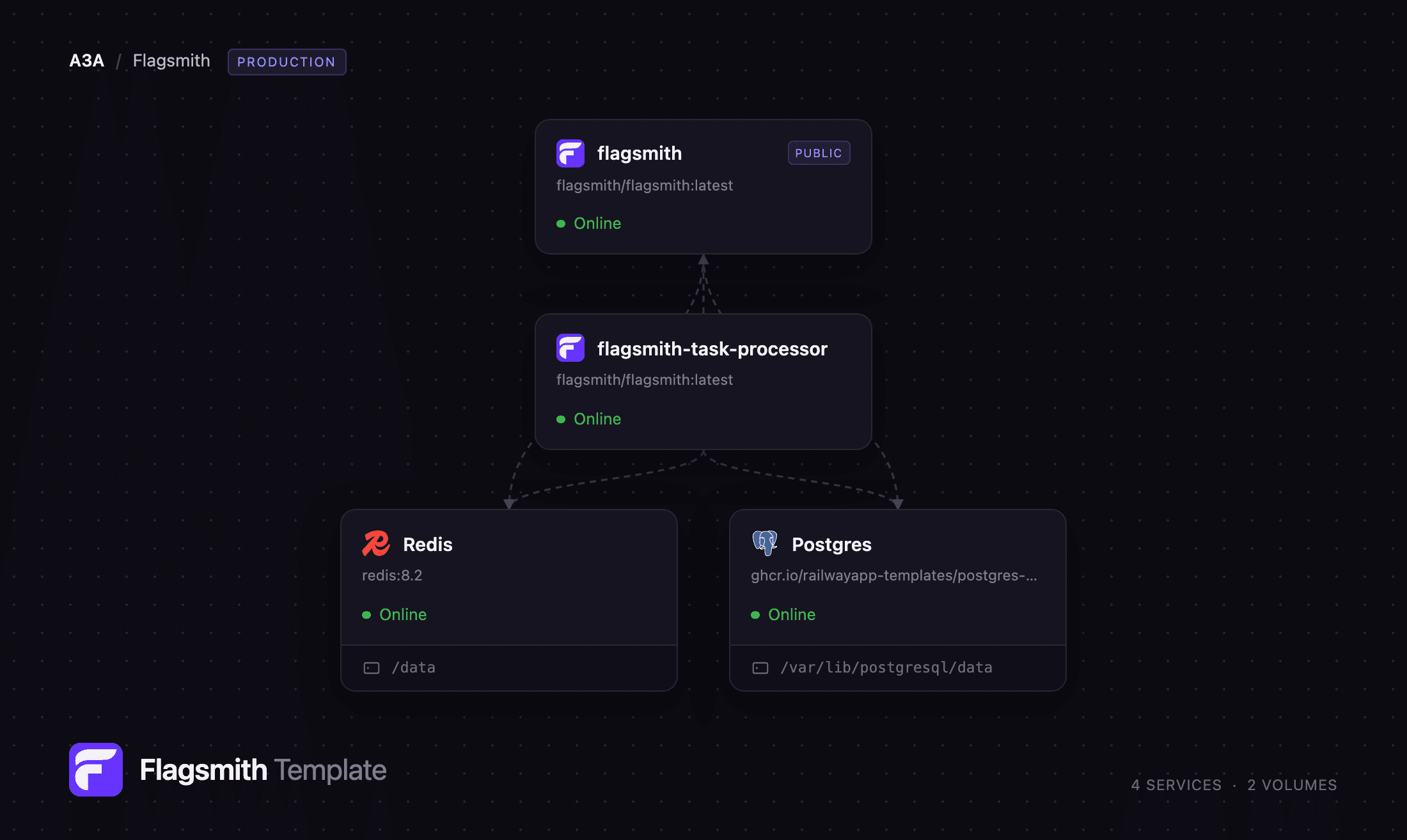
This template runs the production shape, not a single container. flagsmith serves the REST API and the React dashboard on one public domain. flagsmith-task-processor is a private worker draining the async queue — audit records, environment-document rebuilds, webhooks and e-mail — so a dashboard toggle returns immediately. Postgres holds flags, identities, segments and the API analytics. Redis is the shared cache tier for environment objects, documents and rate-limit buckets, so a flag change invalidates once rather than once per process.
Getting Started with Flagsmith on Railway
Set ADMIN_EMAIL to the owner's address before you deploy — the first boot creates that superuser plus a Default Organisation and Default Project, and public sign-up is closed, so nobody else can claim the instance. That account has no password. Open the flagsmith service's deploy log, find the line beginning "Please go to the following page and choose a password", and open the one-time reset URL it prints. Set a password, then sign in at https:///login.
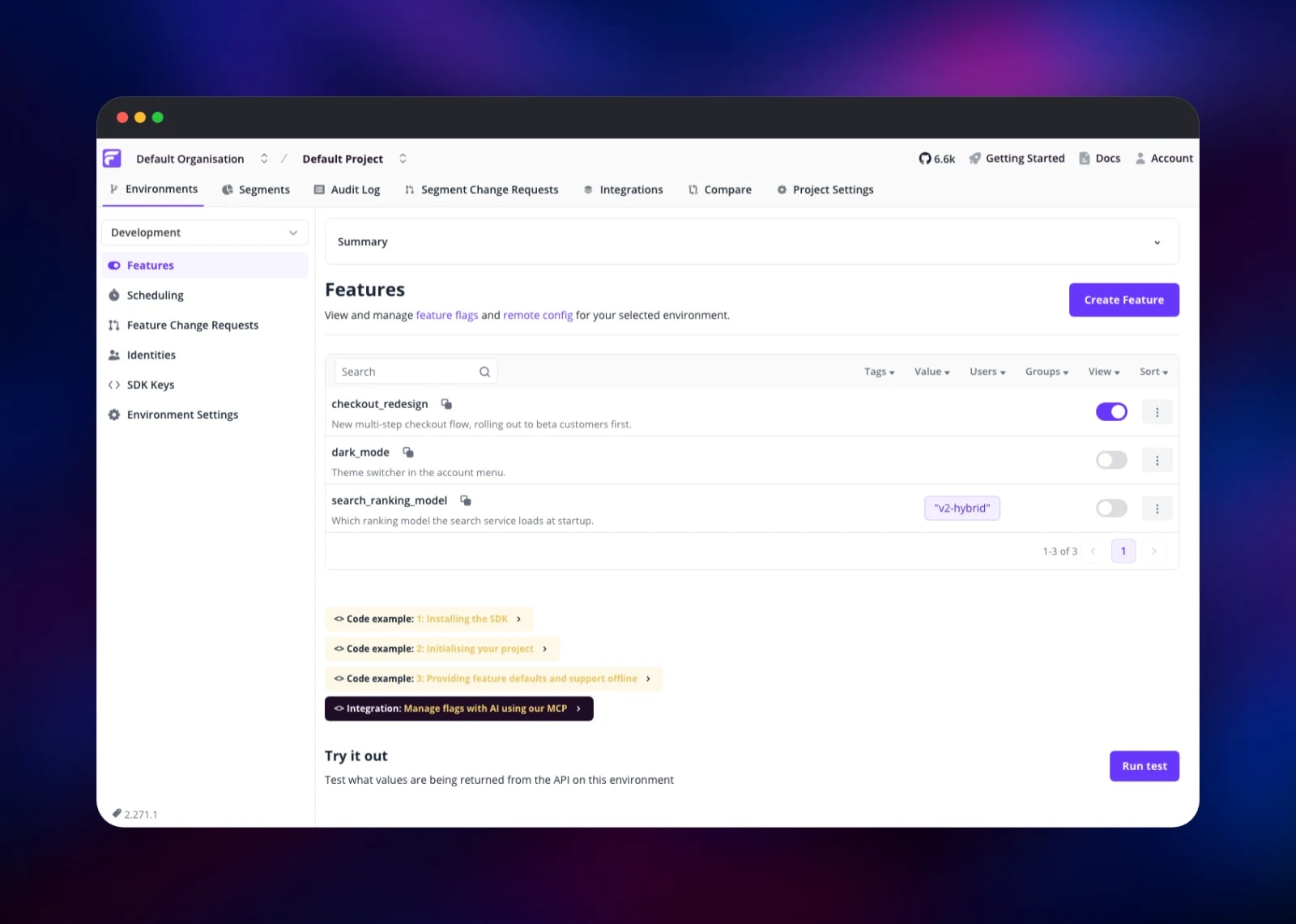
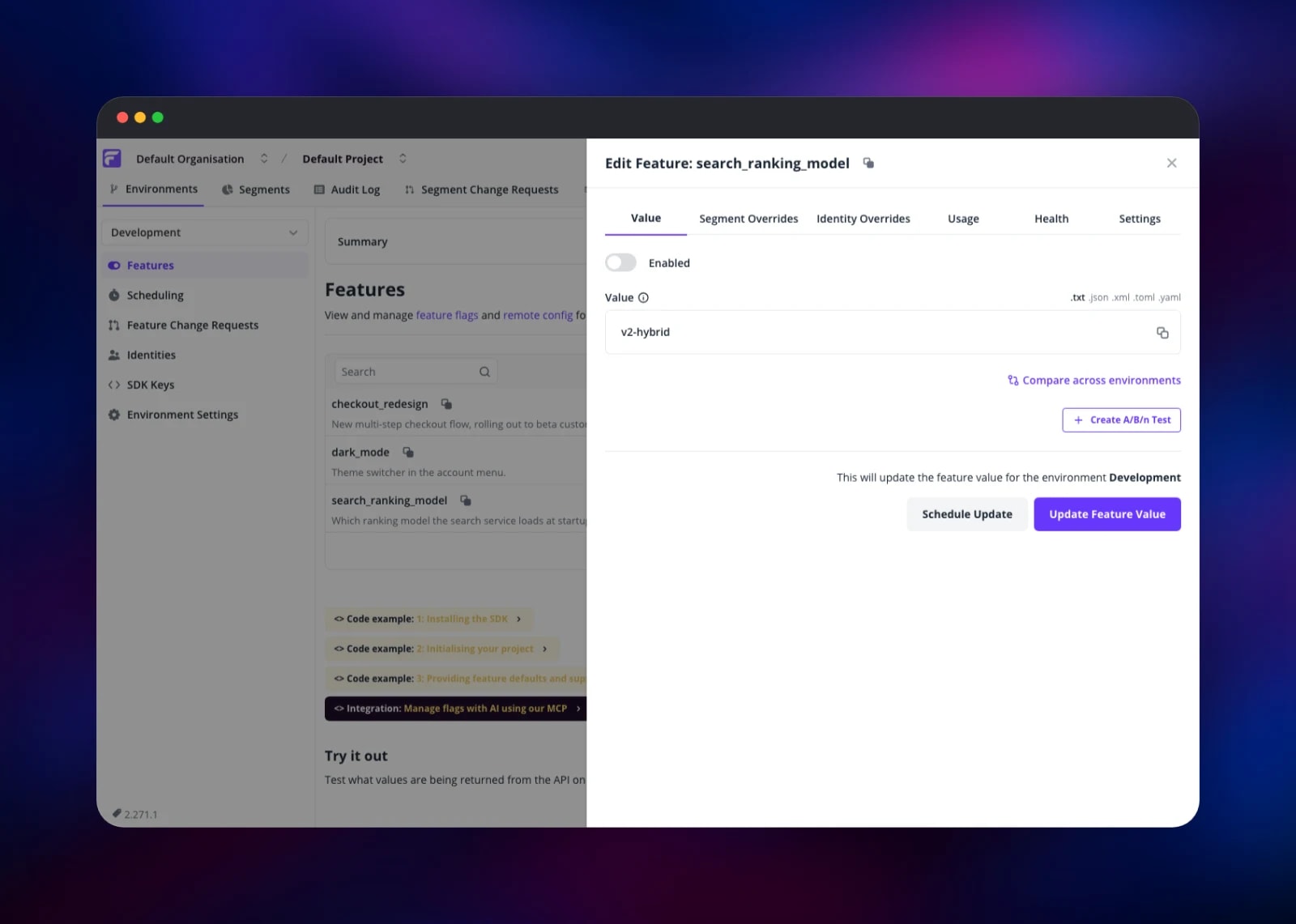
Inside, open Default Project. Create an environment (Development and Production is the usual start), then click Create Feature and add a boolean flag or a remote config value. Toggle it on from the feature list; the Summary panel moves to Features enabled: 1. To confirm the deployment serves SDK traffic, copy the client-side key from SDK Keys and call the flags endpoint:
curl -H "X-Environment-Key: " \
  https:///api/v1/flags/
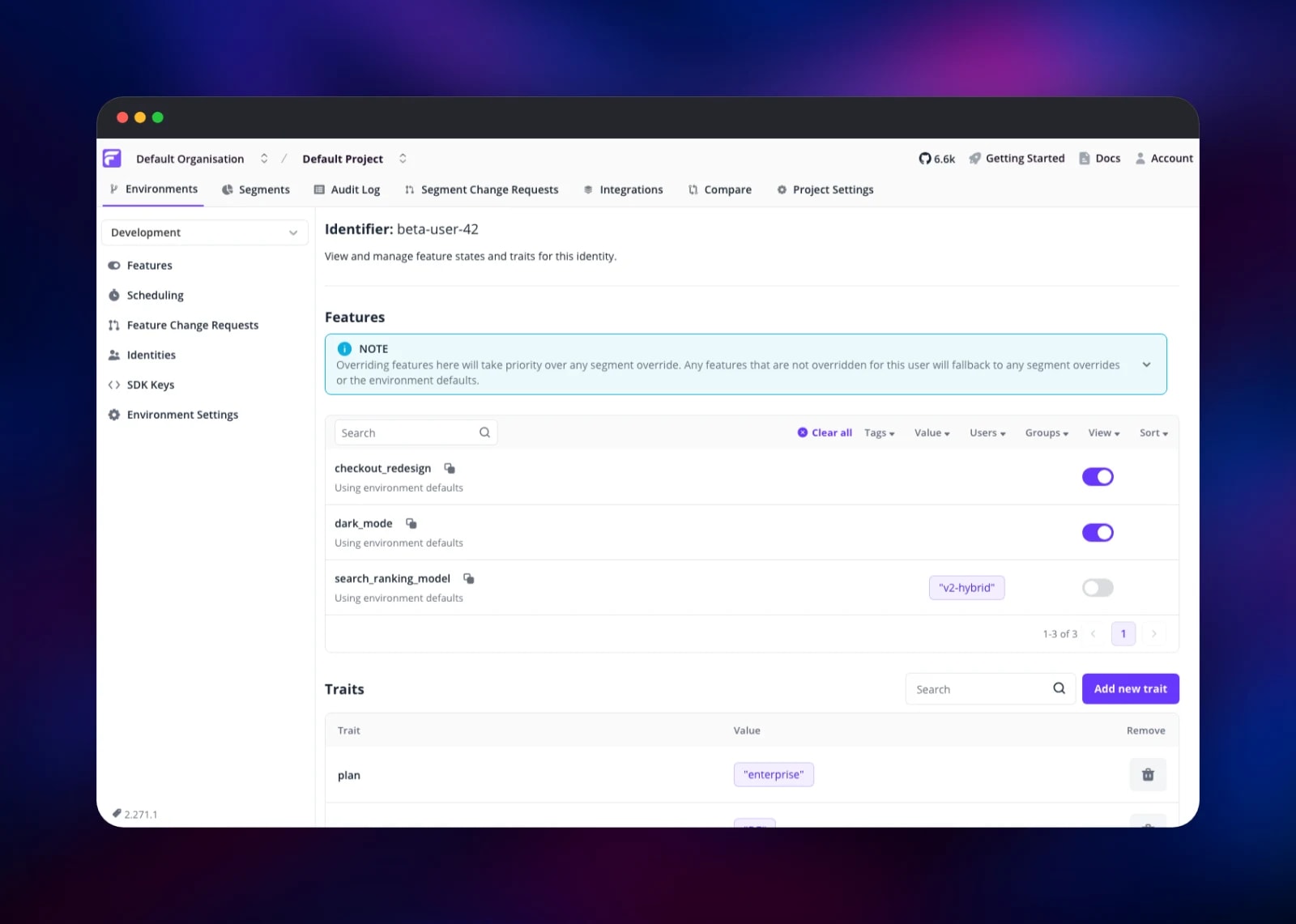
The flag you enabled comes back with "enabled": true. Identify a user from the same endpoint family, then check the Identities page — the identity and its traits appear there, and you can override any flag for that user.
About Hosting Flagsmith
Flagsmith separates the decision to release from the act of deploying. Code checks a flag; its value lives in Flagsmith, scoped to a project, an environment, a segment or one named identity. Teams self-host it when evaluation touches user data they cannot send to a vendor, or when they want their own latency profile.
Key features:
- Boolean flags and remote config values, versioned per environment
- Segments: rules over user traits (plan, country, app version)
- Identity overrides that pin one user to a value
- Percentage rollouts and multivariate flags for A/B tests
- Change requests, scheduled changes, and local-evaluation SDKs
The four services divide cleanly. flagsmith owns HTTP — dashboard, admin API, SDK endpoints — plus migrations on every boot. flagsmith-task-processor runs the same image with a different entry point and no public domain: it waits for migrations, then polls Postgres for queued tasks. Postgres is the system of record and stores API usage analytics, keeping InfluxDB out of the topology. Redis caches the environment document, so SDKs polling every sixty seconds hit Postgres once per TTL rather than once per poll.
Why Deploy Flagsmith on Railway
Railway gives this template what Flagsmith's production shape asks for:
- Managed Postgres and Redis on private networking
- A worker tier as a real service, not a thread in the web process
- Health checks that test the database and pending migrations, not just the port
- HTTPS and a domain on the app service only
- Scaling the API without touching the worker
Common Use Cases
- Trunk-based development — merge unfinished work behind a flag, enable it per environment
- Beta programmes — build a segment from a
planorbeta_opt_intrait and expose features to it only - Remote config for backends — change a model name or timeout without redeploying
- Kill switches — turn off a failing integration in seconds, from a dashboard
Dependencies for Flagsmith
flagsmith/flagsmith:latest— the unified open-source image, API and dashboard in one container (GitHub)- The same image as the task processor, started with
flagsmith start task-processor - Railway managed PostgreSQL 18 — application data and analytics
- Railway managed Redis 8 — environment and throttle caches
Environment Variables Reference
| Variable | Purpose |
|---|---|
ADMIN_EMAIL | Login identity of the superuser created on first boot |
DJANGO_SECRET_KEY | Signing key; changing it invalidates sessions and reset links |
FLAGSMITH_DOMAIN | Host used to build invite and password-reset links |
TASK_RUN_METHOD | TASK_PROCESSOR sends async work to the worker service |
USE_POSTGRES_FOR_ANALYTICS | Keeps flag analytics in Postgres instead of InfluxDB |
ALLOW_REGISTRATION_WITHOUT_INVITE | false closes public sign-up |
EMAIL_HOST, EMAIL_PORT, EMAIL_HOST_USER | SMTP for invite and reset e-mail |
Deployment Dependencies
- Source: github.com/Flagsmith/flagsmith (BSD-3-Clause)
- Image: hub.docker.com/r/flagsmith/flagsmith
- Docs: docs.flagsmith.com; runtime Python 3.13 / Django 5 on gunicorn
Hardware Requirements for Self-Hosting Flagsmith
| Resource | Minimum | Recommended |
|---|---|---|
| CPU | 1 vCPU per app service | 2 vCPU for the API |
| RAM | 512 MB per app service | 2 GB API, 1 GB worker |
| Storage | ~1 GB (Postgres only) | 10 GB+ with analytics retention |
| Runtime | PostgreSQL 11+ | PostgreSQL 18 + Redis 8 |
Self-Hosting Flagsmith with Docker
The quickest local run uses the same image this template deploys. Point it at Postgres and let the default command migrate and serve:
docker run -d --name flagsmith -p 8000:8000 \
  -e DATABASE_URL=postgresql://user:pass@host:5432/flagsmith \
  -e DJANGO_ALLOWED_HOSTS='*' \
  -e DJANGO_SECRET_KEY=change-me \
  -e USE_POSTGRES_FOR_ANALYTICS=true \
  flagsmith/flagsmith:latest
For the worker tier, start a second container from the same image with a different entry point:
docker run -d --name flagsmith-task-processor \
  -e DATABASE_URL=postgresql://user:pass@host:5432/flagsmith \
  -e DJANGO_SECRET_KEY=change-me \
  -e TASK_RUN_METHOD=TASK_PROCESSOR \
  flagsmith/flagsmith:latest start task-processor
Only one container should migrate. The web container does it on every boot; the worker waits until migrations are applied before starting.
How Much Does Flagsmith Cost to Self-Host?
Flagsmith's core is open source under BSD-3-Clause and free to run — no licence key, no seat billing, no call home. Deploying it here costs Railway compute and storage only, across four small services. The open-source build ships a single-seat, single-project organisation; more seats, projects and full audit-log history need an Enterprise licence uploaded under Organisation Settings. Flags, environments, segments, identities and every SDK endpoint work without one.
FAQ
What is Flagsmith? An open-source feature flag and remote config platform. Your application asks Flagsmith whether a feature is on for a given user, and you change the answer from a dashboard instead of shipping a release.
What does this Railway template deploy? Four services: the Flagsmith API and dashboard on a public domain, a private task processor, managed PostgreSQL and managed Redis, wired together with health checks and private networking.
Why does the template include Postgres and Redis?
Postgres is the system of record and, with USE_POSTGRES_FOR_ANALYTICS=true, also stores flag and API analytics, so no InfluxDB service is needed. Redis holds the cached environment document — the biggest lever on database load for SDKs in local-evaluation mode.
How do I log in the first time?
The first boot creates a superuser from ADMIN_EMAIL with no password and prints a one-time reset URL to the flagsmith service log. Open it, choose a password, then sign in.
How do I use the self-hosted API from an SDK?
Point the SDK's API URL at https:///api/v1/ and give it the environment key from the SDK Keys page. Every official Flagsmith SDK exposes that override.
Do I need SMTP to run self-hosted Flagsmith?
No. Sign-in is e-mail and password, and the first admin's reset link comes from the deploy log. Set the EMAIL_* variables when you want invites and resets delivered by mail.
Can I add teammates to my self-hosted instance? The open-source build allows one seat per organisation, so invites are rejected until an Enterprise licence is applied. Plan for one dashboard operator, or ask Flagsmith for a licence file.
Template Content


