
Deploy GProxy
Multi-provider LLM proxy with built-in admin frontend
gproxy
Just deployed
/app/data
Deploy and Host gproxy on Railway
gproxy is a lightweight reverse proxy that securely routes HTTP and gRPC traffic using flexible expression-based routing rules. It supports automatic Let's Encrypt (ACME) TLS certificates, WebSockets, CORS, hot-reloadable configuration, and transparent proxying, making it ideal for modern API gateways and microservice deployments.
About Hosting gproxy
Railway provides a simple way to deploy gproxy without managing infrastructure. This template deploys the official Docker image and exposes the proxy through Railway's networking. A Railway Volume mounted at /app/data persists the SQLite database and runtime data across deployments. Railway automatically manages HTTPS, deployments, environment variables, and scaling, while gproxy handles HTTP and gRPC routing, TLS certificate management, and configurable reverse proxy rules.
Common Use Cases
- Secure reverse proxy for HTTP and gRPC services.
- API gateway with expression-based request routing.
- Front-end proxy for microservices with automatic TLS and CORS support.
Dependencies for gproxy Hosting
| Dependency | Required | Purpose |
|---|---|---|
| Railway Volume | Yes | Stores SQLite database and application data. |
Deployment Dependencies
| Resource | Link |
|---|---|
| GitHub Repository | https://github.com/LeenHawk/gproxy |
| gproxy Documentation | https://gproxy.leenhawk.com/ |
| Docker Image | https://ghcr.io/leenhawk/gproxy |
| Original gproxy Project | https://github.com/graphikDB/gproxy |
Implementation Details
Docker
This template deploys the following Docker image:
ghcr.io/leenhawk/gproxy:latest
No build process is required because Railway pulls the prebuilt Docker image directly.
Public Networking
| Setting | Value |
|---|---|
| Proxy Type | HTTP Proxy |
| Target Port | 8787 |
Environment Variables
Configure the following Railway Variables before deploying.
| Variable | Required | Description |
|---|---|---|
GPROXY_ADMIN_KEY | Yes | Strong administrator authentication key. |
GPROXY_HOST | Yes | Service bind address. |
GPROXY_PORT | Yes | Internal listening port. Use ${{PORT}}. |
GPROXY_DATA_DIR | Yes | Directory used to store the SQLite database and application data. |
GPROXY_DSN | Yes | SQLite database connection string. |
RUST_LOG | No | Application log level. |
Raw Editor example:
GPROXY_ADMIN_KEY=your-strong-key
GPROXY_HOST=0.0.0.0
GPROXY_PORT=${{PORT}}
GPROXY_DATA_DIR=/app/data
GPROXY_DSN=sqlite:///app/data/gproxy.db?mode=rwc
RUST_LOG=info
Persistent Storage
A Railway Volume is required.
- Open your Railway service.
- Navigate to Settings → Volumes.
- Click Add Volume.
- Mount the volume at:
/app/data
The mounted volume stores the SQLite database and application data so they persist across redeployments and restarts.
Build & Start
This template deploys the official prebuilt Docker image.
No custom build or start commands are required.
Accessing the Application
After deployment:
- Open your Railway service.
- Navigate to Settings → Networking.
- Click Generate Domain.
- Open the generated Railway URL in your browser.
Initial Login
On the first startup, gproxy generates administrator credentials.
To retrieve them:
- Open your Railway project.
- Select the gproxy service.
- Open the Deploy Logs for the latest deployment.
- Locate the startup message containing the generated administrator username and password.
- Use those credentials to sign in to the web interface.
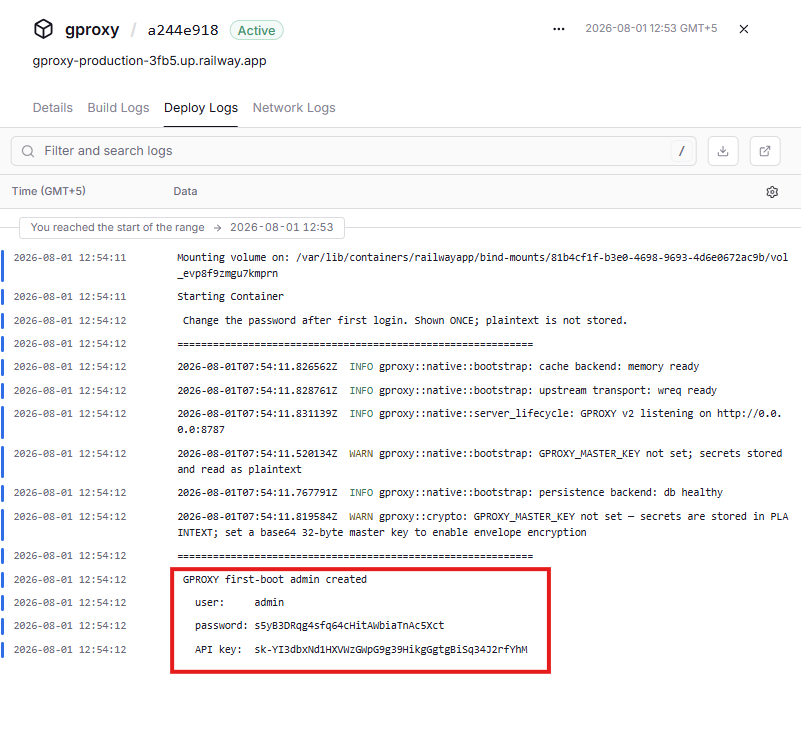
After logging in, you can begin configuring routing rules, proxy targets, TLS settings, and other application options.
Why Deploy gproxy on Railway?
Railway is a singular platform to deploy your infrastructure stack. Railway will host your infrastructure so you don't have to deal with configuration, while allowing you to vertically and horizontally scale it.
By deploying gproxy on Railway, you are one step closer to supporting a complete full-stack application with minimal burden. Host your servers, databases, AI agents, and more on Railway.
Template Content


