
Deploy Grafana | Open-Source Observability Platform
Self Host Grafana: Metrics, logs, traces from 100+ data sources
Grafana
Just deployed
/var/lib/grafana

Deploy and Host Grafana on Railway
Deploy Grafana on Railway to get a self-hosted observability and data visualization platform running in minutes.
Grafana connects to over 100 data sources — Prometheus, PostgreSQL, InfluxDB, Elasticsearch, CloudWatch, and more — turning raw metrics, logs, and traces into interactive dashboards and alerts.
Self-host Grafana on Railway with persistent storage and automatic HTTPS, no infrastructure management required. This Railway template deploys Grafana OSS (v13.0.0) with a pre-configured volume for SQLite persistence, admin credentials, and a public domain with TLS termination.
Getting Started with Grafana on Railway
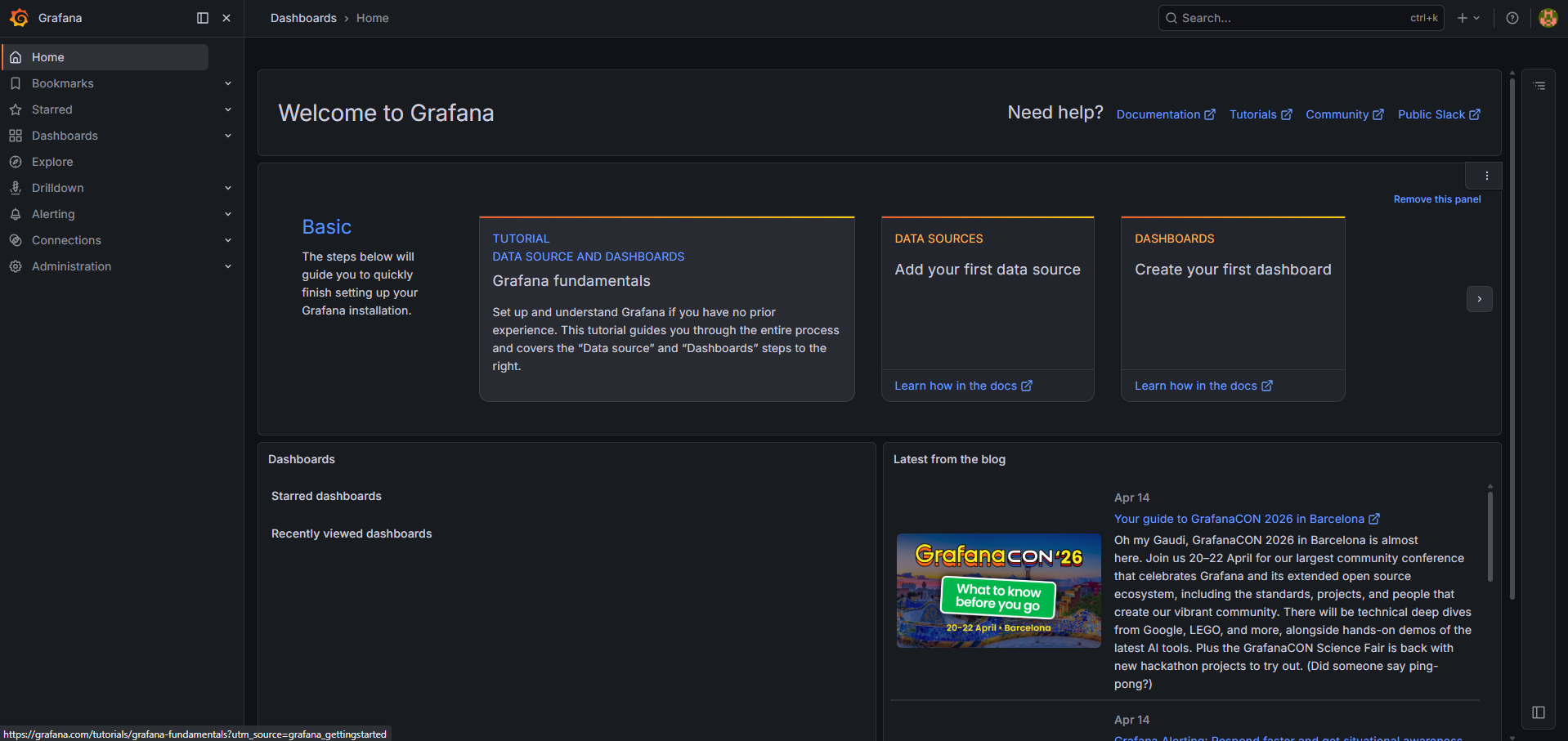
After deployment completes, visit your Grafana URL and log in with the admin credentials configured in your Railway environment variables (admin / the GF_SECURITY_ADMIN_PASSWORD value from the Railway dashboard). On first login, Grafana prompts you to change the default password — do so immediately.
Your first action should be adding a data source. Navigate to Connections > Data Sources > Add data source and select your backend (Prometheus, PostgreSQL, InfluxDB, etc.). If the data source is running on Railway's private network, use the internal domain (e.g., http://prometheus.railway.internal:9090). Once connected, import a community dashboard from grafana.com/dashboards or build your own.
About Hosting Grafana
Grafana is the open-source standard for observability visualization. Created by Grafana Labs and backed by 65,000+ GitHub stars, it provides a unified interface for querying and visualizing data from any source.
- Multi-source dashboards — query Prometheus, Loki, Tempo, PostgreSQL, MySQL, Elasticsearch, InfluxDB, CloudWatch, and 100+ plugins from a single pane
- Alerting engine — define alert rules with multi-condition evaluation, route notifications to Slack, PagerDuty, email, webhooks, and more
- Explore mode — ad-hoc query interface for logs, metrics, and traces without building dashboards first
- Provisioning — define dashboards, data sources, and alert rules as code via YAML files or the HTTP API
- RBAC and teams — role-based access control with organization, team, and folder-level permissions
- Plugin ecosystem — 200+ community and enterprise plugins for panels, data sources, and apps
Why Deploy Grafana on Railway
Railway eliminates the operational overhead of running Grafana in production:
- One-click deploy with persistent SQLite storage — no external database needed
- Automatic HTTPS and public domain with Railway's TLS-terminating proxy
- Volume-backed data persistence across redeploys and restarts
- Scale vertically by adjusting Railway resource limits — no Kubernetes required
- Private networking for connecting to other Railway services (Prometheus, PostgreSQL, InfluxDB)
Common Use Cases for Self-Hosted Grafana
- Infrastructure monitoring — CPU, memory, disk, and network dashboards for servers and containers using Prometheus or node_exporter
- Kubernetes observability — cluster health, pod resource usage, and deployment rollout tracking
- Application performance monitoring — request latency, error rates, and throughput from application metrics
- Business analytics — real-time revenue, user signups, and conversion funnels from PostgreSQL or MySQL queries
Dependencies for Grafana on Railway
- Grafana —
grafana/grafana:latest(v13.0.0) — the core visualization platform
No external database or cache is required. Grafana uses an embedded SQLite database stored in the /var/lib/grafana volume. For high-availability setups, you can optionally add Railway-managed PostgreSQL by setting GF_DATABASE_TYPE=postgres.
Environment Variables Reference for Grafana on Railway
| Variable | Value | Description |
|---|---|---|
GF_SECURITY_ADMIN_USER | admin | Admin username |
GF_SECURITY_ADMIN_PASSWORD | Static generated | Admin login password |
GF_SERVER_ROOT_URL | https://${{RAILWAY_PUBLIC_DOMAIN}} | Public URL for links and redirects |
GF_SERVER_PROTOCOL | http | Railway terminates TLS at edge |
GF_USERS_ALLOW_SIGN_UP | false | Disable public registration |
PORT | 3000 | Railway port routing |
RAILWAY_RUN_UID | 0 | Volume write permissions |
Deployment Dependencies
- Runtime: Docker (Alpine Linux base image)
- Docker Hub: grafana/grafana
- GitHub: grafana/grafana (65k+ stars)
- Docs: grafana.com/docs
Hardware Requirements for Self-Hosting Grafana
| Resource | Minimum | Recommended |
|---|---|---|
| CPU | 1 vCPU | 2 vCPU |
| RAM | 256 MB | 512 MB – 1 GB |
| Storage | 1 GB | 5 GB+ (depends on dashboard count and plugin installs) |
| Runtime | Docker 20+ or bare metal | Docker with persistent volume |
Grafana is lightweight — the v13.0.0 container idles at ~100 MB RAM with SQLite. Memory usage scales with concurrent users, dashboard complexity, and number of active data source queries.
Self-Hosting Grafana with Docker
Run Grafana locally with Docker in one command:
docker run -d \
  --name grafana \
  -p 3000:3000 \
  -v grafana-data:/var/lib/grafana \
  -e GF_SECURITY_ADMIN_PASSWORD=changeme \
  grafana/grafana:latest
For a production setup with PostgreSQL backend and docker-compose:
version: "3.8"
services:
  grafana:
    image: grafana/grafana:latest
    ports:
      - "3000:3000"
    volumes:
      - grafana-data:/var/lib/grafana
    environment:
      GF_SECURITY_ADMIN_PASSWORD: "${ADMIN_PASSWORD}"
      GF_DATABASE_TYPE: postgres
      GF_DATABASE_HOST: postgres:5432
      GF_DATABASE_NAME: grafana
      GF_DATABASE_USER: grafana
      GF_DATABASE_PASSWORD: "${DB_PASSWORD}"
      GF_USERS_ALLOW_SIGN_UP: "false"
    depends_on:
      - postgres

  postgres:
    image: postgres:16-alpine
    volumes:
      - pg-data:/var/lib/postgresql/data
    environment:
      POSTGRES_DB: grafana
      POSTGRES_USER: grafana
      POSTGRES_PASSWORD: "${DB_PASSWORD}"

volumes:
  grafana-data:
  pg-data:
How Much Does Grafana Cost to Self-Host?
Grafana OSS is completely free and open-source under the AGPL-3.0 license. There are no license fees, user limits, or feature gates on the self-hosted version. Grafana Cloud offers a free tier (10k metrics, 50 GB logs, 3 users) and paid plans starting at $19/month for teams needing managed hosting. On Railway, your only cost is infrastructure — typically $5–10/month for a single Grafana instance with moderate usage.
Grafana vs Datadog vs Kibana
| Feature | Grafana | Datadog | Kibana |
|---|---|---|---|
| License | AGPL-3.0 (free) | Proprietary SaaS | Elastic License 2.0 |
| Data sources | 100+ (any backend) | Datadog Agent only | Elasticsearch only |
| Self-host | Yes (Docker, K8s, bare metal) | No (SaaS only) | Yes (with Elastic Stack) |
| Cost | Free + infra | $15/host/mo + usage | Free + Elastic infra |
| Alerting | Built-in, multi-channel | Built-in, enterprise | Watcher (paid feature) |
| Best for | Multi-source visualization | Full-stack SaaS monitoring | Log analysis & search |
Grafana's key advantage is data source flexibility — it can visualize data from any backend without vendor lock-in. Datadog excels in turnkey enterprise monitoring but costs scale aggressively. Kibana is unmatched for Elasticsearch log analysis but limited to the Elastic ecosystem.
FAQ
What is Grafana and why self-host it? Grafana is an open-source observability platform for creating dashboards, alerts, and data visualizations from any data source. Self-hosting gives you full control over your data, no per-user pricing, unlimited dashboards, and the ability to connect to data sources on your private network.
What does this Railway template deploy for Grafana? This template deploys a single Grafana OSS v13.0.0 container with a persistent volume for SQLite storage, admin authentication configured, public sign-up disabled, and automatic HTTPS via Railway's domain system.
Why does Grafana on Railway use SQLite instead of PostgreSQL?
SQLite is Grafana's default database and is perfectly suitable for single-instance deployments. It stores all dashboard definitions, user accounts, alert rules, and settings in a single file at /var/lib/grafana/grafana.db, persisted across redeploys via the Railway volume. PostgreSQL is optional and only needed for high-availability multi-instance setups.
How do I connect Prometheus to self-hosted Grafana on Railway?
Deploy Prometheus as a separate Railway service, then in Grafana go to Connections > Data Sources > Add Prometheus. Use the Railway private domain (e.g., http://prometheus.railway.internal:9090) as the URL. No authentication is needed for internal Railway networking.
Can I install Grafana plugins on Railway?
Yes. Set the GF_PLUGINS_PREINSTALL environment variable with a comma-separated list of plugin IDs (e.g., GF_PLUGINS_PREINSTALL=grafana-clock-panel,grafana-piechart-panel). Plugins are installed on container startup and persisted in the /var/lib/grafana/plugins directory within the volume.
How do I enable anonymous access for public dashboards in Grafana?
Set GF_AUTH_ANONYMOUS_ENABLED=true and GF_AUTH_ANONYMOUS_ORG_ROLE=Viewer in your Railway environment variables. This allows unauthenticated users to view dashboards without logging in. For more granular control, use Grafana's public dashboard sharing feature instead.
Template Content
Grafana
grafana/grafana:latestGF_SECURITY_ADMIN_USER
Create Admin login username
GF_SECURITY_ADMIN_PASSWORD
Create Admin login password