
Deploy Grok API Wrapper
Deploy your personal Grok Reverse Proxy site with one click
dairoot/grok-gateway:latest
Just deployed
/app/.cache_data
Deploy and Host Grok Mirror on Railway
Grok Mirror is an open-source self-hosted Grok mirror platform that enables multiple users to securely share and manage Grok accounts through a unified web interface. It provides the same experience as the official Grok website while exposing an OpenAI-compatible Chat Completions API for applications, AI clients, and automation tools.
About Hosting Grok Mirror
Deploying Grok Mirror on Railway provides a simple way to self-host a multi-user Grok gateway without managing servers or infrastructure. Railway automatically provisions HTTPS, networking, and persistent storage while Grok Mirror lets you manage multiple Grok SSO tokens, user access, and API authentication through an intuitive web interface. Once deployed, simply add your Grok SSO token(s), configure optional API authentication, and begin using both the web UI and the OpenAI-compatible API endpoint from your own Railway domain.
Common Use Cases
- Share Grok access with multiple users or team members.
- Expose an OpenAI-compatible API backed by Grok.
- Rotate multiple Grok SSO tokens automatically.
- Self-host a private Grok web interface.
- Connect Grok to Open WebUI, LobeChat, ChatGPT Next Web, and custom AI applications.
Dependencies for Grok Mirror Hosting
The Railway template automatically deploys everything required.
Required Environment Variables
| Variable | Description |
|---|---|
ADMIN_PASSWORD | Password used to access the administration panel. |
AUTHORIZATION | API authorization key used for OpenAI-compatible API authentication and automatic SSO token rotation. |
Optional Environment Variables
| Variable | Description | Default |
|---|---|---|
ENABLE_MIRROR_API | Enable OpenAI-compatible API. | true |
MIRROR_API_PREFIX | Custom API prefix for additional security. | None |
API_HATD | Enable temporary chat mode for API requests. | true |
PROXY_URL_POOL | HTTP/SOCKS5 proxy pool. | None |
HOST | Public domain of your Railway deployment. | None |
GOOGLEADS | Google AdSense publisher code. | None |
No external database is required.
Persistent storage is automatically included to preserve Grok SSO tokens and application data across deployments.
Deployment Dependencies
- GitHub Repository: https://github.com/dairoot/Grok-Mirror
- Docker Image:
dairoot/grok-gateway:latest - Official Demo: https://gk.dairoot.cn
Configuration
After deployment:
- Open your Railway deployment URL.
- Log in using the configured ADMIN_PASSWORD.
- Add one or more Grok SSO Tokens.
- Configure the optional API authorization key.
- Start using the web interface or the OpenAI-compatible API.
The application exposes an OpenAI-compatible endpoint:
/v1/chat/completions
compatible with OpenAI SDKs, Open WebUI, LobeChat, ChatGPT Next Web, and other OpenAI-compatible clients.
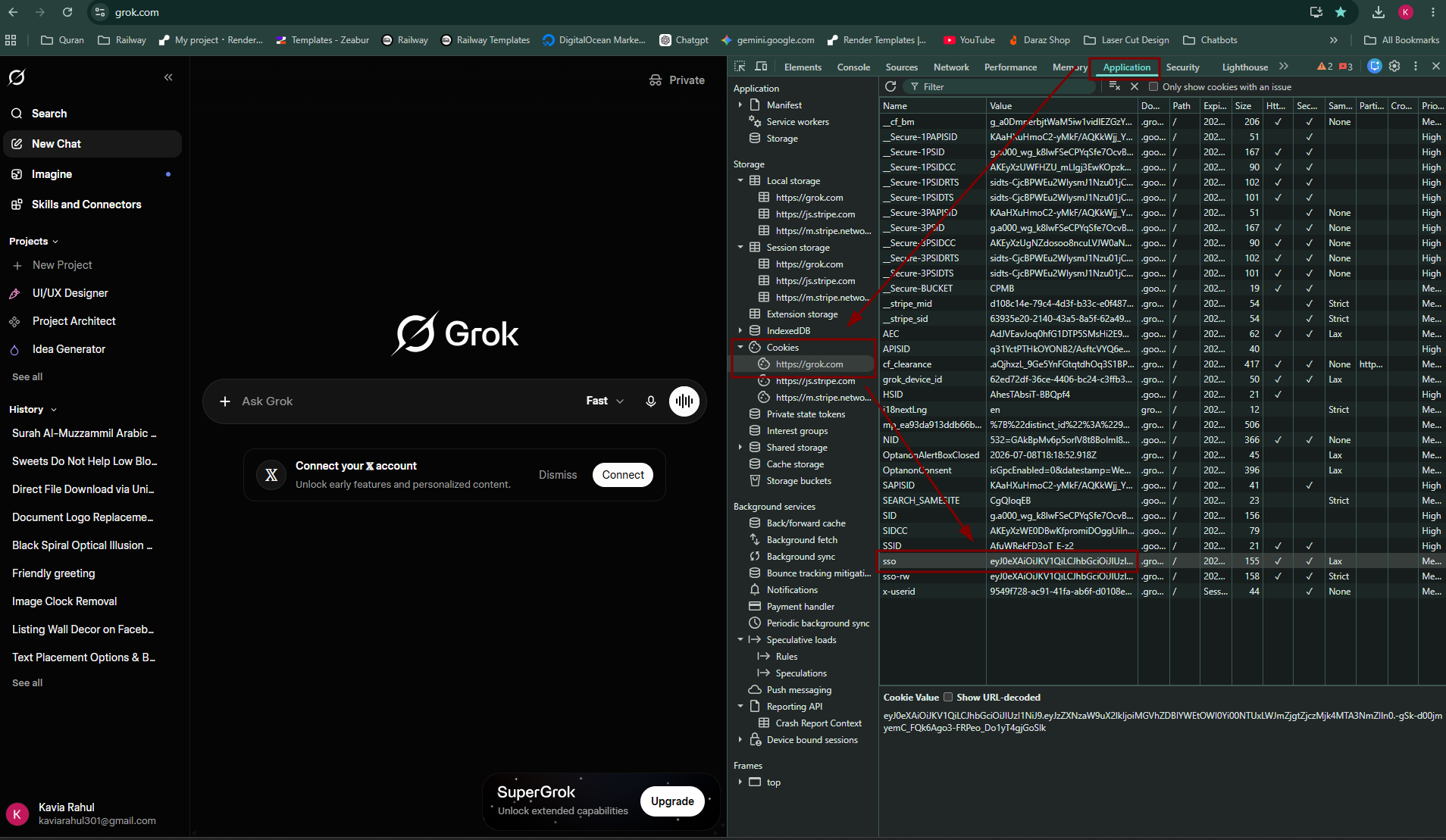
How to Obtain Your Grok SSO Token
-
Sign in to your Grok account:
-
Press F12 to open Developer Tools.
-
Open the Application (Chrome/Edge) or Storage (Firefox) tab.
-
Under Cookies, select:
https://grok.com -
Locate the cookie named:
sso -
Copy its value.
-
Paste the SSO token into the Grok Mirror administration panel.
You can add multiple SSO tokens for automatic account rotation.
Railway Deployment Settings
| Setting | Value |
|---|---|
| Deployment | Docker Image |
| Docker Image | dairoot/grok-gateway:latest |
| HTTP Proxy | Enabled |
| Target Port | 8080 |
| Persistent Volume | /app/.cache_data |
Troubleshooting
"Application failed to respond"
If your Railway deployment displays Application failed to respond, the most common cause is an invalid or stale public domain.
Try the following:
- Open your Railway service.
- Go to Networking.
- Delete the existing generated domain.
- Click Generate Domain to create a new Railway domain.
- Wait a few seconds and refresh the page.
If the issue persists, check the deployment logs to verify the application has started successfully.
Features
- Multi-user Grok web interface
- OpenAI-compatible Chat API
- Multiple Grok account support
- Automatic SSO token rotation
- API authentication
- Proxy support
- Responsive web dashboard
- Persistent account storage
Why Deploy Grok Mirror on Railway?
Railway is a singular platform to deploy your infrastructure stack. Railway will host your infrastructure so you don't have to deal with configuration, while allowing you to vertically and horizontally scale it.
By deploying Grok Mirror on Railway, you are one step closer to supporting a complete full-stack application with minimal burden. Host your servers, databases, AI agents, and more on Railway.
Template Content
dairoot/grok-gateway:latest
dairoot/grok-gateway:latest

