
Deploy Growi
Confluence Alternative. Markdown wiki, real-time editing, full-text search
Just deployed
/data

Redis
Just deployed
/data

mongodb
Just deployed
/data/db

elasticsearch
Just deployed
/usr/share/elasticsearch/data
Deploy and Host GROWI on Railway
GROWI is an open source team wiki and knowledge base built around markdown. Pages live in a tree, several people can edit one page at once, and everything is searchable full-text — a natural fit for runbooks, onboarding guides and internal documentation that would otherwise scatter across chat threads. It is MIT licensed, at github.com/growilabs/growi.
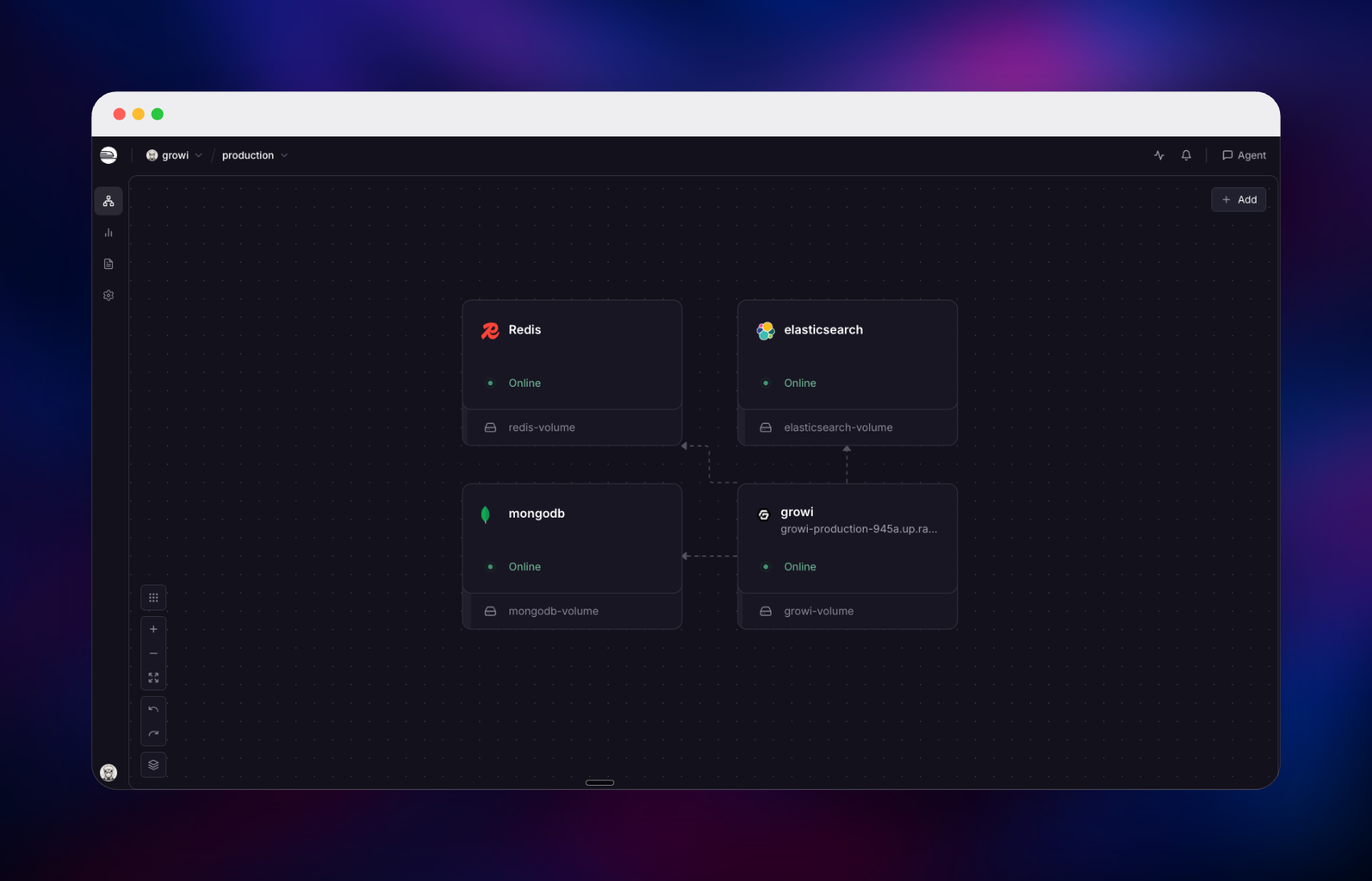
Deploy GROWI on Railway and the pieces it needs are already wired together: the application (growilabs/growi) alongside a MongoDB replica set, an Elasticsearch node carrying the analysis plugins GROWI's search index requires, and a managed Redis for sessions. Self-host GROWI the usual way and you assemble those four yourself; here the app reaches its databases over private networking, the first administrator is created on the initial boot, and only the wiki gets a public URL.
Getting Started with GROWI on Railway
Open the generated Railway URL and you land on the sign-in screen rather than an installation wizard — the administrator is created automatically from the AUTO_INSTALL_ADMIN_* variables. Sign in with your username (admin by default) and the password in AUTO_INSTALL_ADMIN_PASSWORD, readable any time from the service's variables in the Railway dashboard.
Close public registration first: Admin → Security → ID/Pass, and change Registration Mode from Open to Closed or Restricted. GROWI ships with open sign-up and no environment variable for it, so this is a manual step on every fresh install. Signed-out visitors cannot read pages either way, but leaving it open lets strangers create accounts.
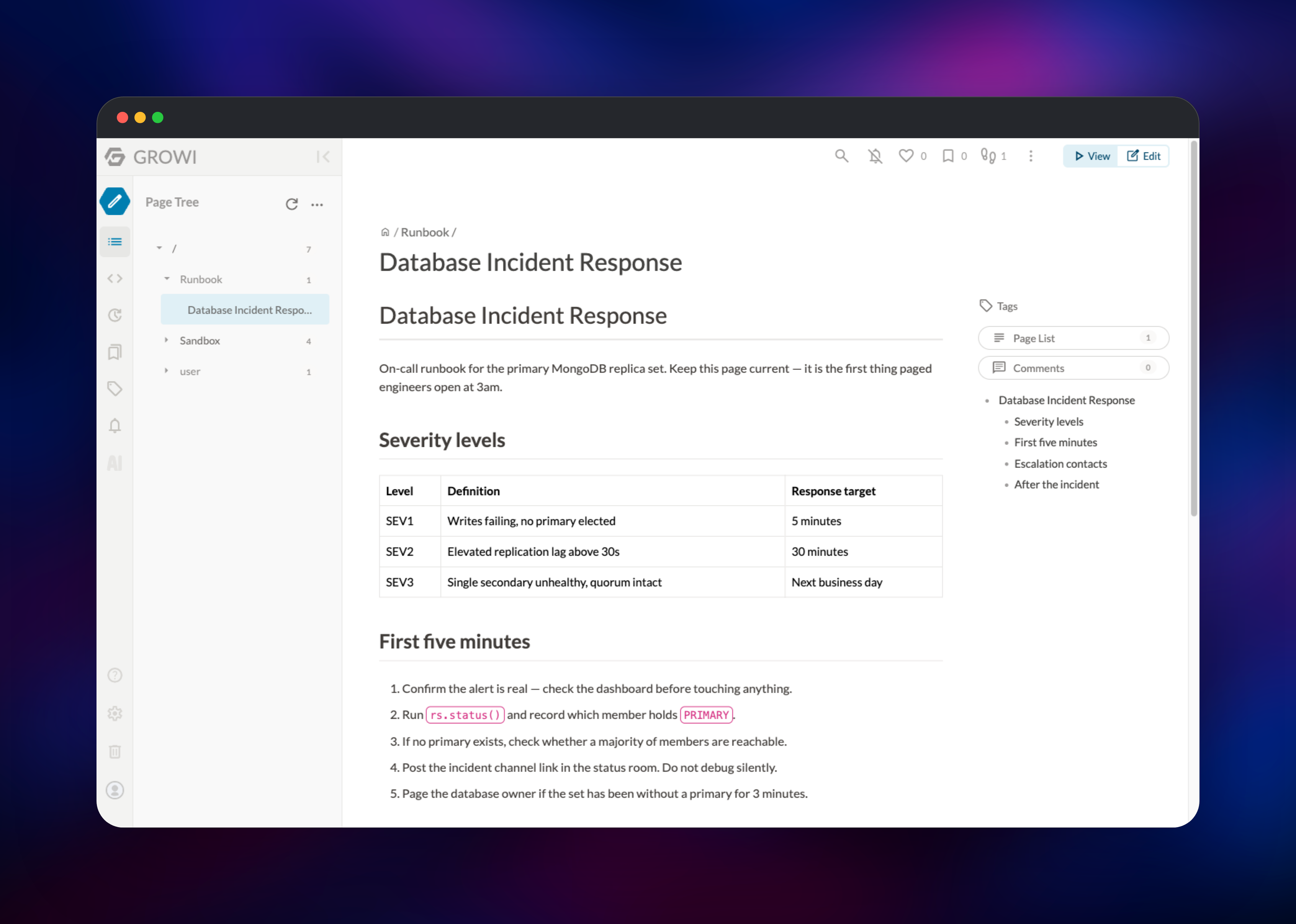
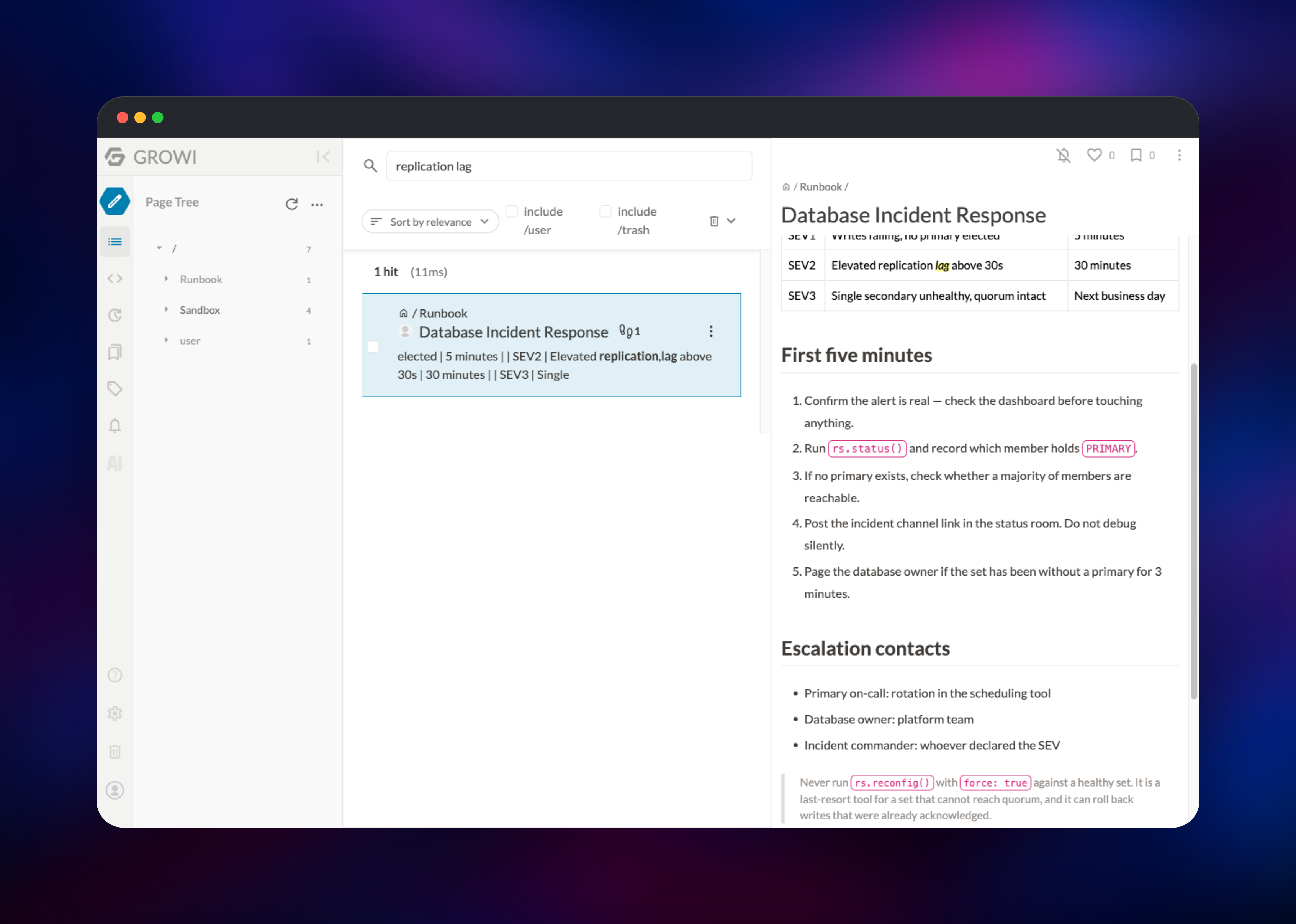
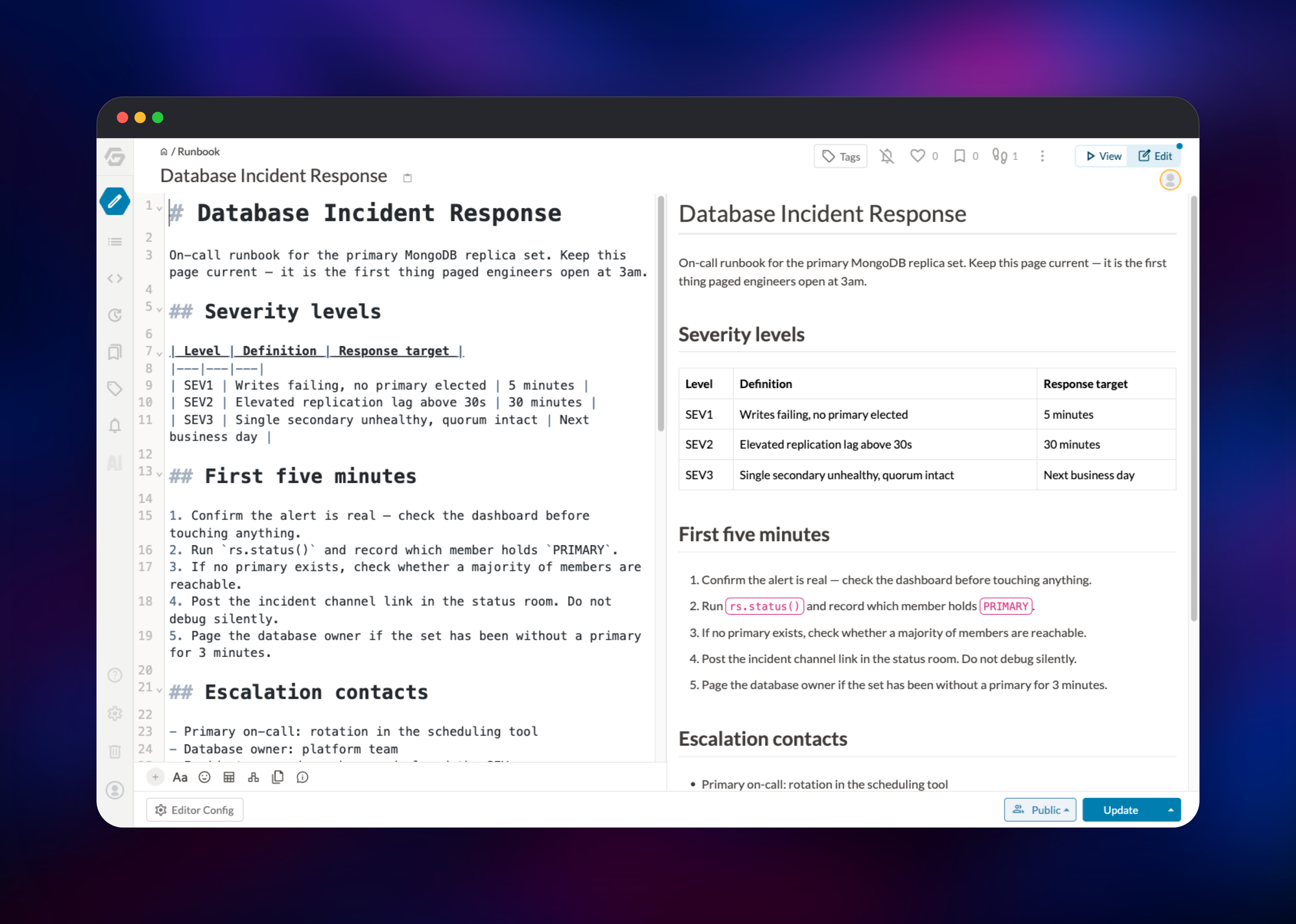
Then create a page with the pencil icon, give it a path such as /Runbook/Deploy Process, write markdown and press Update. Searching a word from that page confirms Elasticsearch is indexing; Admin → Elasticsearch management should report CONNECTED.
About Hosting GROWI
GROWI is a Node.js application storing pages, revisions, users and permissions in MongoDB. Teams self-host it when documentation must stay on infrastructure they control.
- Hierarchical markdown pages with live side-by-side preview
- Real-time collaborative editing
- Full-text search across bodies and titles, including Japanese
- Per-page and per-group access control, plus guest restrictions
- LDAP, Active Directory, OAuth and SAML single sign-on
- Slack and Mattermost integration, audit log, plugin system
Four services make up the template. GROWI serves the web UI and API. MongoDB is the system of record, run as a single-node replica set because GROWI v8 reads change streams for its audit log and bulk-export jobs. Elasticsearch backs full-text search. Redis holds sessions, so a redeploy does not sign everyone out.
Why Deploy GROWI on Railway
Railway removes the setup work between you and a running wiki:
- No Docker Compose, volume wiring or replica-set initialisation by hand
- MongoDB, Elasticsearch and Redis connected over private networking
- Persistent volumes for pages, search indexes and uploads
- Managed TLS, custom domains, and an admin account created on first boot
Common Use Cases
- Engineering runbooks — hierarchical pages and code blocks, searchable at 3am
- Onboarding handbooks — an
/Onboardingtree with per-group access - Meeting notes — collaborative editing live, revision history after
- Internal API documentation — markdown owned by the team that writes it
GROWI vs Confluence vs Wiki.js
| GROWI | Confluence | Wiki.js | |
|---|---|---|---|
| Open source | Yes (MIT) | No | Yes (AGPL) |
| Self-hostable | Yes | Data Center only | Yes |
| Editing | Markdown, real-time | Rich text | Markdown, single editor |
| Search backend | Elasticsearch | Built-in | Database or Elasticsearch |
GROWI fits teams that write markdown and want simultaneous editing without a per-seat licence. Wiki.js is lighter to run but has no real-time co-editing.
Dependencies for GROWI
- GROWI —
growilabs/growi:latest, the application - MongoDB —
mongodb/mongodb-community-server:8.0-ubi8, a single-node replica set - Elasticsearch —
docker.elastic.co/elasticsearch/elasticsearch:9.3.8withanalysis-kuromojiandanalysis-icu - Redis — Railway's managed Redis, the session store
MongoDB and Elasticsearch build from a public source repository, github.com/gridalpha/growi-railway, because both need setup environment variables cannot express: a replica set initialised with a keyfile on first boot, and analysis plugins baked into the image before the index is created.
Environment Variables Reference
| Variable | Description | Required |
|---|---|---|
APP_SITE_URL | Public URL, used in links and callbacks | Yes |
MONGO_URI | MongoDB connection string | Yes |
PASSWORD_SEED | Salts stored password hashes — never change | Yes |
SECRET_TOKEN | Signs session cookies — never change | Yes |
ELASTICSEARCH_URI | Search endpoint plus index name | No |
ELASTICSEARCH_VERSION | Search backend major version, 9 here | No |
REDIS_URI | Session store; falls back to MongoDB if unset | No |
FILE_UPLOAD | Attachment backend, local writes to the volume | No |
AUTO_INSTALL_ADMIN_USERNAME | First administrator's username | No |
AUTO_INSTALL_ADMIN_PASSWORD | First administrator's password, min 8 characters | No |
AUTO_INSTALL_ADMIN_EMAIL | First administrator's email, must be a real TLD | No |
Rotating PASSWORD_SEED invalidates every stored password; rotating SECRET_TOKEN signs everyone out.
Deployment Dependencies
- Source: github.com/growilabs/growi · hub.docker.com/r/growilabs/growi · docs.growi.org
- Runtime: Node.js 24.x, MongoDB 6.x or 8.x, Elasticsearch 7.x–9.x, Redis 3.x+
Server Requirements to Self-Host GROWI
| Resource | Minimum | Recommended |
|---|---|---|
| CPU | 2 vCPU across all services | 4 vCPU |
| RAM (GROWI) | 1 GB | 2 GB |
| RAM (Elasticsearch) | 1 GB heap | 2 GB heap |
| RAM (MongoDB) | 512 MB | 1 GB+ |
| Storage | 5 GB | 20 GB+, grows with attachments |
| Runtime | Node.js 24.x | Node.js 24.x |
Elasticsearch is the memory-hungry component; set ES_JAVA_OPTS to about half its container memory. GROWI sizes its own heap.
Self-Hosting GROWI
GROWI publishes an official Docker Compose setup. Clone it and start the stack:
git clone https://github.com/growilabs/growi-docker-compose.git growi
cd growi
docker compose up -d
That serves GROWI on port 3000 with MongoDB and Elasticsearch alongside. To run it against databases you already have:
docker run -d --name growi -p 3000:3000 \
  -e MONGO_URI=mongodb://mongo:27017/growi \
  -e ELASTICSEARCH_URI=http://elasticsearch:9200/growi \
  -e ELASTICSEARCH_VERSION=9 \
  -e PASSWORD_SEED=$(openssl rand -hex 32) \
  -v growi_data:/data \
  growilabs/growi:latest
Two things catch people out. Elasticsearch must have analysis-kuromoji and analysis-icu installed or index creation fails, because GROWI's mappings reference them for every index, not only Japanese content. And MongoDB must be a replica set, or the audit log and bulk export cannot open change streams.
Is GROWI Free?
Self-hosted GROWI is free and open source under the MIT licence — no seat limits, no paid tier. On Railway you pay only for the infrastructure the four services consume. GROWI, Inc. also runs a commercial hosted version, GROWI.cloud, priced by user count per plan.
FAQ
What is GROWI? An open source, markdown-based team wiki with hierarchical pages, real-time collaborative editing, full-text search and per-page permissions. It is commonly used as a self-hosted Confluence alternative.
What does this Railway template deploy? Four services: the GROWI app with a public URL, a single-node MongoDB replica set, an Elasticsearch node with GROWI's required analysis plugins, and managed Redis for sessions. Each data service keeps its own volume.
Why does this template run MongoDB as a replica set instead of a standalone server? GROWI v8 opens change streams for its audit log and bulk-export jobs, and those exist only on a replica set. A standalone server starts fine and then fails those features, so a single-node replica set is initialised on first boot.
Why is Elasticsearch included, and can I remove it?
It powers full-text search. GROWI runs without it — search simply stops working — so you can delete the service and unset ELASTICSEARCH_URI if page-tree navigation is enough.
How do I stop strangers signing up on my self-hosted GROWI? Set Admin → Security → ID/Pass → Registration Mode to Closed or Restricted. GROWI defaults to open registration and has no environment variable for it, so this is done in the admin UI after deploying.
Does self-hosted GROWI support SSO? Yes — LDAP, Active Directory, OAuth and SAML are configured from Admin → Security, with no licence required.
Template Content

