
Deploy GrowthBook
Feature flags, experimentation, product analytics, SDK edge proxy
growthbook-proxy
Just deployed

MongoDB
Just deployed
/data/db

Redis
Just deployed
/data

gateway
Just deployed
growthbook
Just deployed
growthbook-jobs
Just deployed
growthbook-uploads
Bucket
Just deployed

Deploy and Host GrowthBook on Railway
GrowthBook is an open-source feature flagging and A/B testing platform. Product and engineering teams use it to ship code behind flags, roll changes out to a percentage of users, and measure the result against metrics defined in their own data warehouse — instead of paying per seat for a tool that keeps the numbers elsewhere. It ships 24 SDKs, a stats engine with CUPED, sequential testing and Bayesian analysis, and a product-analytics suite. Every query runs against your warehouse, so it never needs a copy of your event data.
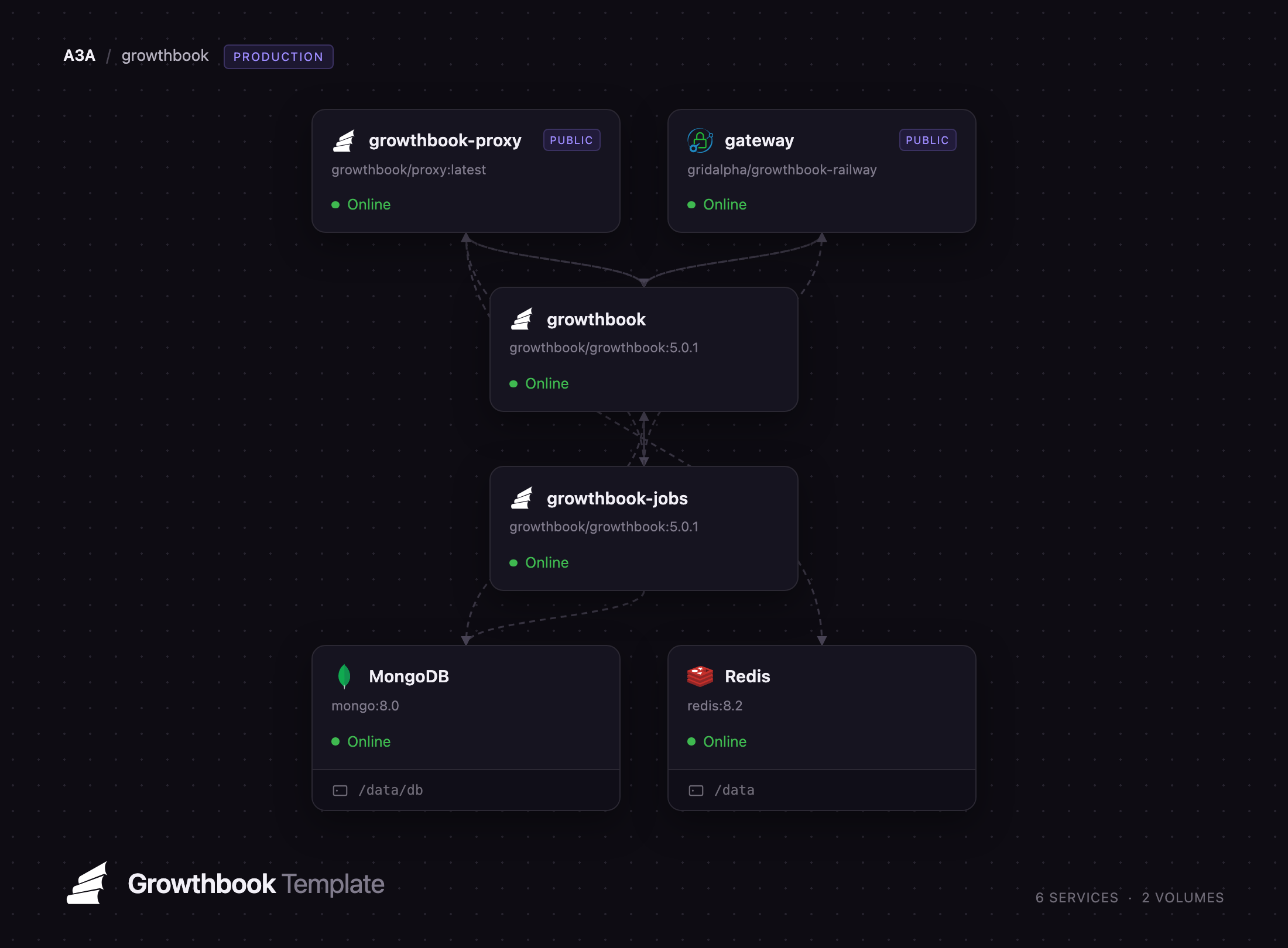
This template runs the whole platform, not just the app container. Deploy GrowthBook on Railway and you get the web app and API, a jobs server owning scheduled work and the Python stats engine, a GrowthBook Proxy with a Redis cache serving SDK payloads, MongoDB for application state, and object storage for uploads. A Caddy gateway sits in front so the front-end and API share one origin, which is what keeps authentication working on a Railway domain. The only thing left to bring is a warehouse connection.
Getting Started with GrowthBook on Railway
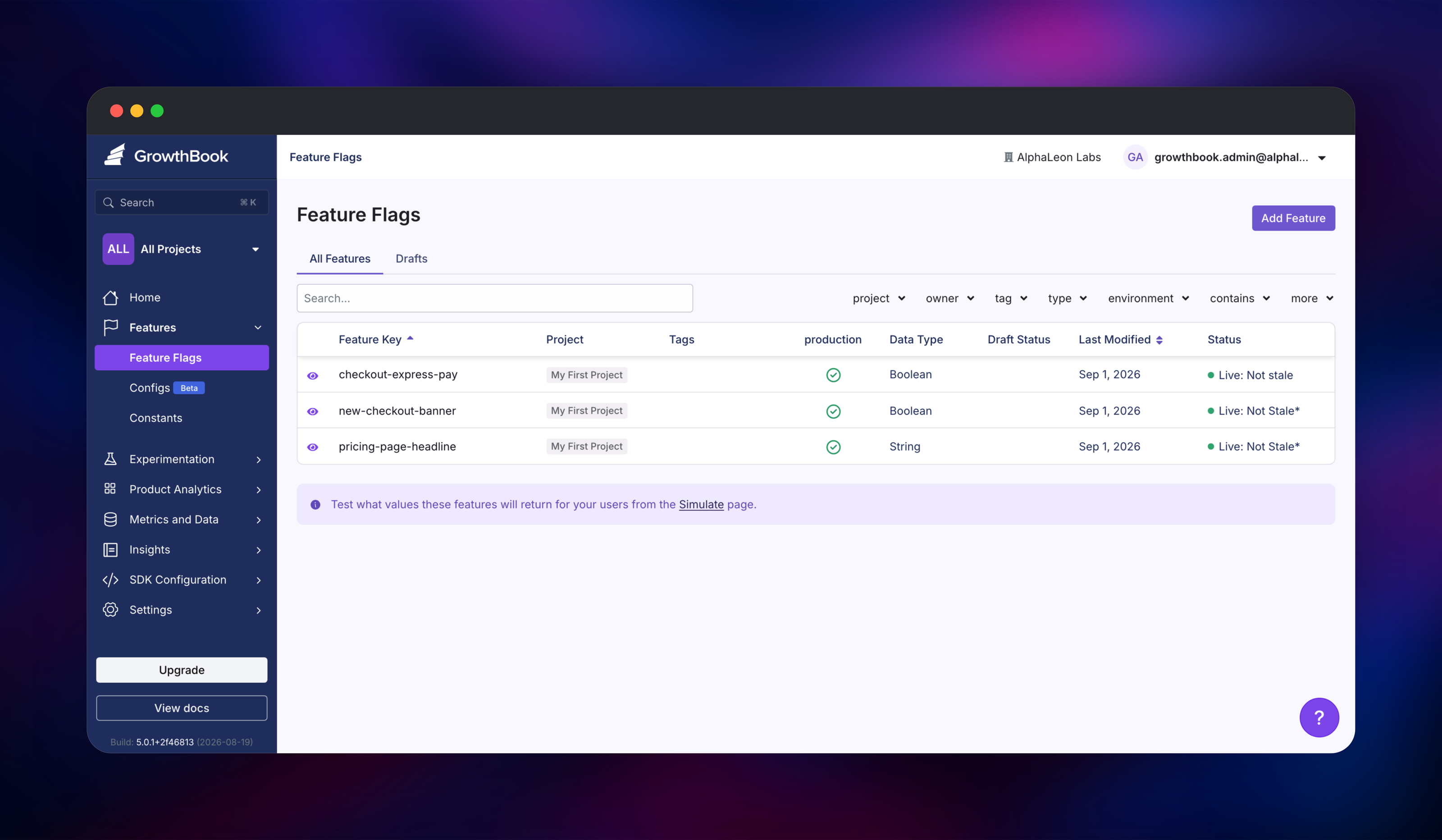
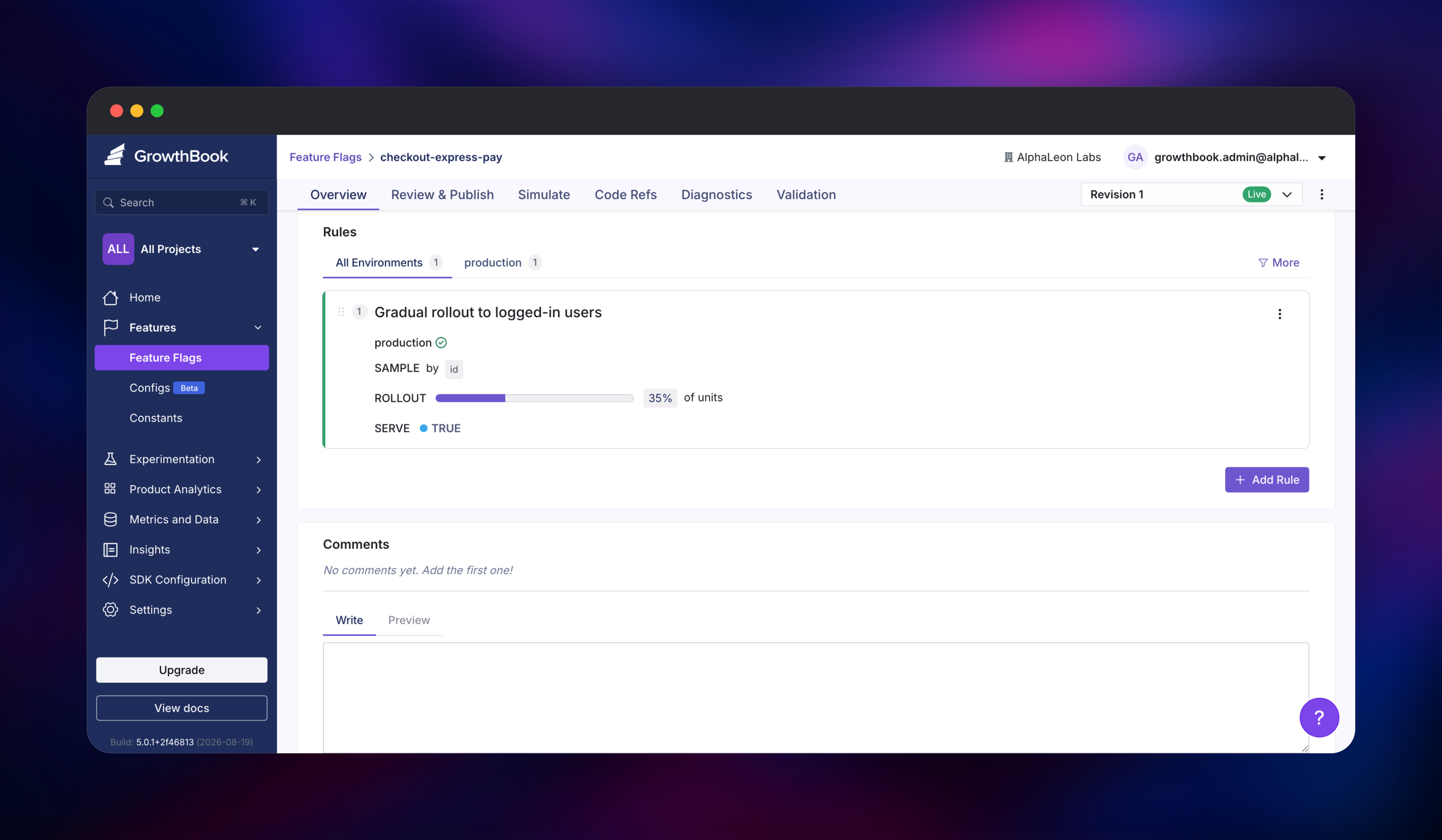
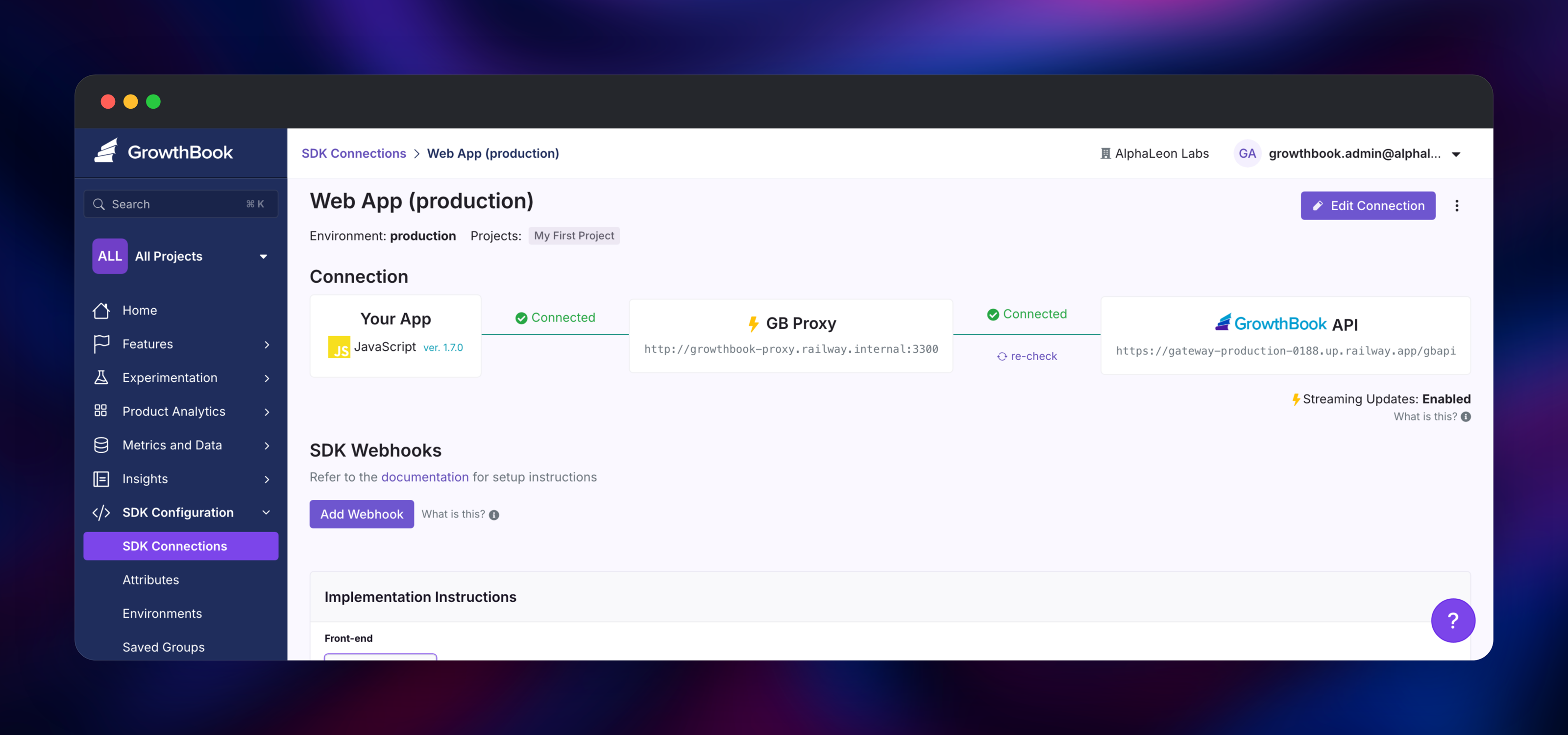
Open the gateway service's public URL as soon as the deployment goes green. There are no default credentials: the first visitor gets a one-time setup form asking for a company name, your name, an email and a password, and that account becomes the organization's super admin. Everyone joining later needs an invitation from Settings → Members, so finish this step promptly rather than leaving it exposed. Next, open SDK Configuration → SDK Connections and create a connection for your language; the page shows the client key and the snippet to paste into your app. Then go to Features → Add Feature, give the flag a key such as new-checkout-banner, pick a value type and add a rule — a percentage rollout sampled by user ID shows targeting working. To confirm the deployment end to end, run curl https:///api/features/; it should return the flag within a second of saving it. Connect a warehouse under Metrics and Data → Data Sources when you are ready to analyse experiments.
About Hosting GrowthBook
Feature flagging and experimentation are usually sold as two products, both charging by seat or tracked user. GrowthBook merges them and inverts the data model: flags are evaluated in your application by an SDK, and experiment results come from SQL run against the warehouse you already own. Self-hosting suits teams with data-residency rules or user counts that make per-MTU pricing painful.
Key features:
- Targeting attributes, saved groups, prerequisites and percentage rollouts per environment
- Bayesian and frequentist analysis, CUPED, sequential testing, bandits and SRM checks
- Warehouse-native metrics as SQL or fact tables, with caching and scheduled refreshes
- Product analytics: funnels, dashboards, saved SQL reports and correlations
- A REST API, webhooks, an MCP server and importers for LaunchDarkly and Statsig
The architecture splits cleanly. growthbook answers browser and SDK requests. growthbook-jobs runs the background job queue, scheduled refreshes and the Python stats engine, so a heavy analysis never slows the dashboard. growthbook-proxy caches payloads in Redis and pushes updates over Server-Sent Events, so flag changes reach clients in real time. MongoDB holds all application state and the bucket holds uploaded images, which keeps every app container stateless.
Why Deploy GrowthBook on Railway
Railway turns a five-container topology into one click.
- MongoDB, Redis and object storage are provisioned and wired up for you
- The jobs server and proxy scale independently of the web tier
- Private networking keeps the API, stats endpoint and datastores off the internet
- Secrets, health checks and a public domain are set at deploy time
- Usage-based pricing, no per-seat fee on top of GrowthBook's own
Common Use Cases
- Rolling a change out to 5% of users, watching guardrails, then ramping to 100% with no redeploy
- Running pricing or onboarding experiments and reading results from the company warehouse
- Replacing a per-seat LaunchDarkly or Statsig plan for a team already paying for Snowflake
- Serving flag payloads to millions of clients from a cached proxy, not the app database
Dependencies for GrowthBook
growthbook/growthbook:5.0.1— web app, REST API and stats engine, deployed twice: request tier and jobs servergrowthbook/proxy:latest— the GrowthBook Proxy, a caching edge for SDK payloadsgridalpha/growthbook-railway— the Caddy gateway serving both halves from one origin- MongoDB 8 for state, Redis 8 for the proxy cache, a bucket for uploads
Environment Variables Reference
| Variable | Service | Purpose |
|---|---|---|
MONGODB_URI | app, jobs | MongoDB connection string, with ?authSource=admin |
APP_ORIGIN / API_HOST | app, jobs | Public URLs; the API sits under the /gbapi path |
JWT_SECRET / ENCRYPTION_KEY | app, jobs | Session signing and data-source encryption; must match |
BACKEND_PORT | app, jobs | Keeps the API off the front-end's PORT |
CRON_DISABLED / PYTHON_SERVER_MODE | app / jobs | Move scheduled work and /stats to the jobs server |
SECRET_API_KEY | app, jobs, proxy | Read-only REST key the proxy uses |
UPLOAD_METHOD / S3_* | app, jobs | Sends uploads to the bucket |
Deployment Dependencies
- GrowthBook on GitHub — MIT, with
enterprisedirectories under a commercial licence - growthbook/growthbook on Docker Hub
- Self-hosting docs and the variable reference
Hardware Requirements for Self-Hosting GrowthBook
| Resource | Minimum | Recommended |
|---|---|---|
| CPU | 1 vCPU per app service | 2 vCPU app, 2–4 jobs server |
| RAM | 2 GB per app service | 4 GB each; the stats engine is hungriest |
| Storage | 512 MB MongoDB | 5 GB for ~1,000 flags and experiments |
| Runtime | Node.js 24 + Python 3.11 | Bundled in the official image |
Self-Hosting GrowthBook with Docker
Upstream ships a Compose file bringing up MongoDB and the app together:
services:
  mongo:
    image: mongo:latest
    environment: [MONGO_INITDB_ROOT_USERNAME=root, MONGO_INITDB_ROOT_PASSWORD=pw]
    volumes: [mongodata:/data/db]
  growthbook:
    image: growthbook/growthbook:latest
    ports: ["3000:3000", "3100:3100"]
    environment:
      - MONGODB_URI=mongodb://root:pw@mongo:27017/growthbook?authSource=admin
volumes:
  mongodata:
Run docker compose up -d and open localhost:3000. Against an existing MongoDB:
docker run -d -p 3000:3000 -p 3100:3100 \
  -e MONGODB_URI="mongodb://user:pw@host:27017/growthbook?authSource=admin" \
  -e APP_ORIGIN="https://gb.example.com" -e API_HOST="https://gb-api.example.com" \
  -e JWT_SECRET="$(openssl rand -hex 32)" \
  -e ENCRYPTION_KEY="$(openssl rand -hex 32)" \
  -e NODE_ENV=production growthbook/growthbook:latest
The front-end and API must share a registrable domain, or browsers drop the session cookie. This template puts both behind one hostname instead.
How Much Does GrowthBook Cost to Self-Host?
GrowthBook's core is MIT licensed and free to self-host with unlimited flags, experiments and traffic. Only the enterprise directories — SSO, SCIM, custom environments, approval workflows and the visual editor — need a commercial licence key. GrowthBook Cloud is free for three users and $40 per seat per month on Pro, so a team of ten saves roughly $4,800 a year by self-hosting. On Railway you pay only for the resources the services use.
FAQ
What is GrowthBook?
GrowthBook is an open-source platform for feature flags, A/B testing and product analytics. Flags are evaluated in your application by an SDK, and experiment results come from SQL run against your own data warehouse.
What does this Railway template deploy?
Six services — the GrowthBook app, a jobs server running scheduled work and the stats engine, the Proxy, a Caddy gateway, MongoDB and Redis — plus a bucket for uploads.
Why does this template need MongoDB and Redis?
MongoDB is GrowthBook's only application database — organizations, users, flags, experiments and cached query results live there. Redis is the proxy's shared cache, so several proxy instances serve identical payloads and stay in sync when a flag changes.
Do I need a data warehouse to use self-hosted GrowthBook?
Not for feature flags, which work right after setup. Experiment analysis does: connect BigQuery, Snowflake, Redshift, Databricks, ClickHouse, Postgres or MySQL under Metrics and Data → Data Sources.
How do I add teammates to a self-hosted GrowthBook instance?
Invite them from Settings → Members. Invitations are emailed, so set EMAIL_ENABLED=true plus EMAIL_HOST, EMAIL_PORT, EMAIL_HOST_USER, EMAIL_HOST_PASSWORD and EMAIL_FROM first; without SMTP, copy the invite link from the members list.
Template Content
growthbook-proxy
growthbook/proxy:latestMongoDB
mongo:8.0Redis
redis:8.2gateway
gridalpha/growthbook-railwaygrowthbook
growthbook/growthbook:5.0.1growthbook-jobs
growthbook/growthbook:5.0.1growthbook-uploads
Bucket


