
Deploy Hasura
Turns a Postgres database into a ready-made GraphQL API

Just deployed
/var/lib/postgresql/data
Just deployed
Postgres-Metadata
Just deployed
/var/lib/postgresql/data
Deploy and Host Hasura on Railway
Hasura is a GraphQL engine that points at a Postgres database and instantly serves a complete GraphQL API over it — queries, nested joins across foreign keys, aggregates, mutations and realtime subscriptions — with no resolver code. Access is declarative: row- and column-level permissions per role, rather than authorization logic scattered through an application. You extend the generated schema with Actions (your own REST handlers), Remote Schemas (other GraphQL services stitched into one endpoint) and Event Triggers (webhooks fired on row changes). Teams use it to put an API over an existing database in an afternoon.
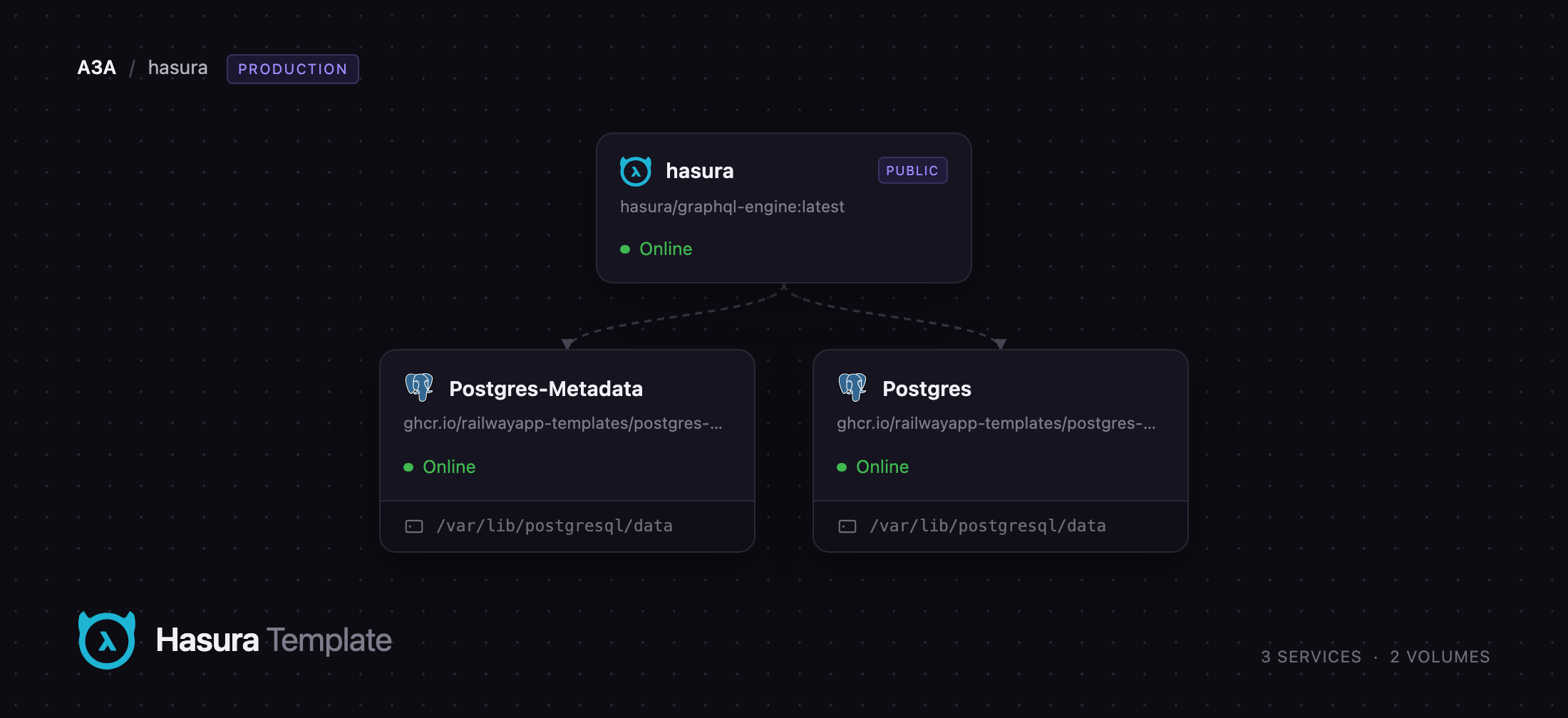
Self-host Hasura on Railway in the shape Hasura's own docs recommend for production: the hasura/graphql-engine Community Edition image behind a public HTTPS domain, plus two managed Postgres services. One holds your application data and is registered automatically as the data source named default. The other holds only Hasura's metadata catalogue — the hdb_catalog schema recording tracked tables, relationships, permissions, event queues and cron state — so your own database stays clean enough to back up or swap without touching engine configuration. Requests are checked against the admin secret or your JWT configuration, then compiled into a single SQL statement sent over the private network; neither database is exposed to the internet.
Getting Started with Hasura on Railway
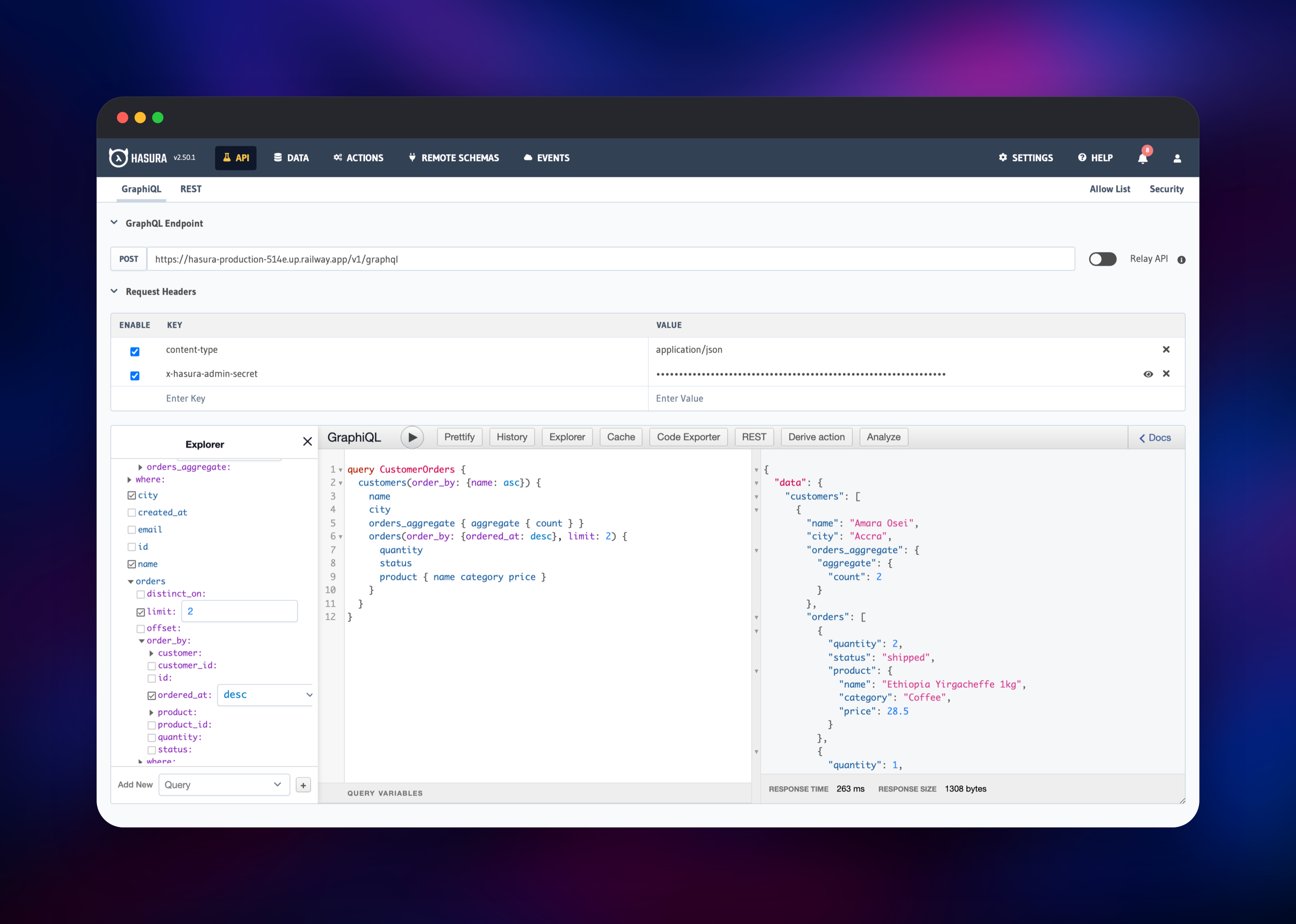
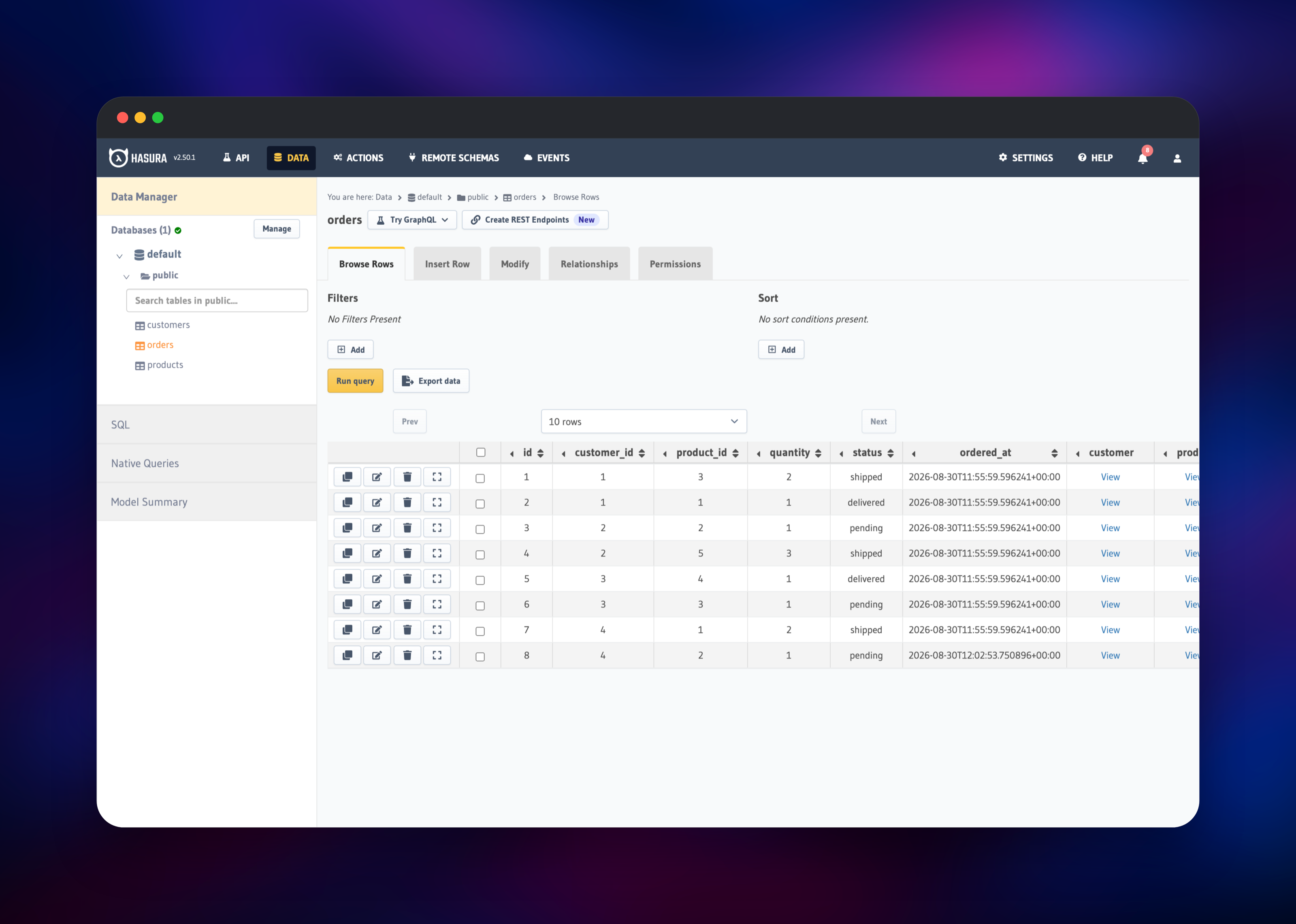
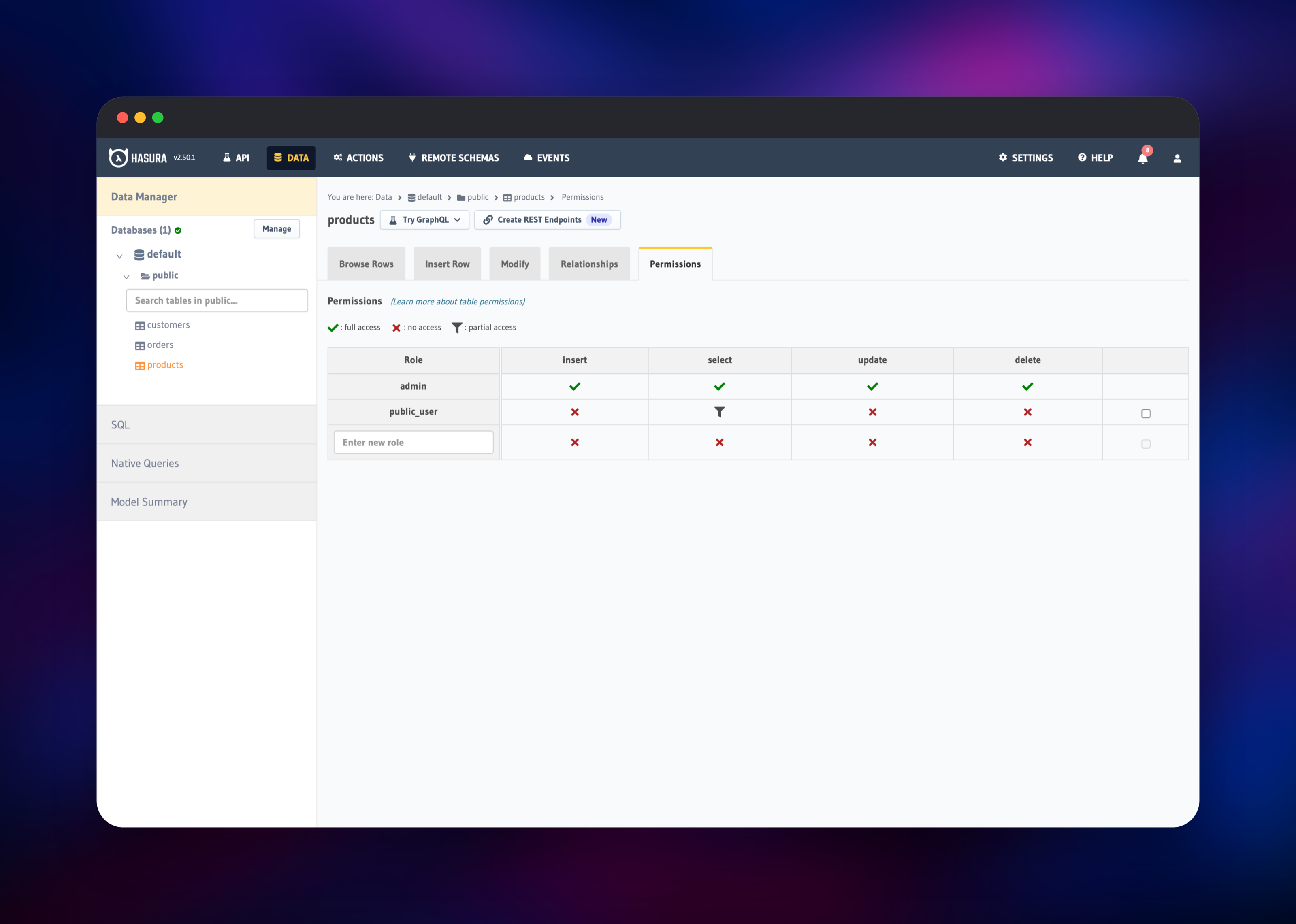
Open the generated URL once the deploy is green: the console is at /console, the API at /v1/graphql. Hasura has no user accounts — the login form asks for the admin secret, generated for you and shown on the hasura service under Variables as HASURA_GRAPHQL_ADMIN_SECRET. Paste it in, tick "Remember on the browser", and you land on the API tab. Next, give Hasura something to serve: open Data and either use Create Table, or run your existing DDL under SQL and click the per-row Track button beside each new table. Hasura then lists your foreign keys under "Untracked foreign-key relationships" — track those too, and nested queries like customers { orders { product { name } } } work immediately. Return to API, expand the Explorer, tick a few fields and press play; a result pane with real rows proves the stack is wired end to end. Before pointing an application at it, open any table's Permissions tab and define a role other than admin: a row filter plus a column list is what makes the endpoint safe to call from a browser.
About Hosting Hasura
Hasura compiles GraphQL into SQL, generating one query per request rather than resolving fields one at a time, so nested reads never degrade into N+1 round trips and subscriptions multiplex many clients onto a few polled queries. Self-host it when your data cannot leave your own infrastructure, or when you do not want per-gigabyte API pricing.
- Auto-generated CRUD, filtering, pagination, ordering and aggregates
- Realtime subscriptions over WebSockets, with live queries
- Permissions as row filters, column lists and row limits, per role
- JWT and webhook auth, with session variables usable inside filters
- Actions, Remote Schemas and Event Triggers for logic SQL cannot express
- Migrations and metadata as version-controlled files via the Hasura CLI
hasura is the engine and the only service with a public domain. Postgres is your data source. Postgres-Metadata stores the catalogue the engine writes as you track tables and edit permissions; it starts nearly empty and stays small.
Why Deploy Hasura on Railway
- Both databases are provisioned, persisted and private-network only
- HTTPS, a public domain and a
/healthzcheck are configured out of the box - The admin secret is generated at deploy, so the API is never left open
- Console assets come from the image, not an external CDN
- Scaling up or out is a slider, not a migration
Common Use Cases
- Putting a typed, permission-aware API over an existing Postgres schema, with no backend code
- Powering realtime dashboards and collaborative UIs with subscriptions, not polling
- Giving web and mobile clients one endpoint stitching your database to other GraphQL services
- Firing webhooks into a job runner whenever rows change, with Event Triggers
Dependencies for Hasura
hasura/graphql-engine:latest— Community Edition, Apache 2.0 (GitHub, Docker Hub)Postgres— the data source the GraphQL schema is generated fromPostgres-Metadata— thehdb_catalogcatalogue, kept apart from your data
Environment Variables Reference
| Variable | Purpose |
|---|---|
HASURA_GRAPHQL_DATABASE_URL | Data source, auto-registered as default |
HASURA_GRAPHQL_METADATA_DATABASE_URL | Where hdb_catalog is stored |
HASURA_GRAPHQL_ADMIN_SECRET | The only admin credential; sent as x-hasura-admin-secret |
HASURA_GRAPHQL_ENABLE_CONSOLE | Serves the console at /console; set false once stable |
HASURA_GRAPHQL_JWT_SECRET | Unset; add it to authenticate real end users |
HASURA_GRAPHQL_UNAUTHORIZED_ROLE | Unset; set it to allow anonymous access under one role |
HASURA_GRAPHQL_ENABLED_APIS | Defaults to metadata,graphql,pgdump,config; narrow to graphql to harden |
Deployment Dependencies
- Runtime: a single Haskell binary, no toolchain at run time
- Postgres 12+ for both the data source and the catalogue
- Docs: hasura.io/docs; optional Hasura CLI for migrations in Git
Hardware Requirements for Self-Hosting Hasura
| Resource | Minimum | Recommended |
|---|---|---|
| CPU | 0.5 vCPU | 2 vCPU |
| RAM | 512 MB | 2 GB |
| Storage | none on the engine | 5 GB+ per database |
| Runtime | Linux container, Postgres 12+ | Linux container, Postgres 16+ |
The engine writes nothing to disk, so all storage sits with the two databases. It sizes its thread pool from the container's CPU limit, so raising the plan is all the tuning there is.
Self-Hosting Hasura with Docker
The following Docker command runs the engine against a Postgres you already have:
docker run -d --name hasura \
  -p 8080:8080 \
  -e HASURA_GRAPHQL_DATABASE_URL=postgres://user:pass@host:5432/appdb \
  -e HASURA_GRAPHQL_ADMIN_SECRET=change-me \
  -e HASURA_GRAPHQL_ENABLE_CONSOLE=true \
  hasura/graphql-engine:latest
To reproduce this template's split, add one more environment variable pointing the catalogue at a second database:
-e HASURA_GRAPHQL_METADATA_DATABASE_URL=postgres://user:pass@host:5432/hasura_metadata
Every request then carries the secret as a header, for example curl -H "x-hasura-admin-secret: change-me" -d '{"query":"{__typename}"}' http://localhost:8080/v1/graphql.
How Much Does Hasura Cost to Self-Host?
The Community Edition is open source under Apache 2.0, with no feature flags, seat limits or metering — self-hosting it is free. Hasura's managed Cloud starts free and moves to roughly $99/month plus per-gigabyte data passthrough, and a separate Enterprise Edition adds caching, read replicas and tracing behind a licence key. On Railway you pay only for the compute and storage the three services use.
FAQ
What is Hasura? An open-source engine that reads a Postgres schema and serves a complete GraphQL API over it — queries, mutations, subscriptions, relationships and permissions — with no resolver code.
What does this Railway template deploy?
Three services: the hasura/graphql-engine Community Edition image on a public HTTPS domain, a managed Postgres for your data, and a second managed Postgres holding only the metadata catalogue.
Why two Postgres databases instead of one?
Hasura writes its hdb_catalog schema wherever its metadata lives. Giving it a database of its own keeps your application database free of engine tables, so the two can be backed up and migrated on separate schedules — the separation Hasura documents for production.
How do I secure a self-hosted Hasura GraphQL API?
The admin secret is generated at deploy and required on every request to /v1/graphql, /v1/metadata and /v2/query. For real end users, set HASURA_GRAPHQL_JWT_SECRET and give each role row and column permissions. Once the schema settles, add HASURA_GRAPHQL_ENABLE_CONSOLE=false and HASURA_GRAPHQL_ENABLED_APIS=graphql.
How do I add my existing tables to the GraphQL schema? Open Data, run your DDL under SQL, then click Track beside each table. Use the per-row Track buttons rather than the bulk "Track All" control, which does not respond in the current console build. Track the foreign keys listed afterwards to enable nested queries.
Can I run Hasura migrations and metadata from source control?
Yes. Install the Hasura CLI, run hasura init, point endpoint at your Railway URL with the admin secret in config.yaml, then use hasura migrate and hasura metadata apply in CI. Subscriptions need no configuration at all — they run over WebSockets on the same domain.
Template Content
Postgres-Metadata
ghcr.io/railwayapp-templates/postgres-ssl:18

