
Deploy Healthchecks
Monitor cron jobs, backups and scheduled tasks; alert when a ping is late

Just deployed
/var/lib/postgresql/data
healthchecks
Just deployed
pings
Bucket
Just deployed
Deploy and Host Healthchecks on Railway
Healthchecks is an open-source monitor for cron jobs, backups and any scheduled task meant to run quietly in the background. Instead of polling your servers, it waits: each job sends an HTTP request to a unique ping URL when it finishes, and if that ping does not arrive on schedule, Healthchecks alerts you through email, Slack, Telegram, PagerDuty, ntfy or webhooks. It is what sysadmins reach for after discovering a nightly database dump stopped running three weeks ago. Self-host Healthchecks and every ping, schedule and alert stays on infrastructure you control.
This template runs Healthchecks on Railway with the pieces a real deployment needs. The main service runs the Django app under uWSGI plus the two background senders from upstream's official image: sendalerts, which watches for late and failed checks, and sendreports, which sends periodic summaries. Managed PostgreSQL stores accounts, checks and the ping log, and an object storage bucket holds captured job output. Traffic arrives on the public Railway domain; the database and bucket stay private.
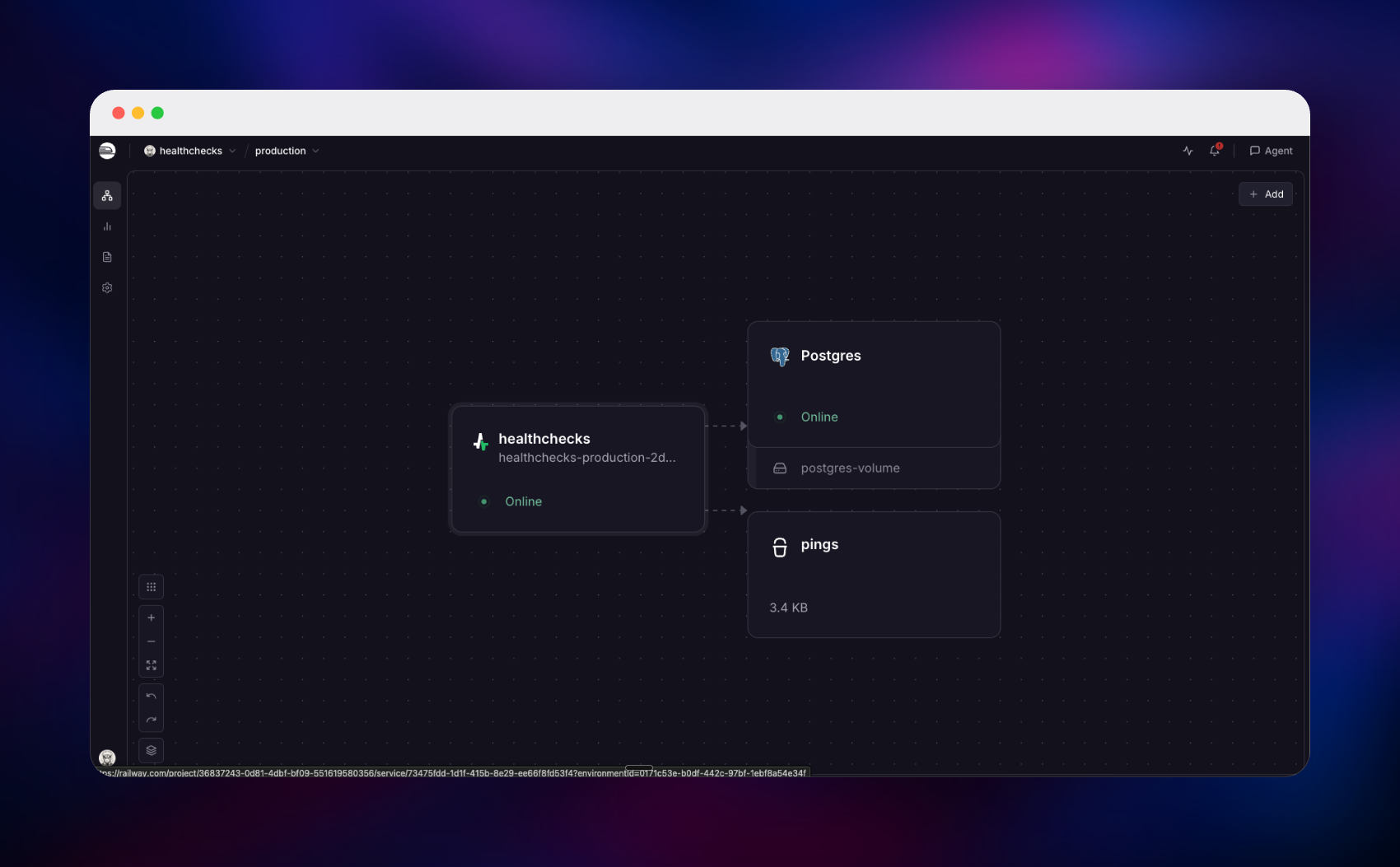
Getting Started with Healthchecks on Railway
When the deploy finishes, open the public URL and you land on the sign-in page. The first administrator is created on first boot from SUPERUSER_EMAIL and SUPERUSER_PASSWORD — open the Healthchecks service in Railway, go to the Variables tab and copy the generated password. Sign in, then use Account → Settings to change both to your own. Public registration is closed by default (REGISTRATION_OPEN=False), so the instance is not open to strangers; invite teammates from Project → Settings instead.
Inside you get a starter project with one check. Click it to reveal its ping URL, then call that URL from the job you want to watch:
0 3 * * * /usr/local/bin/backup.sh && curl -fsS -m 10 --retry 5 https://your-app.up.railway.app/ping/
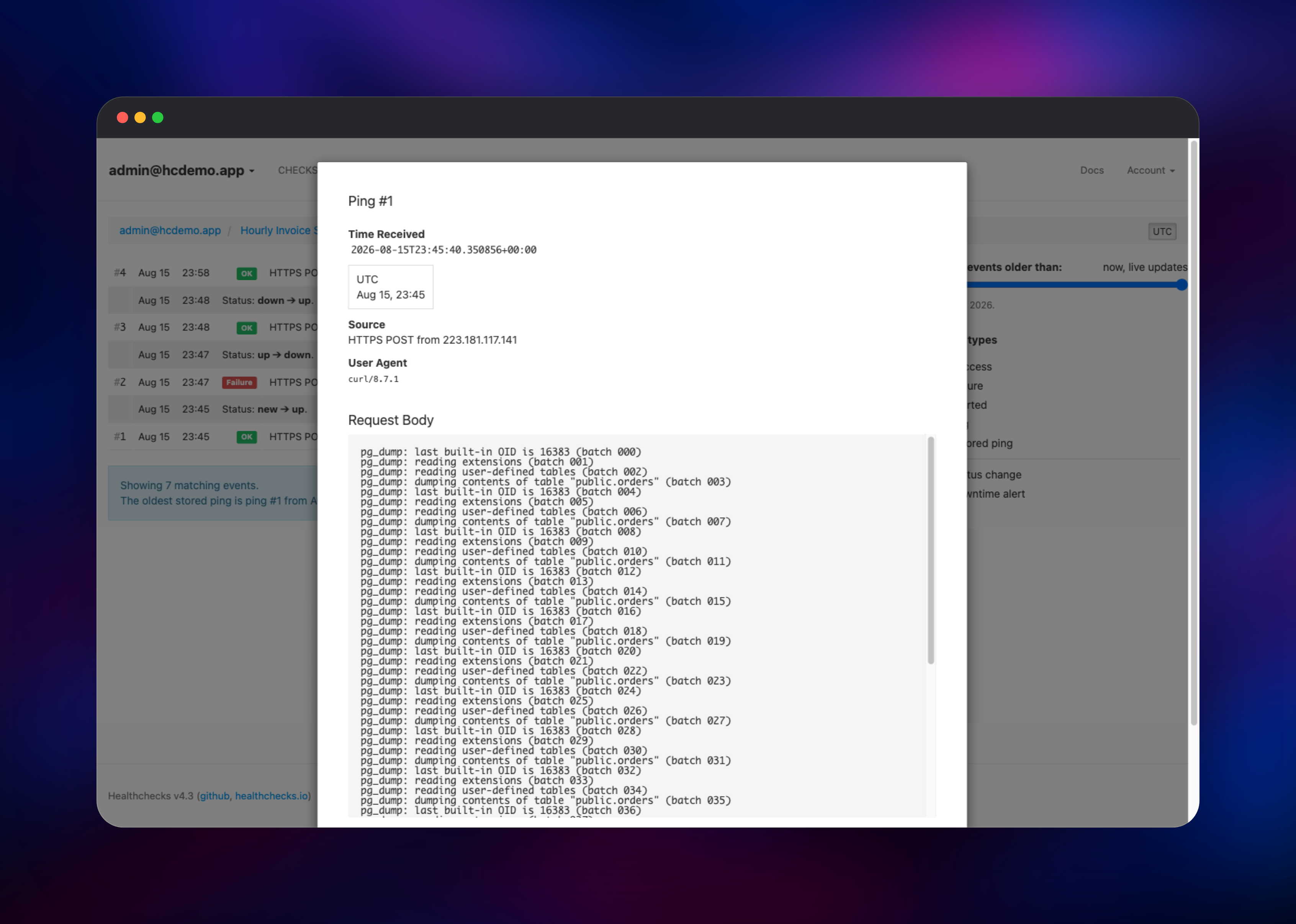
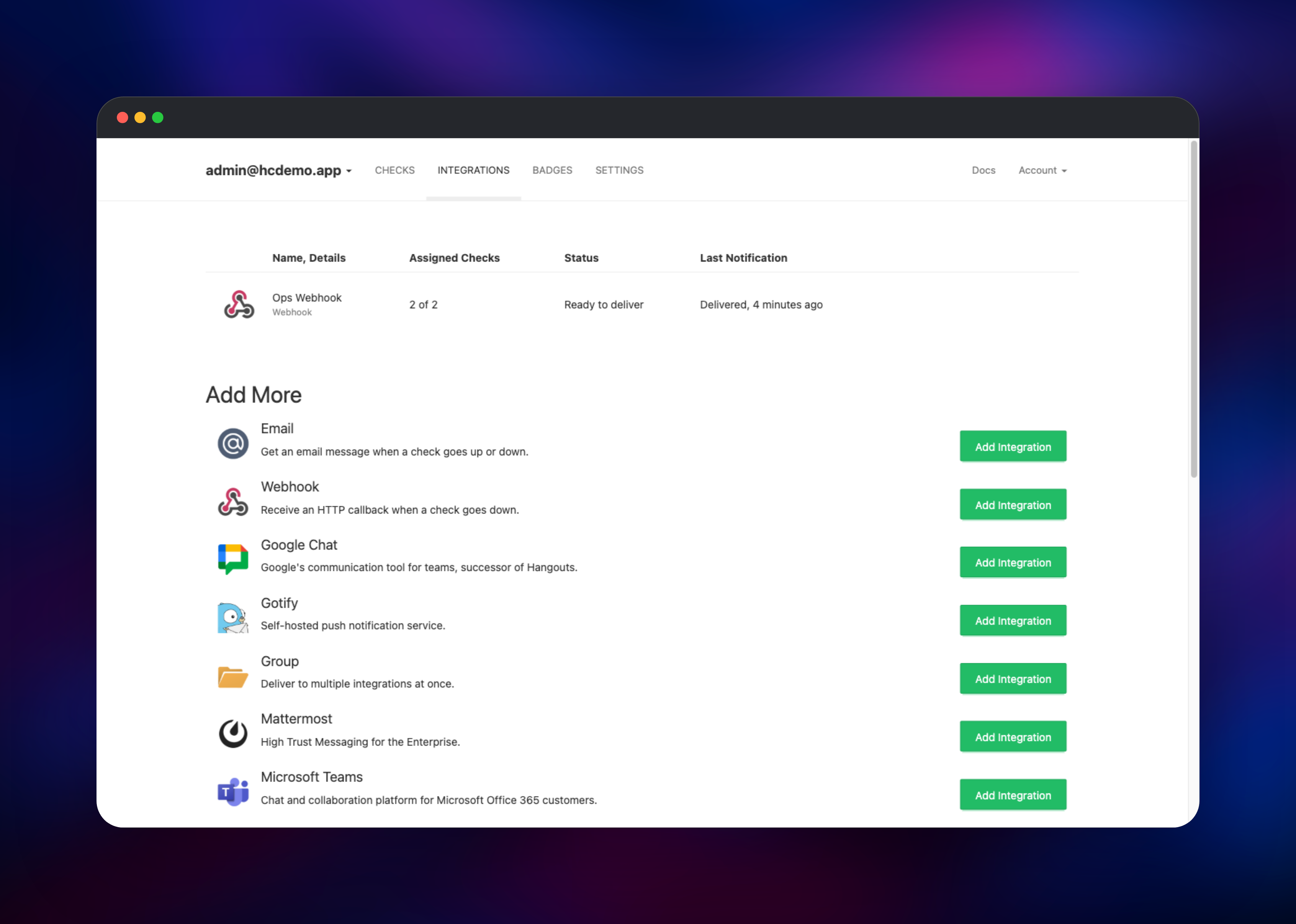
Reload the dashboard and the check turns green with a "Last Ping" timestamp — confirmation the deployment works end to end. Add /start before the job and /fail in the error path to record run duration and alert on failure, and send stdout as the request body to attach each run's output to its ping. Then open Integrations and add an alert channel.
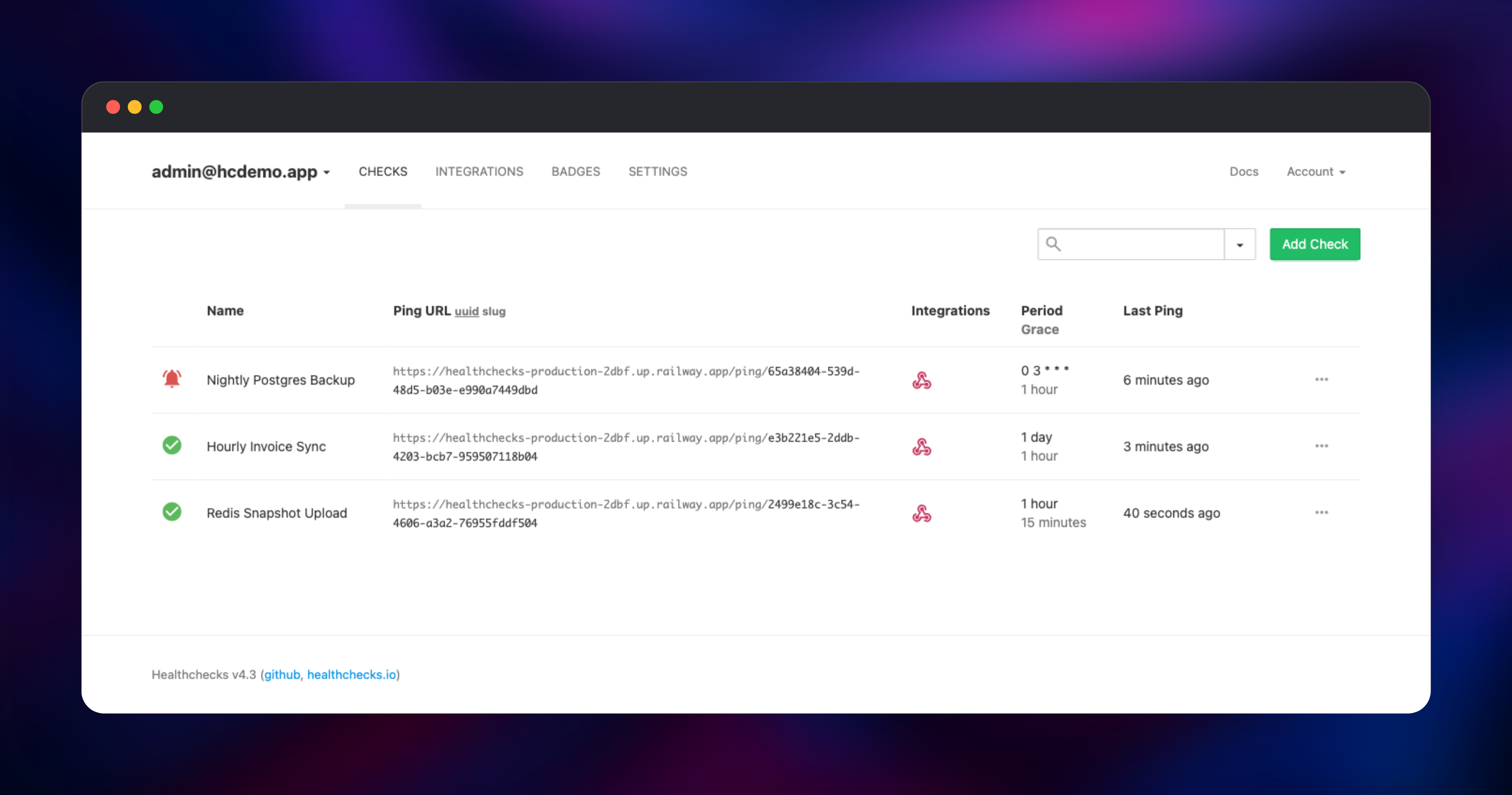
About Hosting Healthchecks
Healthchecks implements the dead man's switch pattern: a job proves it is alive by checking in, and silence is the alarm. That catches failures HTTP probes miss — a cron entry lost in a migration, a backup that exits zero while writing an empty file. Teams self-host it to keep job metadata in-house, to watch jobs behind a VPN no SaaS probe can reach, and to avoid per-check pricing.
Key features:
- Period-and-grace schedules, cron expressions and systemd OnCalendar syntax, each with its own timezone
- Success, start and failure signals, giving run duration, a searchable event log and captured output per check
- 25+ alert integrations: email, Slack, Discord, Telegram, Mattermost, Teams, PagerDuty, Opsgenie, ntfy, Gotify, Pushover, Signal and webhooks
- Projects, teams and read-only members, plus per-project API keys for the REST management API
- Status badges, uptime summaries, Prometheus metrics, and TOTP and WebAuthn two-factor sign-in
The alert senders run inside the main container as supervised daemons, exactly as upstream's image runs them, so there is no separate worker to keep in sync.
Why Deploy Healthchecks on Railway
Railway removes the setup work around the app itself:
- Managed PostgreSQL and object storage provisioned and wired up already
- HTTPS on a public domain immediately, custom domains a click away
- Migrations and first-admin creation run automatically on boot
- Private networking keeps the database off the public internet
- Health checks and restart policies configured out of the box
Common Use Cases for Self-Hosted Healthchecks
- Confirming nightly database dumps and backup syncs ran, and keeping the output when they did not
- Watching scheduled ETL stages, alerting when a step is late instead of waiting for stale dashboards
- Monitoring certificate renewals, log rotation and cache warming — jobs that fail silently for months
- Giving jobs on internal networks an outbound-only way to report health
Dependencies for Healthchecks
- Healthchecks —
healthchecks/healthchecks:latest, the official image from github.com/healthchecks/healthchecks. Serves the dashboard and ping API on port 8000 and runs the senders. - PostgreSQL — Railway managed Postgres, storing users, projects, checks, the ping log and notification history. MySQL and SQLite also work upstream; Postgres is what healthchecks.io runs.
- Object storage bucket — Railway managed S3-compatible storage for ping bodies. Clear the
S3_*variables and bodies go into the database.
Environment Variables Reference
| Variable | Purpose |
|---|---|
SITE_ROOT | Public base URL used in ping URLs, links and emails |
SECRET_KEY | Signs sessions and login links; keep it stable |
SUPERUSER_EMAIL / SUPERUSER_PASSWORD | First administrator, created on first boot |
REGISTRATION_OPEN | False closes public sign-up |
EMAIL_HOST and friends | SMTP server for email alerts and resets |
S3_* | Object storage credentials for ping bodies |
RP_ID | Domain for WebAuthn keys; update it for a custom domain |
Deployment Dependencies
- Runtime: Python 3.14, Django 6.0, uWSGI
- Source: github.com/healthchecks/healthchecks (BSD-3-Clause); image on Docker Hub
- Docs: healthchecks.io/docs/self_hosted_configuration
Hardware Requirements for Self-Hosting Healthchecks
| Resource | Minimum | Recommended |
|---|---|---|
| CPU | 0.5 vCPU | 1–2 vCPU |
| RAM | 512 MB | 1–2 GB |
| Storage | Database only, ~1 GB | 5 GB plus object storage |
| Runtime | Python 3.11+, PostgreSQL 13+ | Python 3.14, PostgreSQL 16+ |
Load scales with ping volume, not check count; four uWSGI workers handle thousands of checks.
Self-Hosting Healthchecks with Docker
The official image needs a database and a few variables. A minimal Docker Compose file:
services:
  db:
    image: postgres:16
    environment:
      POSTGRES_PASSWORD: hc-password
  web:
    image: healthchecks/healthchecks:latest
    ports: ["8000:8000"]
    environment:
      DB: postgres
      DB_HOST: db
      DB_PASSWORD: hc-password
      SECRET_KEY: change-me
      SITE_ROOT: https://hc.example.org
      ALLOWED_HOSTS: "*"
The image runs migrations and starts the alert senders itself. Create the first administrator with the bundled management command:
docker compose exec web ./manage.py createsuperuser --email you@example.org --password s3cret
Put a TLS-terminating proxy in front and make sure it sets X-Forwarded-Proto, or Django rejects sign-in with a CSRF error. Railway handles both.
How Much Does Healthchecks Cost to Self-Host?
Healthchecks is free and open source under the BSD-3-Clause license, with no paid edition or feature gates — the self-hosted build is the same code that runs the hosted service. Hosted healthchecks.io is free for 20 checks and $20/month for 100, so self-hosting pays for itself once you watch a few dozen jobs. On Railway you pay only for resources used.
FAQ
What is Healthchecks? An open-source cron job monitoring service. Jobs send an HTTP ping when they succeed, and Healthchecks alerts you when an expected ping does not arrive on time.
What does this Railway template deploy?
The official healthchecks/healthchecks image with its dashboard, ping API and alert senders, plus managed PostgreSQL and an object storage bucket. Public domain, health check, migrations and the first admin account are configured for you.
Why does the template include PostgreSQL and object storage? Every account, check and ping event lives in a relational database, so a database is not optional. Object storage holds captured job output; without it those bodies land in the database, which grows quickly.
How do I enable email alerts in self-hosted Healthchecks?
Set EMAIL_HOST, EMAIL_PORT, EMAIL_HOST_USER, EMAIL_HOST_PASSWORD and DEFAULT_FROM_EMAIL to your SMTP provider's values and redeploy. Until then use a webhook, Slack, Telegram or ntfy integration — none need an SMTP server.
How do I ping a check from a shell script or cron entry?
Append curl -fsS -m 10 --retry 5 to the job; it stays quiet on success and retries transient network errors. Use /start before the work to measure duration and /fail in your error handler.
Can I create checks programmatically with the Healthchecks API?
Yes. Create an API key under Project → Settings and use the REST management API to list, create, pause and delete checks, keeping monitoring in sync with infrastructure-as-code. If you attach a custom domain, update SITE_ROOT and RP_ID so ping URLs and sign-in follow it.
Template Content
healthchecks
healthchecks/healthchecks:latestpings
Bucket