
Deploy Hermes Agent
Self Host Hermes Agent. Autonomous AI agent w/ self-improving, tools & more
Hermes Agent
Just deployed
/data
Deploy and Host Hermes Agent

Deploy Hermes Agent — the self-improving, open-source AI agent built by Nous Research. Hermes Agent is an autonomous agent that connects to your messaging channels (Telegram, Discord, Slack, WhatsApp, Email), learns from every interaction, creates its own skills, and gets more capable over time. It's not a chatbot wrapper — it's a persistent agent with tool use, memory, and a built-in learning loop.
Self-host Hermes Agent on Railway with this one-click deploy template. It comes with a pre-configured admin dashboard for setup, gateway management, live monitoring, and user access control. No config files to edit — select your LLM provider, enable channels, and start chatting. The template uses the official NousResearch/hermes-agent repo.
Getting Started with Hermes Agent on Railway
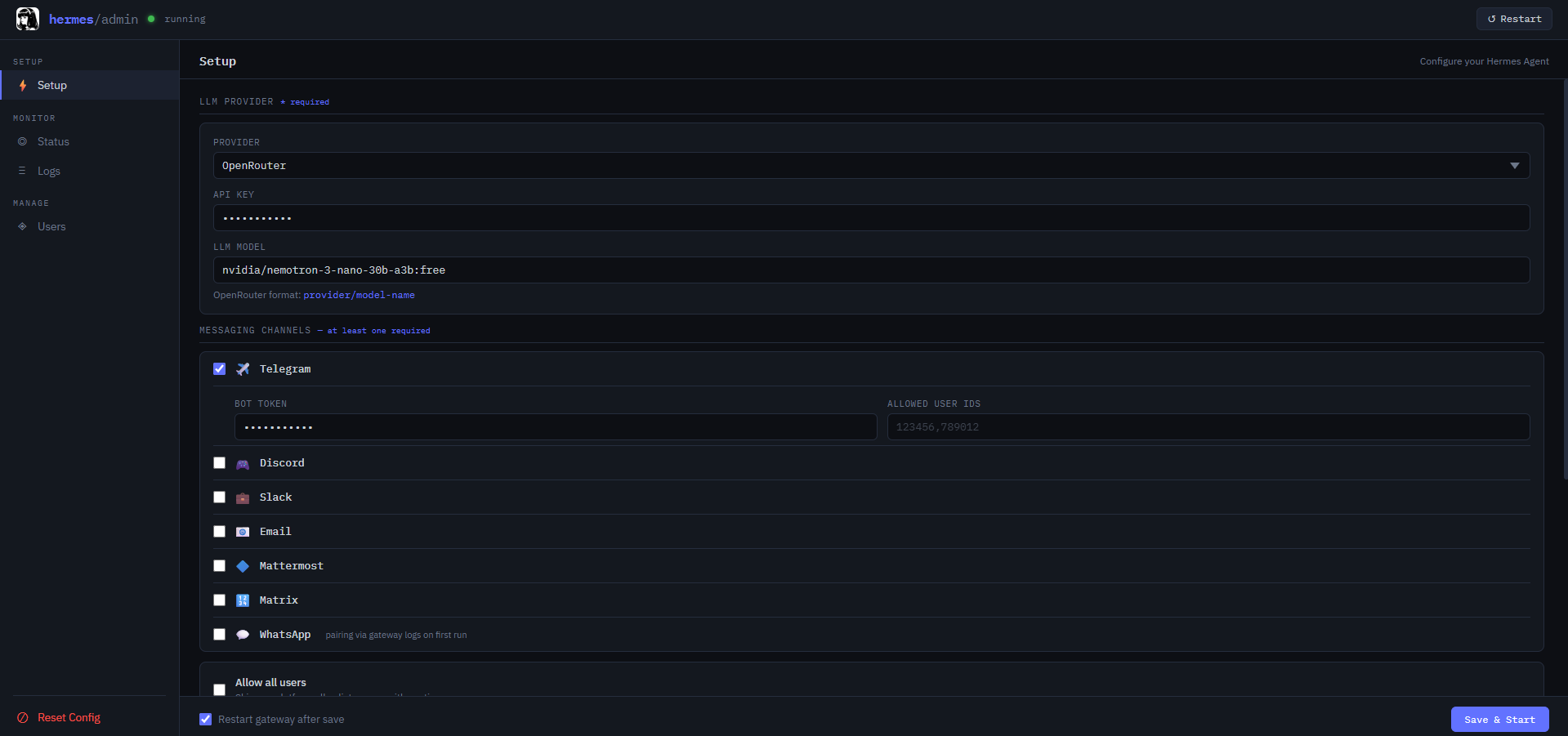
After deploying, open your app URL and log in with username you set up in ADMIN_USERNAME and the password you set in ADMIN_PASSWORD (check deploy logs if you didn't set one — a random password is printed there). You'll land on the Setup page.
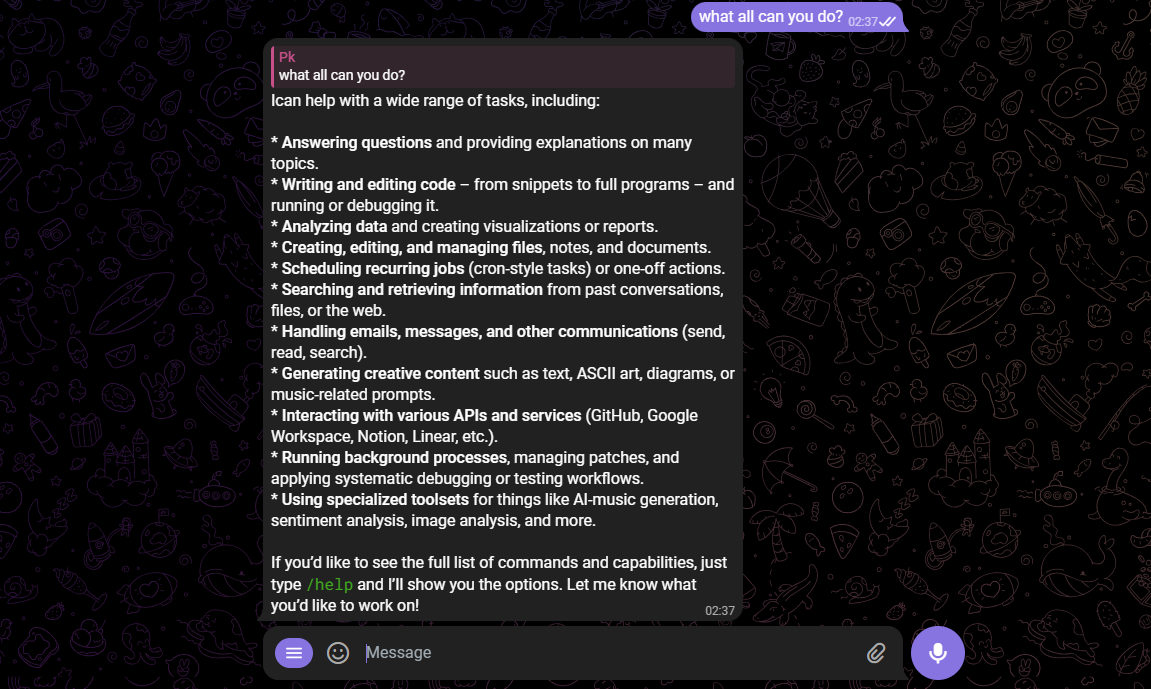
Select your LLM provider from the dropdown — OpenRouter is the easiest, it's free to sign up and offers some free models at openrouter.ai/models (e.g. google/gemma-3-1b-it:free). Paste your API key and model name, then enable at least one messaging channel — Telegram is the fastest (create a bot via @BotFather and paste the token). Click Save & Start. Message your bot on Telegram, approve the pairing request under Users, and you're live.

About Hosting Hermes Agent
Hermes Agent is a fully autonomous AI agent by Nous Research that lives on your server and communicates through messaging channels — there is no web chat UI. It remembers conversations, builds its own skills, and improves with every interaction.
- Learning loop — agent-curated memory, autonomous skill creation, self-improving skills, and FTS5 session search with LLM summarization
- Multi-channel — Telegram, Discord, Slack, WhatsApp, Signal, Email, Mattermost, Matrix via unified gateway
- 200+ LLM models — connect via OpenRouter, DeepSeek, DashScope, GLM/Z.AI, Kimi, MiniMax, or HuggingFace
- Tool integrations — search (Tavily, Parallel), scraping (Firecrawl), image gen (FAL), browser automation (Browserbase), GitHub, voice (Whisper/TTS)
- Parallel subagents — spawn isolated subagents for concurrent workstreams
- Cron scheduler — schedule automated tasks across platforms
- MIT licensed — fully open source
Why Deploy Hermes Agent on Railway
Railway makes running Hermes Agent effortless:
- No Docker config, volume management, or reverse proxy setup
- One-click deploy with a web admin dashboard included
- Persistent storage for config, memory, and learned skills
- Managed TLS and custom domains out of the box
- Scale vertically as your agent's workload grows
- Redeploy from Git in seconds
Common Use Cases
- Personal AI assistant — a private agent on Telegram that remembers your context, runs tools, and improves over time
- Team assistant on Slack/Discord — deploy for your team with per-user access control and pairing approval
- Multi-channel agent — enable Telegram, Discord, and Email simultaneously — one agent, all your channels
- Automated research agent — connect search and scraping tools, schedule recurring tasks with the built-in cron scheduler
Dependencies for Hermes Agent
- Hermes Agent — installed from github.com/NousResearch/hermes-agent (MIT license)
- Base image —
ghcr.io/astral-sh/uv:python3.12-bookworm-slim - Admin server — Starlette + Uvicorn (bundled in template)
- No database required — config and data persisted to volume at
/data
Environment Variables Reference
| Variable | Description | Required |
|---|---|---|
ADMIN_PASSWORD | Admin dashboard password. If blank, a random password is generated and printed to deploy logs | No |
ADMIN_USERNAME | Admin dashboard username (default: admin) | No |
PORT | Web server port (default: 8080, set automatically by Railway) | No |
All LLM provider keys, model config, channel tokens, and tool API keys are managed through the admin dashboard — not as environment variables.
Deployment Dependencies
- Runtime: Python 3.12
- GitHub repo: github.com/NousResearch/hermes-agent
- Official docs: github.com/NousResearch/hermes-agent#readme
- Volume: mount at
/datafor persistent config and session data
Minimum Hardware Requirements for Hermes Agent
| Resource | Minimum | Recommended |
|---|---|---|
| CPU | 1 vCPU | 2 vCPU |
| RAM | 512 MB | 1 GB |
| Storage | 1 GB | 5 GB |
| Runtime | Python 3.12 | Python 3.12 |
Hermes Agent itself is lightweight — the LLM inference runs on the provider's infrastructure (OpenRouter, DeepSeek, etc.), not on your Railway instance. Storage grows with conversation history and learned skills.
Self-Hosting Hermes Agent
Quick install (Linux/macOS/WSL2)
curl -fsSL https://raw.githubusercontent.com/NousResearch/hermes-agent/main/scripts/install.sh | bash
hermes setup
hermes gateway
Docker (with this template's admin dashboard)
git clone https://github.com/praveen-ks-2001/hermes-agent-template.git
cd hermes-agent-template
docker build -t hermes-agent .
docker run --rm -it -p 8080:8080 \
  -e PORT=8080 \
  -e ADMIN_PASSWORD=changeme \
  -v hermes-data:/data \
  hermes-agent
Open http://localhost:8080, log in with admin / changeme, and configure your provider and channels.
Is Hermes Agent Free?
Yes. Hermes Agent is fully open source under the MIT license — free to use, modify, and self-host. On Railway, your only cost is infrastructure (starting around $5/month). The LLM provider may have its own pricing — OpenRouter offers free-tier models, so you can run the full stack at zero LLM cost. Nous Research also offers a hosted portal at portal.nousresearch.com for managed access.
Hermes Agent vs Other Self-Hosted AI Agents
| Feature | Hermes Agent | OpenClaw | Auto-GPT | AgentGPT |
|---|---|---|---|---|
| Open source | ✅ MIT | ✅ MIT | ✅ MIT | ✅ MIT |
| Self-hostable | ✅ | ✅ | ✅ | ✅ |
| Learning loop | ✅ Self-improving | ❌ | ❌ | ❌ |
| Multi-channel (Telegram, Discord, Slack) | ✅ | ✅ | ❌ | ❌ Web only |
| Persistent memory | ✅ | ✅ | Limited | ❌ |
| Tool use | ✅ | ✅ | ✅ | Limited |
| Cron scheduling | ✅ | ✅ | ❌ | ❌ |
| Railway template | ✅ | ✅ | ❌ | ❌ |
Hermes Agent's key differentiator is its learning loop — it autonomously creates and refines skills across sessions, making it more capable over time rather than starting fresh each conversation.
FAQ
What is Hermes Agent? Hermes Agent is an open-source, self-improving AI agent built by Nous Research. It connects to messaging channels (Telegram, Discord, Slack, WhatsApp, Email), uses tools, remembers conversations, and autonomously creates new skills to improve over time.
What does this Railway template deploy? A single service running the Hermes Agent gateway with a Starlette-based admin dashboard. The dashboard lets you configure LLM providers, messaging channels, tool API keys, manage the gateway, view logs, and approve user pairing — all from your browser.
Why is there no chat UI? Hermes Agent is designed as a messaging-channel agent, not a web chatbot. It communicates through Telegram, Discord, Slack, and other platforms. You need at least one channel enabled to interact with it.
Which LLM provider should I use? OpenRouter is the easiest starting point — it's free to sign up and offers free models. Register at openrouter.ai, create an API key, and pick a free model from the model list.
What's the fastest messaging channel to set up?
Telegram. Message @BotFather, send /newbot, copy the token, paste it into the admin dashboard, and you're live in under 2 minutes.
Does Hermes Agent need a GPU? No. LLM inference runs on your provider's infrastructure (OpenRouter, DeepSeek, etc.). The Railway instance only runs the agent gateway and admin server — a basic plan is sufficient.
Can I use multiple messaging channels at the same time? Yes. Enable as many channels as you want — Telegram, Discord, Slack, Email, and more can all run simultaneously through the unified gateway.
Template Content
Hermes Agent
praveen-ks-2001/hermes-agent-templateADMIN_PASSWORD
Create admin login password credential
ADMIN_USERNAME
Create admin login username credential


