
Deploy Homebox
Track items, locations, warranties and receipts on your own server

proxy
Just deployed

Just deployed
/var/lib/postgresql/data
Just deployed
homebox-files
Bucket
Just deployed
Deploy and Host HomeBox on Railway
HomeBox is an open-source inventory and organization system built for the home user — a self-hosted alternative to Sortly for cataloguing everything you own. You photograph an item, file it under a storage location, record what it cost and when the warranty runs out, then find it months later by searching a serial number or scanning a QR label. Homeowners use it for insurance documentation, renters for move tracking, hobbyists for tool libraries.
Deploy HomeBox on Railway and this template wires up the production shape upstream recommends rather than the single-container quick start. Four pieces work together: the HomeBox container, a managed PostgreSQL database holding every item, location, tag and user, a managed object storage bucket for uploaded photos, receipts and generated thumbnails, and a small Caddy service, the only component exposed to the internet. Caddy forwards public traffic over Railway's private network and rewrites the client-address header, so HomeBox's login rate limiter counts real visitors rather than the platform proxy. Because state lives in Postgres and the bucket, the app container needs no volume.
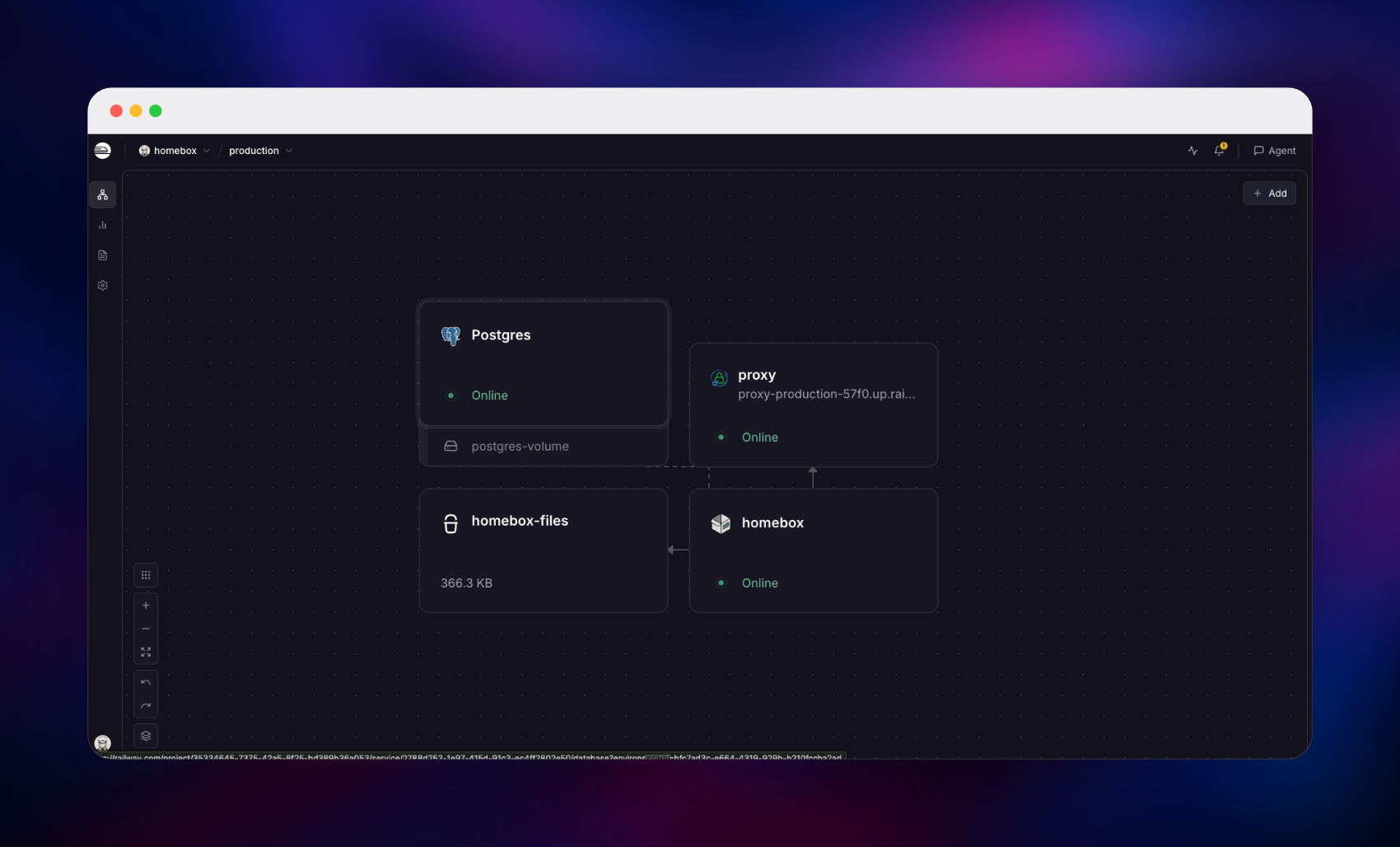
Getting Started with HomeBox on Railway
Open the public URL once the deploy is green and you land on the HomeBox sign-in screen. There are no default credentials: click Register, and the first account you create becomes the owner of a new collection. The dashboard arrives seeded with eight storage locations and six tags. Before adding your first item, visit Collection → Entity Types and create a type called Item — a fresh install ships only the Location type, and the Create dialog needs a non-location type before it will accept an item. Then press Create, choose Item / Asset, pick a location, name it, and drop a photo into Upload Photos. Seeing that picture render on the item's page confirms all three tiers: the record is in Postgres, the image is in the bucket, and thumbnail generation ran. Finally set HBOX_OPTIONS_ALLOW_REGISTRATION to false and redeploy, then add people from Collection → Invites.
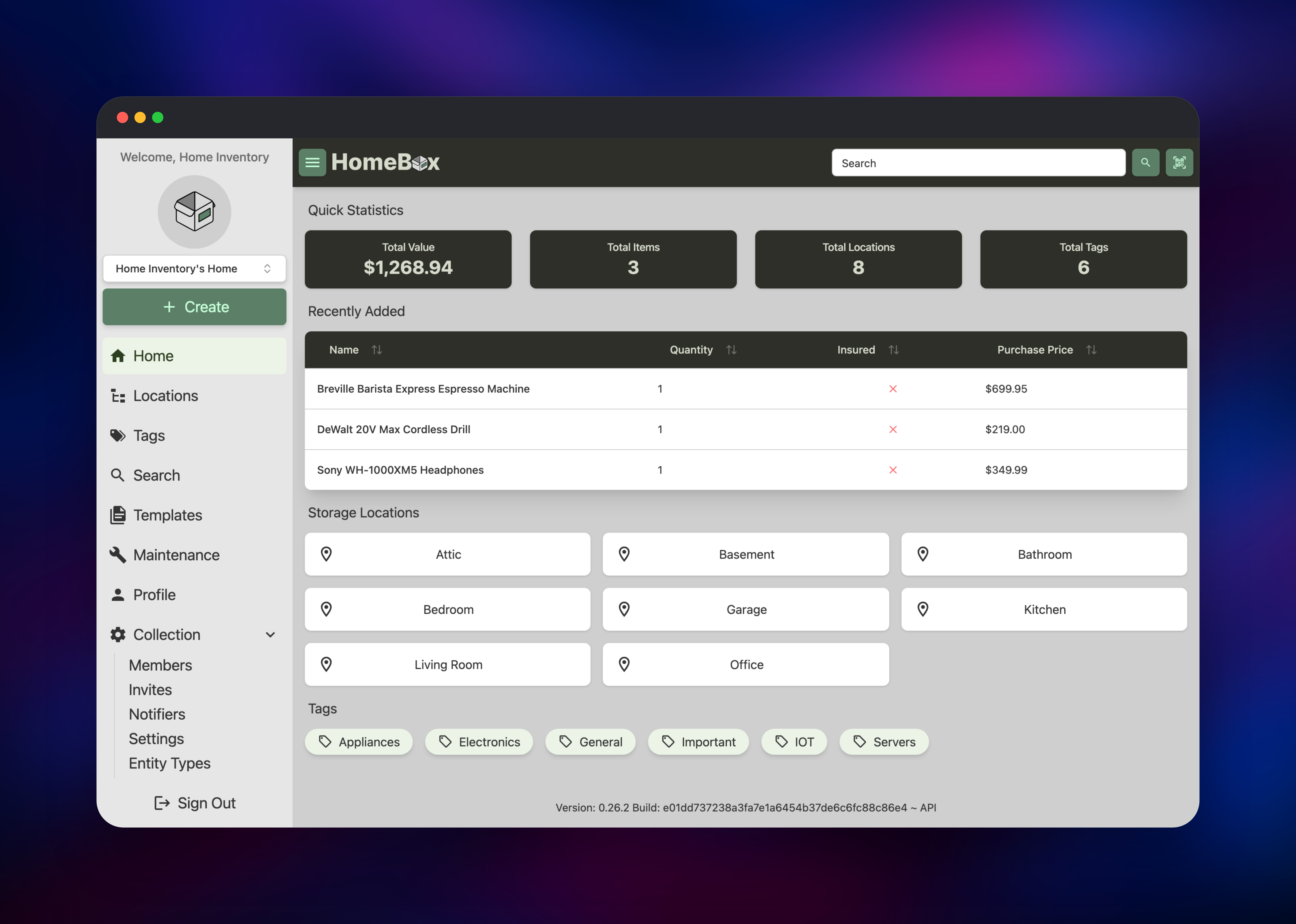
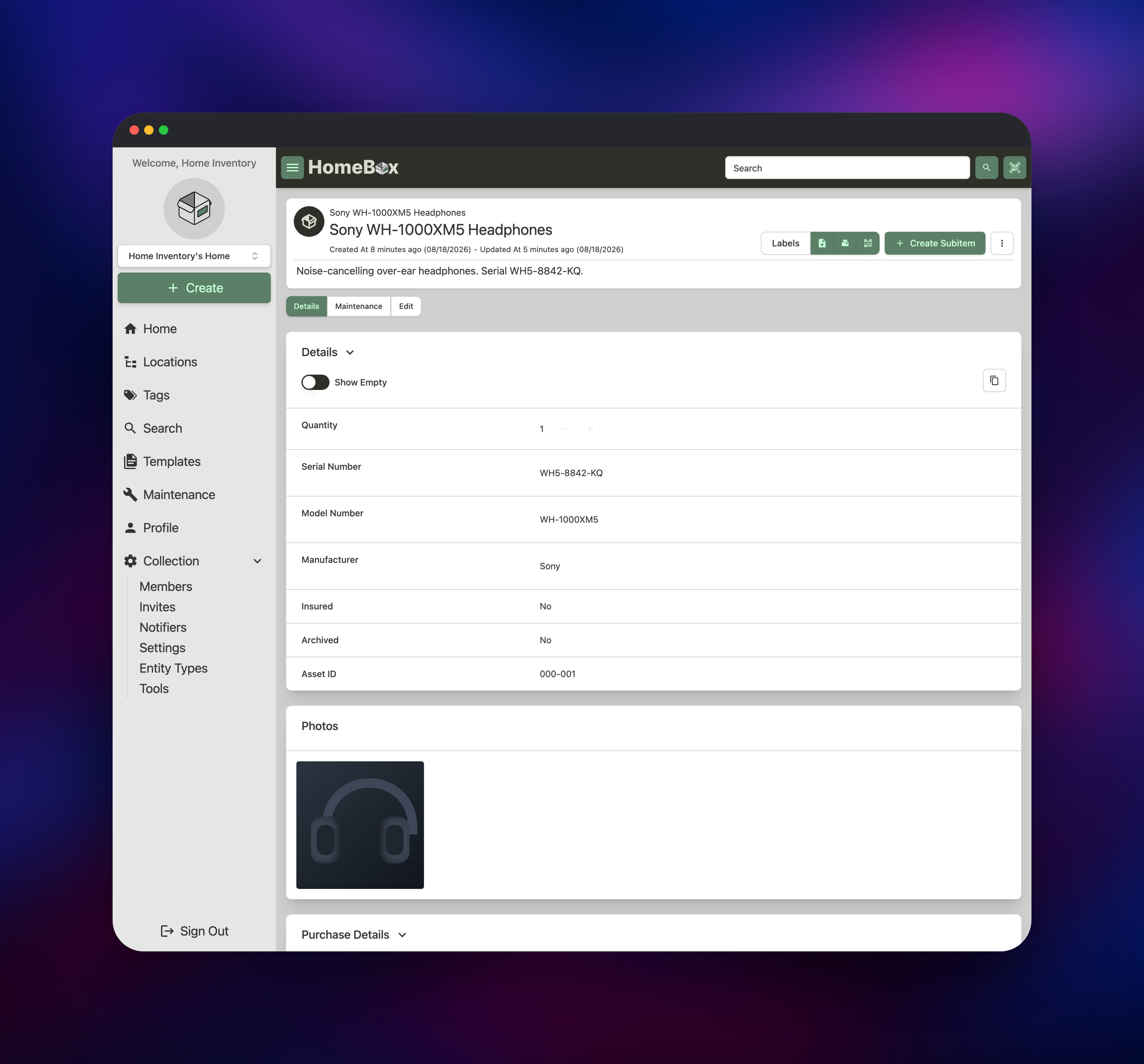
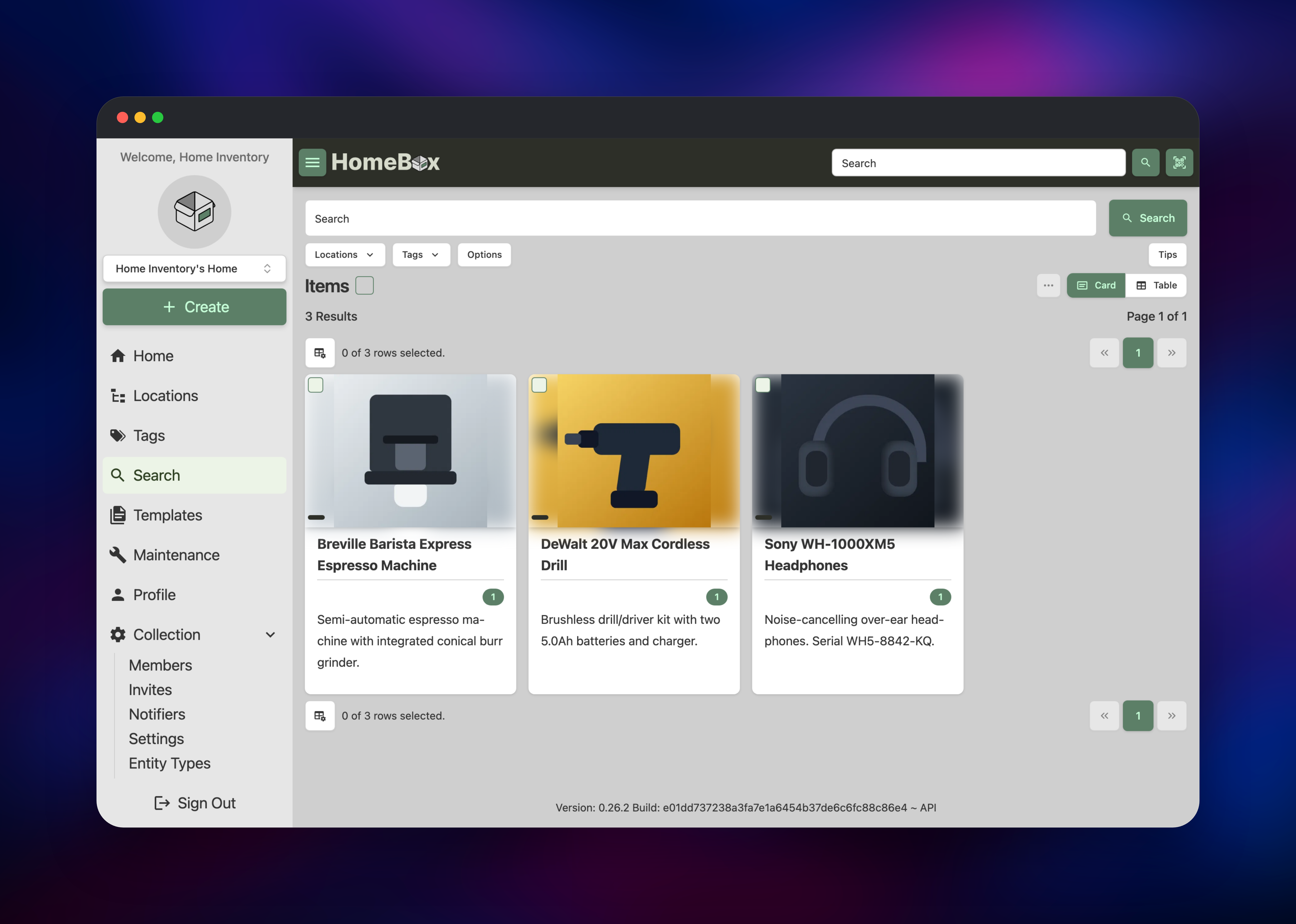
About Hosting HomeBox
HomeBox answers a question most household software ignores: what do I own, and where is it? Insurance claims, warranty disputes and house moves all need a list with photos, prices and dates, and spreadsheets rot the moment a second person edits one. An inventory is also a map of your possessions — good reason to keep it on your own infrastructure.
Key features:
- Items with photos, receipts and file attachments, plus quantity, purchase price and date, serial and model numbers
- Nested storage locations and colour-coded tags, so "Garage → Shelf B → Toolbox" works like a real house
- Full-text search, saved filters, and card or table views over the collection
- Printable QR labels that open an item's page when scanned with a phone
- Maintenance logs, scheduled reminders, warranty tracking and a running total value
- CSV import and export, a REST API, and optional OIDC single sign-on
In this template the HomeBox container serves the API and web UI on a private port, PostgreSQL stores entities, users and sessions, the bucket holds every uploaded photo and generated thumbnail over an S3-compatible connection, and Caddy publishes the app and normalises proxy headers.
Why Deploy HomeBox on Railway
Railway removes the server administration that self-hosting usually implies.
- Postgres and object storage are provisioned and wired up for you
- Private networking keeps the database, bucket credentials and the app off the public internet
- Automatic HTTPS on a generated domain, or bring your own
- Vertical scaling and metrics, no VM to touch
- Redeploys are one click; the app carries no local state to migrate
Common Use Cases
- Home insurance documentation — photograph and price every valuable, then export the list with receipts when you claim
- Workshop inventories — tools, components and consumables across bins, with QR labels on the shelves
- Move planning — box-by-box contents lists that stay searchable at the other end
- Equipment registers — laptops, cameras or field kit with warranty and maintenance dates attached
Dependencies for HomeBox
- HomeBox —
ghcr.io/sysadminsmedia/homebox:latest, the Go API and Nuxt UI in one container on port 7745 - PostgreSQL — Railway managed Postgres, holding items, locations, tags, users and sessions
- Object storage bucket — Railway managed S3-compatible storage for photos and attachments
- Caddy —
caddy:2-alpine, the public entry point proxying to HomeBox privately
Environment Variables Reference
| Variable | Purpose |
|---|---|
HBOX_AUTH_API_KEY_PEPPER | Secret mixed into stored API key hashes. At least 32 characters or the app will not start, and never change it — rotating invalidates every issued API key |
HBOX_DATABASE_DRIVER | postgres uses the managed database instead of SQLite |
HBOX_STORAGE_CONN_STRING | S3 connection string for the bucket, with endpoint and addressing style |
HBOX_OPTIONS_HOSTNAME | Public base URL used in generated links and reset emails |
HBOX_OPTIONS_ALLOW_REGISTRATION | Leave true for your first account, then set false |
HBOX_OPTIONS_TRUST_PROXY | Reads forwarded headers so HTTPS detection and rate limiting work |
HBOX_WEB_MAX_UPLOAD_SIZE | Max upload size in MB; raise it if phone photos are rejected |
HBOX_MAILER_HOST | SMTP host; enables password-reset email |
HBOX_OIDC_ENABLED | Single sign-on against an external identity provider |
Deployment Dependencies
- Source repository: https://github.com/sysadminsmedia/homebox
- Container image:
ghcr.io/sysadminsmedia/homebox - Documentation: https://homebox.software — REST API at https://homebox.software/en/api/
Hardware Requirements for Self-Hosting HomeBox
| Resource | Minimum | Recommended |
|---|---|---|
| CPU | 0.5 vCPU | 1–2 vCPU |
| RAM | 256 MB | 512 MB–1 GB |
| Storage | None on the app container | Database grows with item count; bucket grows with photos |
| Runtime | Linux container, amd64 or arm64 | — |
HomeBox is a compiled Go binary idling well under 100 MB of memory. Thumbnail generation is the only bursty workload, so give it a second core for bulk uploads.
Self-Hosting HomeBox
The quickest local trial runs the published image with SQLite on a mounted directory:
docker run -d --name homebox -p 3100:7745 \
  -e HBOX_AUTH_API_KEY_PEPPER=$(openssl rand -base64 48) \
  -v homebox-data:/data \
  ghcr.io/sysadminsmedia/homebox:latest
For production, point it at PostgreSQL and S3-compatible storage — the shape this Railway template deploys. These environment variables switch it over:
HBOX_DATABASE_DRIVER=postgres
HBOX_DATABASE_HOST=postgres
HBOX_DATABASE_PORT=5432
HBOX_DATABASE_USERNAME=homebox
HBOX_DATABASE_PASSWORD=your_secure_password
HBOX_DATABASE_DATABASE=homebox
HBOX_STORAGE_CONN_STRING=s3://my-bucket?endpoint=https://s3.example.com&use_path_style=true
AWS_ACCESS_KEY_ID=your_key_id
AWS_SECRET_ACCESS_KEY=your_secret
How Much Does HomeBox Cost to Self-Host?
HomeBox is free and open source under AGPL-3.0, with no paid tier, seat licence or feature gate. The only cost is infrastructure: the app container, the Postgres instance and the storage the bucket holds — a household inventory of a few thousand items with photos is a small workload. Commercial alternatives such as Sortly charge per user per month past a couple of hundred items.
FAQ
What is HomeBox? An open-source home inventory system for cataloguing what you own — items with photos, prices, warranties and storage locations, searchable and exportable.
What does this Railway template deploy? The HomeBox app container, a managed PostgreSQL database, a managed object storage bucket for photos and attachments, and a Caddy service that publishes the app.
Why does the template include Postgres and object storage instead of just SQLite? HomeBox defaults to a SQLite file on disk, which upstream recommends only for small trials and which searches non-ASCII text poorly. With Postgres holding records and the bucket holding images, the app container keeps no state and a restart cannot lose anything.
How do I create the first admin user in self-hosted HomeBox?
There is no default password and no bootstrap command — whoever registers first becomes the collection owner. Register right after deploying, then set HBOX_OPTIONS_ALLOW_REGISTRATION to false. Invite links still work once registration is closed.
Why can't I create an item after deploying?
A new collection is seeded with only the Location entity type, and the Create dialog needs a non-location type. Add one under Collection → Entity Types, call it Item, and Create → Item / Asset works normally.
Can I run more than one replica of HomeBox? Keep it at one. HomeBox runs its maintenance-reminder scheduler in every application process with no coordination, so a second replica sends every scheduled notification twice. Scale vertically instead.
Template Content
proxy
caddy:2-alpinehomebox-files
Bucket


