
Deploy Hoppscotch
Postman alternative. Test REST and GraphQL APIs in the browser
hoppscotch
Just deployed

Just deployed
/var/lib/postgresql/data

Deploy and Host Hoppscotch on Railway
Hoppscotch is an open-source API development ecosystem — a browser-based client for sending, testing and sharing REST, GraphQL, WebSocket, SSE, Socket.IO and MQTT requests. It is the MIT-licensed Postman alternative teams pick when they want collections, environments, scripting and shared workspaces without per-seat pricing, and self-hosting keeps every endpoint they test in a database they own.
Deploy Hoppscotch on Railway as two services. The hoppscotch service runs the official all-in-one image hoppscotch/hoppscotch:latest, which puts the API client, admin dashboard, NestJS backend and webapp server behind an internal Caddy proxy: one HTTPS domain serves the app at /, the dashboard at /admin and the backend at /backend. That single origin is what makes sign-in work, since Hoppscotch's session cookies are same-site. Managed Postgres sits beside it on the private network, holding users, collections, environments, teams and the encrypted instance configuration. Migrations run before every deploy, and the health check passes only once the backend reaches the database.
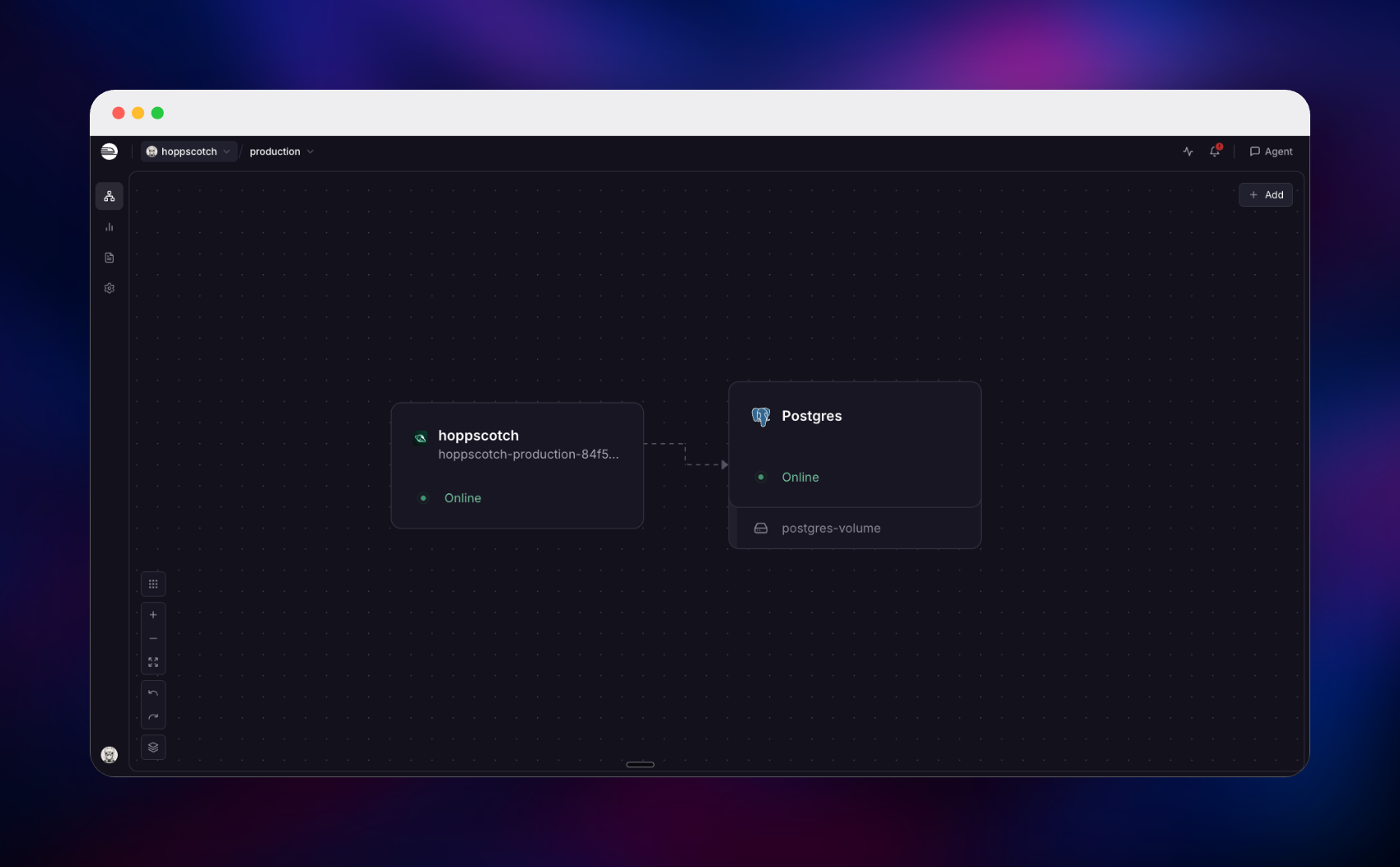
Getting Started with Hoppscotch on Railway
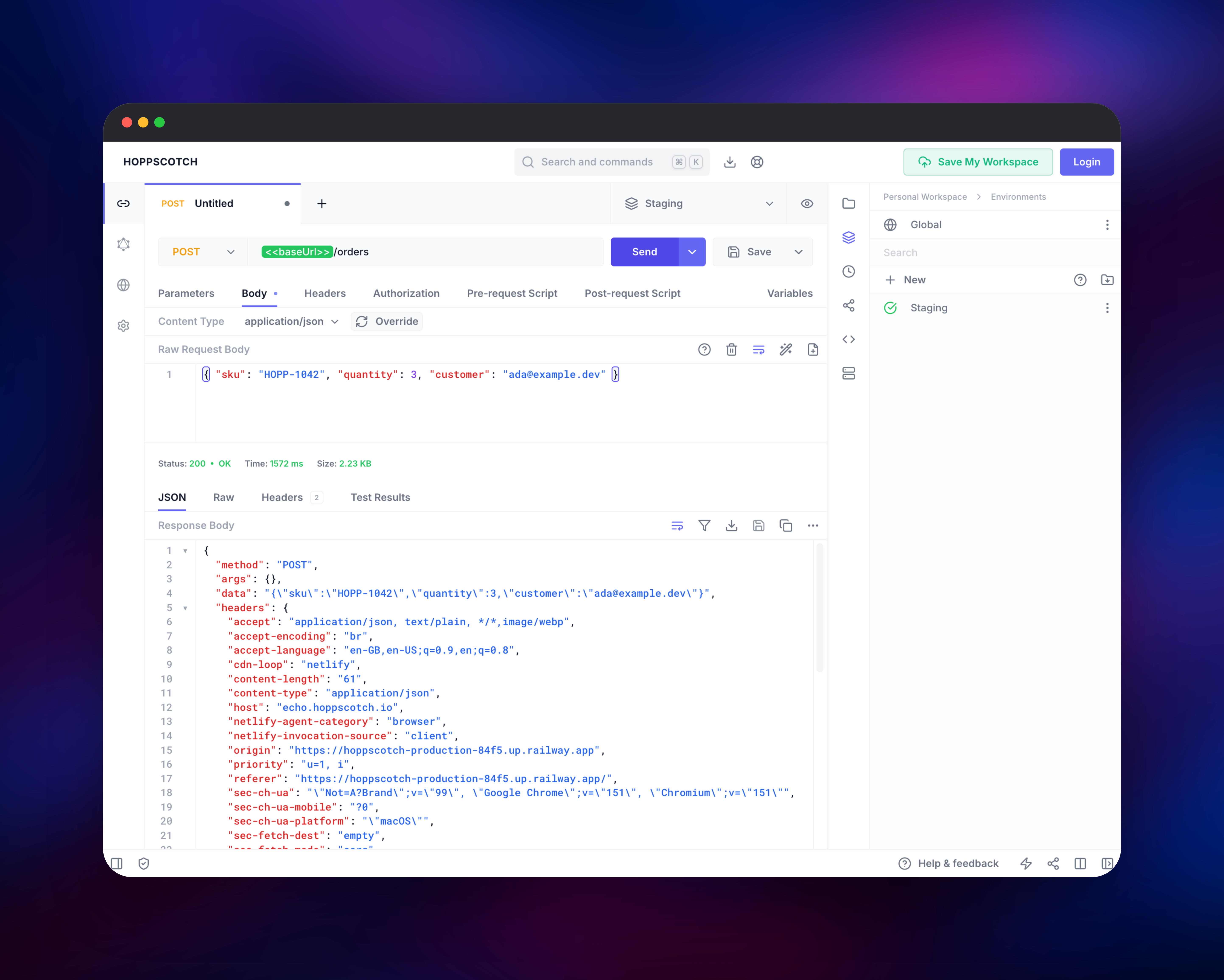
Open the public URL and the API client loads immediately — no login wall, no default credentials. Check it end to end by sending a request to https://echo.hoppscotch.io; a 200 means browser, container and routing are healthy.
Before you invite anyone, open /admin. The dashboard runs a one-time wizard asking for either an SMTP server or an OAuth provider (Google, GitHub or Microsoft). Have one ready before you deploy — it is the only real prerequisite, because self-hosted Hoppscotch has no username-and-password login, so nobody can sign in until one exists. The first account to sign in becomes administrator automatically. Note that registration is then open to anyone who can authenticate with that provider; there is no invite-only mode.
The client works without an account — collections, environments, scripts, GraphQL introspection, realtime connections, code generation — so signing in adds cloud sync, shared collections and team workspaces.
About Hosting Hoppscotch
Every endpoint, header and token a team saves in an API client maps the systems behind it. Self-hosting keeps that map internal, and because Hoppscotch is a web app a URL is the whole onboarding.
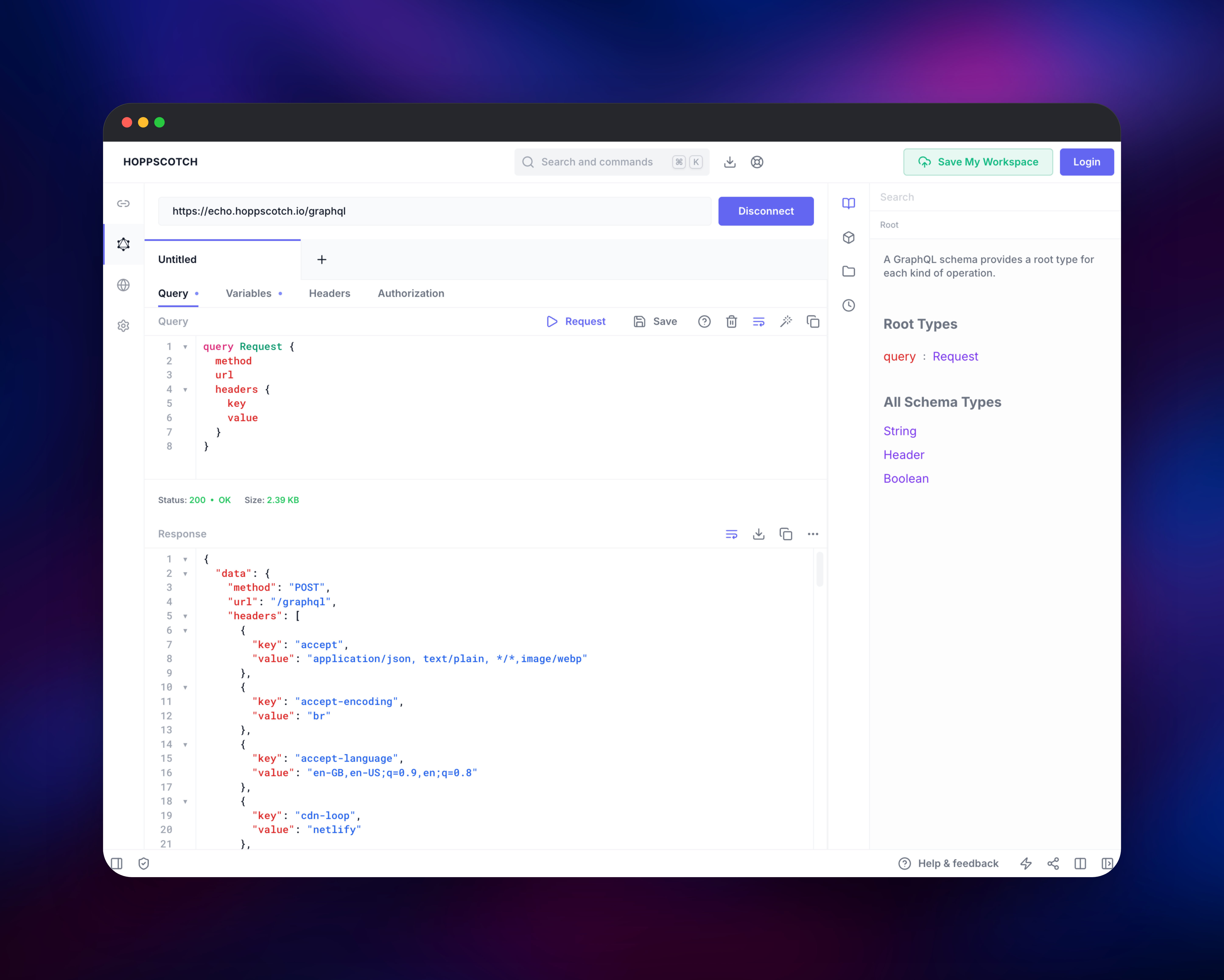
- Six protocols in one client — REST/HTTP, GraphQL with live schema introspection, WebSocket, Server-Sent Events, Socket.IO and MQTT.
- Collections, environments and scripting — nest requests, switch staging and production with variable sets referenced as
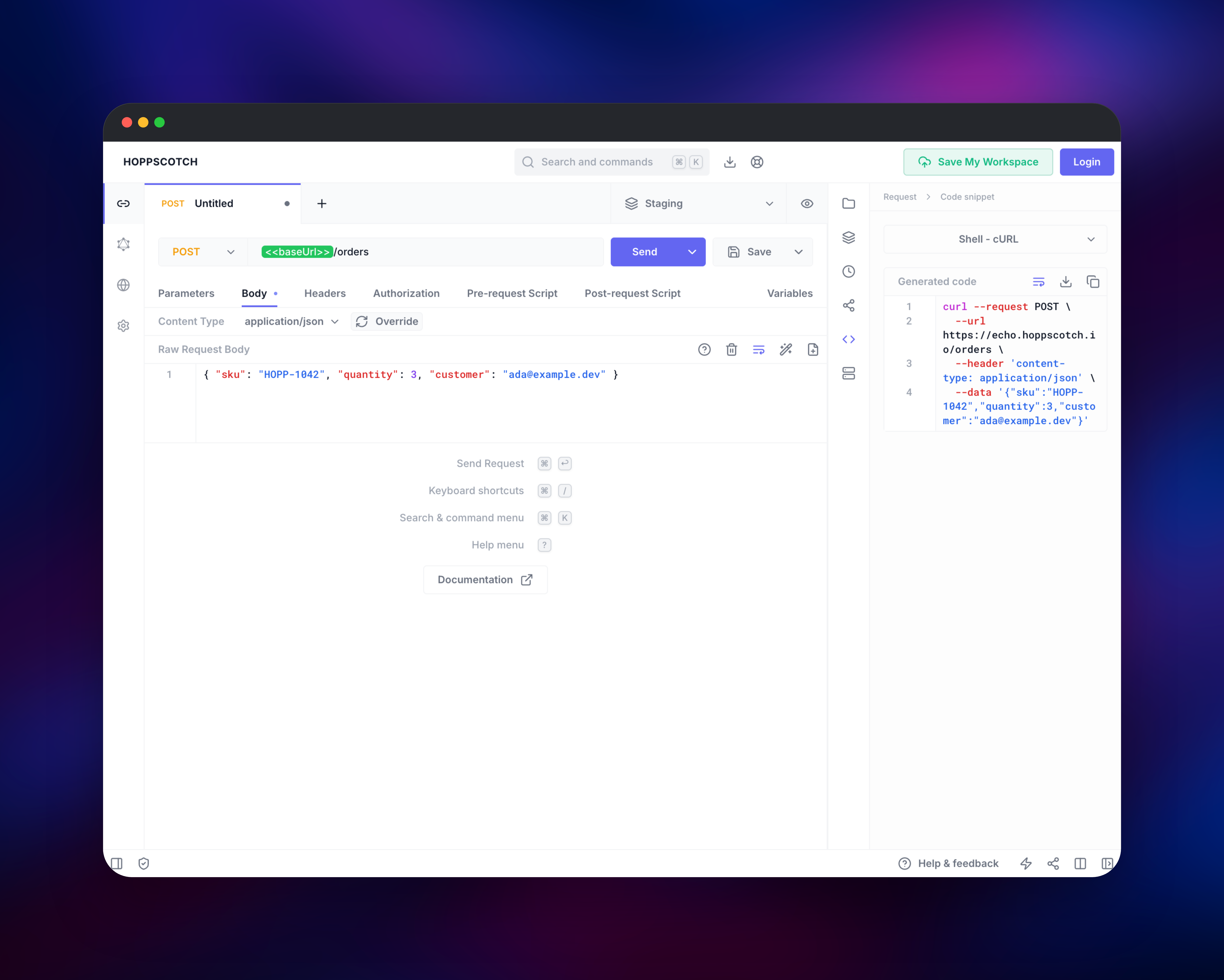
<>, and run pre-request scripts and Chai-style assertions. - Import and code generation — read Postman, Insomnia, OpenAPI and HAR files; turn any request into a snippet for a dozen languages.
- Teams and admin — shared workspaces with owner, editor and viewer roles, and a dashboard for users and auth providers.
Postgres is the only stateful component, so a database backup is a complete backup.
Why Deploy Hoppscotch on Railway
Railway handles the parts of self-hosting an API platform that are not API work.
- Managed Postgres, provisioned and wired up on first deploy.
- One HTTPS domain serving app, admin dashboard and backend together.
- Database migrations applied automatically before each deploy.
- Private networking keeps Postgres off the public internet.
Common Use Cases
- A shared internal API workspace — one URL where every engineer finds the current collection for each service, staging and production included.
- Leaving Postman without losing work — import existing collections and environments, then collaborate on infrastructure you own.
- GraphQL and realtime debugging — introspect a schema into the docs pane, or open a WebSocket, Socket.IO or MQTT connection and watch messages.
Dependencies for Hoppscotch
hoppscotch/hoppscotch:latest— the official all-in-one image: Caddy on port 80, the NestJS backend on 8080, the admin bundle and the webapp server.ENABLE_SUBPATH_BASED_ACCESS=truesplits/,/adminand/backendacross one domain.- Postgres — Railway's managed PostgreSQL, private to the project, storing users, sessions, collections, environments, teams and the encrypted
infra_configtable.
Environment Variables Reference
Variable (all on the hoppscotch service) | Purpose |
|---|---|
DATA_ENCRYPTION_KEY | Exactly 32 characters; encrypts every secret in the database |
VITE_BASE_URL, VITE_ADMIN_URL, VITE_BACKEND_*_URL | Public URLs the frontend calls; must be https:// on first boot |
WHITELISTED_ORIGINS | Origins the backend accepts requests and WebSockets from |
TRUST_PROXY | Tells the backend to read client IPs from proxy headers |
JWT_SECRET, SESSION_SECRET, SMTP credentials and OAuth client secrets are not environment variables in current Hoppscotch: the backend keeps them encrypted in the database with DATA_ENCRYPTION_KEY and you edit them in the admin dashboard. So that key must never change after the first deploy — rotate it and every stored secret becomes unreadable and the backend will not start.
One gap to plan for: the image proxies the backend, so the built-in per-IP rate limit sees the proxy, not the caller. Treat your identity provider as the brute-force control.
Deployment Dependencies
Source: hoppscotch/hoppscotch (MIT) · image hoppscotch/hoppscotch · docs docs.hoppscotch.io
Hardware Requirements for Self-Hosting Hoppscotch
| Resource | Minimum | Recommended |
|---|---|---|
| CPU | 1 vCPU app, shared for Postgres | 2 vCPU app, 1 vCPU database |
| RAM | 1 GB app + 512 MB Postgres | 2 GB app, 1 GB database |
| Storage | None on the app; 1 GB database | 5 GB+ as collections grow |
| Runtime | Node.js, bundled in the image; PostgreSQL 12+ | Managed PostgreSQL 18 |
Node sizes its heap from host memory, not the container limit, so raise NODE_OPTIONS when you resize the app.
Self-Hosting Hoppscotch with Docker
Outside Railway the same image runs against any PostgreSQL database. Put this in a .env file; DATA_ENCRYPTION_KEY must be exactly 32 characters, as openssl rand -hex 16 produces:
DATABASE_URL=postgresql://hopp:pw@db:5432/hopp
DATA_ENCRYPTION_KEY=change-me-32-characters-exactly!
ENABLE_SUBPATH_BASED_ACCESS=true
VITE_BASE_URL=https://example.com
VITE_ADMIN_URL=https://example.com/admin
VITE_BACKEND_GQL_URL=https://example.com/backend/graphql
VITE_BACKEND_WS_URL=wss://example.com/backend/graphql
VITE_BACKEND_API_URL=https://example.com/backend/v1
WHITELISTED_ORIGINS=https://example.com
Then start the container and apply the Prisma migrations, which the image does not run itself — without them the backend exits with a missing-migration error. Railway does this before each deploy:
docker run -d --name hoppscotch -p 3080:80 --env-file .env hoppscotch/hoppscotch:latest
docker exec -it hoppscotch /bin/sh -c 'cd /dist/backend && pnpm exec prisma migrate deploy'
Is Hoppscotch Free? What Does It Cost to Self-Host?
Hoppscotch Community Edition is free and open source under the MIT licence, and it is what this template deploys: the API client, the admin dashboard, team workspaces and role-based access. A paid Enterprise Edition adds SAML/OIDC single sign-on and audit logs, neither needed here. Self-hosting on Railway costs only the infrastructure the two services use, which does not grow with headcount.
FAQ
What is Hoppscotch?
An open-source, MIT-licensed API development platform that runs in the browser. It sends and tests REST, GraphQL, WebSocket, SSE, Socket.IO and MQTT requests, organises them into collections and environments, and shares them with a team.
What does this Railway template deploy?
The hoppscotch all-in-one container on one HTTPS domain — client at /, dashboard at /admin, backend at /backend — plus managed Postgres. No default credentials, no volume.
Why does self-hosted Hoppscotch need a PostgreSQL database?
Accounts, sessions, saved collections and environments, team workspaces, shortcodes and the encrypted instance configuration all live there. Without it nothing is shared or persisted.
Do I need SMTP or an OAuth provider to self-host Hoppscotch?
One of them, before anyone can sign in — there is no local username-and-password login. The wizard at /admin takes SMTP details for magic-link email, or a Google, GitHub or Microsoft OAuth app.
Can I change DATA_ENCRYPTION_KEY after deploying Hoppscotch?
No. Signing keys, session secrets, SMTP passwords and OAuth secrets are encrypted with it, so changing it makes them undecryptable and the backend refuses to boot. Keep it exactly 32 characters.
How do I import my Postman collections into self-hosted Hoppscotch?
Use Import/Export in the collections sidebar. It reads Postman collection JSON, Insomnia exports, OpenAPI specs, HAR files and raw cURL.
Template Content
hoppscotch
hoppscotch/hoppscotch:latest

