
Deploy Horilla
Open-source HR system for employees, leave, payroll and hiring

Just deployed
/var/lib/postgresql/data
horilla
Just deployed
/app/media

Redis
Just deployed
/data
Deploy and Host Horilla on Railway
Horilla is a free, open-source HRMS covering the whole employee lifecycle in one Django application: an employee directory, attendance and shift tracking, leave approvals, payroll with allowances and deductions, recruitment and onboarding, performance reviews, project timesheets, asset tracking and an internal helpdesk. It suits small and mid-sized companies that want one system of record for HR data without a per-seat SaaS bill, and because every module shares one PostgreSQL schema, a leave request, an attendance record and a payslip all reference the same employee row.
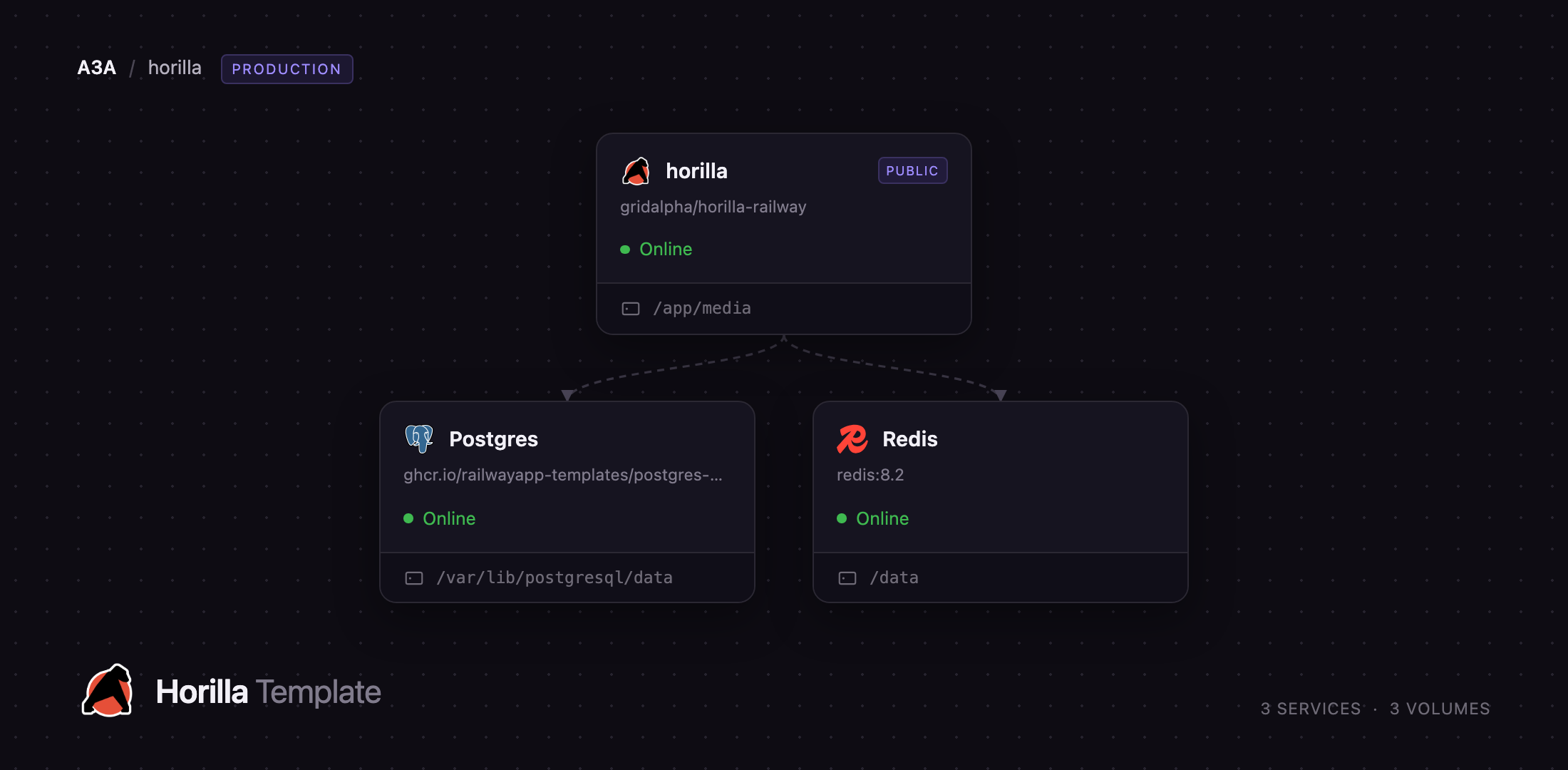
Deploy Horilla on Railway with everything a production install needs already wired together. The web service runs Django 5.2 behind Gunicorn, serves its static assets through WhiteNoise, and keeps uploaded files — photos, employee documents, offer letters — on a persistent volume at /app/media. Managed PostgreSQL holds all application data and managed Redis backs the Django cache; both stay on the private network, and only the web service is public. Migrations and the first administrator account run automatically on first boot, so the URL lands on a working login page, not an installer.
Getting Started with Horilla on Railway
Set HORILLA_ADMIN_USERNAME and HORILLA_ADMIN_PASSWORD when you deploy — the only input needed, and your first administrator account. There are no default credentials, and re-deploying never resets a password changed later in the UI. First boot runs roughly 370 migrations, so allow two to three minutes before the URL responds, then sign in at /login/.
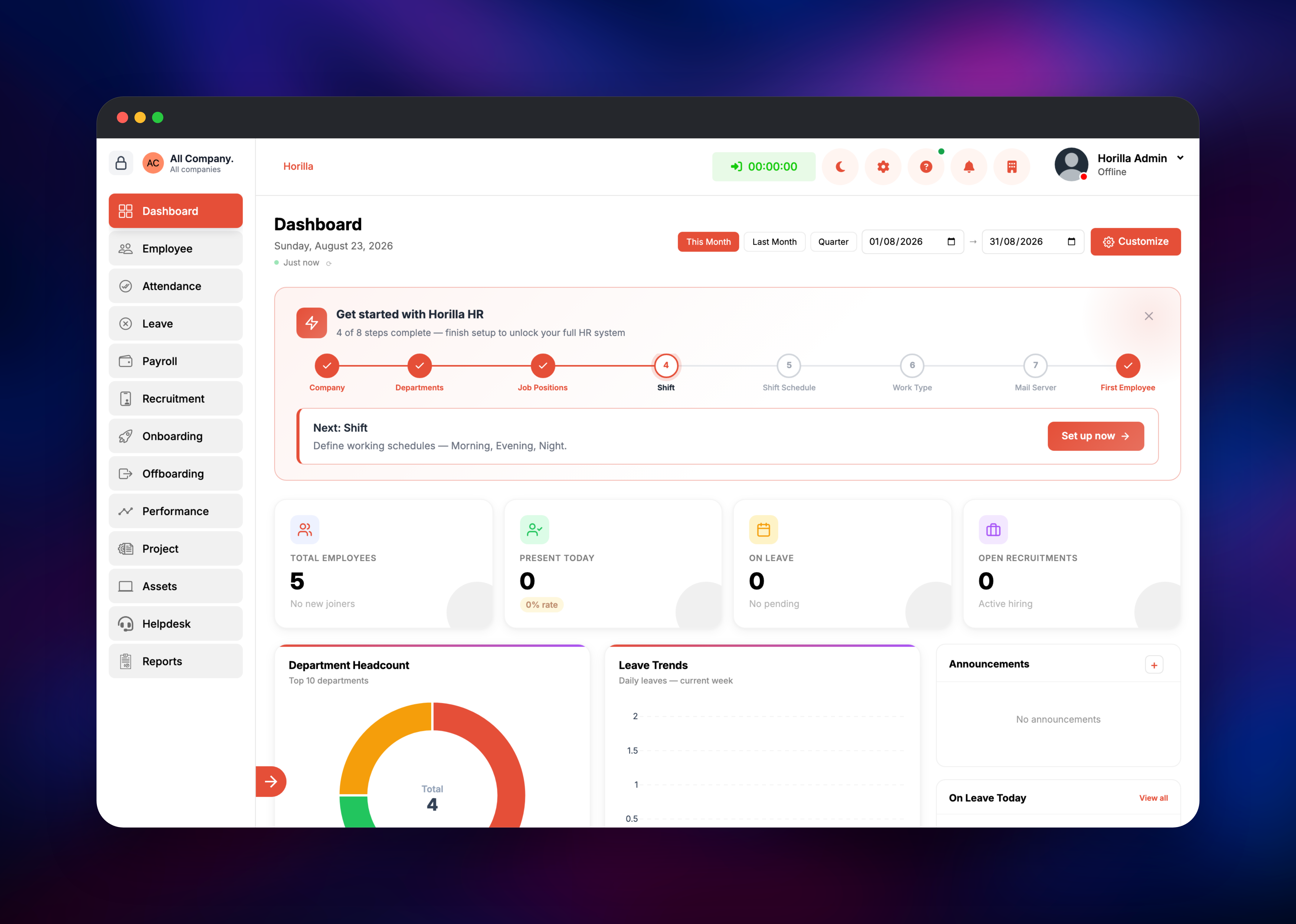
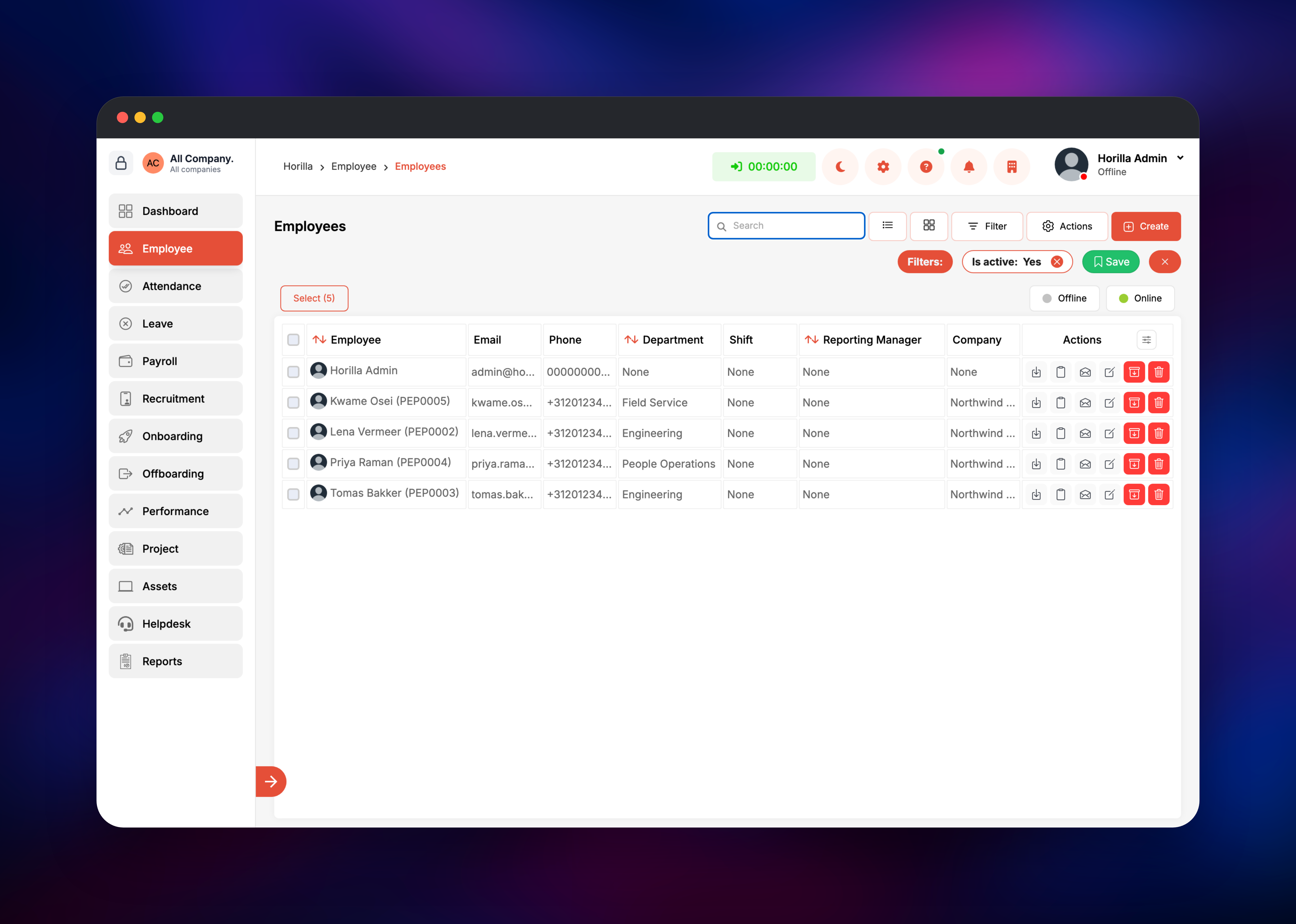
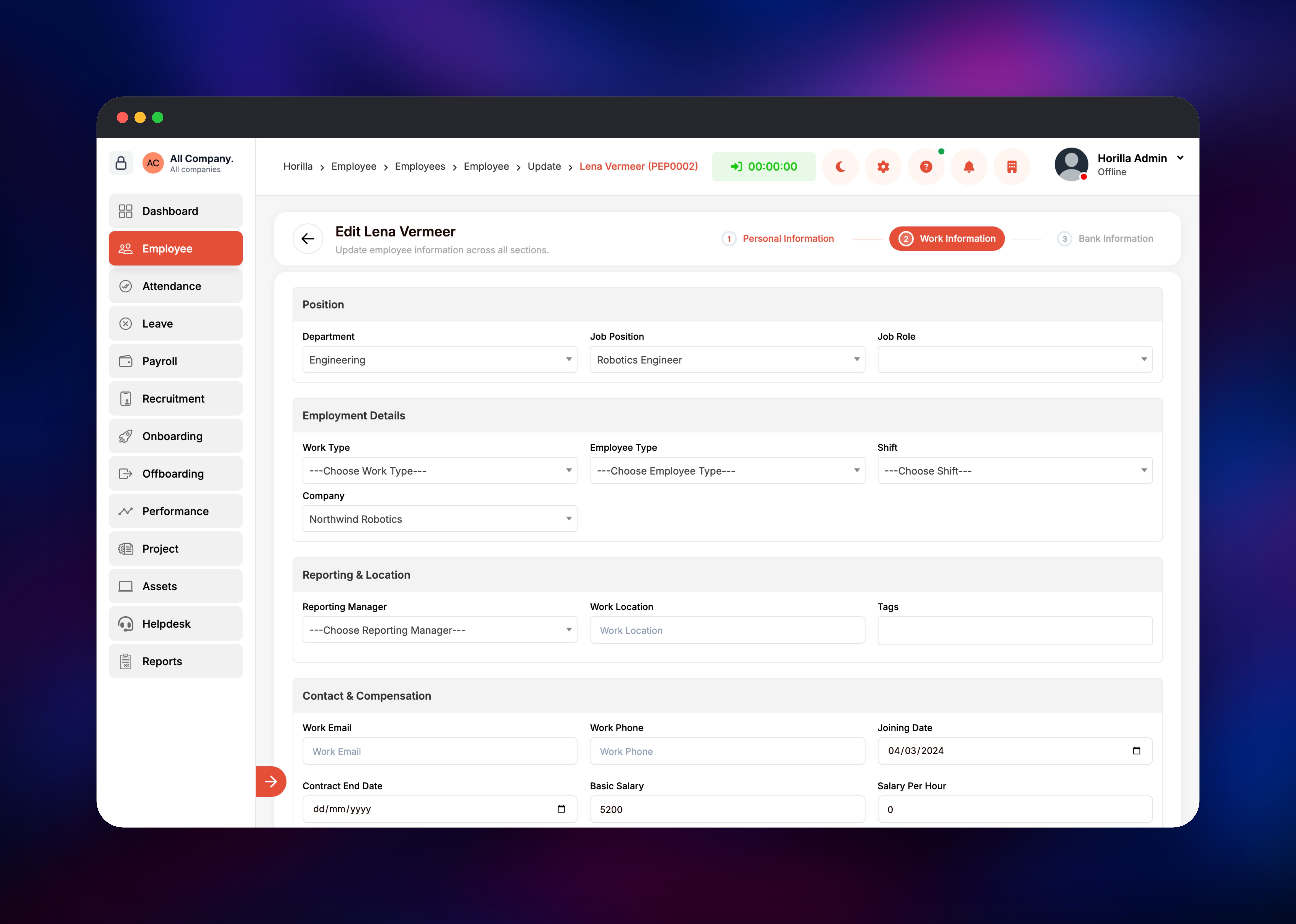
You land on a dashboard with a "Get started with Horilla HR" checklist. Work through it in order, because later steps depend on earlier ones: create your Company first (everything in Horilla is scoped to a company), then Departments, Job Positions, a Shift and Shift Schedule, and a Work Type. Add people under Employee → Create, then fill each person's Work Information tab with department, job position, company, joining date and salary — that tab feeds the headcount chart, payroll and every report. To confirm the deployment works end to end, create one employee and check they appear in the directory with a department attached; /ready/ returns a JSON status covering the database and cache. Email is configured in the app, not in variables: under Settings → Email Servers, add your SMTP host so notifications and password resets can send.
About Hosting Horilla
Horilla replaces the spreadsheet-and-email approach to HR admin with a permissioned web app HR staff, managers and employees use directly. Self-hosting matters more here than for most tools: an HRMS holds salaries, home addresses, identity documents and performance notes, and many organisations must keep that data in an environment they control. The interface also ships translated into nine languages besides English, all compiled and ready in this template.
Key modules include:
- Employees — directory, documents, work information, org structure, LDAP sign-in
- Attendance — check-in/out, shifts, rosters, overtime, biometric devices
- Leave — leave types, balances, holidays, approval workflows
- Payroll — allowances, deductions, federal tax, payslips, encashment
- Recruitment and onboarding — postings, candidate pipeline and portal, tasks
- Performance, projects, assets, helpdesk — objectives, timesheets, asset assignment, ticketing
Three Railway services make this work. The Horilla web service runs the Django application and its background schedulers; PostgreSQL is the system of record for all HR data; Redis backs Django's cache, keeping dashboards and list views responsive as headcount grows. Uploaded files live on the web service's volume and are served through Django, so every download is authorised per request rather than exposed as a static file.
Why Deploy Horilla on Railway
Railway removes the server administration an on-premise HRMS implies:
- Managed PostgreSQL and Redis, provisioned and connected for you
- A persistent volume for employee documents and photos
- HTTPS and a public domain out of the box, custom domains supported
- Private networking, so only the web service is reachable
- Usage-based pricing, no per-employee licence
Common Use Cases
- A 20–200 person company replacing spreadsheets and a shared inbox with one HR system of record
- Agencies tracking billable timesheets against projects, plus leave and attendance
- Organisations whose data-residency rules out hosted HR SaaS
- Recruitment end to end — posting, pipeline, offer, onboarding — with no separate ATS
Dependencies for Horilla
- Horilla web — built from horilla-opensource/horilla branch
2.0onpython:3.12-slim; Django 5.2 and Gunicorn on port 8000 - PostgreSQL — Railway managed Postgres; all module data lives here
- Redis — Railway managed Redis; Django cache backend
Environment Variables Reference
| Variable | Purpose |
|---|---|
HORILLA_ADMIN_USERNAME | Login for the administrator created on first boot |
HORILLA_ADMIN_PASSWORD | Password for that administrator |
SECRET_KEY | Django signing key; changing it ends every session |
DATABASE_URL | PostgreSQL connection string |
REDIS_URL | Redis connection string for the cache |
TIME_ZONE | Timezone for attendance, shifts, payroll |
EXTRA_ALLOWED_HOSTS | Hostnames to trust for a custom domain |
GUNICORN_THREADS | Threads per worker; raise for more concurrency |
Deployment Dependencies
- Source: · Docs: · Site:
- Runtime: Python 3.12, Django 5.2, Gunicorn 23, PostgreSQL, Redis
Hardware Requirements for Self-Hosting Horilla
| Resource | Minimum | Recommended |
|---|---|---|
| CPU | 1 vCPU | 2 vCPU |
| RAM | 1 GB | 2 GB |
| Storage | 5 GB volume | 10 GB+ as documents grow |
| Runtime | Python 3.12, PostgreSQL 14+ | Python 3.12, PostgreSQL 16+, Redis 7 |
First boot is the heaviest moment — migrations across every module need more memory and CPU than steady-state use. Storage grows with uploaded documents and payslips, not headcount alone.
Self-Hosting Horilla with Docker
Horilla ships a Compose stack for local evaluation. Clone the default 2.0 branch and start it:
git clone https://github.com/horilla-opensource/horilla.git
cd horilla
docker compose up -d
That brings the app up on http://localhost:8000 alongside PostgreSQL and Redis. For production, copy .env.dist to .env, set real secrets, and add the production overlay, which turns off debug mode and enforces Horilla's security checks:
cp .env.dist .env
# set SECRET_KEY, ALLOWED_HOSTS, DATABASE_URL, REDIS_URL, DB_INIT_PASSWORD
docker compose -f docker-compose.yml -f docker-compose.prod.yml up -d --build
Horilla refuses to start in production if SECRET_KEY is a shipped placeholder or ALLOWED_HOSTS is unset or *. On Railway this template handles both for you.
How Much Does Horilla Cost to Self-Host?
Horilla is open source under LGPL-2.1, so the software is free with no seat limits and no feature gating. The vendor sells managed hosting from roughly $7 per user per month — what you avoid by running it yourself. On Railway you pay only for the compute, memory and storage the three services use, and that stays flat as you add employees rather than scaling per head.
FAQ
What is Horilla?
Horilla is a free, open-source human resource management system built with Django, covering employees, attendance, leave, payroll, recruitment, onboarding, performance, projects, assets and helpdesk in one application. Uploaded documents and photos live on the web service's volume at /app/media and are served through the app, so each download is permission-checked.
What does this Railway template deploy? Three services: the Horilla web application with a persistent volume for uploaded files, a managed PostgreSQL database, and a managed Redis instance used as Django's cache. Only the web service gets a public URL.
Why does the template include PostgreSQL and Redis? PostgreSQL is Horilla's system of record — every module writes to it, and SQLite is not viable for concurrent HR use. Redis backs Django's cache, and the readiness endpoint checks both before reporting the app healthy.
Can I run Horilla with more than one Gunicorn worker?
Not without duplicating scheduled work. Horilla starts its background jobs — attendance work records, auto punch-out, recruitment and performance reminders — inside each worker process with no leader election, so a second worker runs every job twice. Raise GUNICORN_THREADS instead.
How do I use a custom domain with self-hosted Horilla?
Add the domain to the service in Railway, then add the same hostname to EXTRA_ALLOWED_HOSTS. Django validates the Host header and trusts that hostname for CSRF over HTTPS, so both are needed before forms work there.
Template Content


