
Deploy HumHub
Social network and intranet with spaces, streams and modules

mailpit
Just deployed
/data

MySQL
Just deployed
/var/lib/mysql
humhub
Just deployed
/data
Deploy and Host HumHub on Railway
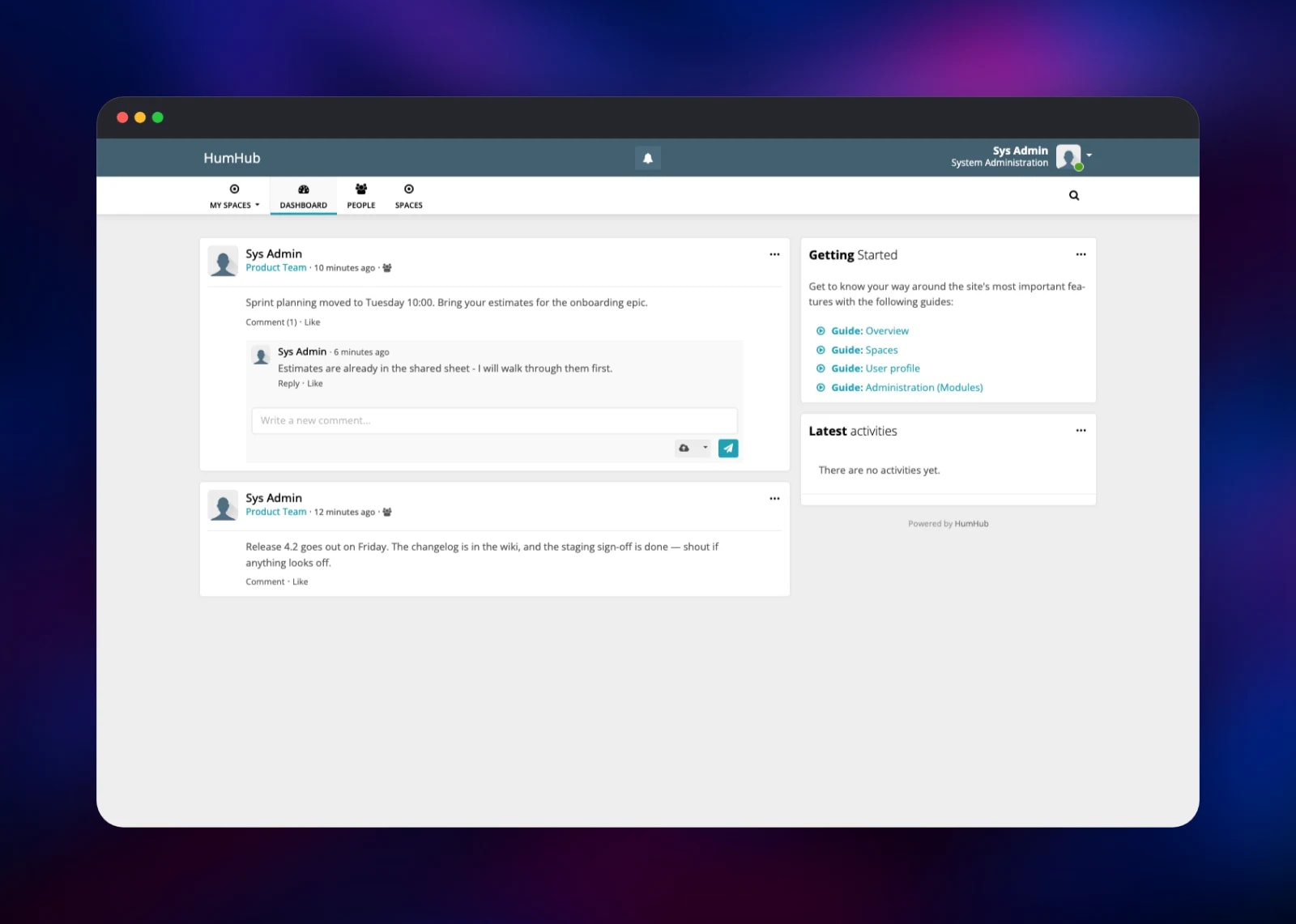
HumHub is an open-source social network and intranet platform. It gives a company, an association or a community the familiar shape of a social app — a dashboard stream, topic-based Spaces, posts, comments, mentions, notifications and file sharing — on infrastructure you own, under an AGPL licence, with a marketplace of modules adding a wiki, calendar, tasks and single sign-on. Teams self-host HumHub when member data cannot sit in someone else's tenant, or when they want a members' area that behaves like a social network, not a forum.
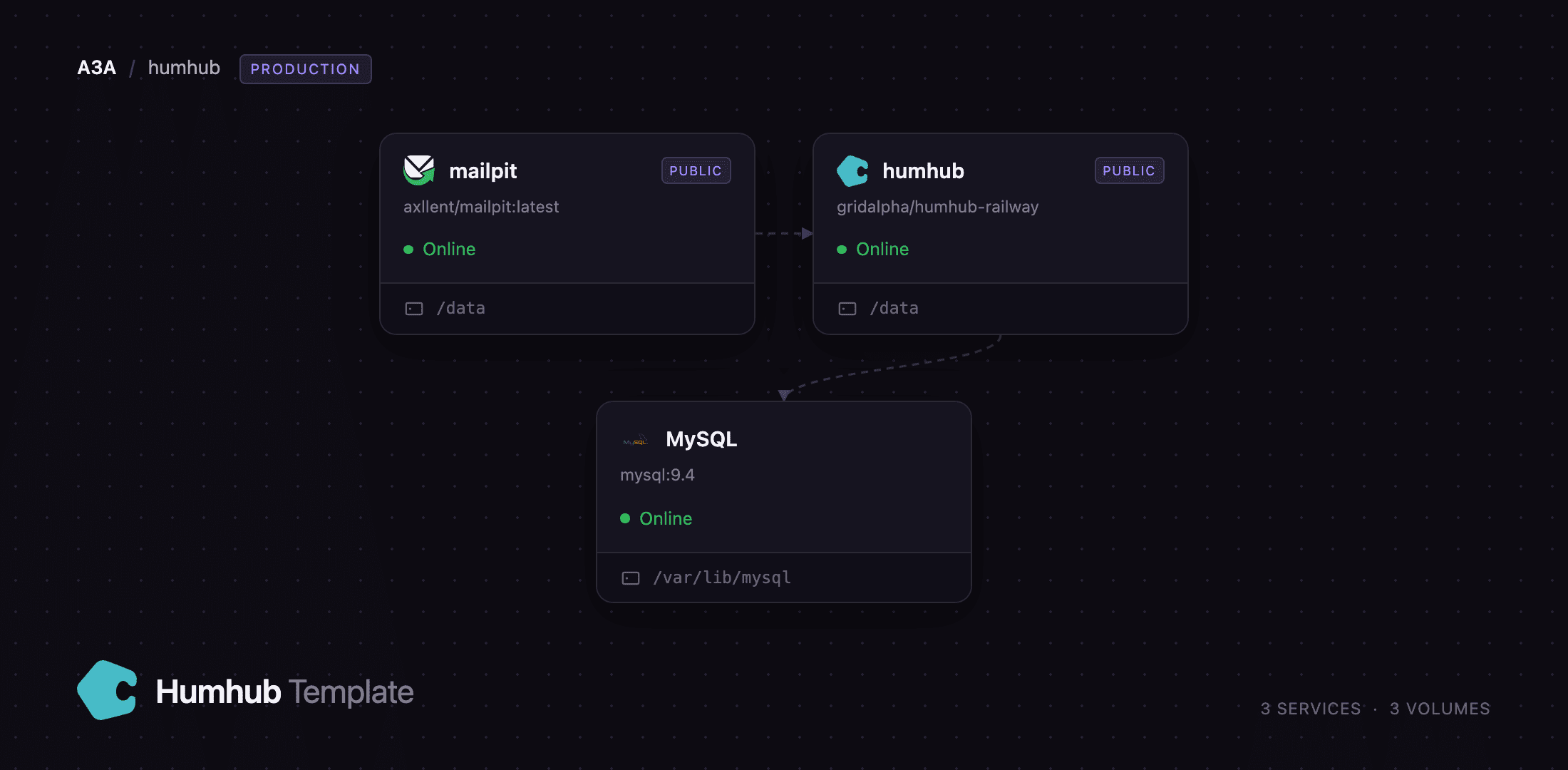
This template runs the official HumHub container with everything wired up. The humhub service is the web tier, cron scheduler and two queue workers in one container, as the project packages it for production. MySQL holds every row — content, users, the job queue, the lock table. mailpit is a private SMTP server capturing the invitations, password resets and digests HumHub sends, so email works from the first minute and can point at a real relay later. Uploads, assets and modules live on a persistent volume.
Getting Started with HumHub on Railway
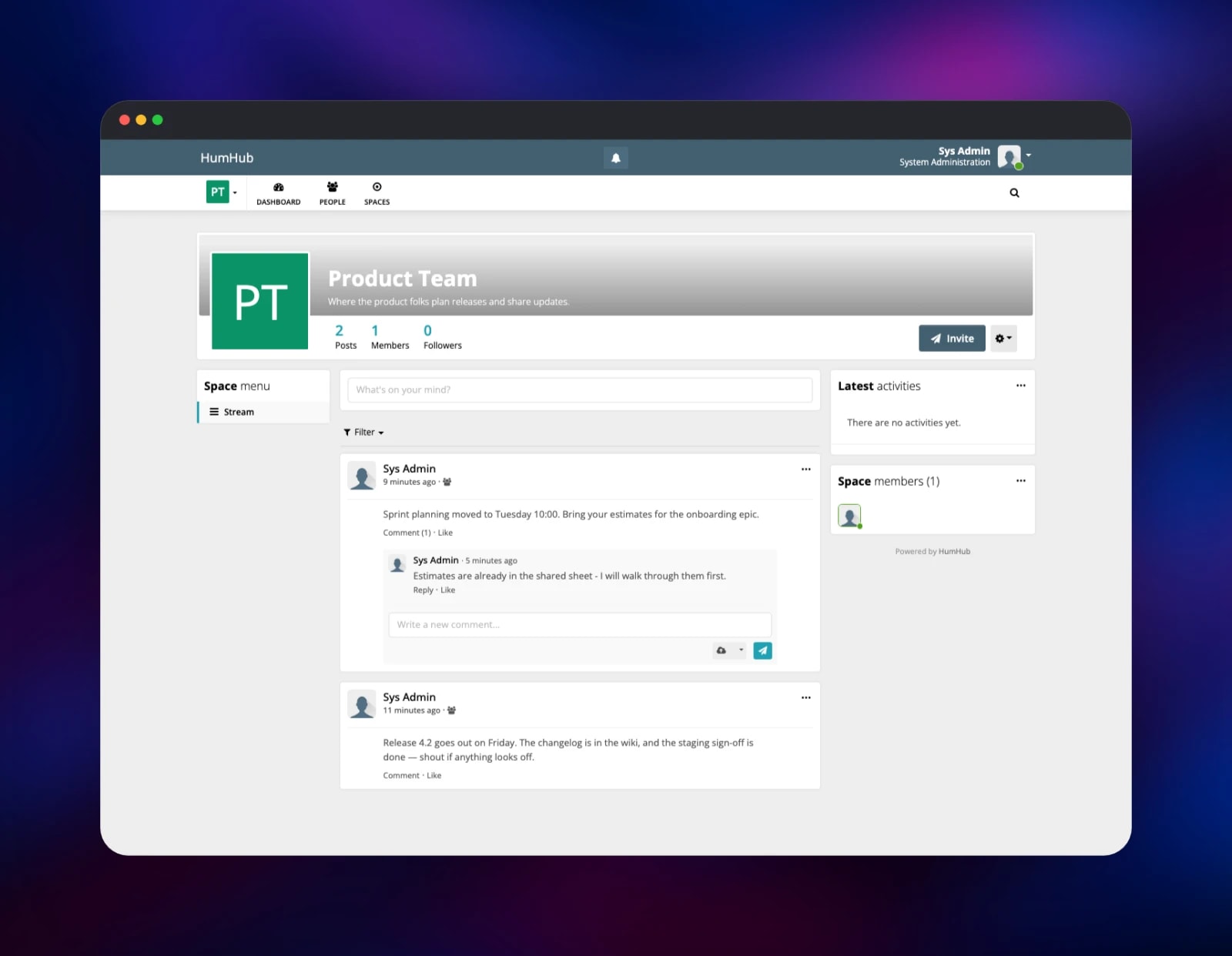
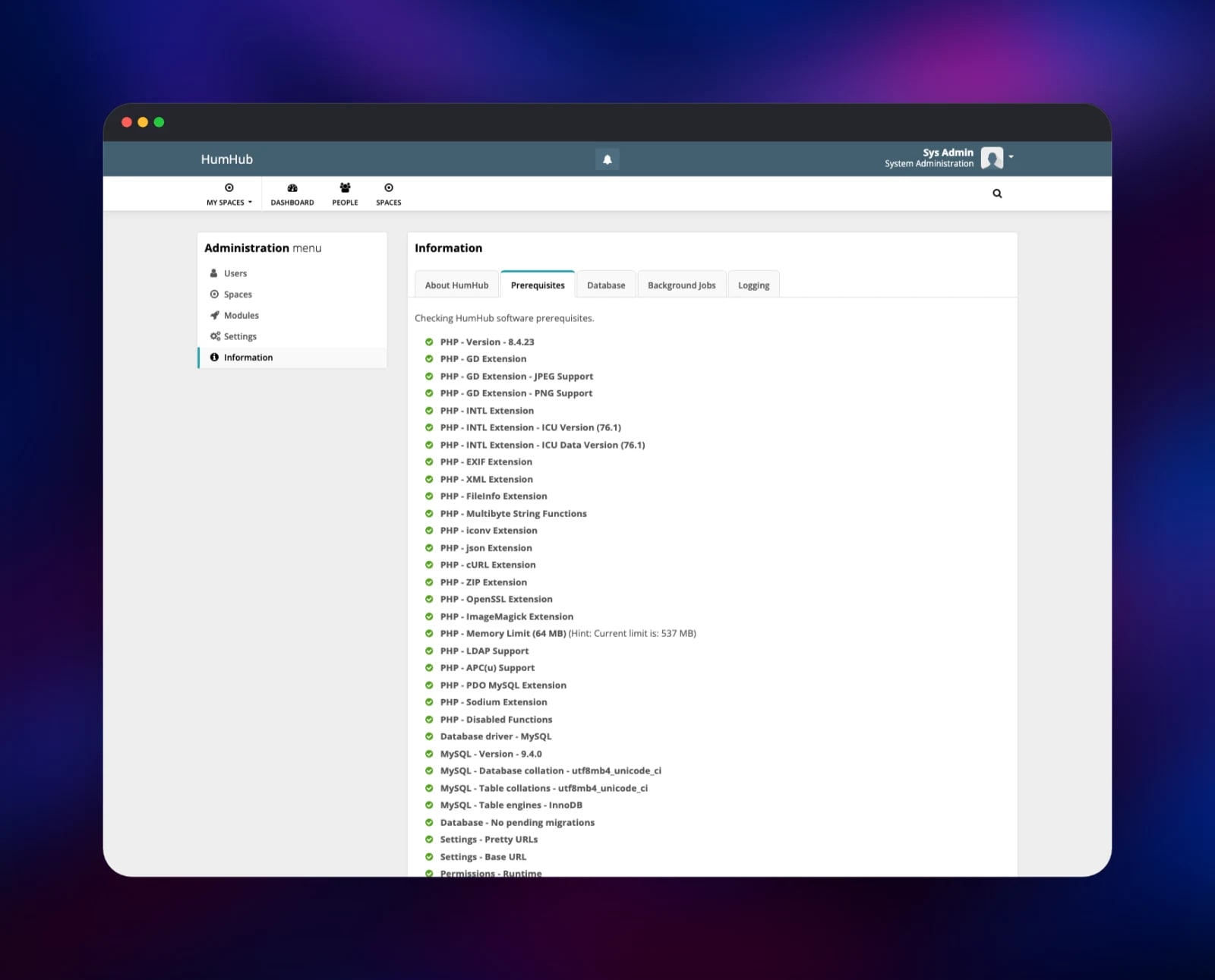
Set HUMHUB_ADMIN_PASSWORD before deploying — the first administrator's password, read once while the database is created; everything else has a working default. When the deployment goes green, open the public URL and sign in as admin. There is no setup wizard to race: the installation finishes before the web server accepts its first request. Go first to Administration → Users → Settings, where anonymous registration is off by default: turn it on for an open community, or leave it closed and invite people by email. Then create a Space — a room with its own stream, members and modules, where nearly all content lives. Post to it, add a comment, then open Administration → Information → Prerequisites: every row green confirms PHP, the database, file permissions and background jobs are healthy. Administration → Settings → E-Mail has a Save & Test button whose message lands in the Mailpit inbox.
About Hosting HumHub
HumHub is a PHP application on the Yii 2 framework, maintained by HumHub GmbH & Co. KG in Germany. The Community Edition is complete software rather than a trial — AGPL-3.0-or-later, with the paid Professional Edition adding commercially licensed modules instead of unlocking the core. Self-hosting is the point for most adopters: GDPR-sensitive member data, or content that should not be one acquisition away from disappearing.
- Spaces — areas with their own stream, members, permissions and modules
- Dashboard stream — one feed of everything a user follows, with @mentions
- Notifications — in-app, real-time over server-sent events, plus digests
- Files and search — per-Space file areas and full-text search
- Marketplace modules — wiki, calendar, tasks, polls, LDAP and OAuth
- Administration — member vetting, groups, permissions and themes
humhub serves HTTP through FrankenPHP and, in the same container, runs the cron scheduler and two queue workers handling notifications, search indexing and scheduled publishing. MySQL is Railway's managed database, so backups and the Data panel come with it. mailpit accepts SMTP on the private network and keeps the messages for you to read.
Why Deploy HumHub on Railway
Railway removes the parts of self-hosting that are not about your community:
- Database, mail and app tier deploy together, already connected
- The volume for uploads and modules is created for you
- TLS, a public domain and health checks come from the platform
- Scaling and metrics need no server access
- Upgrades are a redeploy; migrations run at boot
Common Use Cases
- Employee intranet — announcements, department Spaces, calendar and wiki
- Association or club — a private network with invitation-only sign-up
- Customer portal — a branded space for releases and documentation
Dependencies for HumHub
humhub— built from gridalpha/humhub-railway, a thin layer over the officialhumhub/humhub:stableimage that binds FrankenPHP to Railway's port, trusts the platform's proxy headers so sessions are secure, and installs HumHub non-interactively.MySQL— Railway's managedmysql:9.4, holding content, users, settings, the job queue and the mutex. No Redis is needed: queue, cache and locking all default to the database here.mailpit—axllent/mailpit: SMTP on 1025 inside the private network, web inbox on 8025.
Environment Variables Reference
| Variable | Purpose |
|---|---|
HUMHUB_ADMIN_PASSWORD | First administrator's password, read once at install |
HUMHUB_ENABLE_REGISTRATION | true opens anonymous sign-up; off by default |
HUMHUB_BASE_URL | Set only when you attach a custom domain |
HUMHUB_SMTP_HOST / HUMHUB_SMTP_PORT | Mail server; points at Mailpit out of the box |
HUMHUB_SMTP_USERNAME / HUMHUB_SMTP_PASSWORD | Credentials for a relay |
MP_UI_AUTH | user:password guarding the Mailpit inbox |
Deployment Dependencies
- Source: gridalpha/humhub-railway
- Upstream: humhub/humhub, humhub/docker, docs.humhub.org
- Runtime: PHP 8.4 on FrankenPHP, MySQL 9.4
Hardware Requirements for Self-Hosting HumHub
| Resource | Minimum | Recommended |
|---|---|---|
| CPU | 1 vCPU | 2 vCPU |
| RAM | 1 GB | 2–4 GB |
| Storage | 5 GB volume | 20 GB+ for file sharing |
| Database | MySQL 5.7+ / MariaDB 10.1+ | MySQL 8 or 9 |
| Runtime | PHP 8.2+ | PHP 8.4 |
Memory is the binding constraint: each queue worker is a full PHP process, and resizing uploaded images is the heaviest routine work.
Self-Hosting HumHub with Docker
The official image expects a MySQL-compatible database and one volume:
services:
  humhub:
    image: humhub/humhub:stable
    volumes: ["./humhub-data:/data"]
    environment:
      - SERVER_NAME=https://social.example.com
      - HUMHUB_CONFIG__COMPONENTS__DB__DSN=mysql:host=db;dbname=humhub
      - HUMHUB_CONFIG__COMPONENTS__DB__USERNAME=humhub
      - HUMHUB_CONFIG__COMPONENTS__DB__PASSWORD=change-me
  db:
    image: mariadb:11
    command: ["--collation-server=utf8mb4_unicode_ci"]
    volumes: ["./mysql-data:/var/lib/mysql"]
    environment: ["MYSQL_ROOT_PASSWORD=change-me"]
Any setting in HumHub's config tree becomes an environment variable by joining the path with double underscores. The container's own CLI handles maintenance:
docker compose exec humhub /app/yii migrate/up --includeModuleMigrations=1
docker compose exec humhub /app/yii cron/run
How Much Does HumHub Cost to Self-Host?
The Community Edition is free and open source under AGPL-3.0-or-later, with no user cap and no feature gate. HumHub GmbH sells a Professional Edition subscription bundling commercially licensed modules and support, plus a managed cloud. On Railway you pay only for the compute, memory and storage the three services use, so a small intranet costs a few dollars a month.
FAQ
What is HumHub? An open-source social network and intranet platform written in PHP. It provides Spaces, activity streams, posts, comments, notifications and file sharing, extended through a marketplace of modules such as a wiki, calendar and task board.
What does this Railway template deploy? Three services: the HumHub application (web server, cron scheduler and queue workers in one container with a persistent volume), a managed MySQL database, and a Mailpit SMTP server with a web inbox.
Why does the template include a database and a mail server? HumHub stores all of its state in MySQL, its background job queue included, so the database is not optional. Mail is close to it: invitations and password resets go out by SMTP, and without a mail server a new member can never finish signing up. Mailpit makes those messages visible immediately; swap in a transactional provider when you go live.
How do I log in to self-hosted HumHub for the first time?
Sign in as admin with the value you set in HUMHUB_ADMIN_PASSWORD. That account is created during the first boot, before the site serves traffic, so the public URL never exposes an unclaimed setup screen.
Can I install HumHub marketplace modules on Railway? Yes. Modules install from Administration → Modules onto the volume, so they survive redeploys. Wiki, calendar, tasks and polls are free; some others need a Professional Edition licence.
How do I use my own SMTP provider or a custom domain?
For mail, change HUMHUB_SMTP_HOST, HUMHUB_SMTP_PORT and the SMTP credentials on the humhub service, or edit the same fields under Administration → Settings → E-Mail, which is authoritative after the first boot. For a domain, attach it to the service and set HUMHUB_BASE_URL to the full https:// address, so links in outgoing email point at the right host.
Template Content


