
Deploy imgproxy
Image server that resizes and converts images straight from a URL
imgproxy
Just deployed

Just deployed
/cache
imgproxy-images
Bucket
Just deployed
Deploy and Host imgproxy on Railway
imgproxy is a standalone image server that resizes, crops, converts and optimises images the moment they are requested. You keep one original — in object storage or on any host reachable over HTTP — and ask for a derivative by putting the transformation in the URL: a 400×400 smart crop, a blurred placeholder, an AVIF for browsers that accept one. Nothing is pre-generated, nothing is written back, and the URL is signed so only your application can request a transformation.
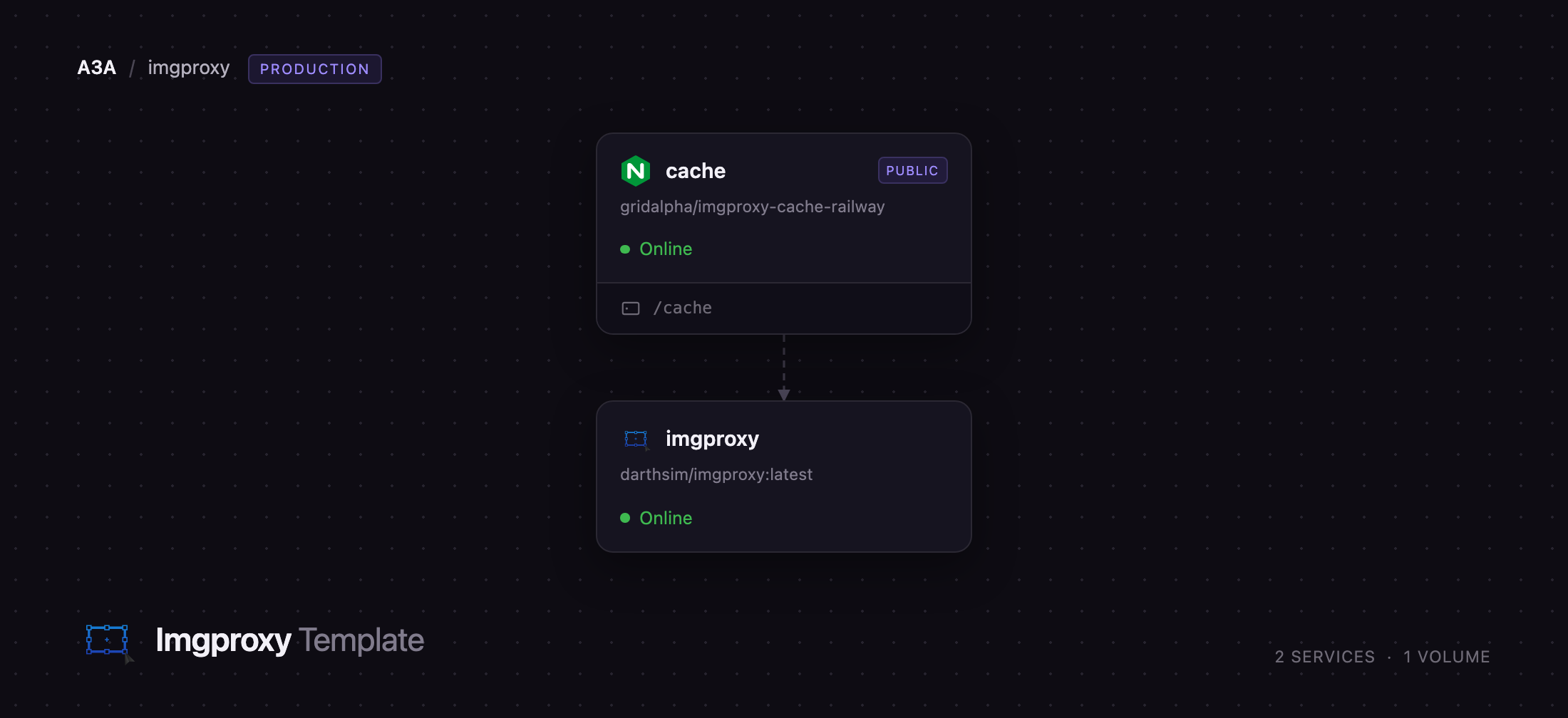
Deploy imgproxy on Railway and this template gives you two services rather than one. imgproxy does the processing on the private network with no public address of its own. cache is an nginx reverse-proxy cache in front of it, holding rendered images on a Railway volume and serving repeats without touching imgproxy again — imgproxy's internal cache is a paid feature, so an external cache is what upstream recommends for the open-source build. A managed object-storage bucket is wired in as an s3:// source, and only the cache service is published, so every request enters through it and is answered from disk from the second hit onward.
Getting Started with imgproxy on Railway
There is no sign-up, no admin panel and no first user to create — imgproxy is an HTTP API, so the deploy is finished the moment the public URL answers. Open it and you should see imgproxy's own landing page, which confirms traffic reaches the processor through the cache. IMGPROXY_KEY and IMGPROXY_SALT are generated at deploy time, so every processing URL must carry a valid HMAC signature and an unsigned request is answered 403 — that is what stops the deployment being an open image proxy for strangers. Copy both values out of the imgproxy service's variables and sign URLs in your application. The signed path is everything after the signature: the options, then /plain/ and the source URL. In Python:
import hmac, hashlib, base64

KEY  = bytes.fromhex("")
SALT = bytes.fromhex("")

path = "/rs:fill:400:400:ce/g:sm/plain/https://example.com/photo.jpg@webp"
sig  = hmac.new(KEY, SALT + path.encode(), hashlib.sha256).digest()
url  = "/" + base64.urlsafe_b64encode(sig).rstrip(b"=").decode() + path
Request that path against your public domain and you get a 400×400 WebP cropped around the most interesting part of the photo. To read from the bucket, upload an object and swap the source for s3:///. Watch the X-Cache-Status header while testing: the first request reads MISS, the second HIT.



About Hosting imgproxy
imgproxy makes every derivative a pure function of a URL and encodes to the best format the browser advertises. It is written in Go on top of libvips, which streams and shrinks on load rather than decoding whole images into memory, so a 2000×1400 JPEG becomes a thumbnail in tens of milliseconds on a small container.
- Resize, fit, fill, crop, pad, zoom, rotate, trim, blur and sharpen, all expressed in the URL path
- Smart gravity, which crops around the most salient region instead of the centre
- WebP, AVIF and JPEG XL negotiation from
Accept, withVary: Acceptset correctly - Sources over HTTP(S), S3-compatible storage, Google Cloud Storage, Azure Blob Storage and Swift
- URL signing, source allow-lists, resolution and file-size ceilings, metadata stripping by default
- Prometheus, OpenTelemetry, Datadog, New Relic and Sentry instrumentation built in
imgproxy holds the signing key and storage credentials and never receives traffic directly. cache terminates public requests, keys on the URL plus the Accept and client-hint headers, serves stale content while imgproxy redeploys, and collapses a burst of requests for one cold image into a single upstream call.
Why Deploy imgproxy on Railway
Railway removes the fiddly parts of running an image tier:
- Private networking between the cache and imgproxy, with no public port on the processor
- A managed S3-compatible bucket wired in as a source, credentials injected as references
- A persistent volume for the rendered-image cache, so a redeploy does not start cold
- Health checks, restart policies and HTTPS on the public domain
- Scale by raising CPU: imgproxy sizes its worker pool from the container's quota
Common Use Cases for Self-Hosted imgproxy
- Product and user-generated media — store one upload, serve every thumbnail and retina variant from it
- Responsive front ends — emit
srcsetentries differing only in the width, with AVIF where it is accepted - Editorial and CMS sites — art-direct crops per breakpoint without re-cutting images by hand
- Replacing an image CDN bill — run the transformation API in your own region, on your own storage
Dependencies for imgproxy
darthsim/imgproxy:latest— the processing server, from imgproxy/imgproxygridalpha/imgproxy-cache-railway— annginx:alpineimage carrying the cache configuration- A Railway managed object-storage bucket, exposed to imgproxy as the
s3://source scheme
Environment Variables Reference
| Variable | Service | Purpose |
|---|---|---|
IMGPROXY_KEY | imgproxy | Hex HMAC key; required for signed URLs |
IMGPROXY_SALT | imgproxy | Hex HMAC salt; must be set alongside the key |
IMGPROXY_USE_S3 | imgproxy | Enables the s3:// source scheme |
IMGPROXY_ALLOWED_SOURCES | imgproxy | Optional allow-list of source URL prefixes |
IMGPROXY_UPSTREAM | cache | host:port of the processing service |
CACHE_MAX_SIZE | cache | Disk budget for cached images |
CACHE_TTL | cache | How long a cached image stays fresh |
Deployment Dependencies
- Source repository: github.com/imgproxy/imgproxy (Apache-2.0)
- Documentation: docs.imgproxy.net
- Image: darthsim/imgproxy on Docker Hub
- Cache image: gridalpha/imgproxy-cache-railway
Hardware Requirements for Self-Hosting imgproxy
| Resource | Minimum | Recommended |
|---|---|---|
| CPU | 1 vCPU | 4–8 vCPU |
| RAM | 512 MB | 2–4 GB |
| Storage | none for imgproxy | 5–50 GB volume for the cache |
| Runtime | Docker | Docker |
imgproxy is CPU-bound. Its worker pool defaults to twice the cores it is allowed, read from the container's quota, so adding CPU raises throughput.
Self-Hosting imgproxy with Docker
The published image needs no build step. To run it locally with signing on:
docker run -p 8080:8080 \
  -e IMGPROXY_KEY=$(openssl rand -hex 32) \
  -e IMGPROXY_SALT=$(openssl rand -hex 32) \
  darthsim/imgproxy:latest
To read from S3-compatible storage, add credentials and the source scheme:
docker run -p 8080:8080 \
  -e IMGPROXY_USE_S3=true \
  -e IMGPROXY_S3_ENDPOINT=https://your-endpoint.example \
  -e IMGPROXY_S3_REGION=auto \
  -e AWS_ACCESS_KEY_ID=... -e AWS_SECRET_ACCESS_KEY=... \
  darthsim/imgproxy:latest
Put a CDN or caching reverse proxy in front in production; without one, every request re-renders the image.
How Much Does imgproxy Cost to Self-Host?
imgproxy is open source under Apache-2.0 and free to run, with no limit on images, requests or instances. A commercial imgproxy Pro tier adds advanced compression, dynamic watermarks, video thumbnails and an internal cache, from $49/month or $499/year for up to 16 workers. Self-hosting the open-source build on Railway costs infrastructure only.
FAQ
What is imgproxy? imgproxy is a fast, secure standalone server that processes images on the fly. It fetches a source image, applies the transformations encoded in the request URL, and returns the result without storing derivatives.
What does this Railway template deploy?
Two services and a bucket: the imgproxy processing server on the private network, an nginx reverse-proxy cache with a volume as the public entry point, and managed object storage wired in as an s3:// image source.
Why does the template include an nginx cache in front of imgproxy? imgproxy renders every request from scratch and its built-in cache is a Pro feature, so upstream recommends a CDN or caching proxy in front. The cache service is that layer, on a volume so redeploys start warm.
Do I need the object-storage bucket?
No. imgproxy fetches plain http(s):// sources, so you can point it at an existing origin and ignore the bucket. Official signing helper libraries exist for Ruby, PHP, Go, Node.js, Python, Java and .NET.
Can I disable URL signing in self-hosted imgproxy?
You can, by clearing IMGPROXY_KEY and IMGPROXY_SALT, but not on a public deployment: anyone could then make your server fetch and re-encode arbitrary images. Keep signing on, and add IMGPROXY_ALLOWED_SOURCES to restrict which origins it reads from.
How do I know the cache is working?
Request the same signed URL twice and read X-Cache-Status: the first response reads MISS, the second HIT. CACHE_MAX_SIZE, CACHE_TTL and CACHE_INACTIVE control how much is kept and for how long.
Template Content


