
Deploy InvenTree
Inventory system for tracking parts, stock levels and orders
inventree-server
Just deployed
/home/inventree/data

Redis
Just deployed
/data

Just deployed
/var/lib/postgresql/data
inventree-worker
Just deployed
/home/inventree/data
inventree-media
Bucket
Just deployed
Deploy and Host InvenTree on Railway
InvenTree is an open-source inventory management system for people who keep physical parts on shelves — electronics labs, hardware startups, makerspaces and small manufacturers. It gives you a searchable parts catalogue with internal part numbers, stock locations down to the individual bin, bills of materials, build orders that consume stock, and purchase and sales orders. All of it sits behind a documented REST API, so scanners, label printers and shop-floor scripts read the same data the interface does.
Self-host InvenTree on Railway and this template deploys the full production shape, not a single container: inventree-server runs the web application under gunicorn, inventree-worker runs the django-q2 background cluster behind pricing updates, notifications and report rendering, Postgres stores the catalogue and doubles as the task broker, Redis is the shared cache that lets the worker run more than one process, and an object storage bucket holds part images, attachments and PDFs so both containers see the same files.
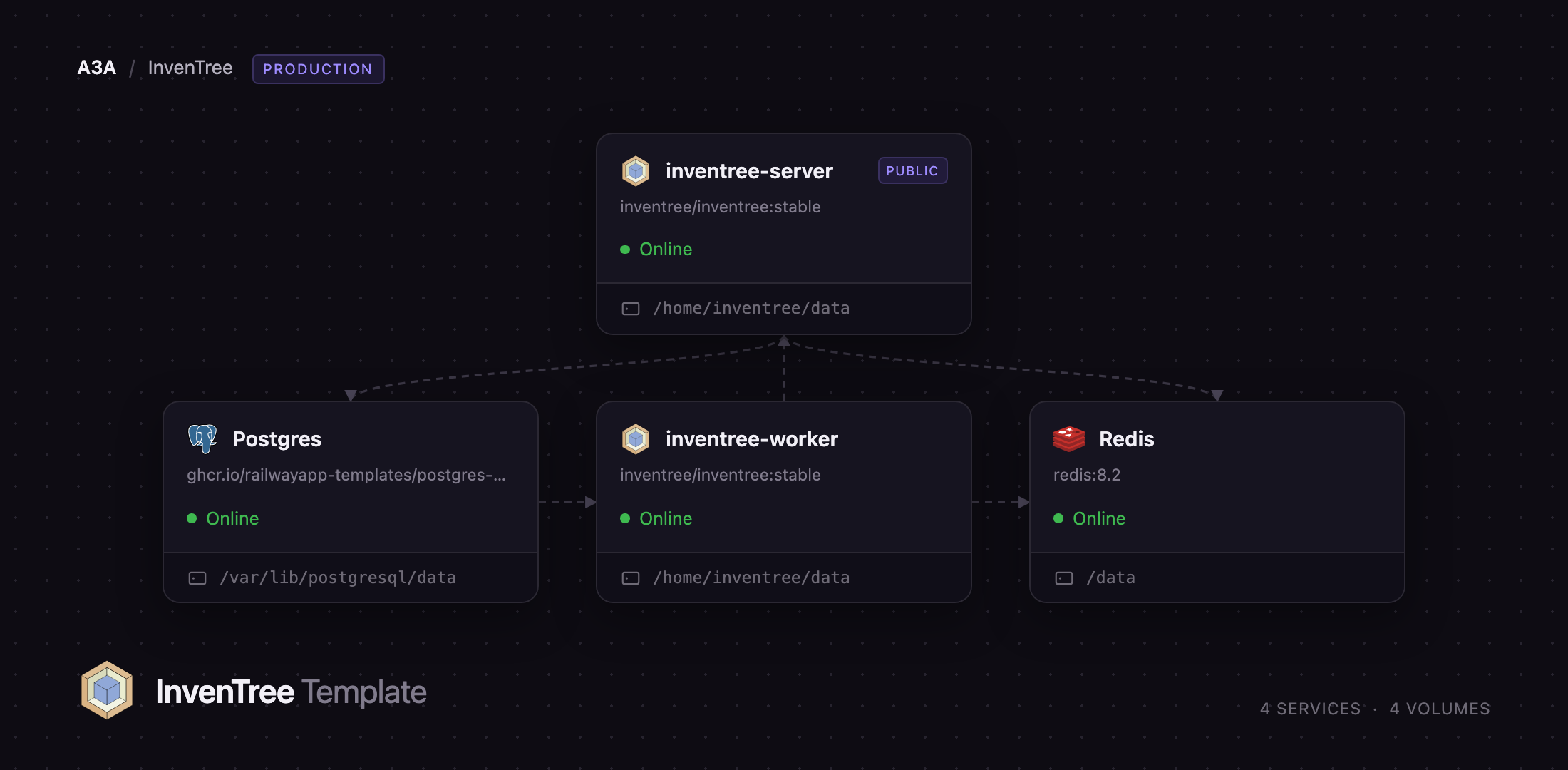
Getting Started with InvenTree on Railway
Set INVENTREE_ADMIN_PASSWORD before you deploy — that, with the username and email beside it, creates your superuser. There is no open sign-up page, so it is your only way in. First boot runs the full migration set before the server answers, so allow a few minutes.
Your first useful action is to give stock somewhere to live. Under Stock → Stock Locations create a location such as Main Warehouse, then a child location for a shelf. Switch to Parts, create a category, and add a part with an internal part number and a minimum stock level. Open it, upload an image, and use Stock → Add Stock Item to place a quantity on that shelf. If the image renders and the quantity appears in the stock table, the database and the bucket are both wired correctly.
To confirm the background tier is alive, open Admin Center → Background Tasks; it should read Background worker running. Add further users under Admin Center → Users / Access rather than sharing the superuser account.
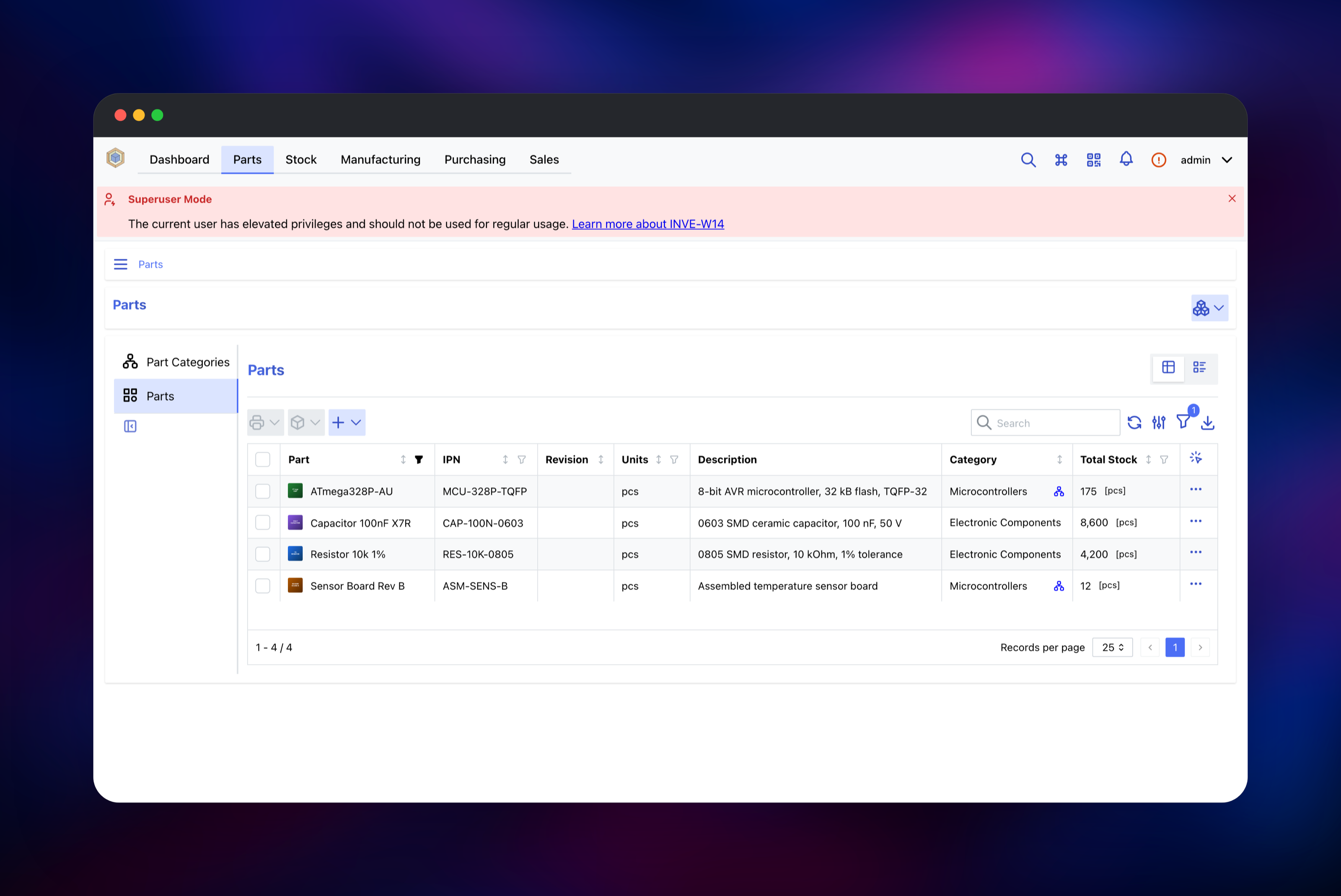
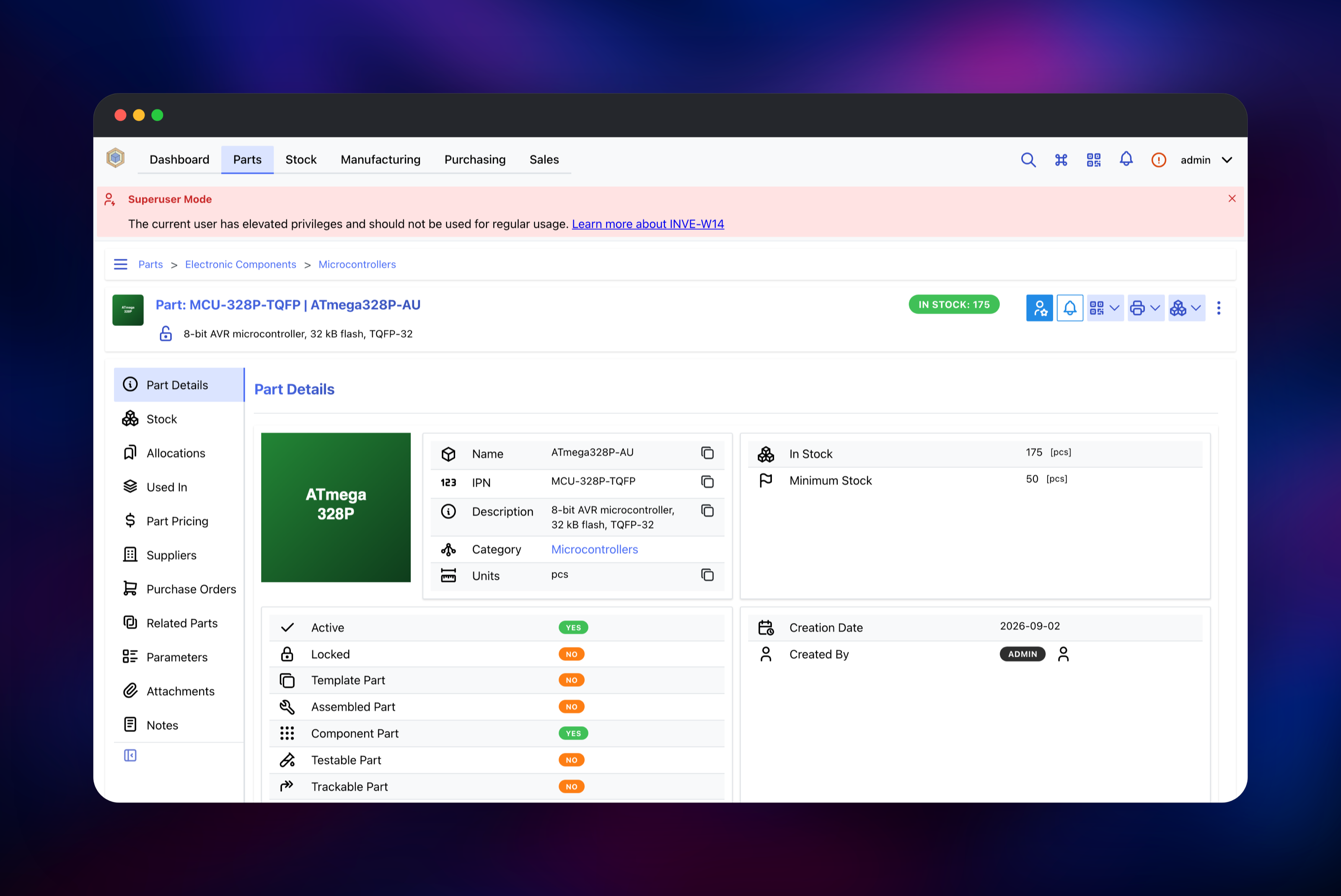
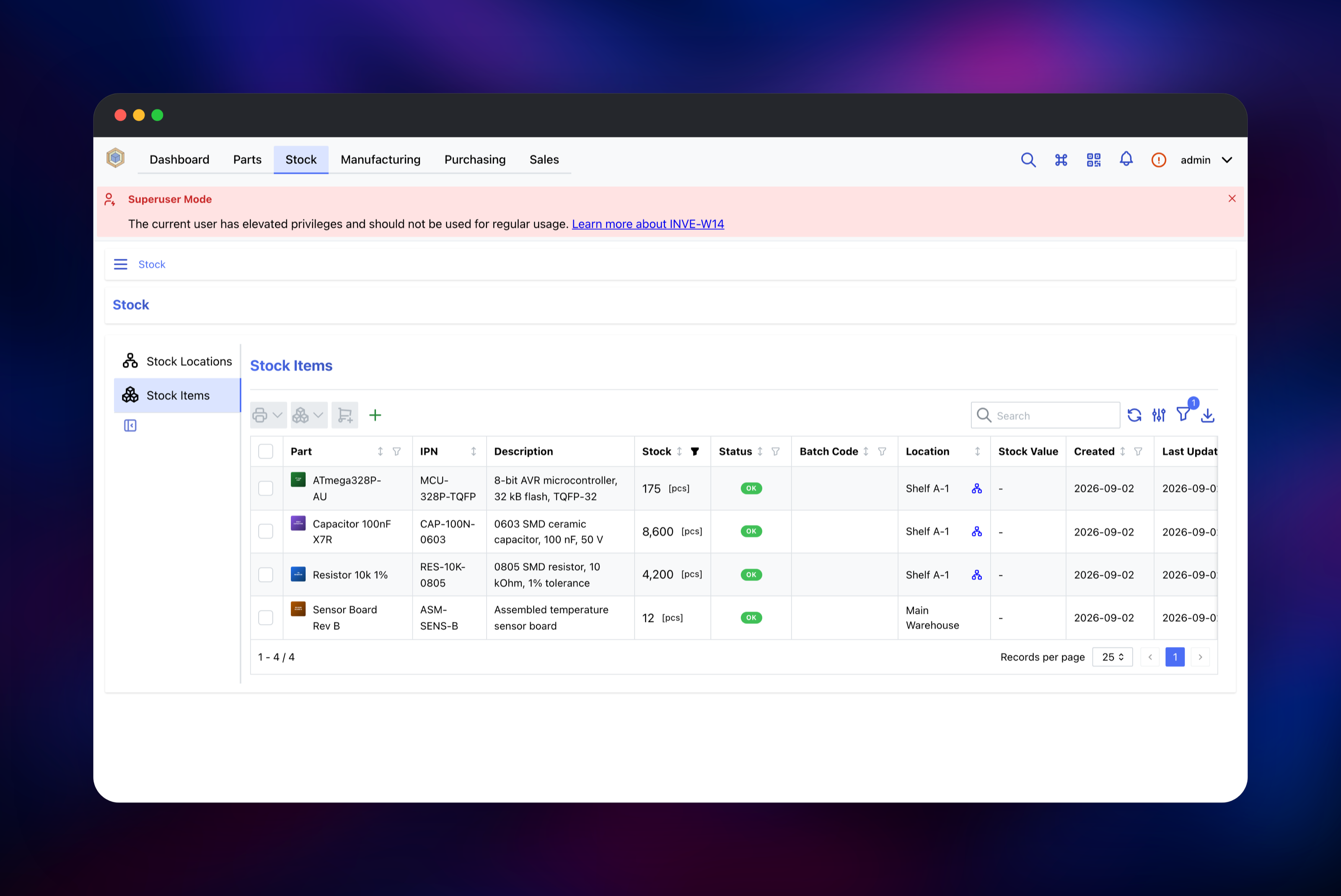
About Hosting InvenTree
Spreadsheets stop working as an inventory system the moment two people edit one, a part gets ordered twice, or somebody needs to know which build consumed the last twelve capacitors. InvenTree replaces that with a relational model — parts, stock items, locations, suppliers and orders referencing each other, with a full history of every stock movement.
Key capabilities:
- Hierarchical part categories and stock locations, with low-stock alerts
- Multi-level bills of materials, build orders, stock allocation and consumption
- Purchase and sales orders with per-supplier part pricing
- Barcode and QR support, plus label and report templates rendered to PDF
- Serial numbers, batch codes, expiry dates and full movement history
- A plugin framework and a REST API with a published OpenAPI schema
The two application services run the same image in different roles: the web service serves the interface and the API, the worker consumes the task queue. Splitting them matters because report generation and pricing updates are slow enough to make the interface feel broken if they run in the request path.
Why Deploy InvenTree on Railway
Railway removes the compose file and the reverse proxy from the picture.
- Postgres, Redis and object storage are provisioned and wired by the template
- The web service gets HTTPS on a generated domain, with custom domains available
- Database and worker stay on the private network, never exposed publicly
- Persistent volumes survive redeploys, so configuration and plugins stick
- Scale the worker and the web service independently as your catalogue grows
Common Use Cases
- Electronics and PCB assembly: track parts by internal part number, build BOMs per board revision, consume stock through build orders
- Hardware startups: raise purchase orders, hold serialised finished goods, issue sales orders from one catalogue
- Makerspaces and labs: let members find parts by category and bin, with low-stock alerts triggering reorders
- Repair shops: manage spares across locations and track which serial number went into which repair
Dependencies for InvenTree
- InvenTree —
inventree/inventree:stable, deployed twice: as the gunicorn web server and as the background worker. - PostgreSQL 18 — the application database, and the django-q2 task broker, so queued jobs survive a restart of either service.
- Redis 8 — the shared cache. Without it InvenTree pins the background cluster to one process, so it is what makes a real worker tier possible.
- Railway object storage — an S3-compatible bucket for part images, attachments and reports. Both containers write to it, which is how the worker's PDFs reach the web service.
Environment Variables Reference
| Variable | Purpose |
|---|---|
INVENTREE_ADMIN_USER / _EMAIL / _PASSWORD | First superuser; all three are required |
INVENTREE_SECRET_KEY | Django signing key, identical on both services |
INVENTREE_SITE_URL | Public URL; also sets the CSRF trusted origins |
INVENTREE_DB_* / INVENTREE_CACHE_* | PostgreSQL and Redis connection settings |
INVENTREE_STORAGE_TARGET / INVENTREE_S3_* | Object storage backend for media files |
INVENTREE_PLUGINS_ENABLED | Allows third-party plugins to be installed |
INVENTREE_GUNICORN_WORKERS | Web worker processes; raise for more users |
INVENTREE_BACKGROUND_WORKERS | Background processes on the worker service |
INVENTREE_EMAIL_* | Optional SMTP for notifications and password resets |
Deployment Dependencies
- Image inventree/inventree, source github.com/inventree/InvenTree, docs at docs.inventree.org
- Runtime: Python 3.14, Django, gunicorn, django-q2
Hardware Requirements for Self-Hosting InvenTree
| Resource | Minimum | Recommended |
|---|---|---|
| CPU | 1 vCPU per service | 2 vCPU web, 1–2 vCPU worker |
| RAM | 1 GB web, 512 MB worker | 2 GB web, 1 GB worker |
| Storage | 1 GB volume per service | 5 GB volumes; bucket grows with attachments |
| Database | PostgreSQL 13+ | PostgreSQL 18 |
| Runtime | Python 3.10+ | Python 3.14, bundled in the image |
Self-Hosting InvenTree
The published image is the fastest route. Put INVENTREE_DB_*, INVENTREE_SITE_URL and the three INVENTREE_ADMIN_* values in a .env file, then run the server with this shell command:
docker run -d --name inventree-server -p 8000:8000 --env-file .env \
  -v inventree_data:/home/inventree/data inventree/inventree:stable
The image does not migrate on its own, and the worker is a separate container on the same image:
docker exec inventree-server invoke migrate
docker exec inventree-server invoke static
docker run -d --name inventree-worker --env-file .env \
  -v inventree_data:/home/inventree/data \
  inventree/inventree:stable invoke worker
Upstream also publishes a docker-compose.yml with PostgreSQL, Redis and a Caddy proxy. On Railway that proxy is unnecessary — the platform terminates TLS and InvenTree serves its own static files.
Is InvenTree Free to Self-Host?
InvenTree is free and open source under the MIT licence, with no paid tier, seat limits or feature gates. Every feature — BOMs, build orders, plugins, the API — is in the image you deploy. On Railway you pay only for the compute, database and storage it uses, which for a small team is a few dollars a month.
FAQ
What is InvenTree?
An open-source inventory management system for tracking physical parts and stock: a parts catalogue, stock locations, bills of materials, build orders, and purchase and sales orders, all exposed through a REST API.
What does this Railway template deploy?
An InvenTree web server, an InvenTree background worker, a PostgreSQL database, a Redis cache, and an object storage bucket for media files. Only the web server gets a public URL.
Why does it need Redis and an object storage bucket as well as PostgreSQL?
PostgreSQL is the task broker; Redis is the shared cache, and InvenTree limits the background cluster to one process without it. The bucket exists because the web service and the worker are separate containers that cannot share a filesystem — part images, attachments and worker-generated PDFs go there, served through short-lived signed URLs.
How do I create the first user in self-hosted InvenTree?
Set INVENTREE_ADMIN_USER, INVENTREE_ADMIN_EMAIL and INVENTREE_ADMIN_PASSWORD before the first deploy. All three are required; if any is missing, no superuser is created, and the step never overwrites an existing password.
How do I connect a barcode scanner or a script to my instance?
Use the REST API at /api/, with the OpenAPI schema at /api/schema/. Authenticate with a personal API token from your user settings, passed as an Authorization header.
Template Content
inventree-server
inventree/inventree:stableRedis
redis:8.2inventree-worker
inventree/inventree:stableinventree-media
Bucket


