
Deploy Invoice Ninja
Invoicing app for sending bills and getting paid by clients
invoiceninja
Just deployed
/var/www/html/storage

Redis
Just deployed
/data

MySQL
Just deployed
/var/lib/mysql

mailpit
Just deployed
/data
Deploy and Host Invoice Ninja on Railway
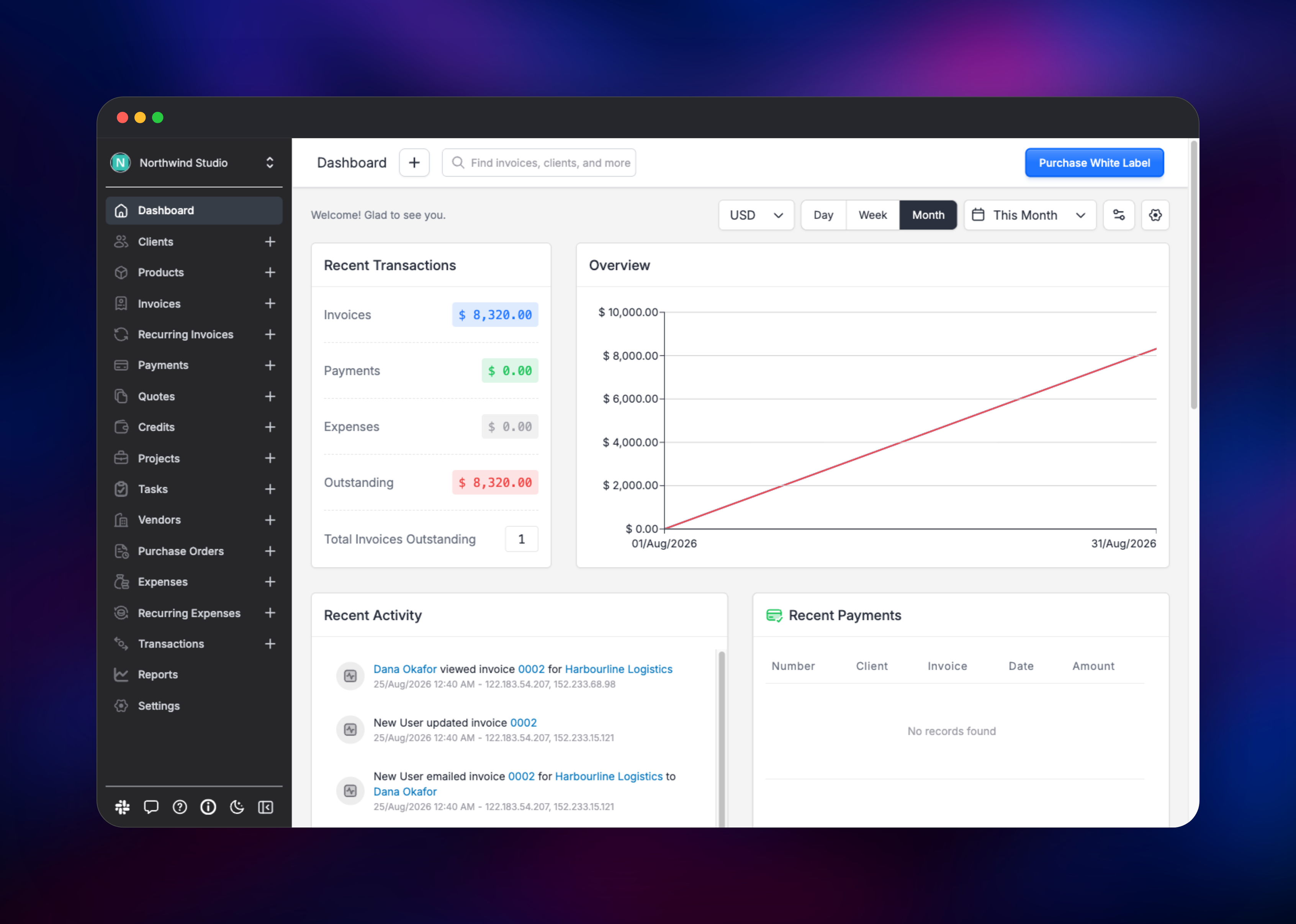
Invoice Ninja is a self-hosted invoicing, quoting and payments platform used by freelancers, agencies and small finance teams to bill clients and get paid faster. It covers the whole cycle: clients, products, quotes that convert to invoices, recurring billing, expenses, time tracking, tax rules, and a branded client portal where customers view a PDF and pay through one of 40+ gateways such as Stripe. Self-host Invoice Ninja and your clients, rates and payment history stay in a database you own, with every feature the hosted service reserves for its enterprise tier unlocked.
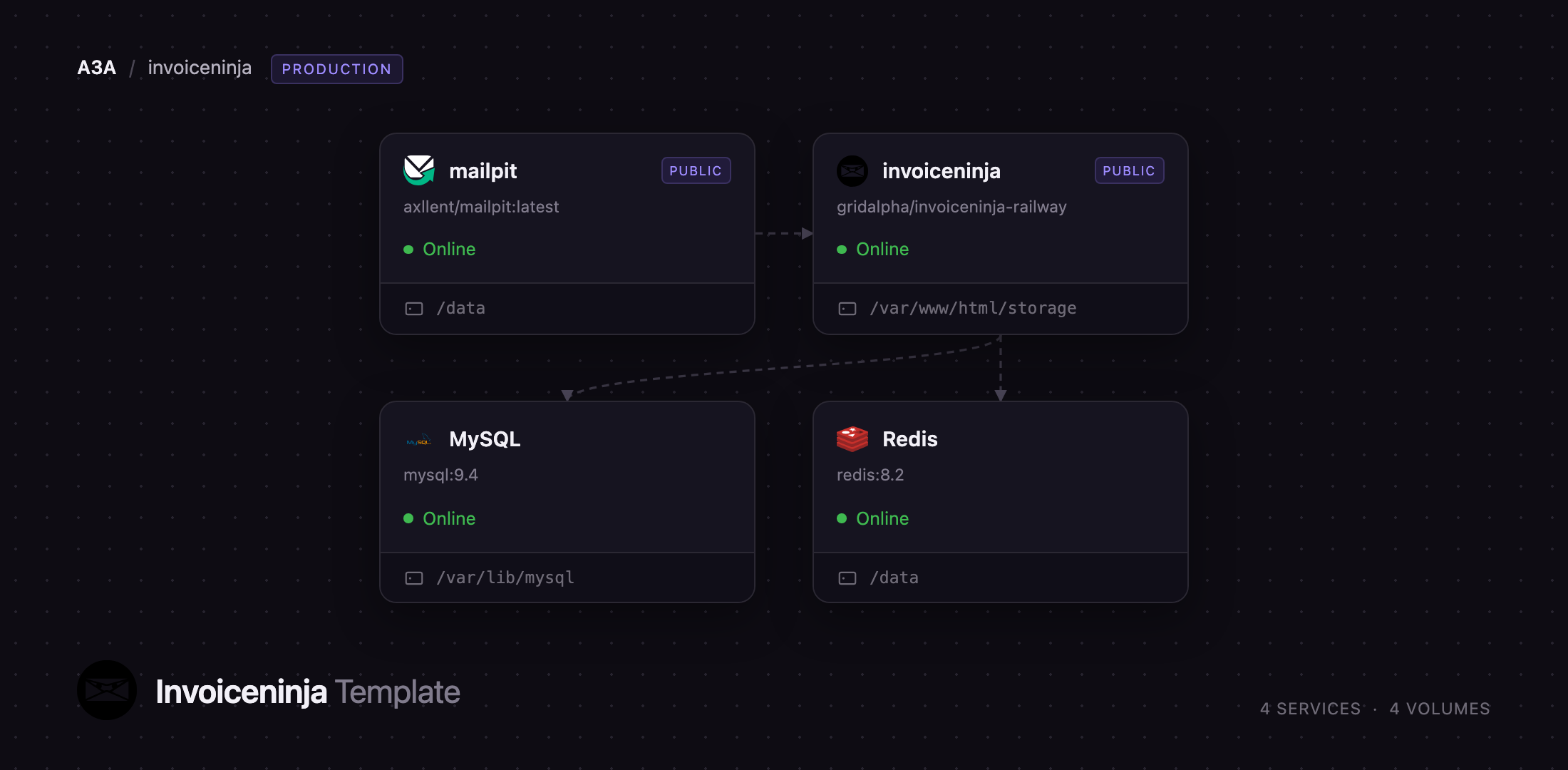
This template runs Invoice Ninja on Railway with the pieces its production Docker setup expects. The application service carries nginx and PHP-FPM in front of the Laravel app, two queue workers, and the scheduler that sends recurring invoices and reminders. Managed MySQL stores every record, managed Redis backs the queue, cache and sessions, and Mailpit captures outgoing mail so you can watch an invoice email arrive before pointing the deployment at a real relay. Logos, documents and PDFs live on a persistent volume, and the owner account is created on first boot from the email and password you supply.
Getting Started with Invoice Ninja on Railway
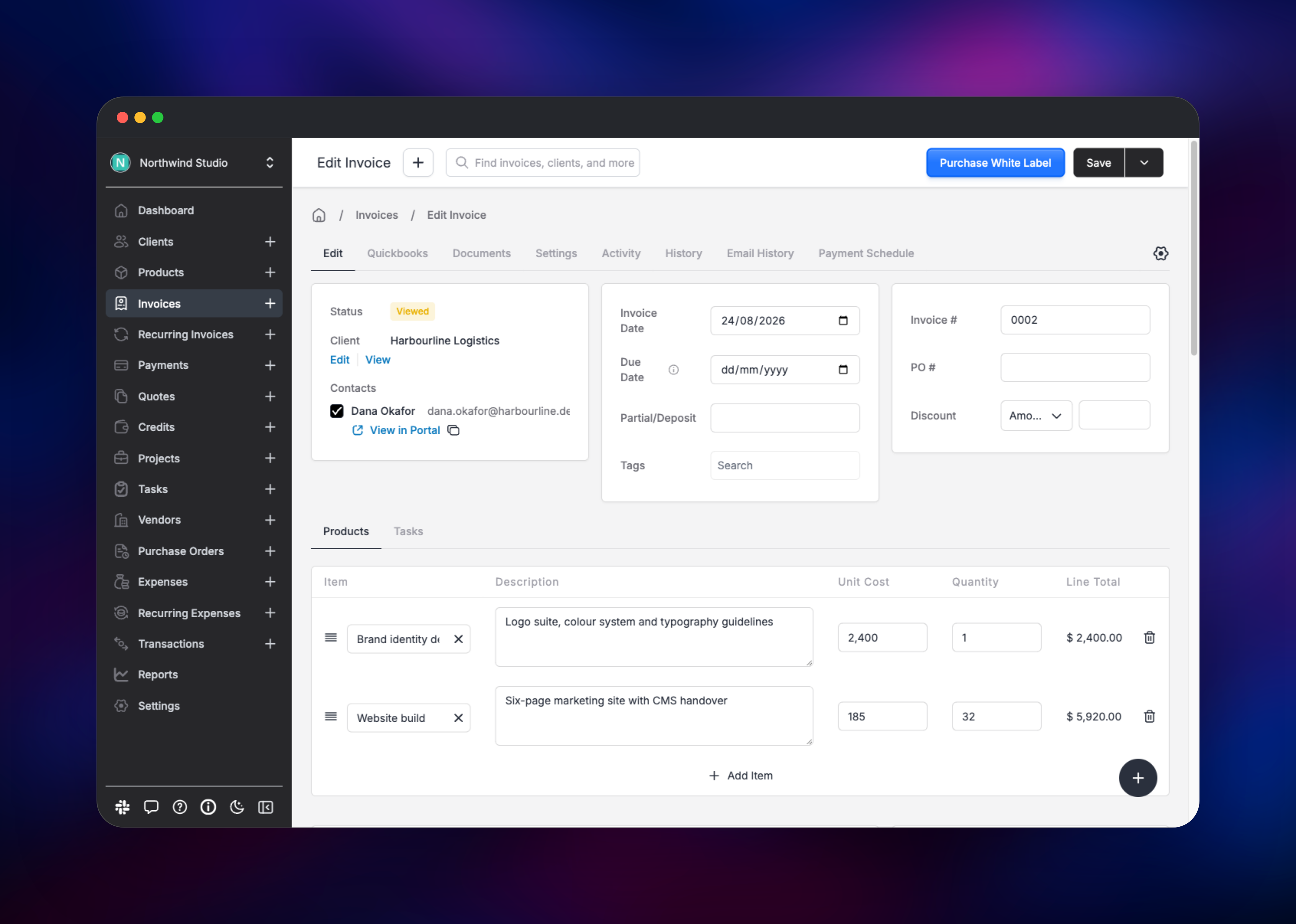
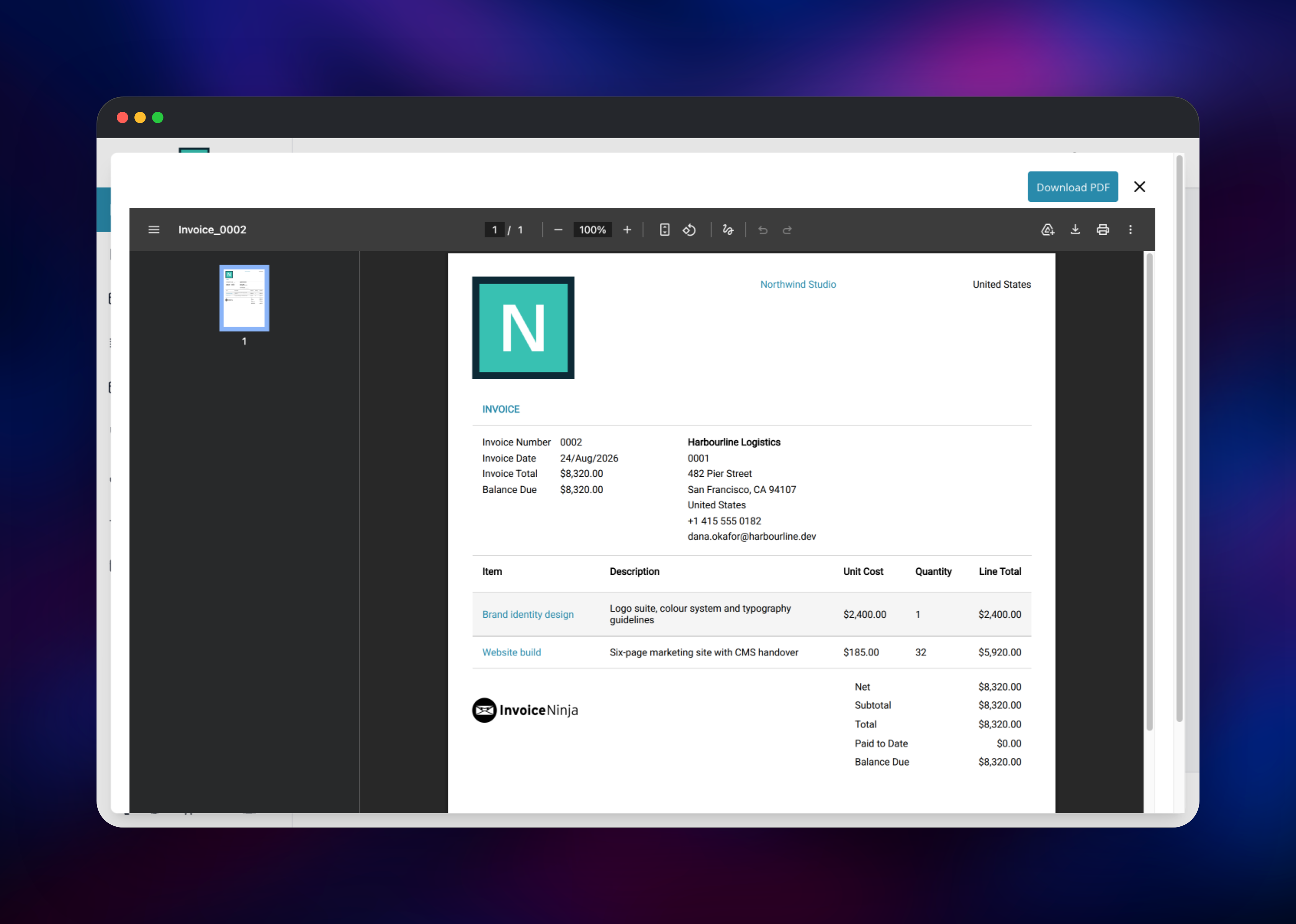
Set IN_USER_EMAIL and IN_PASSWORD before deploying — they become the owner account, and the container will not bootstrap without a password. First boot runs the migrations and seeds currencies, tax presets and designs, so allow a few minutes before the URL answers. Sign in and complete the short welcome dialog asking for company name, language and currency. Under Settings, then Company Details, upload a logo: it heads every PDF. Create a client, then an invoice with a couple of line items, and use Send Email on it: the message is queued through Redis, rendered to PDF by the bundled headless Chrome, and delivered to the Mailpit inbox on this project's second public URL, behind the credentials in MP_UI_AUTH. That email's View Invoice link shows exactly what your customer sees. For real delivery, repoint the MAIL_* variables at your own SMTP provider.
About Hosting Invoice Ninja
Invoice Ninja is a Laravel application with a React admin console and a separate client portal. Self-hosting it means four cooperating parts.
- Application service — nginx serves the front end and proxies PHP to PHP-FPM. Supervisor also runs two
queue:workworkers and oneschedule:workscheduler in the same container, since they write to the storage directory the web tier serves from. - MySQL — system of record for clients, invoices, payments and settings.
- Redis — the queue carrying email, PDF generation and webhooks off the request path, plus cache and sessions.
- Mailpit — a local SMTP sink with a web inbox, so invoice email works as soon as the deploy finishes rather than needing an SMTP account.
Key features: recurring invoices with auto-billing, partial payments and deposits, multi-currency and multi-company support, customisable designs, online quote approval, expense and vendor tracking, project time tracking that converts to billable lines, UBL and Zugferd e-invoicing, and a REST API.
Why Deploy Invoice Ninja on Railway
Railway removes the server work self-hosting invoicing software usually involves.
- MySQL and Redis provisioned and connected, with no connection strings to copy
- A persistent volume keeps logos, documents and PDFs across every redeploy
- HTTPS and a public domain issued automatically, which the client portal needs
- Private networking keeps the database, cache and mail sink off the internet
- Scaling CPU and memory is a slider
Common Use Cases
- A freelancer or consultancy billing retainer clients monthly, with automatic reminders
- An agency whose quotes are approved online, converted to invoices and paid by card
- A company whose data-residency rules keep revenue records off a vendor's cloud
Dependencies for Invoice Ninja
- Invoice Ninja — built on
invoiceninja/invoiceninja-debian:latest, upstream's maintained Debian image, bundling PHP 8.4, the SaxonC XSLT engine and Google Chrome for PDF rendering. - MySQL
mysql:9.4and Redisredis:8.2, both Railway managed images. - Mailpit —
axllent/mailpit:latest, an SMTP capture server with a web inbox.
Environment Variables Reference
| Variable | Purpose |
|---|---|
IN_USER_EMAIL | Email of the owner account created on first boot |
IN_PASSWORD | Password for that account; required, no default |
APP_KEY_SEED | Seed the container turns into Laravel's encryption key |
APP_URL | Base URL used in emails, PDFs and portal links |
UPDATE_SECRET | Guards the /update maintenance route; keep it random |
MAX_UPLOAD_SIZE | Upload ceiling for logos and documents, default 64M |
PDF_GENERATOR | snappdf uses bundled Chrome; gotenberg offloads it |
MAIL_HOST, MAIL_PORT | Point these at your own relay to send real email |
MP_UI_AUTH | user:password protecting the Mailpit inbox |
TRUSTED_PROXIES | Lets Laravel read the real client IP behind the edge |
Set APP_KEY directly instead of APP_KEY_SEED only when migrating an existing installation — data encrypted under the old key is unreadable under a new one. Leave HASH_SALT unset: the built-in invoice designs are referenced by identifiers encoded with the default salt, and changing it breaks invoice creation.
Deployment Dependencies
- Source: · Docker image:
- Self-hosting docs: · Build sources:
Hardware Requirements for Self-Hosting Invoice Ninja
PDF rendering spawns headless Chrome, the memory-hungry part of this stack.
| Resource | Minimum | Recommended |
|---|---|---|
| CPU | 1 vCPU | 2 vCPU |
| RAM | 1 GB | 2–4 GB |
| Storage | 5 GB volume | 10 GB+ with many client documents |
| Runtime | PHP 8.4, MySQL 8+, Redis 6+ | Same, Redis-backed queue and cache |
Run one replica of the application service: the scheduler has no leader election, so a second replica sends every recurring invoice and reminder twice.
Self-Hosting Invoice Ninja with Docker
Upstream's Debian image is PHP-FPM only and expects a web server in front of it. The shortest local setup clones the official Docker sources, whose Compose file wires up nginx, MySQL and Redis:
git clone -b debian https://github.com/invoiceninja/dockerfiles.git
cd dockerfiles/debian
cp .env .env.local
docker compose up -d
Generate an application key first and paste it into the env file as APP_KEY:
docker run --rm invoiceninja/invoiceninja-debian php artisan key:generate --show
On Railway none of this is manual: the template builds the image, derives the key, connects MySQL and Redis, mounts the volume and creates the owner account.
How Much Does Invoice Ninja Cost to Self-Host?
Invoice Ninja is source-available under the Elastic License 2.0 and free to run for your own business, with no user or invoice limits and every feature unlocked; the licence only forbids reselling it as a hosted service to others. An optional white-label licence, around $30 a year, removes the "Created by Invoice Ninja" credit from PDFs and the portal. On Railway you pay for the compute, memory and volume the four services use.
FAQ
What is Invoice Ninja?
A self-hosted invoicing and billing platform that creates quotes and invoices, tracks expenses and time, bills clients on a recurring schedule and collects payments through gateways like Stripe.
What does this Railway template deploy?
Four services: the application with nginx, PHP-FPM, two queue workers and the scheduler; managed MySQL; managed Redis; and Mailpit. The app and Mailpit each get a public URL; MySQL and Redis stay private.
Why do MySQL and Redis need to be separate services?
MySQL holds every record and must survive container replacement. Redis carries the job queue, so sending an invoice, rendering its PDF and firing webhooks happen in the background rather than blocking the browser.
How do I send real invoice email from self-hosted Invoice Ninja?
Replace the Mailpit values with your provider's MAIL_HOST, MAIL_PORT, MAIL_USERNAME, MAIL_PASSWORD and MAIL_ENCRYPTION, and point MAIL_FROM_ADDRESS at an address your domain may send from. Restart, then use the test send in Settings.
Can I connect Stripe or PayPal to a self-hosted Invoice Ninja deployment?
Yes. Open Settings, then Payment Settings, add a gateway and paste your own API keys. Customers pay through the portal on your domain and funds settle in your own merchant account.
Where are uploaded documents and generated PDFs stored, and how do I upgrade?
On the volume at /var/www/html/storage, served through the public/storage link; they persist across redeploys. To upgrade, redeploy the app service — the image tracks the latest release and runs pending migrations at startup. Back the volume up first.
Template Content


